
M-AUDIO M-Track Duo
4.4Editor score
Two combo inputs
Crystal Preamps
Includes MPC Beats Software
This guide compares the top 10 guitar to Mac interfaces for 2026, evaluating audio quality, latency, connectivity, and software compatibility.
Finding the right audio interface for your guitar and Mac setup is essential for capturing high-quality recordings. The best models offer low latency, clear preamps, and seamless integration with popular music software.
We analyzed ten top-rated interfaces based on performance, features, and user feedback. This list covers everything from portable pocket units to full studio solutions for Mac users.
Each pick includes detailed specs, pros, cons, and real-world usage tips. Note that availability and pricing may vary, so check current listings before purchasing.
4.4Editor score
4.6Editor score

4.6Editor score
The following comparison table breaks down the key specifications and features of all ten interfaces to help you choose the right fit for your needs.



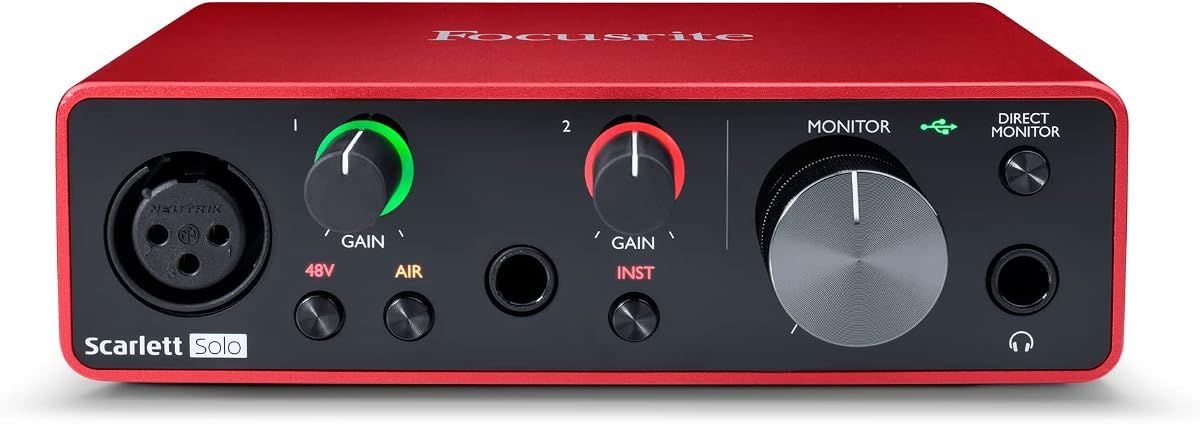
The Focusrite Scarlett Solo 3rd Gen stands out as a top-tier USB-C audio interface designed for musicians and podcasters using Mac systems. It delivers pro-level recording performance with high-quality converters that support up to 24-bit/192kHz resolution.
We may earn a commission when you buy through this link, at no additional cost to you.
Its standout feature is the high-performance mic preamps with switchable Air mode, which adds extra clarity to acoustic instruments. The high-headroom instrument inputs ensure your guitar shines without distortion, while Gain Halos provide visual feedback to prevent clipping.
While it is limited to two inputs and lacks ADAT expansion for larger setups, this is acceptable for solo artists and small bands. The low-noise balanced outputs ensure crystal clear monitoring, and the included software suite gets you started immediately.
This interface is ideal for creators seeking professional sound quality in a compact package. If you need a reliable tool for recording guitar and vocals on Mac, the Scarlett Solo 3rd Gen is our top recommendation.
The switchable Air mode enhances acoustic recordings by adding brightness and clarity, making vocals and guitars sound more polished.
Included tools like Pro Tools Intro+ and Ableton Live Lite provide everything needed for recording, editing, and mastering tracks.
We may earn a commission when you buy through this link, at no additional cost to you.
The M-AUDIO M-Track Duo is an excellent portable audio interface for Mac users needing reliable sound capture without a high cost. It covers podcasting, recording, and live streaming with a versatile design that supports multiple input types.
We may earn a commission when you buy through this link, at no additional cost to you.
Its Crystal Preamps ensure optimal sound quality from microphones, including condenser mics, while the combo inputs allow flexibility for XLR or instrument cables. The USB/Direct switch enables zero-latency monitoring, crucial for tracking performance.
Although it lacks higher sample rates like 96kHz or 192kHz, the 48kHz resolution is sufficient for most web-based projects. The build is functional but basic, which is expected at this price level, yet it remains durable for regular use.
For budget-conscious musicians starting their home studio journey, this interface delivers great value. It pairs well with Mac systems and includes MPC Beats software to jumpstart your production efforts.
Two combo XLR/Line/Instrument inputs let you connect mics, guitars, or line-level gear simultaneously with phantom power support.
The USB/Direct switch allows you to hear your input signal instantly without delay through headphones or outputs.
We may earn a commission when you buy through this link, at no additional cost to you.
The Motu M2 sets a high standard for audio quality in its class, utilizing ESS Sabre32 Ultra DAC technology found in expensive studio gear. It offers exceptional clarity and dynamic range, making it a top choice for discerning Mac users.
We may earn a commission when you buy through this link, at no additional cost to you.
With a measured 120 dB dynamic range on outputs and -129 dBu EIN on mic inputs, it captures subtle nuances without noise. The ESS-driven headphone output ensures you hear every detail, while the built-in metering helps visualize signal levels easily.
While it is priced higher than entry-level models, the investment pays off in sonic performance and reliability. It requires a USB-C connection, which is standard on modern Macs, ensuring fast data transfer and bus power.
If audio fidelity is your priority and you need a compact interface that punches above its weight, the Motu M2 is unmatched. It bridges the gap between portable devices and full rack-mounted studio interfaces.
Using ESS Sabre32 Ultra DAC ensures superb analog sound conversion that rivals much more expensive interfaces.
The visual metering on the unit gives you precise feedback on input and output levels for optimal gain staging.
We may earn a commission when you buy through this link, at no additional cost to you.
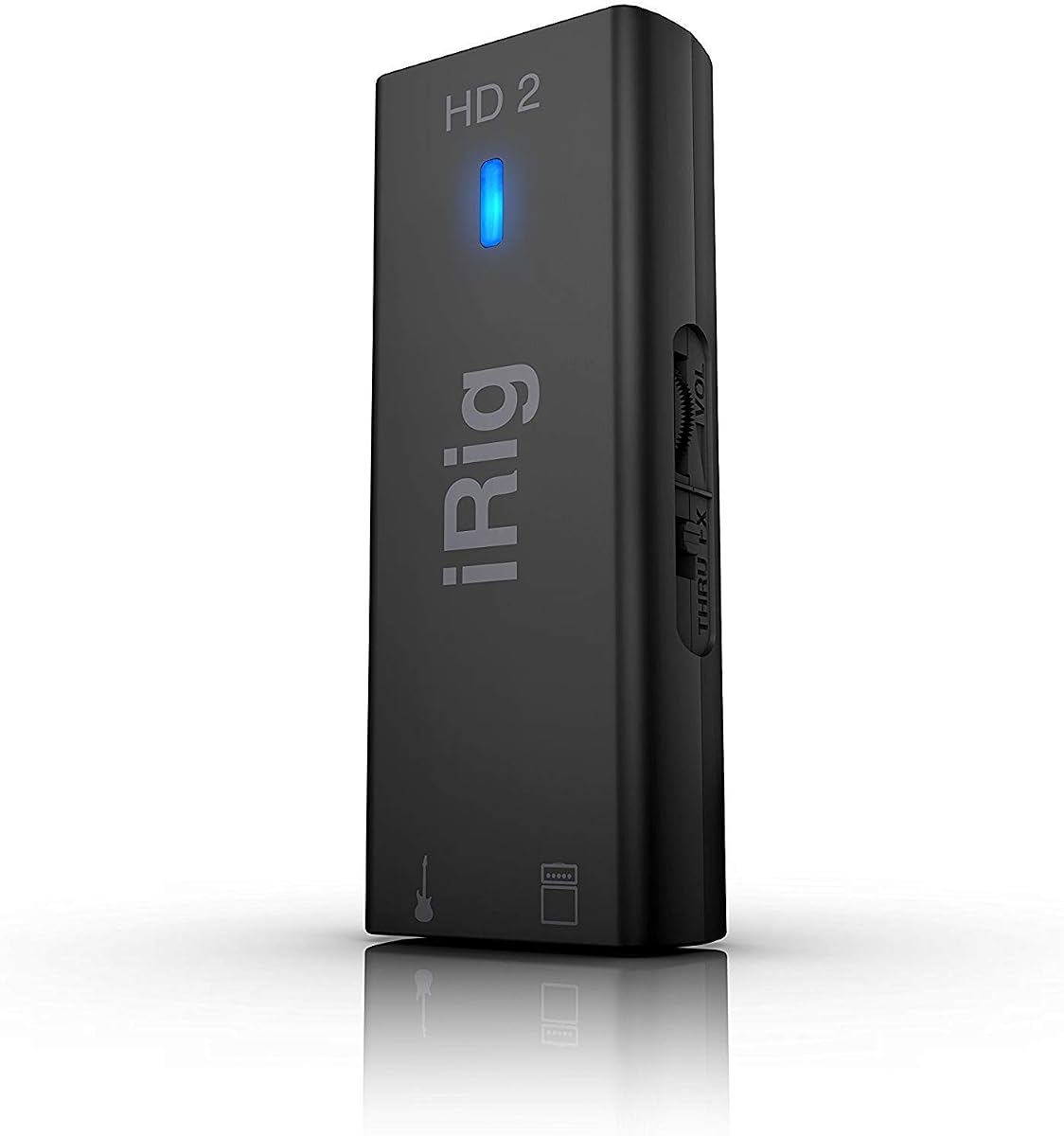
The IK Multimedia iRig HD 2 is a high-definition digital guitar interface designed for musicians who want to record on mobile devices or Mac. It features a Hi-Z input and supports 24-bit/96kHz recording for pristine audio capture.
We may earn a commission when you buy through this link, at no additional cost to you.
One of its key strengths is the ability to connect to an amplifier without extra accessories using the Amp Out jack. You can switch between FX and Thru modes, allowing flexible routing for live or recorded performances.
While it excels in portability and simplicity, it is not designed for complex studio setups with multiple inputs. However, for guitarists needing a reliable tool for capturing ideas on the go, it offers excellent performance.
This interface is perfect for players using iPhone, iPad, or Mac who want studio-quality results without bulky gear. It also unlocks exclusive content in apps like AmpliTube, adding value to your recording experience.
With a 96kHz sampling rate, it captures detailed audio quality suitable for professional music recording.
The Amp Out jack lets you connect your guitar to amps directly, enabling practice without recording.
We may earn a commission when you buy through this link, at no additional cost to you.
The JOYO MOMIX CAB is an ultra-compact audio interface ideal for guitarists seeking direct monitoring on phones or Macs. It passes your clean signal directly to headphones with zero latency, ensuring you hear your playing in real-time.
We may earn a commission when you buy through this link, at no additional cost to you.
It requires no drivers, software, or charging, making it incredibly simple to use. The signal indicator light helps you avoid distortion by showing when the input is too hot, prompting you to adjust guitar volume.
Because it is designed for dry signal monitoring, it does not support real-time software amp simulations. However, it excels for recording dry tracks, practicing with backing tracks, or live streaming your performance online.
This interface is perfect for travelers who want a reliable recording tool in their pocket. Its small size and ease of use make it a great addition to any mobile setup.
The direct monitoring feature ensures you hear your guitar instantly without any delay through the headphone output.
No batteries or driver installations are needed; just connect via USB-C or Lightning to start recording.
We may earn a commission when you buy through this link, at no additional cost to you.
The PIYONE Q28 delivers high-fidelity recording capabilities with a modern design and USB-C port for seamless connectivity. It supports 24-bit/192kHz resolution, ensuring crystal-clear recordings for music production on Mac or PC.
We may earn a commission when you buy through this link, at no additional cost to you.
Its elegant design includes fixed LED light rings on gain knobs, aiding visibility in dim lighting. The interface supports phantom power for condenser mics and includes a loopback function for streaming and podcasting needs.
While it lacks advanced DSP features found in premium models, its performance is reliable for home studios. The zero-latency monitoring ensures you hear your track without delay while recording.
This interface is a solid choice for creators looking for professional quality without breaking the budget. It handles vocals and instruments well, making it versatile for various recording scenarios.
Support for 24-bit/192kHz ensures you capture every nuance of your performance with wide dynamic range.
The loopback feature allows for easy creation of monitor and streaming mixes using your computer audio.
We may earn a commission when you buy through this link, at no additional cost to you.
The Motu M2 offers professional monitoring features that appeal to serious audio producers. Its ESS Sabre32 Ultra DAC technology ensures superb analog sound quality that stands out in the market.
We may earn a commission when you buy through this link, at no additional cost to you.
With a dynamic range of 120 dB and clear metering, it provides precise control over your signal. The headphone output is specifically designed to deliver high-quality audio for mixing and tracking.
Although it comes at a premium price, the reliability and sound fidelity justify the investment. It is built to withstand rigorous studio use while maintaining consistency in performance.
This interface is ideal for those who demand high standards in audio reproduction. It bridges the gap between portable devices and professional rack systems effectively.
The ESS Sabre32 Ultra DAC ensures superior analog sound conversion quality similar to expensive studio gear.
Visual meters on the front panel help you manage levels easily during recording sessions.
We may earn a commission when you buy through this link, at no additional cost to you.
The PreSonus Quantum ES 2 is designed with input optimized for guitar and bass by Fender engineers. It features MAX-HD mic preamps that are transparent and low-noise for clean recording results.
We may earn a commission when you buy through this link, at no additional cost to you.
The Auto Gain button simplifies setup by setting the perfect gain level for instruments and mics. You also get a perpetual license for Studio One Pro software to start your production journey.
It is built for low latency performance with custom drivers that ensure excellent signal flow. The Universal Control app allows remote management of functions, giving you flexibility during recording sessions.
This interface is a great fit for guitarists who want tailored tone control. It combines robust hardware with software features to streamline your workflow.
The instrument input is designed by Fender engineers to provide transparent and optimized recording for guitars.
The Auto Gain button ensures perfect recording levels every time, reducing setup time and frustration.
We may earn a commission when you buy through this link, at no additional cost to you.
The Fender Quantum HD 2 is an ultra-high-fidelity interface built for musicians needing advanced recording capabilities. It supports 20×24 channels and 32-bit/192kHz conversion for professional clarity.
We may earn a commission when you buy through this link, at no additional cost to you.
You gain access to the Fender Studio Amp & FX Pack, offering authentic amp models to craft guitar tones. It includes ADAT expansion and S/PDIF I/O for hybrid studio growth and dual re-amp outputs for tone exploration.
While it is priced higher and may be complex for entry-level users, its features are unmatched for professional production. The Auto Gain and DSP mixer streamline complex sessions, ensuring smooth workflow.
This interface is ideal for established creators who need expansion and top-tier sound quality. It integrates perfectly with Fender software to enhance your production workflow.
Register to unlock a complete collection of authentic Fender amp models and effects for tone crafting.
ADAT expansion adds sixteen digital inputs, allowing your studio to grow as your needs expand.
We may earn a commission when you buy through this link, at no additional cost to you.
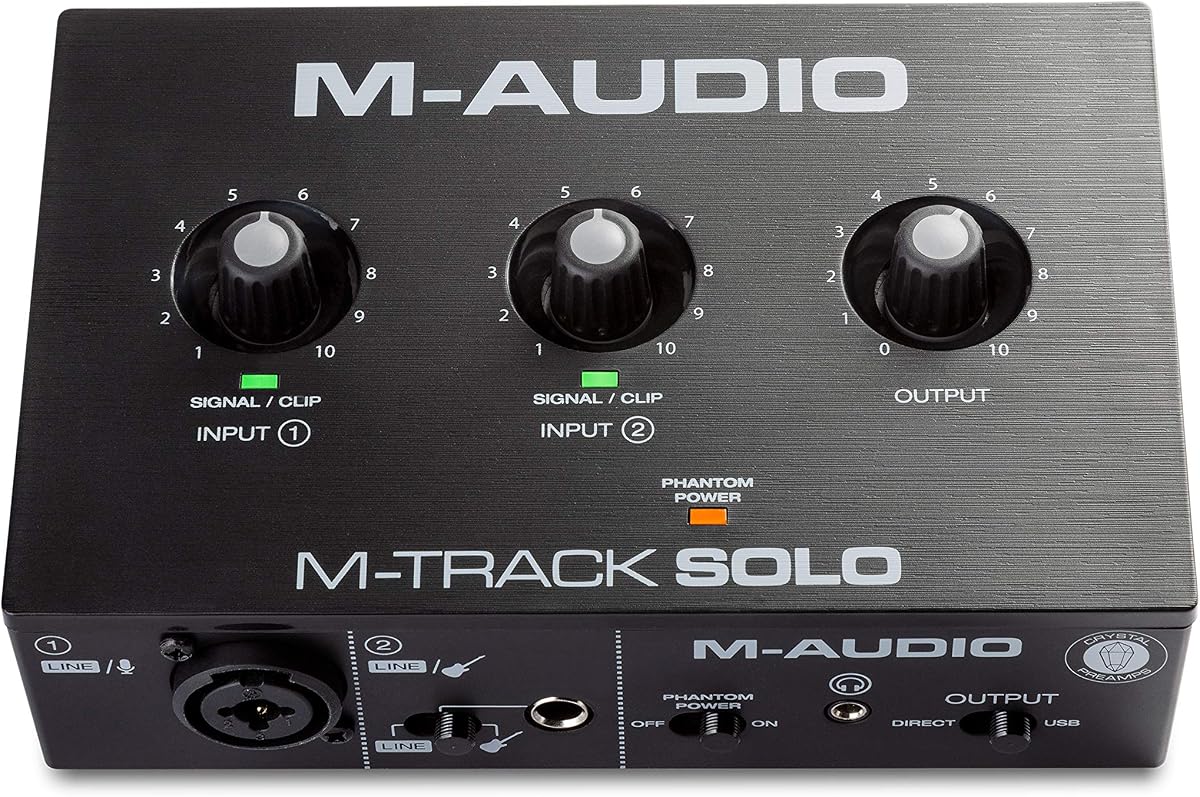
The M-AUDIO M-Track Solo is a simple and affordable USB audio interface designed for Mac and PC users. It delivers pristine recording with a Crystal Preamp that optimizes microphone sound.
We may earn a commission when you buy through this link, at no additional cost to you.
It features a combo XLR input with phantom power and a line/instrument input. This allows you to record vocals and guitar simultaneously if needed. The USB/Direct switch enables zero latency monitoring.
As a single-channel interface, it is best for solo performers or podcasters. While it lacks the flexibility of multi-input units, it provides solid performance for its price point.
This interface is perfect for beginners or creators starting small. It pairs with MPC Beats software to give you essential production tools right out of the box.
The transparent preamp ensures optimal sound quality from microphones, including condensers.
Included tools from Akai Professional provide essential production capabilities for your sessions.
We may earn a commission when you buy through this link, at no additional cost to you.
The IK Multimedia iRig USB is a portable audio interface built for guitarists needing seamless connectivity on Mac and iPad. It features studio-grade 24-bit/48kHz resolution for clear audio capture.
We may earn a commission when you buy through this link, at no additional cost to you.
It includes a dedicated Amp out for connecting to rigs and direct monitoring for silent practice. The USB-C cable ensures compatibility with modern Macs, making connection effortless.
The interface comes bundled with a recording suite to help you start creating quickly. Its robust design ensures durability for professional use on the road.
This interface is ideal for mobile musicians who need reliable performance. It balances portability with enough features to record high-quality tracks.
The included USB-C cable ensures compatibility with modern Mac devices, allowing you to focus on music.
Hear your guitar instantly with direct monitoring, allowing for silent practice and accurate recording.
We may earn a commission when you buy through this link, at no additional cost to you.
Selecting the right interface involves considering compatibility, inputs, and audio quality to ensure your setup meets your recording needs.
Ensure the interface supports Mac OS and connects via USB-C if possible. Check that it works with your DAW and any specific apps you use for recording.
Always verify system requirements before purchase to avoid driver issues and ensure smooth operation on your device.
Consider how many instruments and microphones you need to connect at once. Combo jacks provide flexibility for both XLR mics and guitar inputs.
Choose enough inputs for your current needs but leave room for growth if you plan to expand your setup later.
Look for interfaces that support 24-bit resolution and at least 48kHz sample rates. Higher rates like 96kHz offer more detail but require more processing power.
For most Mac recording needs, 24-bit/48kHz is sufficient, but 96kHz provides extra headroom for post-production.
Low latency monitoring is crucial for tracking performances without hearing delays. Interfaces with direct monitor switches or ASIO drivers help achieve this.
Select interfaces that offer zero-latency monitoring options to ensure you hear your sound in real time.
Quality preamps determine the clarity of your guitar and vocal recordings. Look for models with high headroom and transparent sound.
High-quality preamps reduce noise and ensure your signal remains clean and strong throughout the recording chain.
If you travel or record on the go, choose compact interfaces that fit easily in your bag. Battery-free options powered by USB are ideal for mobility.
Portability ensures you can capture ideas anywhere without being tied to a large desk setup.
Many interfaces come with DAW licenses or amp simulation plugins. These can save money and help you start producing immediately.
Evaluate the included software to see if it meets your creative needs and supports your workflow.
A durable interface withstands regular use and transport. Metal construction and robust connectors ensure long-term reliability.
Investing in a well-built unit protects your investment and ensures consistent performance over time.
Connect your interface to your Mac using a high-quality USB cable. Install any required drivers or software from the manufacturer's website to ensure compatibility.
Set your audio input and output settings in the Mac Sound preferences to select the interface. Adjust gain knobs to avoid clipping and ensure clear signal levels.
Keep the interface clean and store it in a dry place when not in use. Regularly check cables and ports for dust or damage to maintain performance.
Most modern interfaces use USB-C for connectivity and power. However, some older models or mobile interfaces may use Lightning or standard USB. Check your Mac's ports and the interface requirements before buying.
Yes, many interfaces offer loopback features and direct monitoring which are perfect for streaming. Ensure your DAW or streaming software recognizes the interface for audio input.
For beginners, the M-AUDIO M-Track Duo or M-Track Solo offer great value and ease of use. They include essential software and have simple controls that are easy to learn.
Most USB-powered interfaces do not require external power supplies. They draw power directly from your Mac's USB port, making them portable and easy to set up.
Many interfaces come with phantom power which is necessary for condenser microphones. Check the specs of your chosen model to ensure it provides 48V phantom power.
Air mode adds a high-frequency boost to your recordings, giving vocals and acoustic instruments more clarity and presence. It is a unique feature found on some Focusrite interfaces.
The Focusrite Scarlett Solo 3rd Gen, M-AUDIO M-Track Duo, and Motu M2 lead the list for their reliability and audio quality. These models cover the needs of most home and mobile studios.
When choosing, prioritize input flexibility and latency performance. Ensure your selected interface supports your recording style and integrates well with your Mac setup.
Remember to check current listings and availability before purchasing. Prices and availability can change, so verifying details helps ensure you get the right interface for your needs.