
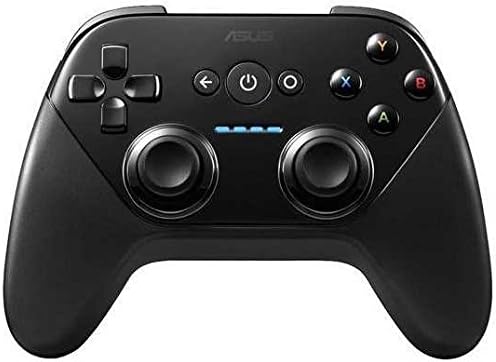
ASUS ROG Tessen Mobile Gaming Controller
4.1Editor score
Foldable portable design
500Hz polling rate
RGB lighting support
Explore the top ASUS ROG Ally Controller options for 2026, comparing features, performance, and compatibility to help you find the perfect gaming controller
Finding the right controller for your handheld setup is essential for immersive gameplay. Whether you prefer wireless freedom or wired precision, modern controllers offer advanced features like adjustable triggers and customizable buttons to enhance your experience across various platforms.
We evaluated the top models based on connectivity, build quality, battery life, and software support. Our comparison includes official ROG peripherals and third-party alternatives designed to complement devices like the ROG Ally and other Windows-based handheld gaming systems.
Each selection highlights key strengths and potential limitations to guide your decision. Remember that product availability and pricing fluctuate frequently, so verify current details before purchasing to ensure you get the best value for your specific gaming needs.
4.1Editor score

3.9Editor score

4.0Editor score
This table provides a quick side-by-side overview of key specifications for each controller we reviewed. Use it to compare connectivity options, unique features, and overall ratings at a glance before diving into detailed reviews.


The ASUS ROG Raikiri II stands out as a top contender for handheld and PC gaming setups. It features tri-mode connectivity allowing seamless switching between Bluetooth, 2.4GHz RF, and wired USB-C connections. Its TMR joysticks provide precise control while minimizing drift issues common in traditional sensors.
We may earn a commission when you buy through this link, at no additional cost to you.
Key strengths include the ultra-response control with a 1000Hz polling rate in wired and RF modes. The dual-mode triggers let you choose between short travel micro-switches or full travel TMR sensors depending on your preference. Additionally, the four programmable rear buttons offer quick access to complex commands without lifting fingers from the analog sticks.
Honest trade-offs involve the battery life which lasts around 30 hours only when RGB and vibration are disabled. The included accessories like the charging stand and case are valuable but add to the bulk. Some users may find the grip texture slippery over extended sessions compared to rubberized alternatives.
This controller is ideal for gamers who need reliable connectivity across PC and Xbox devices. Whether you prioritize latency or battery flexibility, the Raikiri II balances performance with customization. It remains a solid investment for those seeking versatility without sacrificing tactile feedback or build integrity.
TMR joysticks consume less power and offer superior anti-drift protection compared to standard Hall Effect sensors found in competitors.
Switching between micro-switch and TMR triggers allows players to adapt control schemes for different game genres instantly.
We may earn a commission when you buy through this link, at no additional cost to you.
The ROG Raikiri II Pro targets enthusiasts demanding maximum responsiveness. It boasts an 8K sampling rate for extremely low latency in both wired and 2.4GHz modes. The full-color display on the face provides quick access to profiles and calibration settings without needing external software.
We may earn a commission when you buy through this link, at no additional cost to you.
Performance benefits are clear with hot-swappable TMR joysticks allowing easy maintenance or replacement. The extended battery life of up to 79 hours ensures marathon gaming sessions without interruption. Four removable rear buttons plus additional bumpers expand input options significantly compared to standard layouts.
However, the premium price reflects these advanced features which may not justify the cost for casual users. The sheer number of customization options might overwhelm those preferring plug-and-play simplicity. Also, the added bulk from the display could affect portability for some handheld configurations.
If you seek the ultimate in control precision and customization, this model is unmatched. It suits competitive players or power users who value every millisecond of latency reduction. The combination of hardware features and long battery life makes it a top-tier choice for serious gaming.
The 8K sampling rate delivers near-instantaneous input response, critical for fast-paced competitive gaming scenarios.
Hot-swappable modules mean you can replace worn sticks instantly without sending the controller for repairs or buying a new unit.
We may earn a commission when you buy through this link, at no additional cost to you.
The ROG Raikiri Pro OLED integrates a distinctive display for personalization and real-time status checks. Users can switch profiles on the fly and view custom animations to match their setup. Tri-mode connectivity ensures compatibility with PC, Xbox, and mobile devices seamlessly.
We may earn a commission when you buy through this link, at no additional cost to you.
Its standout features include rear controls that adjust joystick sensitivity instantly during gameplay. The built-in ESS DAC enhances audio quality through the 3.5mm jack for immersive sound. Step triggers allow fine-tuning of actuation points to suit shooting or racing games specifically.
The OLED screen is visually striking but may reduce overall battery life compared to non-display models. Reliance on Armoury Crate software for full customization adds a layer of complexity. Some users might find the extra weight of the display unnecessary if they prioritize raw function over aesthetics.
Ideal for gamers who want a personalized interface alongside solid performance, this controller delivers unique value. It bridges the gap between utility and style effectively. If you appreciate visual flair and deep customization options, this model offers a compelling experience distinct from standard controllers.
Change sensitivity and button mappings instantly via the OLED interface without pausing your game or opening menus.
The integrated ESS DAC ensures crystal clear sound output through the headphone jack enhancing immersion during gameplay.
We may earn a commission when you buy through this link, at no additional cost to you.
The ROG Tessen is specifically engineered for Android mobile gaming. Its foldable design allows it to fit easily into a pocket while securely holding phones in landscape mode. The wired USB-C connection ensures zero latency, critical for fast reaction times in competitive mobile titles.
We may earn a commission when you buy through this link, at no additional cost to you.
Console-grade control is achieved with 22° range of movement sticks and analog triggers. Programmable rear paddles enable complex inputs without shifting hand positions. Pass-through charging means you can play indefinitely without worrying about battery depletion during extended sessions.
Limitations include exclusivity to Android phones and reliance on a wired connection which restricts wireless freedom. The lack of Bluetooth pairing means it cannot connect to consoles or PCs directly. Users with iPhones or tablets may need to look elsewhere for compatibility.
For Android users seeking a dedicated mobile controller, this is an excellent pick. It balances compactness with robust performance effectively. If you frequently play mobile shooters or strategy games, the Tessen provides a reliable console-like experience tailored for your device.
Rubber support pads and extended USB-C connectors ensure your device stays protected while you game intensely.
Charge your phone while playing without interruption thanks to the 18W pass-through power delivery system.
We may earn a commission when you buy through this link, at no additional cost to you.
The ROG Raikiri Pro offers similar OLED capabilities to the newer models at a competitive price. It supports tri-mode connectivity and includes extensive customization via Armoury Crate. Users can switch profiles on the fly and view status indicators directly on the controller face.
We may earn a commission when you buy through this link, at no additional cost to you.
The 48-hour battery life ensures nonstop gaming for many days of typical use. Built-in ESS DAC provides immersive audio for headphones, reducing external noise interference. Rear buttons offer flexibility for in-game commands or sensitivity adjustments without pausing play.
Some users report lower satisfaction due to occasional software glitches or connection inconsistencies. The build quality feels solid but may lack the polish of the II series. Buyers should be aware that updates may be required to stabilize performance features fully.
This model remains a viable option for those wanting OLED features without the top-tier price. It suits gamers who value aesthetic customization and audio quality. If you encounter minimal issues during setup, it delivers a strong feature set for the cost.
Switch between different game profiles instantly using the built-in OLED display for quick adjustments.
The ESS DAC delivers clearer sound through the 3.5mm jack improving the overall audio experience during play.
We may earn a commission when you buy through this link, at no additional cost to you.
This renewed version offers the full feature set of the Raikiri Pro Pro at a reduced price. It undergoes functionality testing and repackaging to ensure it works like new. The OLED display allows for customizable animations and quick profile switching on the fly.
We may earn a commission when you buy through this link, at no additional cost to you.
With 48 hours of battery life, it supports long gaming sessions without frequent charging. The tri-mode connectivity ensures it works across PC and Xbox platforms effectively. Users can remap buttons and adjust sensitivity via Armoury Crate for tailored control schemes.
Since it is a renewed product, physical condition may vary slightly between units. The 90-day warranty is shorter than new items, offering less long-term protection. Buyers should inspect packaging and functionality immediately upon delivery to confirm quality standards.
It is a smart choice for budget-conscious gamers who still want premium OLED capabilities. If you prioritize features over brand-new packaging, this model delivers significant value. Just ensure you check current warranty terms before finalizing your purchase decision.
Certified to look and work like new with limited to no signs of wear after thorough inspection and testing.
Enjoy the same advanced customization and display features as the new version without paying full retail price.
We may earn a commission when you buy through this link, at no additional cost to you.
The ROG Xbox Ally combines a handheld console with high-performance specs including a 120Hz touchscreen and Ryzen Z2 A processor. It brings the full Xbox experience to a portable form factor with Game Pass included. Built-in controllers mimic Xbox Wireless design for familiar ergonomics.
We may earn a commission when you buy through this link, at no additional cost to you.
Performance benefits include 512GB SSD storage and 16GB LPDDR5 RAM for seamless multitasking. The 120Hz display with FreeSync Premium ensures smooth visuals without tearing during fast-paced scenes. Fast charging allows quick top-ups between gaming sessions effectively.
While the built-in controls are excellent, it does not serve as an external controller for PC unless used in desktop mode. The price reflects its role as a primary handheld device rather than just an accessory. Battery life is decent but depends heavily on game intensity and settings.
Ideal for those seeking a dedicated portable gaming system, this unit excels in versatility. It suits travelers who want console-level graphics in a compact device. If you prioritize an all-in-one solution, the ROG Xbox Ally offers a compelling balance of power and portability.
Experience native Xbox gameplay and PC titles in your pocket with optimized hardware for handheld gaming.
The 120Hz display with Gorilla Glass ensures smooth motion and vibrant visuals for an immersive experience.
We may earn a commission when you buy through this link, at no additional cost to you.
This renewed unit provides the same core features as the new Raikiri II at a lower cost. It includes a travel case for protection during transport. Anti-slip grips and TMR joysticks ensure stable performance even after extended use.
We may earn a commission when you buy through this link, at no additional cost to you.
Battery life is impressive with up to 50 hours on a single charge. The web-based configuration tool allows easy customization without needing specific desktop software. Connectivity remains flexible with 2.4GHz and Bluetooth options for various devices.
As a renewed item, physical wear might be present depending on the previous usage. Warranty coverage is typically shorter than brand-new products. Buyers should verify the condition upon arrival to ensure no critical defects exist.
It suits gamers who want reliable features without the full retail price. If you prioritize function over pristine condition, this offers solid value. Ensure you read seller details carefully to confirm quality standards before purchasing.
Includes a travel case designed to protect the controller and its accessories while you are on the move.
Easily customize button mappings and settings through a browser-based interface without installing extra software.
We may earn a commission when you buy through this link, at no additional cost to you.
The CRKD NEO S features limited edition designs that appeal to collectors. Hall Effect sensors ensure precise control without stick drift over time. The mobile companion app reveals unique product numbers and rarity ranks adding to its collectible nature.
We may earn a commission when you buy through this link, at no additional cost to you.
Adjustable trigger sensitivity lets you fine-tune actuation points for personal preference. Swappable stick tops allow quick customization of feel and style without replacing the controller. Re-mappable back buttons add versatility for complex gaming inputs.
Users should note that unique designs are limited which may affect availability. The mobile app requires pairing to fully access collectible features. While versatile, it lacks some advanced trigger features found in dedicated PC controllers.
Ideal for those who value aesthetics alongside functionality, this controller stands out visually. It works well across multiple platforms for flexible gaming. If you enjoy customizing your setup and collecting unique designs, this model offers a distinct advantage.
Hall Effect sensors ensure no stick drift and precise control over extended usage periods.
Easily swap stick tops to change the grip and height to suit your personal preferences.
We may earn a commission when you buy through this link, at no additional cost to you.
The TV500BG Gamepad is designed for simple Android and Windows gaming setups. It connects wirelessly and works with TV applications for living room entertainment. The design focuses on basic control accuracy for casual gaming experiences.
We may earn a commission when you buy through this link, at no additional cost to you.
Users can track progress and earn achievements across devices using Google Play Games. The controller supports Android TV and Windows operating systems effectively. It is an affordable entry point for those new to wireless gamepads.
Modern features like high polling rates or programmable buttons are absent in this model. The wireless range may be shorter than newer Bluetooth standards. It may not support advanced titles requiring precise analog inputs.
Ideal for budget buyers looking for a simple controller for TV or casual mobile games. If you need basic functionality without advanced tech, it serves its purpose. However, serious gamers might find the lack of customization limiting over time.
Compatible with both Android Lollipop and Windows systems for flexible use across different devices.
Track your progress and earn achievements across your Android phone, tablet, and TV seamlessly.
We may earn a commission when you buy through this link, at no additional cost to you.
Selecting the right controller involves balancing connectivity, features, and compatibility with your specific device. Consider your primary gaming platform and whether you prefer wireless freedom or wired reliability for your setup.
Controllers offer Bluetooth, wired USB-C, or 2.4GHz RF connections. Wireless provides freedom but adds latency, while wired ensures zero lag for competitive play. Check if your device supports the specific mode you prioritize for seamless pairing.
Prioritize 2.4GHz RF for low latency on handhelds and Bluetooth for versatility across multiple devices.
TMR and Hall Effect joysticks prevent drift better than traditional potentiometers. TMR sticks offer precision with lower power consumption. Hall Effect sensors are durable and often found in retro designs for long-term stability.
Opt for TMR or Hall Effect sticks to avoid drift issues that degrade performance over time.
Dual-mode triggers let you choose between short travel micro-switches or full travel TMR sensors. Short travel is better for shooting games while full travel suits racing. Adjustable dead zones allow fine-tuning for personal sensitivity preferences.
Select triggers that match your game genres to improve control accuracy during intense gameplay.
Rear paddles and bumpers let you map actions without lifting fingers from sticks. This adds speed and versatility for complex commands. Software tools like Armoury Crate enable detailed customization of button mappings and profiles.
Ensure the controller supports remappable inputs if you need quick access to complex game commands.
Battery life varies from 30 to 79 hours depending on RGB and vibration settings. Longer life supports extended sessions without interruption. Wireless modes generally consume more power than wired alternatives during heavy use.
Look for controllers with at least 40 hours of battery if you game frequently without charging.
Controllers with OLED or color displays allow profile switching and visual customization. These features add value for personalization but may impact battery. Built-in screens can enhance immersion with animations or status indicators.
Decide if a display enhances your experience or if standard controllers meet your functional needs.
Ensure the controller works with your primary device whether it is PC, Xbox, or mobile. Some controllers support Android only while others are universal. Certification ensures plug-and-play functionality without extra drivers.
Confirm device compatibility before purchasing to avoid issues with pairing or software recognition.
Premium materials like aluminum bridges or anti-slip grips improve comfort and longevity. Robust build ensures withstands daily wear better than plastic alternatives. Warranty coverage protects against manufacturing defects for added peace of mind.
Invest in controllers with sturdy construction to extend the lifespan of your gaming peripherals.
Connect your controller via the preferred method such as USB-C cable, 2.4GHz dongle, or Bluetooth pairing. Download Armoury Crate or the companion app to access full customization features like remapping buttons and adjusting sensitivity settings.
Keep firmware updated to ensure compatibility and stability. Charge the controller fully before first use and avoid exposing it to moisture or extreme temperatures to preserve battery health and internal components over time.
Clean the joysticks and buttons regularly with a soft dry cloth to prevent dust buildup. If using swappable caps, handle them carefully to avoid misalignment. Store in the provided case when not in use to protect against physical damage.
The ASUS ROG Raikiri II Pro PC Controller is ideal due to its 8K sampling rate and low latency. It supports wired and 2.4GHz RF connections ensuring quick response times essential for competitive play and precise control.
Most models like the Raikiri II and Pro are certified for Xbox via USB-C and 2.4GHz RF. They support Xbox Game Bar integration and work seamlessly with Xbox consoles when connected correctly via wired or wireless modes.
Use Armoury Crate on PC or the companion app on mobile to check for firmware updates. Connect the controller via USB-C, launch the software, and follow the on-screen prompts to install any available updates for optimal performance.
Yes, controllers like the Tessen and Raikiri support Bluetooth for Android gaming. Ensure your game supports controller input and pair via Bluetooth for wireless play. Wired USB-C works for zero latency mobile sessions.
TMR joysticks use tunnel magnetoresistance sensors offering lower power consumption and anti-drift. Hall Effect uses magnetic sensors also for drift prevention. Both are superior to traditional potentiometers for long-term accuracy.
New products typically come with a standard manufacturer warranty covering defects. Renewed items often have shorter warranties such as 90 days. Always check the product listing or contact the seller for specific warranty details before purchase.
On OLED models, press the Xbox or profile button to switch profiles directly on the controller. The display shows current settings and allows quick changes without opening menus on your computer or handheld device.
Yes, all listed controllers work with Windows PCs. They support Xbox Wireless and Bluetooth connectivity ensuring broad compatibility with Steam and other launchers. Armoury Crate software enhances PC customization options effectively.
We reviewed ten top controllers ranging from budget-friendly mobile options to high-performance PC models. The Raikiri II offers the best overall balance of connectivity and features while the Tessen excels for Android users. The Pro series delivers premium performance for enthusiasts.
Prioritize connectivity and durability based on your play style. If latency is critical, opt for 2.4GHz wired modes. For customization, look for OLED displays and programmable buttons. Matching the controller to your specific needs ensures a better experience.
Prices and availability change often so verify current offers before buying. Checking recent reviews helps ensure the latest firmware and quality standards. Selecting the right model today can elevate your gaming sessions significantly in the coming months.