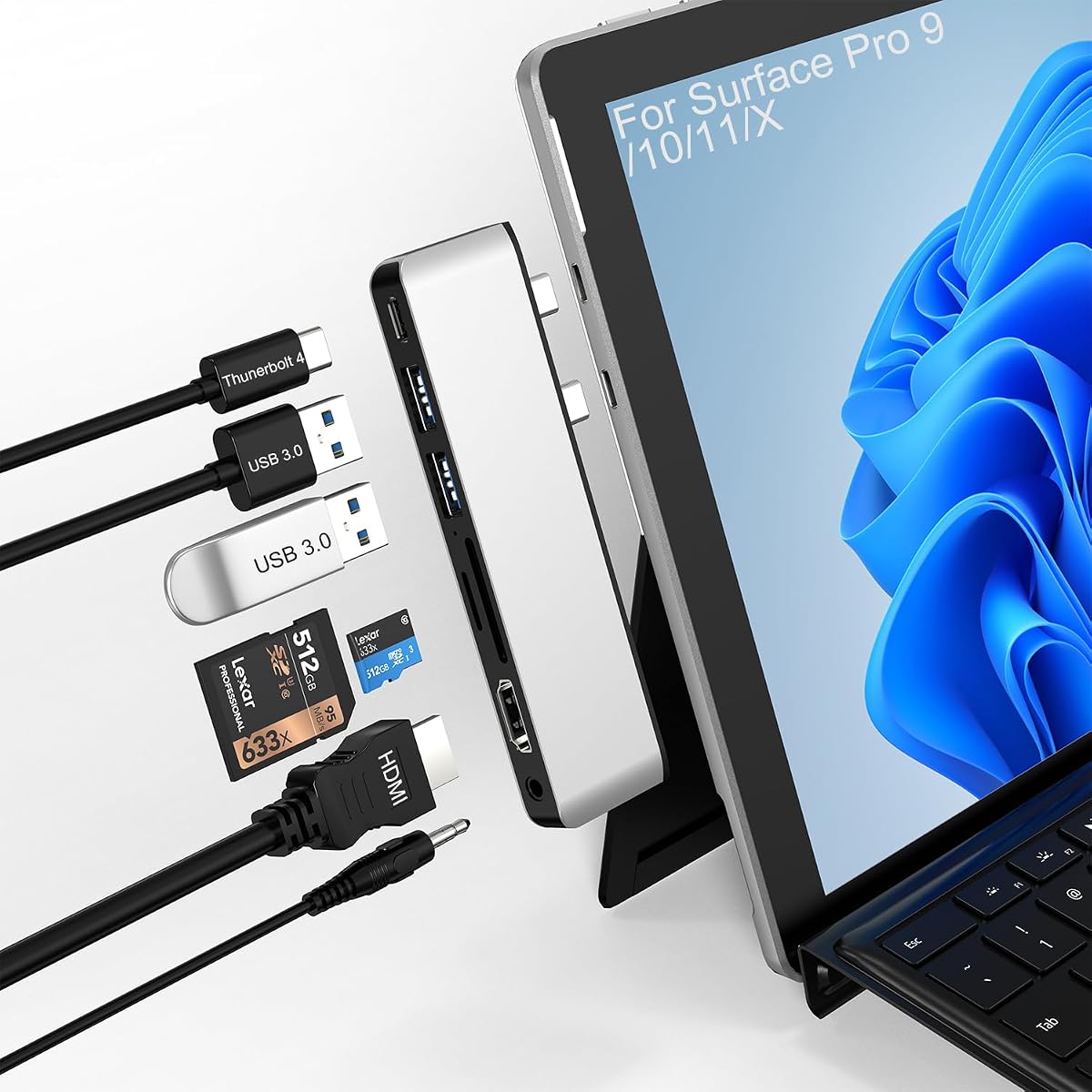
Surface Pro 11 USB Hub
4.2Editor score
Thunderbolt 4 USB C port
100W PD charging
Compact aluminum design
This guide compares the top 10 docking stations for Surface Pro 11, evaluating connectivity, display support, and charging power for professional users.
Finding the right docking station for your Surface Pro 11 is essential for maximizing productivity in modern work environments. These devices transform your portable tablet into a full desktop workstation by adding essential ports and display capabilities seamlessly.
We evaluated ten top-rated models based on port variety, display resolution support, charging power, and overall build quality. Each product was assessed for compatibility with the Surface ecosystem and real-world performance during daily tasks.
Each pick highlights unique strengths like triple display output, high-speed data transfer, or compact designs for travel. Prices and availability may change, so check the latest listings before making your final purchasing decision today.
4.2Editor score
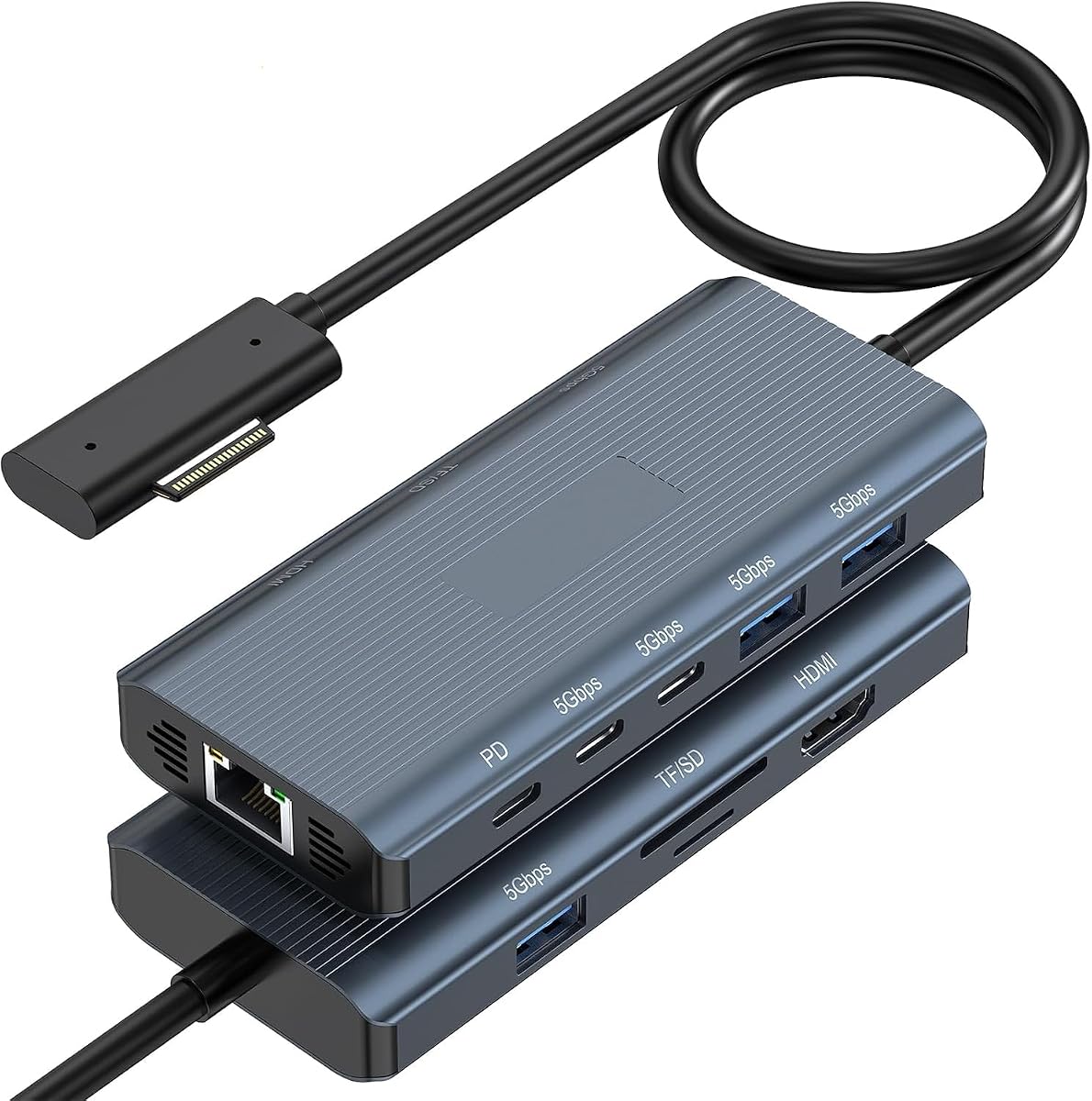
4.8Editor score

4.3Editor score
This side-by-side comparison highlights key specifications across all ten selected docking stations to help you identify the best fit for your specific workflow requirements.



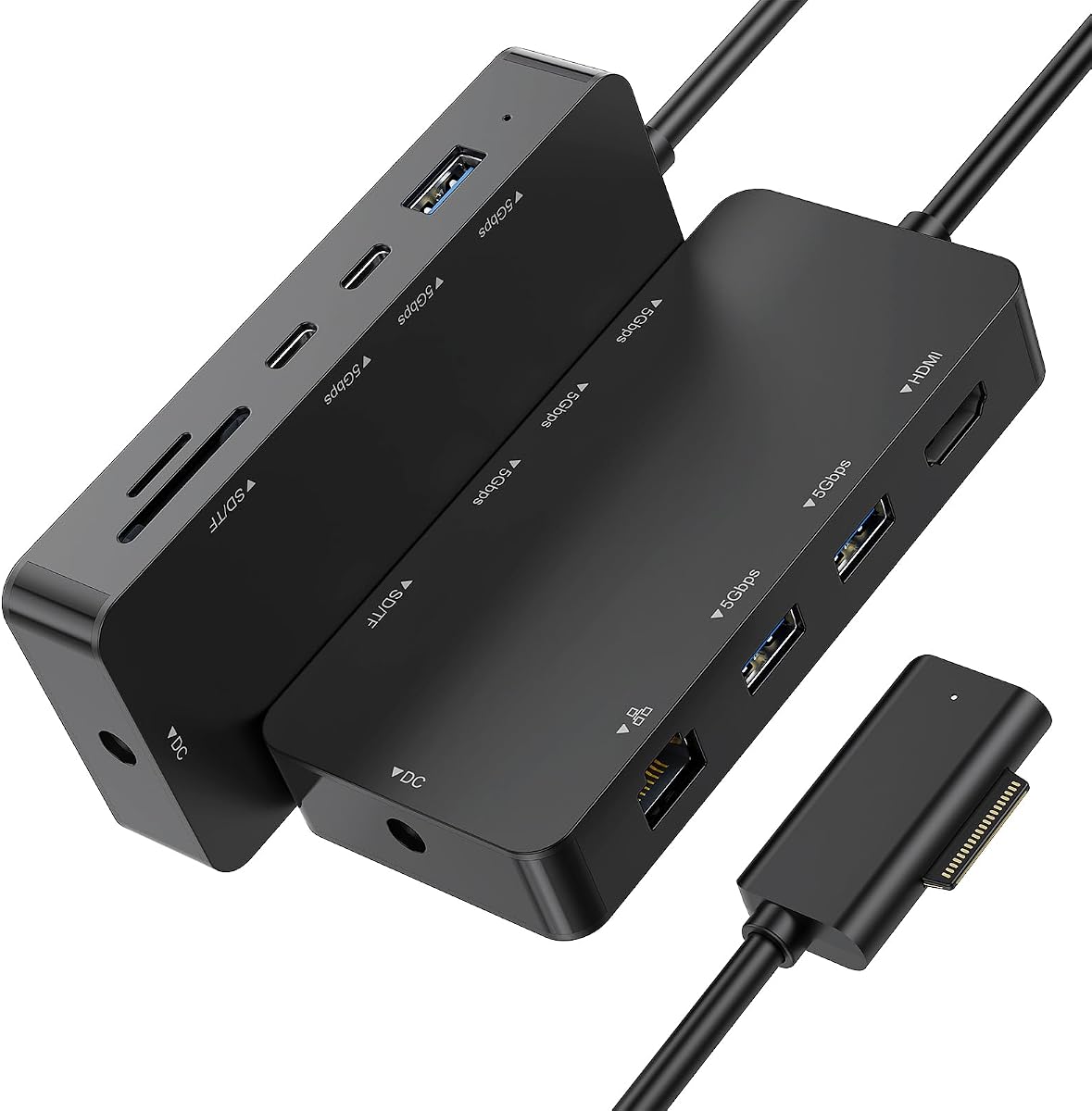
This 11-in-1 Surface Pro Docking Station stands out as the top choice due to its comprehensive port selection and high-performance display capabilities. With a 4.8 rating from verified users, it delivers reliable connectivity for diverse professional needs.
We may earn a commission when you buy through this link, at no additional cost to you.
The standout feature is the 4K@60HZ HDMI port, which ensures smooth visuals for video editing or detailed design work without screen tearing. Additionally, the 1000Mbps Gigabit Ethernet port provides a stable network connection ideal for large file transfers and video conferencing.
While the dock requires an external power supply and the magnetic connector must be oriented correctly, these minor trade-offs are standard for high-performance Surface docks. The included 45W adapter ensures your device stays charged during heavy use.
For users seeking a versatile hub that combines fast data transfer with high-resolution display support, this dock is the ideal solution. It effectively transforms your Surface Pro 11 into a powerful desktop workstation.
The 60Hz refresh rate on the HDMI port enables smoother motion compared to standard 30Hz docks, benefiting creative workflows.
Ethernet connectivity ensures stable speeds up to 1000Mbps, reducing latency during critical online tasks.
We may earn a commission when you buy through this link, at no additional cost to you.
This docking station excels at multi-monitor setups, allowing users to connect up to three external screens simultaneously. The rating of 4.1 reflects its utility for productivity-focused users who need expanded screen real estate.
We may earn a commission when you buy through this link, at no additional cost to you.
The dual HDMI ports combined with a VGA output enable flexible display configurations for trading or coding. Users can mirror or extend their desktop across multiple screens, significantly boosting workflow efficiency during complex projects.
The Ethernet port is limited to 100Mbps which may be slower than Gigabit alternatives, but it suffices for basic internet browsing. Additionally, the 30Hz refresh rate on HDMI might feel less smooth for high-motion video content.
Ideal for professionals needing three screens on a budget, this hub provides essential connectivity without breaking the bank. Ensure you turn off the Surface screen when using all three external displays for optimal performance.
Triple display support via HDMI and VGA allows for extensive workspace expansion without additional hardware.
The VGA port ensures compatibility with older monitors or projectors commonly found in conference rooms.
We may earn a commission when you buy through this link, at no additional cost to you.
This USB Hub offers exceptional value for users who need high-speed connectivity without the bulk of a full dock. Its rating of 4.2 indicates satisfaction among those prioritizing speed and portability in their accessories.
We may earn a commission when you buy through this link, at no additional cost to you.
The inclusion of a Thunderbolt 4 port is rare at this price point, offering speeds up to 40Gbps for data transfer and 100W charging via USB-C. This capability means one cable can handle video, data, and power simultaneously.
Note that the aluminum case may not fit if your Surface Pro is inside a protective case, requiring you to remove it for connection. While not a major drawback, it adds a small step to setup compared to magnetic connectors.
For travelers and minimalists, this hub is the perfect companion to your Surface Pro 11. It delivers professional-grade performance in a slim profile that fits easily in any laptop bag.
Up to 40Gbps transfer rates ensure massive files move instantly between your device and external storage.
The aluminum casing helps dissipate heat efficiently, maintaining performance during extended usage sessions.
We may earn a commission when you buy through this link, at no additional cost to you.
This new docking station delivers robust performance for office environments requiring multiple monitors and diverse peripheral connections. With a strong 4.8 rating, it is praised for its reliability and ease of daily use.
We may earn a commission when you buy through this link, at no additional cost to you.
The dual 4K HDMI and VGA outputs provide a complete video solution for standard office multitasking. The included 72W adapter ensures your device remains charged while supporting power-intensive accessories like hard drives.
USB-C ports on this model are for data transfer only, meaning you still need the main power connection for charging. While this adds a cable to your setup, it ensures stable power distribution to all connected devices.
Perfect for users who want a complete desktop replacement experience, this dock offers the flexibility to connect printers, scanners, and external drives effortlessly. It effectively centralizes all your connection needs.
Mixing HDMI and VGA allows connection to modern and older displays simultaneously for maximum flexibility.
The dedicated 72W adapter handles high power demand without draining the laptop battery during operation.
We may earn a commission when you buy through this link, at no additional cost to you.
This dock is highly rated for its audio capabilities alongside its video output, making it suitable for media editing and creative tasks. A 4.8 rating highlights user satisfaction with its build quality and performance consistency.
We may earn a commission when you buy through this link, at no additional cost to you.
The 3.5mm headphone jack allows precise audio monitoring without relying on internal laptop speakers. Combined with the triple display setup, it creates an immersive environment for designers and video editors working on detailed projects.
The Ethernet port supports up to 100Mbps which is sufficient for standard office internet but lacks Gigabit speed. However, for most users, this remains a stable option for maintaining a consistent network connection.
If you need a compact hub that supports multiple screens and provides high fidelity audio output, this is a strong contender. It simplifies your desk setup while delivering the connectivity you need.
Dedicated 3.5mm jack ensures low latency sound output for professional editing and casual listening.
USB ports support 5Gbps transfer rates for quick file movement between storage drives.
We may earn a commission when you buy through this link, at no additional cost to you.
This premium docking station delivers top-tier performance with 60Hz refresh rates and Gigabit networking. A 4.3 rating reflects its value for users who prioritize speed and fluid display performance above all else.
We may earn a commission when you buy through this link, at no additional cost to you.
The dual 4K@60Hz HDMI ports allow for smooth motion in creative applications like video editing. Combined with MST technology, you can extend your desktop across three monitors without any visual stutter or lag.
The dedicated 100W DC adapter ensures your Surface Pro stays fully charged even when powering multiple drives and displays. The 1000Mbps Ethernet port further guarantees stable connectivity for heavy network usage.
Ideal for power users who demand the best, this dock transforms your mobile device into a high-end workstation. Its performance capabilities justify the investment for professional workflows.
60Hz refresh rates ensure fluid video playback and smooth cursor movement on external monitors.
Gigabit Ethernet provides stable high-speed data access crucial for large file transfers.
We may earn a commission when you buy through this link, at no additional cost to you.
This 10-in-1 dock is praised for its efficient power delivery, ensuring your device stays charged during extended use. A 4.4 rating from users confirms its reliability as a daily driver for office work.
We may earn a commission when you buy through this link, at no additional cost to you.
The 65W PD power port provides ample charging power to keep your Surface running while connected to peripherals. This feature reduces the need to carry multiple chargers, simplifying your mobile setup.
The 30Hz HDMI limit means it is best suited for static office tasks rather than fast-paced video editing. However, the Gigabit Ethernet port ensures your internet connection remains fast and stable for all other tasks.
For professionals needing reliable charging and connectivity in a compact package, this dock is a practical choice. It effectively bridges the gap between portable tablet and desktop workstation.
65W power input ensures your device maintains battery levels during intensive use.
Fast Ethernet ensures consistent high-speed internet for cloud syncing and communication.
We may earn a commission when you buy through this link, at no additional cost to you.
This 12-in-1 dock provides extensive connectivity for users with many peripherals. A 4.5 rating highlights its success in delivering reliable access to various ports without signal loss or overheating.
We may earn a commission when you buy through this link, at no additional cost to you.
The combination of dual HDMI and VGA outputs allows for a versatile triple display setup. Users can connect up to three screens simultaneously, significantly increasing productivity for data analysis and multitasking.
While the Ethernet is limited to 100Mbps, it remains sufficient for standard internet browsing and streaming. The multiple USB 3.0 ports ensure you can connect multiple drives without needing additional hubs.
For those needing maximum port variety in one device, this dock is an excellent solution. It simplifies cable management by consolidating connections into a single hub.
Multiple USB and card slots allow simultaneous connection of drives, printers, and cameras.
Triple display setup increases screen real estate for complex professional workflows.
We may earn a commission when you buy through this link, at no additional cost to you.
This dock offers a unique combination of HDMI, DisplayPort, and Thunderbolt 4 for maximum display flexibility. A 4.3 rating indicates that users appreciate its capability to drive three high-resolution screens simultaneously.
We may earn a commission when you buy through this link, at no additional cost to you.
The 120W power adapter is one of the highest wattage options available, ensuring sufficient power even with multiple monitors and drives connected. This eliminates power bottlenecks for heavy usage scenarios.
Users must manage multiple cable connections rather than a single magnetic plug, which might take time to set up. However, the performance gains justify the extra effort for professional workstation setups.
If you need high refresh rate DisplayPort connectivity alongside Thunderbolt capabilities, this dock is the top choice. It provides the power and flexibility for demanding professional environments.
The dedicated DP port ensures compatibility with monitors that require DP input over HDMI.
120W power handles high load scenarios without throttling performance.
We may earn a commission when you buy through this link, at no additional cost to you.
This model stands out for its 50cm magnetic cable which offers flexibility in desk positioning. A 4.7 rating reflects user satisfaction with its reliable performance and ease of connection.
We may earn a commission when you buy through this link, at no additional cost to you.
The 4K@60Hz HDMI ensures smooth visuals for video content. Combined with Gigabit Ethernet, this dock provides a high-performance link for both display and network connectivity without lag.
The magnetic connection is convenient but only works with devices featuring the specific port. This limits use to the Surface ecosystem but ensures a secure connection that prevents accidental disconnections.
For users prioritizing convenience and display quality, this dock is a top contender. Its design simplifies daily use while maintaining high performance standards.
The dedicated magnetic cable allows for easy connection and secure attachment.
60Hz HDMI support ensures smooth visuals for motion content and games.
We may earn a commission when you buy through this link, at no additional cost to you.
Selecting the right docking station requires evaluating several critical factors that impact your workflow efficiency and device compatibility. This guide breaks down the most important features to consider before purchasing.
Look for docks that offer the exact mix of ports your peripherals need. High-speed USB 3.0 or Type C ports are vital for external drives, while HDMI or DisplayPort ensures you can connect your monitors. Ensure there are enough USB-A ports for your keyboard and mouse.
Always verify that the dock has enough physical ports to avoid needing additional hubs.
Check the resolution and refresh rate specifications carefully. For creative work, look for 4K support at 60Hz to ensure smooth motion. Standard 30Hz displays may feel sluggish for video editing or gaming.
Prioritize 60Hz support for better visual smoothness if you edit media regularly.
Ensure the dock provides sufficient power to charge your device while in use. Models with 65W or higher PD charging allow you to leave your original charger at home. This is essential for mobile workflows.
Higher wattage power delivery ensures stable charging under heavy load.
A Gigabit Ethernet port is preferred for stable internet connections. 100Mbps ports may be slower during large file transfers or cloud syncing. Wired connections are generally more reliable than WiFi.
Gigabit Ethernet ensures fast and stable network access.
Premium materials like aluminum help dissipate heat effectively. Docks that run hot may throttle performance over time. A robust build ensures longevity in professional environments.
Look for metal casings for better heat dissipation.
Confirm the dock is explicitly designed for Surface Pro 11 or Surface Connect ports. Compatibility issues can prevent proper charging or display output. Always read the detailed compatibility list.
Verify exact model compatibility before buying.
Consider the length and type of cable used to connect the dock. Magnetic connectors offer convenience but may be specific to Surface. Longer cables provide better desk positioning flexibility.
Choose cable length based on your desk layout.
To use your dock effectively, start by connecting all your peripherals to the hub before plugging it into your Surface Pro 11. This sequence ensures the device recognizes all devices immediately upon connection.
Ensure the power adapter is plugged into a grounded outlet to prevent electrical surges. Keeping cables organized reduces strain on the magnetic port and prevents accidental disconnections.
Periodically clean the ports with compressed air to remove dust. Keeping the dock in a well-ventilated area helps maintain optimal operating temperatures during heavy use.
Not all docks support charging, so check for Power Delivery (PD) support. Most high-performance models include PD support to charge your device while docked.
Yes, models with triple display support can connect three monitors. This often requires turning off the built-in screen for best results.
DisplayPort often supports higher refresh rates for gaming. HDMI is more common for standard monitors. Check your specific monitor requirements.
Magnetic connectors offer secure physical attachment for Surface devices. They simplify setup but may not fit all models.
Yes, Gigabit Ethernet ensures faster downloads and more stable video calls compared to 100Mbps ports.
Most magnetic docks require direct contact with the port. You may need to remove the case to connect properly.
Choosing the best docking station depends on your specific workflow needs. The 11-in-1 model stands out for overall versatility with high refresh rate HDMI and fast charging.
Prioritize display refresh rates and power delivery if you work with video or heavy files. These features ensure smooth performance and uninterrupted work sessions.
Always check current prices and availability as these deals change frequently. Investing in a quality dock will significantly enhance your daily productivity.