
HP OmniBook 3
4.1Editor score
Affordable OLED display option
Long battery life capacity
AI assistant integration features
Laptops with OLED displays offer stunning visuals with deep blacks and vibrant colors that enhance everything from creative work to entertainment. These screens provide superior contrast ratios and fast refresh rates that make motion appear smoother and more lifelike compared to traditional panels.
We evaluated ten top models released in 2026 focusing on display quality, processing power, battery life, and overall build. Each laptop was assessed based on real-world usage scenarios to determine which ones deliver the most compelling OLED experiences for different user needs and budgets.
Each pick highlights key strengths and potential trade-offs to help you find the perfect match for your workflow. Keep in mind that pricing and availability can change rapidly so check current listings before making your final decision to ensure you get the best deal available.
4.1Editor score
4.4Editor score

5.0Editor score
As an Amazon Associate we earn from qualifying purchases.
The following comparison table provides a side-by-side overview of all ten laptops evaluated in this guide allowing you to quickly assess their core specifications and key differentiators at a glance.



The Lenovo IdeaPad Pro 5 stands out as a top choice for creatives and professionals seeking a balance of performance and display quality. It features a stunning 16-inch OLED display with high resolution and a 120Hz refresh rate that delivers vivid colors and smooth motion for media consumption and design work.
We may earn a commission when you buy through this link, at no additional cost to you.
Powered by the AMD Ryzen AI 7 processor and NVIDIA GeForce RTX 5050 GPU this laptop handles demanding workloads efficiently. The inclusion of AI-accelerated features ensures that content creation tasks and multitasking run smoothly while the robust build quality meets military standards for durability and reliability.
While the device excels in performance and visuals there are some trade-offs to consider. The battery life is respectable but not class-leading which may require frequent charging during heavy use. Additionally the price point places it in a higher tier compared to some competitors offering similar display technology.
This laptop is ideal for users who prioritize screen quality and performance over portability and budget constraints. If you need a reliable machine for professional creative work and are willing to invest in premium features the IdeaPad Pro 5 offers excellent value and a compelling OLED experience.
The 2880 x 1800 OLED panel provides exceptional clarity and color accuracy making it perfect for detailed design work and video editing tasks.
Built-in AI capabilities enhance productivity by optimizing workflows and supporting intelligent features that adapt to your usage patterns.
We may earn a commission when you buy through this link, at no additional cost to you.
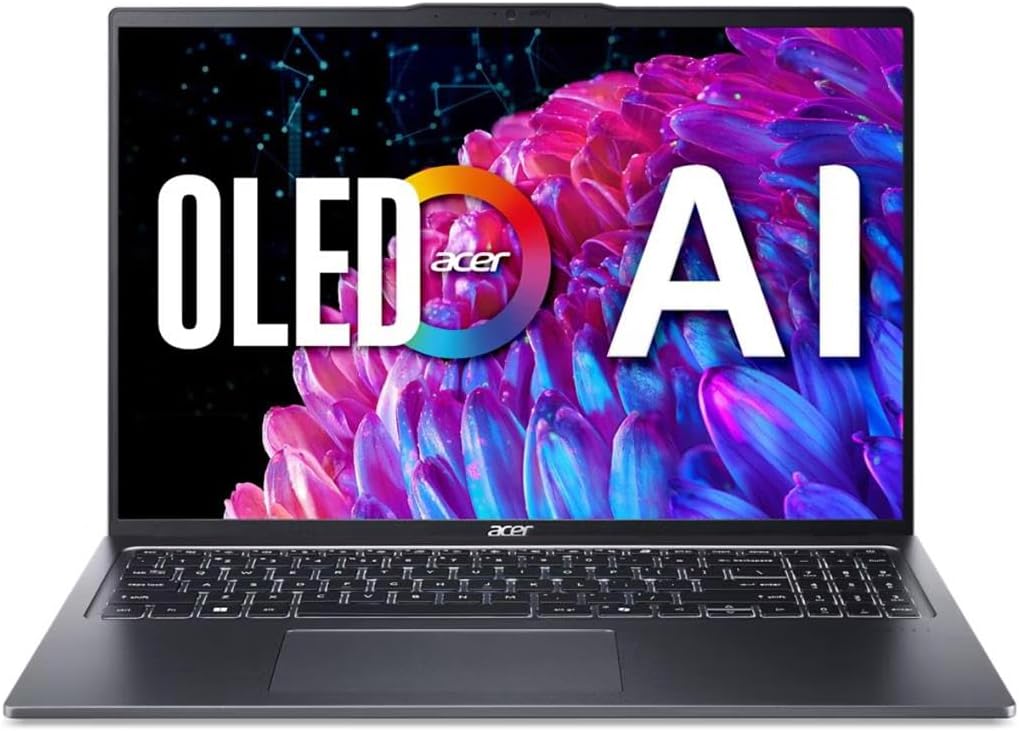
The Acer Swift Go 16 delivers impressive OLED visuals at a competitive price point making it an attractive option for budget-conscious buyers. Its 16-inch WQXGA+ OLED display features HDR True Black certification and wide color gamut coverage which ensures professional-grade accuracy for photo and video editing.
We may earn a commission when you buy through this link, at no additional cost to you.
Powered by the Intel Core Ultra 5 processor this laptop optimizes workloads for creators and professionals with integrated AI acceleration. The system supports efficient multitasking and longer battery efficiency while the eye comfort certification reduces harmful blue light emissions for extended viewing sessions.
Despite its strengths the device has some limitations regarding memory and build. The 8GB of RAM may constrain heavy multitasking scenarios and the chassis while sleek does not match the premium feel of more expensive models. These factors may influence long-term usability for power users.
This laptop is best suited for users who need a portable and visually stunning device for everyday productivity and light creative work. If you value display quality and AI features over raw power and extensive memory the Swift Go 16 provides a compelling balance for the cost.
The 3.2K resolution and VESA certified HDR True Black 500 deliver deep contrast and vibrant visuals ideal for immersive media experiences.
Dual Thunderbolt 4 and USB4 ports enable high-speed data transfers and multi-monitor setups supporting versatile workflows and external displays.
We may earn a commission when you buy through this link, at no additional cost to you.
The ASUS Vivobook S16 is a Copilot+ PC that leverages the AMD Ryzen AI 7 processor to deliver smooth intelligent performance. With 32GB of RAM and 1TB of storage this model handles multitasking effortlessly making it a strong choice for users who need reliable productivity capabilities on the go.
We may earn a commission when you buy through this link, at no additional cost to you.
Its 16-inch OLED display offers deep contrast and vivid detail although the resolution is lower than some competitors. The design is ultra-portable at just 3.75 lbs and under 0.63 inches thin while the battery life promises up to 21 hours of uninterrupted use with fast charging support.
Trade-offs include limited discrete graphics performance which may not satisfy heavy gaming or rendering needs. Additionally the WUXGA resolution is less sharp than higher-end panels but remains adequate for most work and study tasks. These compromises help maintain a lighter weight and longer battery life.
This laptop is ideal for students and professionals who prioritize memory capacity battery life and AI assistance over graphical power. If you need a portable and efficient device for general computing and light creative work the Vivobook S16 offers a calm and confident edge.
Copilot+ PC features enable on-device AI for writing organizing and searching tasks reducing reliance on cloud services for faster responses.
The lightweight chassis and all-day battery ensure effortless mobility allowing you to work from anywhere without constant charging concerns.
We may earn a commission when you buy through this link, at no additional cost to you.
The HP OmniBook 3 is an affordable entry into the OLED laptop market without compromising on essential features. Its 2K OLED display provides rich colors and crisp visuals for everyday productivity while the Snapdragon X processor delivers efficient performance and long-lasting battery life for on-the-go use.
We may earn a commission when you buy through this link, at no additional cost to you.
One of its standout features is the impressive battery life promising up to 41 hours and 45 minutes of usage. Fast charge technology restores the battery from zero to fifty percent in approximately forty five minutes ensuring you stay productive throughout the day without frequent interruptions.
Despite its advantages the device has limitations including a smaller 256GB SSD which may fill up quickly with large files. Additionally reliance on the Snapdragon ecosystem can mean compatibility issues with certain legacy applications or peripheral devices that expect traditional x86 architectures.
This laptop is best suited for students and casual users who need a portable and budget-friendly device for basic tasks and media consumption. If you prioritize battery life and display quality over raw performance and storage capacity the OmniBook 3 offers remarkable value for the cost.
The Snapdragon architecture optimizes power consumption to deliver industry-leading battery life ideal for extended work sessions away from outlets.
Built-in Otter.ai assistant helps record and transcribe meetings saving time and organizing notes automatically for improved productivity.
We may earn a commission when you buy through this link, at no additional cost to you.
The ASUS Vivobook S16 with Intel Core Ultra 9 combines powerful processing capabilities with a sleek design making it a robust choice for professional workflows. Its Copilot+ PC architecture delivers intelligent on-device AI with 50 TOPS of NPU performance ensuring fast and responsive everyday computing.
We may earn a commission when you buy through this link, at no additional cost to you.
This model features a 16-inch OLED display with narrow borders for an engaging viewing experience and supports up to 25 hours of battery life. The build meets US MIL-STD 810H durability standards providing reliable strength for travel while maintaining a lightweight 3.75 lbs profile for portability.
Trade-offs include a higher price point compared to similar models and a WUXGA resolution that is less sharp than 2.8K or 3.2K alternatives. These factors may limit its appeal for users who prioritize maximum visual detail or strict budget constraints over processor performance and durability features.
This laptop is ideal for professionals who require reliable performance and durability for demanding tasks without sacrificing portability. If you value high-end processing power and long battery life the Intel version of the Vivobook S16 offers a compelling premium option.
The Core Ultra 9 processor ensures seamless multitasking and responsiveness supporting complex applications and large datasets smoothly.
MIL-STD certification ensures the chassis withstands drops and environmental stress making it suitable for rugged daily travel and use.
We may earn a commission when you buy through this link, at no additional cost to you.
The HP OmniBook 5 enhances productivity with a 2K OLED touchscreen that provides rich colors and crisp visuals for interactive workflows. The Snapdragon X Plus processor supports responsive performance and seamless multitasking while AI tools enhance productivity and connectivity with long battery life.
We may earn a commission when you buy through this link, at no additional cost to you.
Battery life is another strong point with up to 34 hours of usage and fast charge technology restoring half the battery in thirty minutes. The device includes 512GB of storage and 16GB of RAM offering ample space for files and smooth operation for general productivity tasks.
Trade-offs involve limited graphics capabilities compared to models with dedicated GPUs and a standard refresh rate that may not satisfy gaming needs. These constraints are acceptable for a device focused on business and education use rather than high-performance entertainment or creative rendering.
This laptop is perfect for users who need a large interactive display for presentations annotations and touch-based navigation. If you value battery life and touch convenience over raw power the OmniBook 5 delivers a practical and efficient OLED experience.
The touchscreen interface enables intuitive navigation and annotation supporting versatile workflows for presentations and creative tasks.
Qualcomm Wi-Fi 6E provides fast speeds and expanded capacity ensuring seamless wireless connectivity for collaborative environments.
We may earn a commission when you buy through this link, at no additional cost to you.
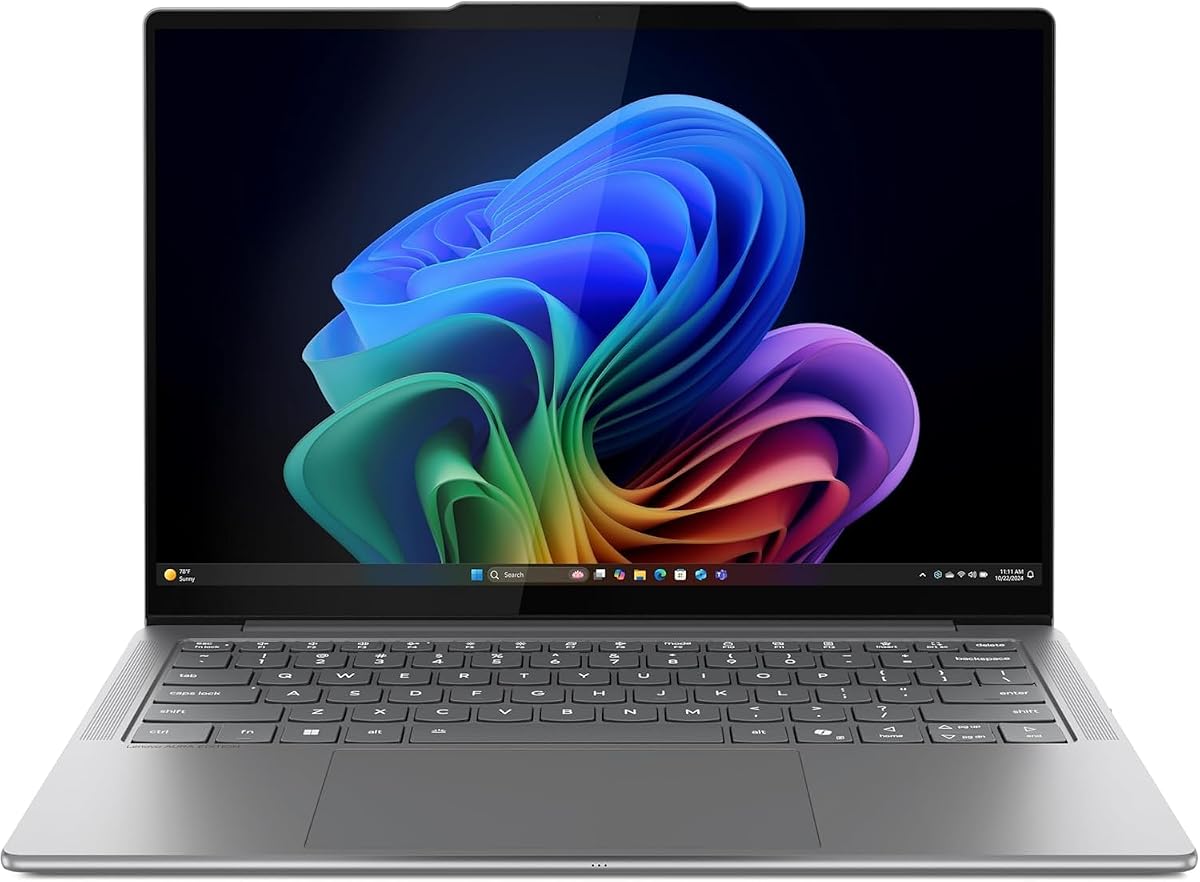
The Lenovo Slim 7i is designed for on-the-go creators seeking exceptional portability and display quality. Featuring a lightweight aluminum chassis and a 14-inch OLED touchscreen with DisplayHDR True Black 500 it delivers sparkling clarity and true-to-life color for professional tasks and media consumption.
We may earn a commission when you buy through this link, at no additional cost to you.
Its Intel Core Ultra 7 processor supports AI-powered apps that personalize and protect your data while providing up to 17 hours of battery life. The advanced thermal design ensures cool and quiet performance making it suitable for focused work sessions without distracting fan noise.
Trade-offs include a limited port selection requiring dongles for some peripherals and a price that is higher than many competitors. However these compromises are offset by the device's durability lightweight profile and premium features that support creative workflows effectively.
This laptop is ideal for travelers and professionals who prioritize portability and color accuracy over expandability. If you need a reliable and stylish device for creative work and communication the Slim 7i offers an excellent blend of power and mobility.
The OLED display provides deep blacks and wide color gamut ensuring precise visuals for photo editing and content creation.
Weighing just 2.82 lbs the laptop is easy to carry ensuring effortless transport for daily commutes and business travel.
We may earn a commission when you buy through this link, at no additional cost to you.
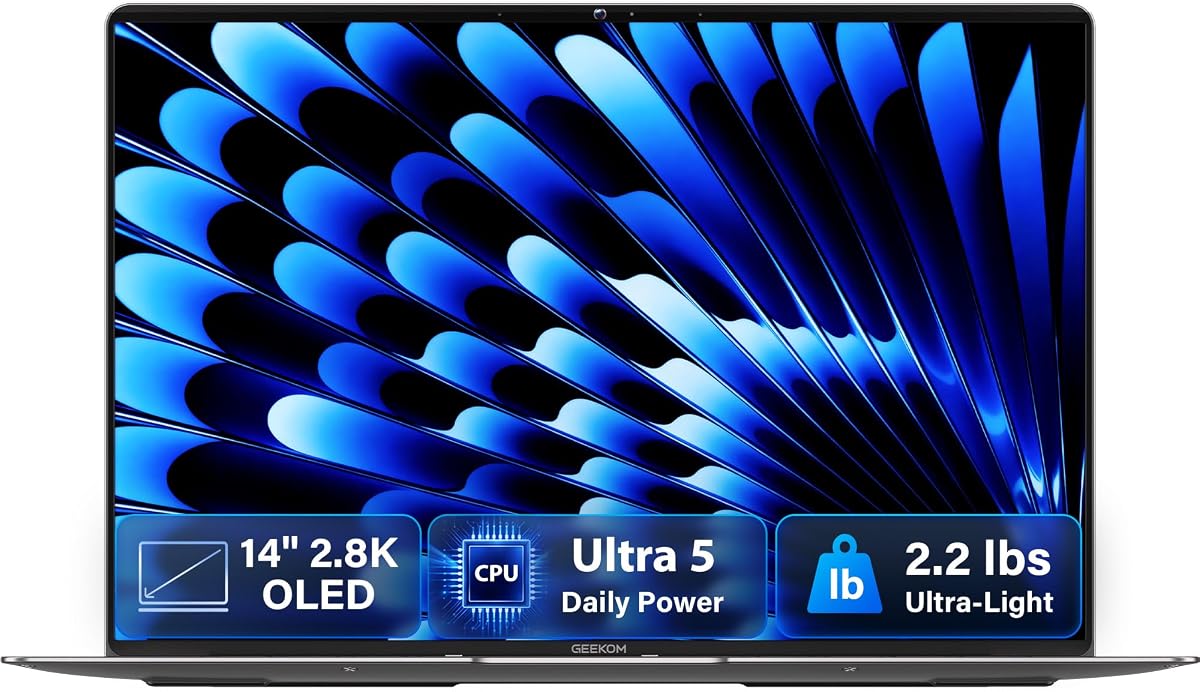
The GEEKOM GeekBook X14 Pro is an ultra-thin laptop weighing just 2.2 lbs with a stunning 2.8K OLED display. Its aerospace-grade magnesium alloy chassis and precision-milled CNC unibody provide a solid feel while reducing smudges and fingerprints for a clean and modern aesthetic.
We may earn a commission when you buy through this link, at no additional cost to you.
Equipped with an Intel Core Ultra 5 processor it supports on-device AI and efficient performance for daily tasks. The 72Wh battery delivers up to 16 hours of life and fast charging supports productivity on the go while a compact GaN charger keeps your travel load light.
Trade-offs include limited memory expansion options and a brand ecosystem that is less established than major competitors. However the inclusion of a docking station and high-quality build materials offset these concerns for users seeking a premium portable experience.
This laptop is best for frequent travelers and professionals who value weight and visual quality above all else. If you need a device that is easy to carry and provides crisp visuals for work and entertainment the GeekBook X14 Pro is a strong choice.
The award-winning design combines durability and aesthetics with a warm finish that feels comfortable in hand.
Advanced cooling systems maintain steady performance during demanding tasks keeping noise levels whisper-quiet.
We may earn a commission when you buy through this link, at no additional cost to you.
The Lenovo Legion 5a is a powerful gaming laptop that combines a 15.3-inch WQXGA OLED display with NVIDIA RTX 5060 graphics. The 165Hz refresh rate and DisplayHDR True Black 1000 deliver deep blacks and smooth motion creating an immersive experience for gaming and entertainment.
We may earn a commission when you buy through this link, at no additional cost to you.
Powered by the AMD Ryzen 7 250 processor it supports modern gaming and content creation with 32GB of DDR5 RAM and a 1TB SSD. Advanced connectivity includes Wi-Fi 7 and USB4 ensuring fast data transfer and seamless connection to peripherals and external displays.
Trade-offs include significant weight and reduced battery life compared to thin-and-light models due to the powerful hardware. These factors limit portability but are acceptable for users who prioritize performance and display quality over mobility for home and office use.
This laptop is ideal for gamers and creators who need high-performance graphics and stunning visuals. If you want a machine that handles AAA gaming and rendering tasks with ease the Legion 5a offers premium features and reliable performance.
The RTX 5060 GPU delivers realistic lighting and fast frame rates ensuring smooth gameplay and rendering.
The OLED panel supports G-SYNC for tear-free visuals enhancing immersion during fast-paced gaming sessions.
We may earn a commission when you buy through this link, at no additional cost to you.
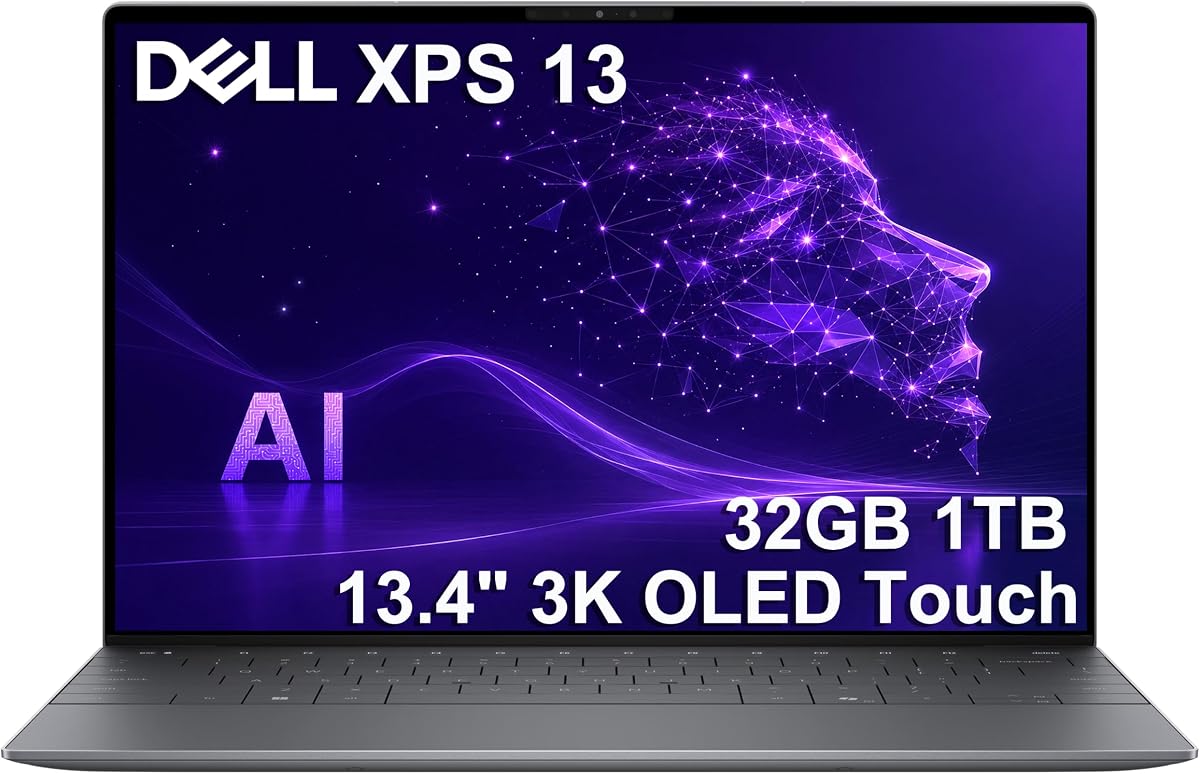
The Dell XPS 13 is the first XPS CoPilot+ PC featuring the Snapdragon X Elite processor for desktop-class power and industry-leading battery life. Its 13.4-inch 3K OLED touchscreen delivers crisp visuals and supports multi-monitor setups enabling professional-grade content creation anywhere.
We may earn a commission when you buy through this link, at no additional cost to you.
With 32GB of RAM and 1TB of SSD storage it ensures seamless multitasking and fast application loading. The device supports Windows 11 Pro with enterprise features like BitLocker encryption and remote desktop enhancing productivity and security for business workflows.
Trade-offs include a higher price point and limited ports requiring USB-C hubs for full connectivity. These constraints are offset by the premium build quality extended battery life and enterprise-grade security features that justify the investment for professional users.
This laptop is ideal for executives and professionals who need a portable and secure device for business tasks. If you value battery endurance and professional features over raw power and port variety the XPS 13 is a top choice.
Enterprise features and AI acceleration streamline document creation and data analysis for efficient daily operations.
The 3K resolution OLED panel with anti-reflective coating ensures crisp visuals in various lighting conditions.
We may earn a commission when you buy through this link, at no additional cost to you.
Selecting a laptop with an OLED display involves balancing several key factors to ensure the device meets your specific needs and budget requirements.
Resolution determines how sharp and detailed your visuals will be. Common options include WUXGA 2.8K and 3.2K panels. Larger screens offer more workspace but increase weight so choose a size that balances portability and productivity needs.
Look for at least 2.8K resolution for detailed work and consider screen size based on how often you travel or work remotely.
Refresh rate affects how smooth motion appears on the screen. Standard rates start at 60Hz but higher rates like 120Hz or 165Hz reduce blur and enhance scrolling experiences.
Choose a higher refresh rate if you watch lots of video or play games but 60Hz is sufficient for basic office work.
Color accuracy is crucial for creators and professionals working with visual media. Look for displays that cover 100% of DCI-P3 or sRGB color gamuts to ensure true-to-life representation.
Prioritize high color coverage if you edit photos or videos but standard displays work fine for general tasks.
The processor drives overall system speed and efficiency. Modern AI-enhanced chips from Intel AMD and Qualcomm offer significant performance gains for multitasking and specialized tasks.
Match the processor tier to your workload needs and ensure it supports AI features if you want future-proof capabilities.
Memory and storage dictate how many programs you can run simultaneously and how much data you can keep locally. Aim for at least 16GB of RAM and 512GB SSD storage for smooth operation.
Upgrade to 32GB RAM and 1TB storage if you work with large files or run multiple demanding applications regularly.
Battery life is critical for mobility and uninterrupted use. OLED screens can impact power consumption so look for efficient processors and high-capacity batteries to maximize uptime.
Check real-world usage reports and consider fast charging support if you travel often or have long workdays away from outlets.
Ports determine how you connect peripherals and external displays. USB-C and Thunderbolt ports offer versatility but you may need specific connectors for legacy devices.
Ensure the laptop has enough ports for your needs or budget for a quality dock and cable set to expand connectivity options.
A sturdy build protects your investment and extends device lifespan. Aluminum or magnesium alloy chassis provide better resilience than plastic alternatives and often feel more premium.
Look for MIL-STD certifications or durable materials if you plan to use the laptop frequently in diverse environments.
To preserve the lifespan of your OLED display avoid static images for long periods by using screen savers or dark modes when possible. This reduces the risk of image retention and burn-in over time.
Keep the screen clean with a soft microfiber cloth and avoid harsh chemicals or paper towels that could scratch the surface. Gentle cleaning preserves clarity and ensures the panel remains vibrant for years.
Optimize battery life by lowering brightness levels and closing unused apps. OLED screens consume power based on content so lighter backgrounds and dark mode help conserve energy.
OLED displays offer deeper blacks and higher contrast because they emit their own light. They also have faster response times and wider viewing angles making them superior for media consumption and design work compared to traditional LCD panels.
Modern OLED panels include features like pixel shifting and automatic brightness to reduce burn-in risk. While prolonged static images can still cause issues it is less likely with daily mixed usage and proper care.
OLED screens consume less power when displaying dark content since black pixels are off. However bright images may use more power than LCDs so battery impact depends on how you use the device.
Yes many OLED laptops support high refresh rates and fast response times ideal for gaming. Just ensure the GPU matches your gaming needs and consider battery drain during intensive sessions.
For 16-inch laptops aim for 2.8K or higher resolution for sharp visuals. Lower resolutions like WUXGA are acceptable for general work but less ideal for detailed creative tasks.
Many OLED displays include low blue light modes and high refresh rates that can reduce eye strain. However bright screens in dark environments may still cause discomfort so adjust settings as needed.
This guide has explored ten standout laptops with OLED displays ranging from budget-friendly options to premium gaming and business models. Each device offers unique strengths whether you prioritize portability battery life performance or visual fidelity.
When choosing focus on the features that matter most for your workflow. If you need high-end performance for creative work the Lenovo Legion 5a or IdeaPad Pro 5 offer excellent capabilities. For everyday use and travel the Slim 7i or OmniBook models provide great balance.
Keep in mind that pricing and stock levels fluctuate regularly. Always verify the latest listings and warranty terms before purchasing to ensure you secure the best value available for your chosen device.