
BENFEI USB 3.0 Switch
4.1Editor score
2 In 4 Out USB 3.0
5Gbps Data Transfer Speed
LED Indicator for Status
This guide compares the top keyboard and mouse switch for 2 computers, evaluating features, speed, and compatibility to help you choose the right USB switch
Finding the right keyboard and mouse switch for 2 computers can streamline your workflow significantly. These devices allow you to share peripherals like keyboards, mice, and printers between two systems without constantly unplugging cables. A good switch ensures seamless transitions between work and personal setups.
We compared ten top-rated USB switches based on data transfer speeds, port variety, build quality, and ease of use. Our analysis focuses on models that support USB 3.0 for faster file transfers and include features like external controllers or power supply options for stability.
Each pick below highlights key strengths and potential trade-offs to help you decide based on your specific needs. Prices and availability fluctuate frequently, so always check the latest listings before purchasing to ensure you get the best deal available today.
4.1Editor score

4.0Editor score

4.3Editor score
The following table provides a side-by-side comparison of all ten products reviewed in this guide. It highlights key specifications such as port counts, data transfer speeds, and included accessories to help you quickly identify the best option for your dual computer setup.


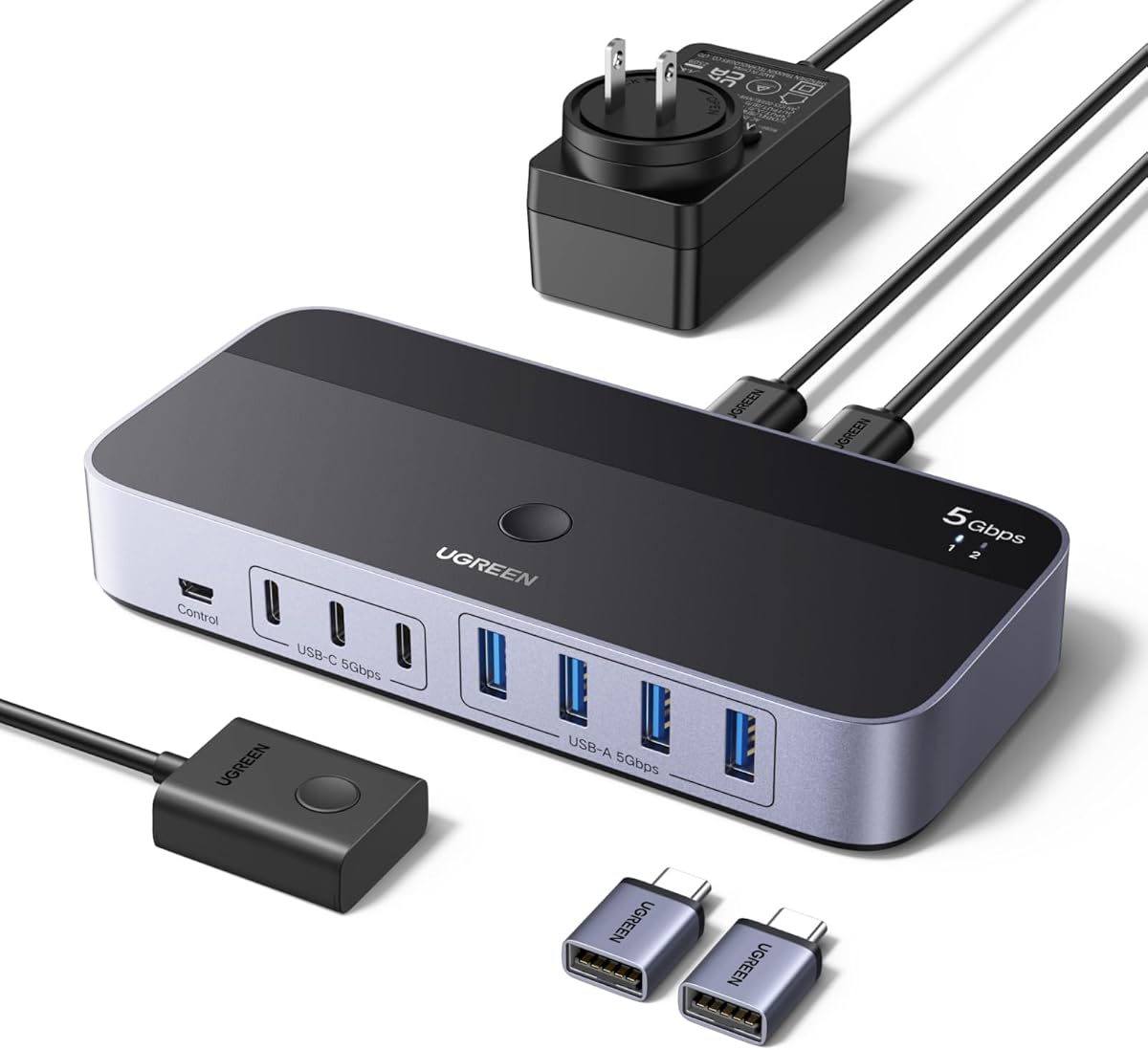

This UGREEN USB switch stands out as a top choice for sharing peripherals between two computers. It supports USB 3.0 speeds up to 5Gbps and includes both USB-C and USB-A ports for maximum compatibility. The inclusion of an external controller adds convenience for desktop users.
We may earn a commission when you buy through this link, at no additional cost to you.
The switch allows you to connect up to four USB devices such as keyboards, mice, printers, and scanners. You can switch between computers using the button on the device or the included external controller. This flexibility makes it ideal for dual PC setups at home or office.
While it is not a KVM switch and does not support video transmission, it excels at sharing USB peripherals efficiently. The USB-C power port ensures stable performance when using high-power devices like external hard drives or headphones.
If you need a reliable way to share keyboards and mice between two computers without video switching, this is an excellent choice. The mix of ports and external controller makes it a versatile option for modern workspaces.
The mix of USB-C and USB-A ports allows you to connect modern and legacy devices without extra adapters.
Switch between computers quickly using the external controller to keep your desk tidy and accessible.
We may earn a commission when you buy through this link, at no additional cost to you.
The BENFEI USB switch offers excellent value for those looking to share peripherals between two computers on a budget. It supports USB 3.0 speeds up to 5Gbps and includes an LED indicator to show which computer is active. The simple design makes it easy to use without drivers.
We may earn a commission when you buy through this link, at no additional cost to you.
You can share four USB devices such as keyboards, mice, printers, and scanners between two computers. The one-click switching mechanism allows for quick transitions between work and personal setups. The extra power slot ensures stability when using high-power devices.
While it lacks an external controller, the compact design keeps your desktop neat. Just note that you need to use the included BENFEI USB-A to USB-A cables for proper functionality. This requirement ensures stable connections but limits flexibility.
For budget-conscious users who need reliable USB sharing without video switching, this switch delivers strong performance. The included warranty and customer support add peace of mind for your purchase.
This switch provides high-speed USB 3.0 connectivity at a fraction of the cost of premium alternatives.
The one-button design and LED indicator make switching between computers intuitive for all users.
We may earn a commission when you buy through this link, at no additional cost to you.
This 2-in-2-out USB switch is designed for users who need a straightforward way to share a keyboard and mouse between two computers. It supports USB 3.0 speeds up to 5Gbps and features a durable aluminum alloy shell for heat dissipation. The high customer rating reflects its reliability.
We may earn a commission when you buy through this link, at no additional cost to you.
The one-button switching mechanism with LED indicator allows you to toggle between computers instantly. It includes two USB 3.0 cables so you can start using it right out of the box. The compact design saves space on your desktop.
While it is limited to two ports, this is ideal for basic setups where you only need to share input devices. The sturdy build ensures longevity even with frequent switching. However, it does not support video transmission or additional USB devices.
If you have a clean dual PC setup and only need to share a keyboard and mouse, this switch is a great choice. The included cables and plug-and-play design make installation effortless.
The aluminum alloy shell provides durability and better heat dissipation for long-term reliability.
Included cables and driver-free operation mean you can start switching between computers immediately.
We may earn a commission when you buy through this link, at no additional cost to you.
This UGREEN USB switch provides a compact solution for sharing two USB devices between two computers. It supports USB 3.0 speeds up to 5Gbps and includes two USB 3.0 cables for immediate use. The driver-free design ensures compatibility with Windows, macOS, and Linux.
We may earn a commission when you buy through this link, at no additional cost to you.
The one-button switching mechanism with LED indicator lets you easily toggle between computers. It is perfect for sharing a keyboard and mouse without needing video switching. The compact size keeps your desktop organized and clutter-free.
While it is limited to two ports, this is sufficient for basic keyboard and mouse sharing. The included cables mean you do not need to purchase additional accessories. Just note that it does not support video transmission or monitor sharing.
For users with a simple dual PC setup who want a reliable and compact USB switch, this model is ideal. The trusted brand reputation and included accessories make it a hassle-free choice.
The compact form factor ensures your desk remains tidy while still providing essential USB sharing functionality.
Included USB 3.0 cables allow you to set up the switch immediately without extra purchases.
We may earn a commission when you buy through this link, at no additional cost to you.
This KVM switch goes beyond simple USB sharing by allowing you to share a monitor along with keyboard and mouse between two computers. It supports 4K resolution at 60Hz for crystal-clear visuals and includes four USB 3.0 ports for peripherals. The wired remote adds convenience for switching.
We may earn a commission when you buy through this link, at no additional cost to you.
The switch supports various input devices including PCs, laptops, and gaming consoles. It is compatible with multiple operating systems including Windows and Mac. The adaptive EDID feature ensures stable image transmission without requiring a power supply.
While it costs more than basic USB switches, it eliminates the need for separate video switches. This makes it ideal for users who want to share a single monitor across two computers. The remote switch keeps your desk tidy.
If you need to share a monitor along with your keyboard and mouse, this KVM switch is the best choice. The 4K support and included remote make it a versatile solution for dual PC setups.
This KVM switch allows you to control both video and USB devices from two computers using one monitor.
The included wired remote switch lets you toggle between computers easily without reaching for the main unit.
We may earn a commission when you buy through this link, at no additional cost to you.
This UGREEN USB switch offers a budget-friendly way to share four USB devices between two computers using USB 2.0 technology. It features a one-button swapping mechanism with LED indicator for easy operation. The compact design works well for basic setups.
We may earn a commission when you buy through this link, at no additional cost to you.
You can share keyboards, mice, printers, and scanners between two systems without constantly swapping cables. It is compatible with Windows, Mac, Linux, and Chrome OS without requiring drivers. Just note you need to supply your own micro USB power cable for stability.
While USB 2.0 is slower than USB 3.0, it is sufficient for sharing input devices and printers. The included USB-A to USB-A cables make setup easy. This model is ideal for users who do not need high-speed data transfer.
For basic peripheral sharing at a low cost, this USB 2.0 switch is a solid choice. The trusted brand and included accessories provide good value for budget-conscious buyers.
This switch provides essential USB sharing functionality at a price point accessible to most users.
The one-button design with LED indicator makes switching between computers straightforward and intuitive.
We may earn a commission when you buy through this link, at no additional cost to you.
This UGREEN USB 3.0 switch supports four USB devices between two computers with transfer speeds up to 5Gbps. It includes two USB 3.0 cables and features a one-button switch with LED indicator for easy operation. The plug-and-play design ensures compatibility with major operating systems.
We may earn a commission when you buy through this link, at no additional cost to you.
The USB-C power port allows you to connect an external power supply for stability with high-power devices. You can share keyboards, mice, printers, and scanners seamlessly. The compact design keeps your desktop organized.
While it is not a KVM switch and does not support video, it excels at peripheral sharing. The USB 3.0 speed is great for transferring files between computers via flash drives. Just note the power adapter is not included in the box.
For users needing fast USB 3.0 sharing without video switching, this model is a reliable choice. The included cables and trusted brand reputation make it a strong option for home and office use.
USB 3.0 speeds up to 5Gbps allow for quick file transfers between computers using flash drives.
The USB-C power port ensures stable performance when using high-power peripherals like external hard drives.
We may earn a commission when you buy through this link, at no additional cost to you.
This UGREEN switch allows you to share up to seven USB devices between two computers including a mix of USB-A and USB-C ports. It supports USB 3.0 speeds up to 5Gbps and includes a power adapter for stability. The external controller adds convenience.
We may earn a commission when you buy through this link, at no additional cost to you.
The switch is perfect for users with many peripherals who need to share them between computers. It includes a USB-C to USB-A adapter for compatibility with older devices. The included power adapter ensures reliable performance even with multiple devices.
While it is more expensive than basic switches, the high port count justifies the cost. It is not a KVM switch so video is not supported. The included adapter and power supply make it a comprehensive solution.
If you need to share many devices including USB-C peripherals between two computers, this is the best option. The external controller and power adapter ensure smooth and reliable operation.
With seven ports including USB-C, this switch accommodates a wide range of peripherals for dual PC setups.
The included power adapter and USB-C to USB-A adapter reduce the need for extra purchases.
We may earn a commission when you buy through this link, at no additional cost to you.
This USB switch provides a basic way to share two devices between two computers using a simple push-button mechanism. It includes two USB cables and features an LED indicator to show which computer is active. The design is compact and affordable.
We may earn a commission when you buy through this link, at no additional cost to you.
You can share a keyboard and mouse between two systems without drivers. The plug-and-play functionality ensures it works with Windows, Mac, Linux, and Chrome OS. Just note it draws power directly from the computer so no adapter is needed.
While it lacks advanced features like USB 3.0 speeds or external controllers, it works well for basic needs. The included cables make setup easy. This is ideal for budget users who need straightforward switching.
If you need a simple and affordable switch just for keyboard and mouse sharing, this model is suitable. The compact design and included accessories make it easy to get started immediately.
This switch offers essential functionality without unnecessary complexity or extra cost for basic users.
Drawing power directly from USB ports eliminates the need for external adapters in most cases.
We may earn a commission when you buy through this link, at no additional cost to you.
This premium UGREEN USB switch supports up to ten gigabits per second for ultra-fast file transfers between computers. It offers seven ports including USB-A and USB-C to accommodate modern peripherals. The included power adapter ensures stability with high-power devices.
We may earn a commission when you buy through this link, at no additional cost to you.
The switch is designed for users who need maximum connectivity and speed. It includes a USB-C to USB-A cable for compatibility. The external controller allows quick switching between work and personal computers.
While it is more expensive, the 10Gbps speed is significantly faster than standard 5Gbps switches. It is perfect for transferring large files efficiently. Just note it does not support video transmission.
For power users who need the fastest USB sharing with extensive connectivity, this switch is the top choice. The premium build and included accessories justify the higher price point.
USB 3.2 speeds up to 10Gbps reduce file transfer times dramatically compared to standard switches.
With seven ports and USB-C support, this switch handles modern and legacy devices effortlessly.
We may earn a commission when you buy through this link, at no additional cost to you.
Selecting the right keyboard and mouse switch requires considering several factors including speed, port count, and power requirements. This section outlines key criteria to help you make an informed decision.
USB 3.0 switches offer transfer speeds up to 5Gbps which is ideal for transferring files between computers via flash drives. USB 2.0 switches are slower at 480Mbps but sufficient for keyboards and mice. Look for USB 3.2 models if you need 10Gbps speeds for large data transfers.
Determine how many devices you need to share between computers. A 2-in-2-out switch is enough for just a keyboard and mouse. A 2-in-4-out switch allows you to share additional devices like printers or scanners. More ports provide flexibility for complex setups.
Modern laptops often have USB-C ports while many peripherals still use USB-A. Choose a switch that supports both types or includes adapters. This ensures compatibility with your devices without needing additional dongles or hubs.
Most switches feature a button on the device or an external controller for switching. An external controller keeps the main unit hidden and accessible. Some models offer remote switches for added convenience. Choose based on your preferred workflow.
High-power devices like external hard drives may require more power than a computer USB port provides. Look for switches with external power ports or included adapters. This prevents disconnections and ensures stable performance with demanding peripherals.
Ensure the switch works with your operating systems. Most USB switches are plug-and-play and compatible with Windows, macOS, Linux, and Chrome OS. Check product descriptions to confirm compatibility especially if using older or specialized systems.
Look for switches made from durable materials like aluminum alloy which help dissipate heat. A solid build ensures longevity even with frequent switching. Avoid flimsy plastic models if you plan to use the switch daily.
Check if the switch includes USB cables as many require specific lengths or types. Included adapters for USB-C compatibility can save extra costs. Having everything in the box simplifies setup and reduces the need for additional purchases.
Connect each computer to the switch using the provided USB cables ensuring you connect to the correct ports labeled for PC1 and PC2. Connect your peripherals such as keyboards and mice to the output ports on the switch.
Plug in any required external power adapters if your switch has a power port especially when using high-power devices like external hard drives to ensure stable performance and prevent disconnections.
Use the button on the switch or the external controller to toggle between computers. The LED indicator will show which computer is currently active. Regularly dust the switch to maintain proper ventilation and connection integrity.
A USB switch only shares USB peripherals like keyboards, mice, and printers between computers. A KVM switch also shares video output allowing you to control multiple computers with one monitor along with peripherals. KVM switches are more versatile but often cost more and require HDMI or VGA connections.
Most USB switches are plug-and-play and do not require drivers. They are designed to work immediately with operating systems like Windows, macOS, and Linux. Just ensure your system has basic USB support which is standard in modern versions.
Yes, most USB switches work with gaming mice and keyboards. However, ensure the switch supports USB 3.0 if your devices require high-speed data transfer. Some switches may not support polling rates above certain thresholds so check specifications if you need high-performance gaming peripherals.
A USB switch can facilitate file transfers if you use a flash drive connected to the switch. You can toggle between computers to access the flash drive. However, direct network transfer or dedicated file transfer tools are faster for large files.
Disconnections often occur due to insufficient power especially with high-power devices like external hard drives. Ensure you use an external power adapter if your switch supports it. Also check that USB cables are securely connected and not damaged.
Most standard USB switches are designed for two computers only. Some models support more computers but are less common. If you need to share devices across multiple systems, consider network-based sharing solutions or specialized hardware designed for that purpose.
Yes, most USB switches are compatible with Mac computers as they follow standard USB protocols. Ensure the switch is plug-and-play which works with macOS. Some features like external controllers may require driver installation on older macOS versions.
A well-built USB switch can last for several years with normal use. Durability depends on build quality and frequency of switching. Choosing models with aluminum casing and reliable brands often ensures longer lifespan and consistent performance.
Choosing the right keyboard and mouse switch depends on your specific needs for speed, port count, and power requirements. The UGREEN USB 3.0 switch remains a top pick for its versatility and external controller while the BENFEI switch offers excellent budget value.
If you need high-speed transfers or USB-C support look for models with USB 3.2 or 10Gbps speeds like the UGREEN 2-in-7-Out switch. For simple setups the 2-in-2-out options provide sufficient functionality without extra cost.
Prices and availability change frequently so always check current listings for the latest deals. Consider your specific peripherals and setup requirements before purchasing to ensure the switch meets all your needs.