
Cable Matters 2-Pack 6-Pin to 8-Pin PCIe GPU Power Adapter Cable
4.7Editor score
6-pin male to 8-pin female connector
Secure locking latch on 8-pin end
Convenient 2-pack for multiple systems
This guide compares the top GPU Power Adapters for 2026, evaluating compatibility, power delivery, cable quality, and safety features to help you choose the
GPU power adapters are essential components for ensuring your graphics card receives stable and adequate power. Whether you are upgrading to a new model or dealing with limited connectors on your power supply, the right adapter can make a significant difference in system stability and performance.
We have compared ten highly rated adapters based on their build quality, compatibility with modern standards like ATX 3.0 and PCIe 5.0, and user feedback. This list covers everything from basic 6-pin to 8-pin converters to advanced 12VHPWR extension cables for next-generation cards.
Each pick highlights specific strengths such as cable length, connector design, and current handling capabilities. Please note that product availability and prices change frequently, so always verify the specifications match your specific power supply and graphics card requirements before purchasing.
4.7Editor score

4.7Editor score

4.2Editor score
The following table provides a side-by-side comparison of all ten adapters reviewed in this guide. Each entry lists key specifications including connector types, power ratings, and compatibility notes to help you quickly identify the best match for your hardware.


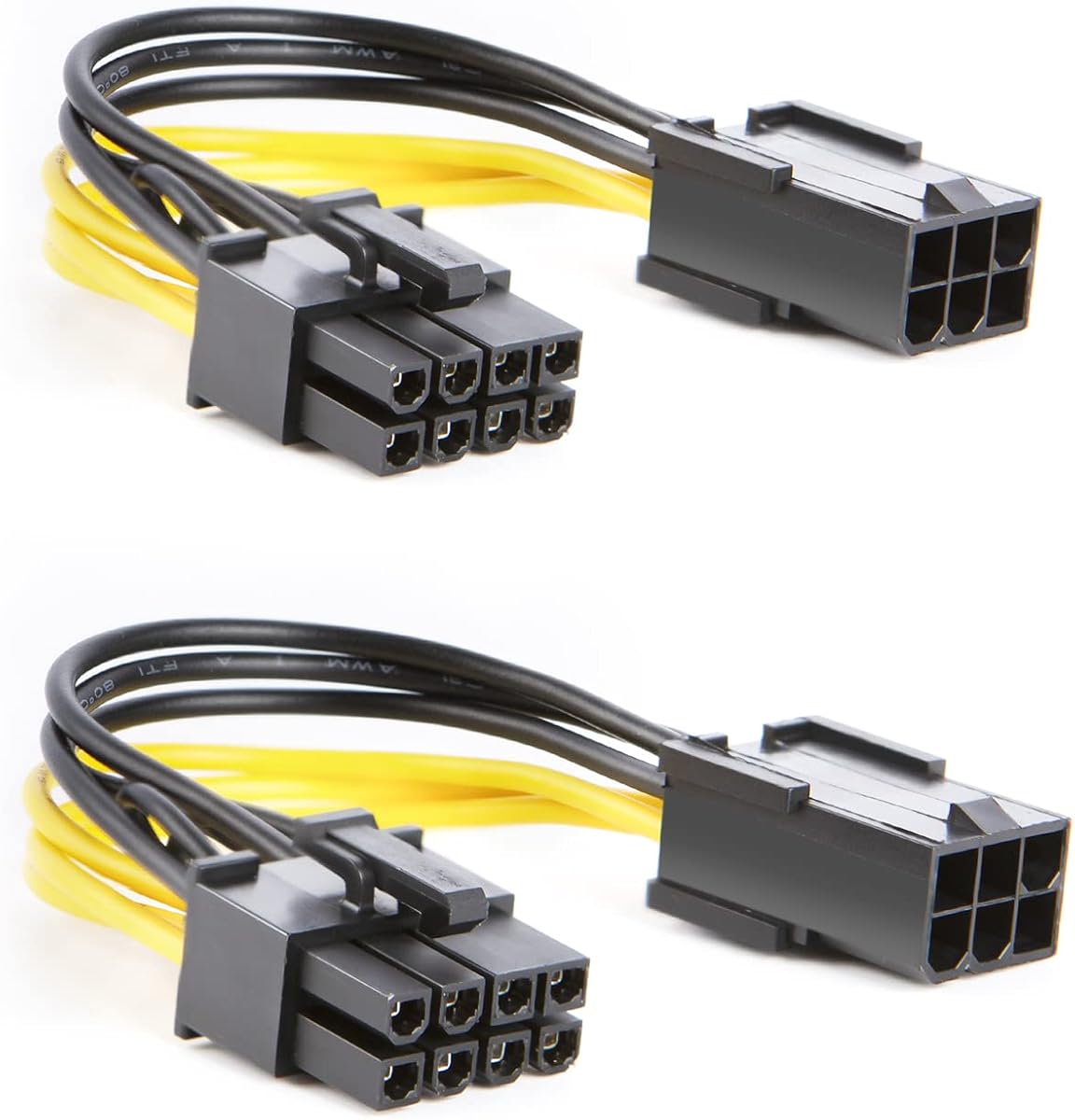


This adapter by Cable Matters is a highly rated solution for connecting a 6-pin power supply output to an 8-pin graphics card input. With a rating of 4.7 stars, it is trusted by users for its reliability and straightforward design. The 2-pack ensures you have a spare or can manage multiple systems easily.
We may earn a commission when you buy through this link, at no additional cost to you.
The key strength lies in its secure connection features. The 8-pin male connector includes a locking latch to prevent accidental disconnection, while the 6-pin female connector uses a keyed housing for proper alignment. This design helps maintain stable power delivery without risking loose connections during system use or transport.
However, the cable is only 4 inches long, which may limit flexibility in tight cases. It is also important to note that this adapter does not increase the power supply wattage. Users should verify their PSU can provide sufficient current before using this to avoid power-related system instability.
This adapter is ideal for budget-conscious builders who need a reliable connection for mid-range graphics cards. It is perfect for scenarios where the PSU has 6-pin ports but the GPU requires 8-pin. Always check your specific GPU power requirements before installation.
The locking latch on the 8-pin connector ensures the cable stays firmly plugged in during operation.
Buying a 2-pack allows you to keep one cable as a spare or use them in different setups.
We may earn a commission when you buy through this link, at no additional cost to you.
This adapter is designed specifically for GPUs with 16Pin connectors like the RTX 4070 Super and similar models. It features a 90-degree connector that significantly reduces the risk of overheating caused by sharp bends in the cable. Users rate it highly for its ability to solve common cable routing issues in small cases.
We may earn a commission when you buy through this link, at no additional cost to you.
The construction uses alloy copper and tinned material for plug terminals, which supports stable current transmission up to 400W peak power. The 13-inch length provides ample room for bending without stressing the connection point. Additionally, the included cable combs help maintain a clean and organized look inside your PC chassis.
One limitation is that it is not suitable for the 12pin GeForce RTX 3090 Series GPUs. You must ensure your specific card model matches the 16Pin requirement. While it costs more than standard adapters, the improved safety and cable management benefits justify the expense for high-end builds.
Buy this if you own an RTX 4070 or newer 16Pin GPU and want to avoid the tight bends that can lead to connection failures. The right-angle design is a game-changer for maintaining airflow and reducing heat near the graphics card power port.
The 90-degree angle allows the cable to exit the GPU port horizontally, reducing strain and heat.
Upgraded 16AWG tinned copper wire ensures stable voltage transmission and prevents oxidation over time.
We may earn a commission when you buy through this link, at no additional cost to you.
The NZXT 12VHPWR Adapter Cable is designed for users with NVIDIA 40 Series graphics cards who want a clean power solution. It delivers up to 600 watts of power and does not require an ATX 3.0 power supply, making it compatible with existing NZXT ATX 2.X units. This flexibility is a major advantage for upgrades.
We may earn a commission when you buy through this link, at no additional cost to you.
Its compact design replaces the bulky standard adapters that often come with GPUs, helping to keep cable management clean. The 12+4-pin connector connects to the GPU, while the dual 8-pin ends connect to the PSU. This setup ensures efficient power flow without the clutter of longer, thicker cables.
While the user rating is 4.2, this is likely due to specific compatibility nuances rather than quality issues. It is best used with NZXT C-Series Gold PSUs for guaranteed performance. If you are not using an NZXT PSU, verify compatibility before purchasing to ensure a proper fit.
This adapter is a premium choice for those who prioritize aesthetics and brand reliability. If you want to upgrade your GPU without buying a new PSU, this cable offers a safe and stylish bridge to connect your hardware properly.
This adapter allows you to use modern GPUs with existing ATX 2.X power supplies effectively.
The shorter, slimmer profile reduces cable clutter inside your PC case for better airflow.
We may earn a commission when you buy through this link, at no additional cost to you.
Fasgear offers a robust solution for high-power GPUs like the RTX 5070, 4090, and 4080. This cable supports up to 600W output and uses 16AWG tinned copper wire for stable voltage transmission. The detailed warnings help users confirm compatibility before installation, reducing the risk of damage.
We may earn a commission when you buy through this link, at no additional cost to you.
The connector terminals are made of alloy copper and tinned material to handle higher currents without excessive heat. It includes transparent cable comb clips to help manage the 30cm extension, ensuring your build looks tidy. This length is significantly longer than standard cables, providing flexibility.
One constraint is that it requires two unoccupied 8-pin ports on your power supply. Connecting fewer than two may cause system damage, so ensure your PSU has enough capacity. Also, this cable does not fit GPUs with 12pin or 8pin connectors like the RTX 3090.
Choose this adapter if you have a high-wattage GPU and a PSU with multiple 8-pin ports. The emphasis on safety and detailed documentation makes it a reliable choice for enthusiasts building power-hungry systems.
Supporting up to 600W ensures stable power for demanding graphics cards under load.
Included acrylic clips help keep the extension cable organized and prevent loose connections.
We may earn a commission when you buy through this link, at no additional cost to you.
This conversion cable is ideal for power supplies that already feature an original 12VHPWR output cable. It connects a female 16pin port to dual 8-pin male connectors for GPUs like the RTX 3060 through 4070. At 6.8 inches, it is compact enough for tight spaces.
We may earn a commission when you buy through this link, at no additional cost to you.
The 16AWG copper wire supports up to 600W output, ensuring stable power delivery. It is listed as compatible with various Corsair and Seasonic ATX 3.0 PSUs. This makes it a great option if you have a modern PSU but an older GPU that needs standard 8-pin inputs.
Note that it is not compatible with GPUs having a 16pin connector like the RTX 4070 TI Super. Always check your GPU port type before buying. The short length can be a pro or con depending on your case size and cable routing needs.
Use this cable when your PSU has a native 12VHPWR port but your GPU needs 8-pin connectors. It simplifies the power setup without requiring additional adapters, keeping your build clean and efficient.
Designed specifically for PSUs with native 12VHPWR output ports for easy conversion.
The short length reduces clutter in smaller PC cases without unnecessary slack.
We may earn a commission when you buy through this link, at no additional cost to you.
This extension cable is tailored for GeForce RTX 4070 series GPUs requiring a 16Pin connector. It uses upgraded 16AWG tinned copper wire to ensure stable voltage transmission up to 450W peak power. The high-density flexible protective sleeve adds durability and aesthetic value to your build.
We may earn a commission when you buy through this link, at no additional cost to you.
At 13 inches, the cable provides room to manage wires neatly, especially in smaller cases. The included transparent cable combs help secure the cord for a clean look. Users appreciate the focus on reducing heat and strain on the adapter connection through better design.
As a newborn brand, the company emphasizes customer service, but be mindful of return policies. The cable is not suitable for RTX 3090 series GPUs which use a different connector type. Always verify your specific GPU model before purchasing to ensure a proper fit.
If you are building a system with an RTX 4070 or similar card, this extension offers a practical balance of length and performance. The braided sleeve ensures the cable looks good and withstands daily handling.
The nylon braided fiber sleeve protects the cable and improves the visual appeal of your system.
This length gives you enough room to route the cable properly without sharp bends.
We may earn a commission when you buy through this link, at no additional cost to you.
CableCreation offers a reliable 6-pin to 8-pin adapter that supports up to 36W. The 18AWG pure copper conductors ensure safe and superior performance for standard GPU power needs. With a rating of 4.7 stars, it is a trusted option for basic connectivity requirements.
We may earn a commission when you buy through this link, at no additional cost to you.
The 2-pack provides excellent value, allowing for spares or multiple upgrades. The cable is RoHS certified and backed by a 24-month warranty and lifetime customer service. This level of support gives buyers confidence in the product's longevity and quality.
The main limitation is the 4-inch length, which may not be sufficient for complex cable routing. Additionally, it is designed for lower power requirements. For high-end cards needing more wattage, check if this adapter meets your power specifications before installation.
This adapter is ideal for casual upgrades where the PSU has 6-pin ports. It is a cost-effective way to enable compatibility without replacing your entire power supply unit. Verify your GPU needs to ensure this adapter is suitable.
Pure copper conductors provide safe and efficient power transfer for your graphics card.
A 24-month warranty and lifetime customer service ensure peace of mind for your purchase.
We may earn a commission when you buy through this link, at no additional cost to you.
The Corsair PCIe 5.0 12VHPWR GPU Power Bridge is designed to finish cable routing with a tight 180-degree bend. This helps prevent the power cable from pressing against the side panel of your case, reducing stress on components. It is specifically made for PCIe 5.0 GPUs.
We may earn a commission when you buy through this link, at no additional cost to you.
With high thermal endurance up to 105°C, it supports reliable use even with power-hungry graphics cards. The right-angle adapter ensures a cleaner build without compromising the connection integrity. This focus on aesthetics and protection makes it unique among adapters.
The lower rating of 3.9 may reflect limited use cases or higher price for specialized function. It does not increase power output but manages existing connections better. Verify your GPU compatibility to ensure it fits your specific requirements.
Choose this bridge if you need to route cables cleanly in a tight case. It is perfect for enthusiasts who want to avoid pinched cables and maintain a pristine look inside their PC chassis.
The tight bend allows cables to exit cleanly without stressing the GPU power port.
Built to withstand temperatures up to 105°C for safe operation under heavy loads.
We may earn a commission when you buy through this link, at no additional cost to you.
The EVGA PowerLink is designed to support NVIDIA Founders Edition and all EVGA GeForce RTX series cards. It offers adjustable spacing for different PCI-E connections, allowing for dramatically improved cable management. This reduces clutter and makes your PC interior look more organized.
We may earn a commission when you buy through this link, at no additional cost to you.
Integrated solid state capacitors provide power filtering for stable delivery. The product is rated 4.4 stars by users who value its ease of installation and compatibility with older and newer EVGA GPUs. It is a specialized tool for EVGA owners.
This adapter is not compatible with non-EVGA cards like standard RTX models unless they are found in specific bundles. It is best for users with EVGA GPUs who want to tidy up the power cable entry point. Check your GPU model before buying to ensure compatibility.
For EVGA card owners, this device is an excellent addition to improve build aesthetics. The adjustable spacing helps you route cables cleanly without forcing them into tight spaces.
Adjustable spacing allows you to route power cables cleanly without forcing bends.
Integrated capacitors filter power noise for stable electrical delivery to your GPU.
We may earn a commission when you buy through this link, at no additional cost to you.
This adapter is engineered for next-generation graphics cards, featuring a 16-pin to triple 8-pin configuration. It delivers up to 600W of stable power and uses robust aluminum alloy construction for sustained high-performance operation. The perfect 5.0 rating highlights user satisfaction with its quality and functionality.
We may earn a commission when you buy through this link, at no additional cost to you.
The 90-degree angled connector enables clean cable routing and reduces port strain. It supports flexible mounting orientations to improve airflow in compact builds. This design helps manage cables without putting stress on the GPU power interface.
Ensure you select the correct Type B configuration based on your chassis setup. While it is versatile, compatibility with specific modular PSUs is key. Always check the product images to confirm the interface type matches your system before purchasing.
Use this adapter if you need a modular solution for high-wattage GPUs. It is ideal for modern ATX 3.0 builds where clean routing and high power capacity are required.
The robust aluminum alloy construction ensures durability during sustained high-performance operation.
This design enables clean cable routing and reduces strain on the power port.
We may earn a commission when you buy through this link, at no additional cost to you.
Selecting the right power adapter requires understanding your power supply and graphics card connector types. Here are the key factors to consider before making a purchase.
Always match the adapter connector type to your specific hardware. Check if your power supply has 6-pin, 8-pin, or 12VHPWR outputs and if your GPU requires 8-pin or 16-pin inputs. Mismatched connectors will not fit physically.
Verify the connector type on both your PSU and GPU before ordering an adapter.
Ensure the adapter supports the maximum power your graphics card requires. Some adapters support up to 400W while others support 600W. Using an underpowered adapter can lead to system instability.
Choose an adapter that matches or exceeds your GPU power draw.
Consider the physical space inside your case. A short 4-inch cable might be tight in smaller cases. Longer 13-inch cables offer flexibility for routing without sharp bends.
Select a length that allows clean routing without straining the connection.
Look for cables made with copper wire such as 16AWG or 18AWG. Thicker wire ensures stable voltage transmission. Avoid thin or cheap wires that might overheat.
Higher gauge copper wires are safer and more efficient for power delivery.
A 90-degree or 180-degree adapter can help manage cables in tight spaces. Straight connectors might press against side panels. Angled designs keep the build tidy and reduce heat.
Opt for angled connectors if you have a compact PC case.
Choose reputable brands that offer warranties and safety certifications. Reliable brands use better materials and testing. This reduces the risk of electrical issues over time.
Prioritize established brands with positive user feedback and warranty support.
Some adapters come in 2-packs which provide value and spares. Having an extra adapter can be useful if one fails. It also helps if you plan to upgrade another system later.
Buying a 2-pack can offer better long-term value and convenience.
Look for adapters with clear labeling and locking mechanisms. Easy installation reduces the risk of accidental disconnection. Good design helps you connect securely without force.
Choose adapters with clear guides and locking clips for secure connections.
First, shut down your PC and disconnect all power before installing any adapter. Connect the adapter firmly to both the PSU and GPU connectors to ensure a snug fit. Verify that the locking latches click into place properly.
Second, route the cables neatly without sharp bends or sharp pressure. Use cable ties or combs to secure the adapter cable. This prevents accidental pulls that could loosen the connection during use.
Third, inspect the adapter periodically for any signs of heat or wear. If you notice discoloration or burning smells, replace the adapter immediately. Proper maintenance ensures safe and stable power delivery.
A 6-pin adapter connects a 6-pin power supply plug to an 8-pin GPU port. This allows older PSUs to support newer GPUs. However, it does not increase power output. Always check your PSU current limits before using these adapters.
Not always. Some adapters like the NZXT one work with existing ATX 2.X PSUs. Others require ATX 3.0 native 12VHPWR ports. Check your specific adapter requirements to confirm PSU compatibility.
No. The RTX 3090 uses a 12-pin connector which is different from the 16-pin on newer models. Using a 16Pin adapter on a 3090 will not fit. Ensure your GPU model matches the adapter connector type.
A 90-degree adapter reduces bending stress on the cable and prevents it from pressing against case panels. This improves airflow and protects the connection. It is ideal for small PC cases with tight space.
Check the adapter power rating in watts. If your GPU needs 300W, use an adapter rated for at least 300W. Underpowered adapters can lead to system crashes. Match the rating to your card requirements.
If the cable gets hot, disconnect it immediately. This may indicate overload or poor connection. Check your power supply capacity. Replace the adapter with a higher-rated one if needed.
Yes. A 2-pack offers value and a spare cable. If one adapter fails or gets damaged, you have a backup. It also helps if you upgrade multiple PCs. This convenience makes them a smart buy.
No. An adapter only changes connector shape not power capacity. Your PSU wattage remains the same. If your PSU is underpowered, upgrade the PSU itself instead of relying on an adapter.
We have reviewed the top GPU power adapters from basic converters to high-end 12VHPWR solutions. Each option meets different needs whether you are upgrading a mid-range card or building a power-hungry system.
Prioritize compatibility and power rating when making your choice. Ensure the adapter supports your GPU requirements and PSU limits. A proper match guarantees stable performance and safety.
Prices and availability change regularly so verify current details before buying. Check the latest specs and user reviews to confirm the adapter is right for your build. Enjoy a reliable setup with the right power solution.