
GOLFBUDDY Shot Mate Launch Monitor
4.3Editor score
Doppler Radar Accuracy
Real-Time Performance Feedback
10Hr Battery Life
Golfers seeking to refine their swing mechanics and optimize shot performance rely heavily on accurate data. A quality launch monitor captures critical metrics like club speed, ball flight, and spin rates to provide actionable insights for every player.
We evaluated ten leading devices based on accuracy, portability, and features to create this definitive list. Each product offers unique strengths ranging from radar technology to smartphone integration for versatile training environments.
Our selections highlight diverse needs from budget-friendly options to premium simulators. Prices fluctuate often so always verify current deals before purchasing your ideal training tool for immediate improvement on the course.
4.3Editor score

4.6Editor score

5.0Editor score
As an Amazon Associate we earn from qualifying purchases.
This side-by-side comparison outlines the core capabilities of each model including sensor types display options and data storage limits to help you choose the right tool for your training needs.



The Rapsodo Golf Launch Monitor stands out for its dual camera setup and Doppler radar integration. It offers tour-level shot tracking accuracy that helps golfers identify patterns quickly across various conditions.
We may earn a commission when you buy through this link, at no additional cost to you.
This device captures fifteen key metrics including spin rate and club path. Users benefit from over thirty thousand home golf simulator courses during the included premium trial period which enhances indoor practice sessions significantly.
While it requires a subscription for full features the initial trial provides extensive value. The slow-motion analysis helps visualize club contact details that might otherwise go unnoticed during standard practice routines.
Ideal for serious players wanting detailed feedback without full range fees the Rapsodo delivers reliable data. It is an excellent choice for those committed to refining their swing mechanics with visual aids.
Visual aids allow you to see exactly where the clubface meets the ball improving consistency over time.
Customizable driving ranges let you simulate real course conditions to prepare effectively for actual play.
We may earn a commission when you buy through this link, at no additional cost to you.
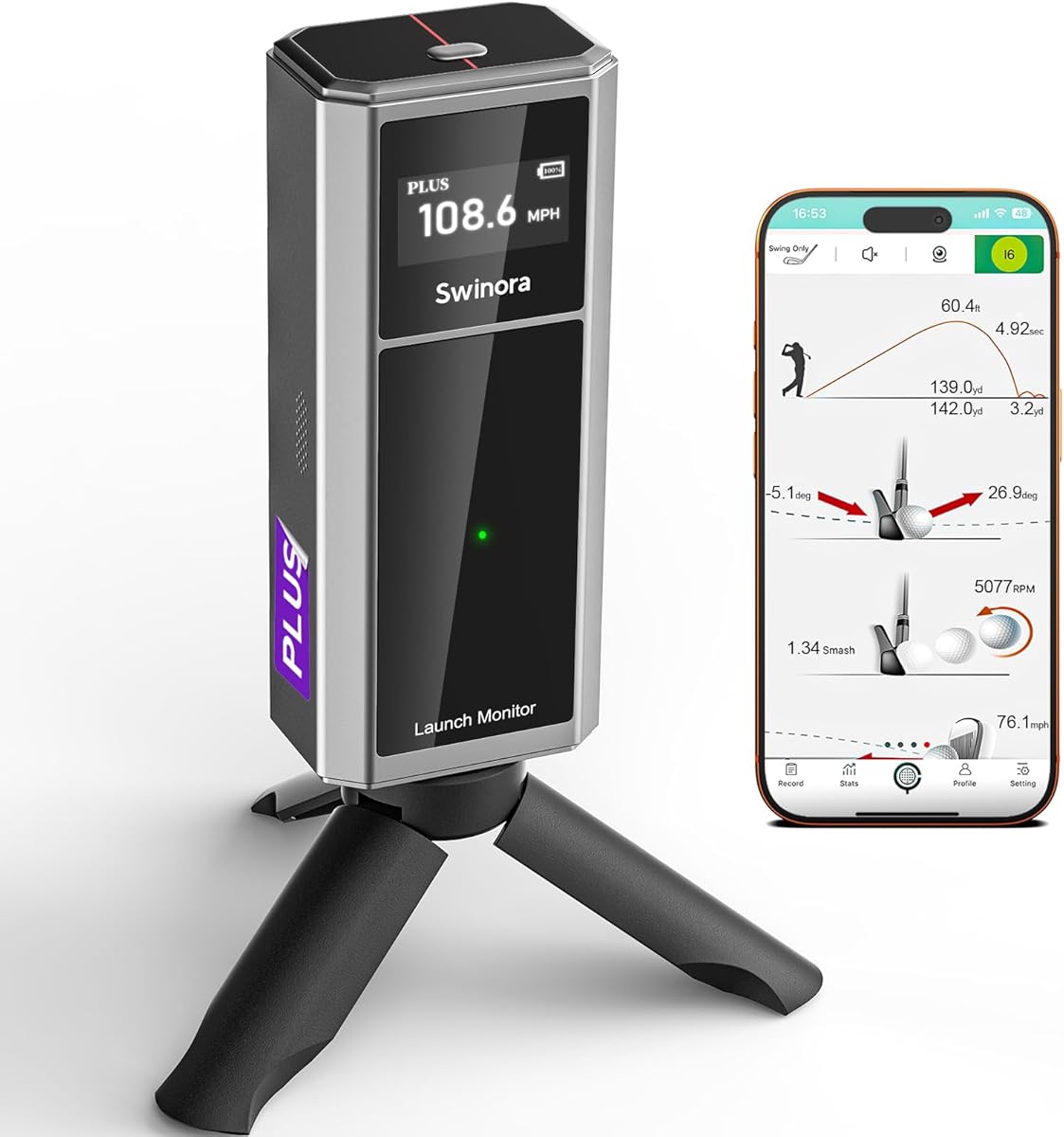
This portable swing analyzer offers incredible value with zero annual fees and lifetime use of its app. It tracks thirteen metrics including attack angle and ball speed using advanced environmental sensors for accuracy.
We may earn a commission when you buy through this link, at no additional cost to you.
Users can review swings from multiple angles and receive real-time voice feedback. The device also features a distance compensation function allowing fine-tuning of yardages to match on-course performance effectively.
Indoor use requires fifteen feet of space but the accuracy compensates for this requirement. The metal body ensures durability while the OLED display provides clear data visibility in various lighting conditions.
Perfect for budget-conscious golfers needing reliable data this device eliminates subscription costs. It is a practical choice for those who want consistent tracking without ongoing financial commitments.
Eliminate recurring costs by accessing all features permanently after the initial one-time download.
Adjust yardage percentages to align measured carry distances with your personal playing style accurately.
We may earn a commission when you buy through this link, at no additional cost to you.
The Voice Caddie SC300i provides essential shot analysis using Doppler radar technology for reliability. It features a bright display and voice output allowing hands-free feedback during practice sessions indoors or outdoors.
We may earn a commission when you buy through this link, at no additional cost to you.
Included bundle options offer power solutions and gps overview functionality for added convenience. Users can adjust loft angles to simulate different club conditions which supports versatile shot training strategies effectively.
While the metric set is smaller than competitors it covers core needs like carry distance and swing speed. The interface is straightforward making it accessible for golfers who prefer simplicity over complex data sets.
Ideal for players valuing portability and voice cues this monitor delivers consistent results. It serves well for those seeking a straightforward tool to track improvements without unnecessary complications.
Receive instant audio feedback without needing to look at a screen constantly during your swing routine.
Take your training anywhere with a compact design that fits easily in a golf bag or car.
We may earn a commission when you buy through this link, at no additional cost to you.
The GOLFBUDDY Shot Mate uses advanced radar technology to deliver precise swing and ball data. It features a full-color display and offers up to one thousand shots of storage for detailed performance review.
We may earn a commission when you buy through this link, at no additional cost to you.
Practice and target modes help golfers train smarter with structured repetition. The device tracks ball flight up to three hundred twenty yards providing a wide range of scenarios for effective outdoor or indoor practice.
Its lightweight build makes it easy to carry to various locations. A rechargeable battery provides ten hours of continuous use ensuring uninterrupted sessions during extended practice or driving range visits.
Perfect for beginners needing consistent feedback this monitor simplifies data tracking. It offers a reliable entry point into technology-assisted training without requiring complex setups or expensive subscriptions.
Keep your last one thousand swings accessible for quick comparison and progress tracking over time.
Utilize dedicated modes to focus on specific skills like accuracy or distance control systematically.
We may earn a commission when you buy through this link, at no additional cost to you.
Designed specifically for iOS devices the Rapsodo Mobile Launch Monitor pairs with the Rapsodo app for instant feedback. It returns real numbers on every swing helping golfers dial in yardages efficiently.
We may earn a commission when you buy through this link, at no additional cost to you.
Video replay features allow you to watch swings back with an on-screen tracer showing true ball flight. This visual aid makes it easy to spot swing faults and fix them on the spot.
The unit is lightweight and easy to pack for practice at the range or backyard. Premium unlocks simulator courses and game modes offering added value for users wanting virtual golf experiences.
Ideal for apple users seeking a portable tool this monitor delivers clear actionable insights. It suits both beginners and low-handicap players looking to practice smarter at home or outdoors.
See your true shot trajectory instantly to identify and correct launch path issues effectively.
Connect wirelessly to your phone for a streamlined setup process that gets you playing faster.
We may earn a commission when you buy through this link, at no additional cost to you.
The PRGR Launch Monitor tracks club head and ball speed without requiring Wi-Fi or Bluetooth. It uses advanced doppler radar technology to keep five hundred past swings in memory for quick reference anytime.
We may earn a commission when you buy through this link, at no additional cost to you.
This pocket-sized unit measures speeds without a ball making it ideal for swing speed training anywhere. It compares well to high-end units while maintaining an affordable price point for most golfers.
Trusted by major champions like Padraig Harrington it delivers accurate feedback for sessions. The simple design allows for immediate use in garages gyms or driving ranges without complex setup steps.
Perfect for speed-focused training this monitor offers simplicity and precision. It is a practical choice for those wanting raw data without smartphone dependencies or additional software subscriptions.
Track data directly on the device without needing to pair with any external mobile applications.
Use for baseball or tennis speed training alongside golf to maximize utility across sports.
We may earn a commission when you buy through this link, at no additional cost to you.
Work to improve your game with a portable monitor that pairs with a compatible smartphone for data. Track key metrics including club head speed and spin to better your shot consistency indoors or outdoors.
We may earn a commission when you buy through this link, at no additional cost to you.
Access over forty-two thousand virtual courses around the world with an active subscription. Use training modes to see shot dispersion charts and analyze video clips automatically recorded with your swing metrics.
The device is waterproof and features up to ten hours of battery life for extended range sessions. A included phone mount attaches to a golf bag for better viewing and interaction with the app.
Ideal for golfers wanting a full home simulator experience this monitor delivers versatility. It balances portability with powerful software tools to help players improve their game significantly.
Play iconic courses globally from home or the range to simulate real playing conditions.
Review dispersion charts and video clips to understand swing patterns and shot tendencies clearly.
We may earn a commission when you buy through this link, at no additional cost to you.
This portable launch monitor measures swing speed and ball speed reliably for training. It calculates estimated carry distance and smash factor perfect for speed training with the stack wedge practice sessions.
We may earn a commission when you buy through this link, at no additional cost to you.
Connect directly to the stack app via Bluetooth for a seamless speed training experience. A bonus app delivers guided putting practice sessions and detailed insights into your tendencies on the greens.
Used by US Open Champion Matt Fitzpatrick it offers trusted performance for everyday practice. The stack wedgeging builds fun gamified skill-specific sessions to help you dial in your distances effectively.
Perfect for focusing on specific skills this tool offers specialized training benefits. It is an excellent option for golfers wanting to refine wedge play and speed metrics with precision.
Engage with fun skill-specific sessions that make repetitive wedge training more enjoyable.
Join professional players who trust this device for accurate daily training feedback and improvement.
We may earn a commission when you buy through this link, at no additional cost to you.
The SC4 PRO delivers precise ball and club head data tracking from swing to impact. It offers unmatched real-time accuracy for indoor and outdoor practice using a prometrics engine for reliable performance.
We may earn a commission when you buy through this link, at no additional cost to you.
Enjoy a 3D driving range and E6 Connect home golf simulator with your device. Connect to the voicecaddie app to unlock distance calibration speed radar and high-level statistical analysis for insights.
Take advantage of versatile training modes including a 3D simulator and speed training modes. The device features voice output for feedback and a signature towel bundle is included for value.
Ideal for serious players seeking a full simulation system this monitor excels. It provides professional-grade tools to enhance your practice sessions and improve overall game performance significantly.
Experience immersive virtual ranges that replicate real-world conditions for effective preparation.
Access detailed stats that reveal swing nuances to drive focused improvement in every session.
We may earn a commission when you buy through this link, at no additional cost to you.
Practice with purpose using this accurate and affordable launch monitor using 3D doppler radar. Train and improve distance control with eight full swing performance data parameters including direct spin measurements.
We may earn a commission when you buy through this link, at no additional cost to you.
Use skills challenges to compare stats against tour averages for every data parameter. The FS Golf app allows customizable viewing of data video and trajectories with automatic video clipping and storage.
Measures data parameters immediately including an option for text-to-speech for convenience. The bundle includes a signature series EVA hard case for protection and easy transport of the unit.
Ideal for golfers needing versatile performance this monitor offers solid data. It is a practical tool for improving on the range or at home with reliable video and data support.
Challenge yourself against tour averages to set realistic goals and measure progress accurately.
Capture entire swings with corresponding data automatically to review performance details easily.
We may earn a commission when you buy through this link, at no additional cost to you.
Selecting the right device requires understanding your training goals and budget constraints.
Accuracy is paramount for any launch monitor. Doppler radar sensors track ball flight and club movement remotely offering high precision without physical contact. Camera-based systems use vision technology to analyze swings visually which can provide additional insights like club path or face angle.
Consider how you will use the device. Some monitors are pocket-sized and run on batteries for easy transport to the range. Others require specific mounting or space requirements indoors which may limit where you can practice effectively.
Different models capture varying numbers of data points. Basic units might measure only speed and distance while advanced ones offer spin rate and launch angle. Ensure the metrics align with the aspects of your game you wish to improve.
A clear display helps you review data quickly without extra devices. Some monitors have built-in screens while others rely entirely on smartphone apps. Choose an interface that feels intuitive and matches your preferred way of reviewing information.
Look for devices with long battery life to support extended practice sessions. Connectivity options like Bluetooth allow you to sync data with apps for deeper analysis. Ensure the connection is stable to avoid interruptions during training.
Some monitors work standalone while others need an app or subscription for full features. Check if the device requires annual fees for access to courses or advanced data. A one-time purchase with lifetime access might be more cost-effective in the long run.
Place the device at the recommended distance behind the ball for optimal radar or camera capture. Ensure the surface is flat and stable to prevent errors in data transmission during your swing.
Calibrate the device according to the manufacturer instructions before each session. This ensures environmental factors like temperature or humidity do not affect your metrics accuracy and reliability.
Store the unit in a cool dry place when not in use to preserve battery health. Use protective cases if included to prevent physical damage during transport or storage periods.
Yes many monitors support indoor use with specific space requirements. Check if the device needs a minimum backswing area or net setup for accurate readings without hitting obstacles.
Most modern devices pair with apps for detailed stats but some work standalone. Verify compatibility with your operating system to ensure you can access all features and data storage options.
Portable monitors offer high accuracy within a small margin of error. They are suitable for practice and tracking improvement over time though they may not match full-size professional studio equipment.
Focus on club speed ball speed and launch angle to understand swing efficiency. Spin rate is crucial for controlling shot shape and distance on the course for better strategic play.
Not all monitors require subscriptions. Some offer lifetime access to features while others limit courses or data without paid plans. Consider your long-term needs before committing to a recurring fee.
Use the included case or a soft pouch to shield it from impacts. Keep it away from extreme temperatures and moisture to extend the lifespan of electronic components and battery.
We reviewed ten excellent options ranging from budget-friendly trackers to premium simulation systems. Each offers unique benefits tailored to different training needs and skill levels.
Prioritize accuracy and ease of use when making your decision. A device that fits your lifestyle will be used more often leading to better results on the course.
Remember to check current availability and features before purchasing. Technology evolves quickly so verify the latest specs to ensure you get the best tool for your golf improvement journey.