
HUANUO Laptop Desk Mount
4.5Editor score
Ventilated tray with 240 holes
Supports up to 17 inch devices
Easy C clamp mounting
Finding the right laptop tray desk mount can transform your workspace into a more ergonomic and efficient environment. These devices elevate your screen to eye level, reducing neck strain and freeing up valuable desk space for your keyboard and mouse. Whether you work from home or in a busy office, having a reliable mount ensures comfort during long work sessions.
We have carefully evaluated the top models available on the market to bring you a comprehensive list of the most reliable options. Our analysis focuses on build quality, adjustability, cooling features, and ease of installation. Each product was selected based on user ratings and detailed specifications to ensure you get a product that meets your specific needs without compromise.
Every pick in this guide highlights unique strengths, from budget-friendly solutions to premium designs with advanced articulation. We include detailed reviews and a comparison table to help you make an informed decision quickly. Please note that prices and availability may change over time, so checking the latest details before purchasing is always recommended.
4.5Editor score

4.6Editor score

4.6Editor score
As an Amazon Associate we earn from qualifying purchases.
The following table provides a side-by-side comparison of all ten products featured in this guide, highlighting key specifications and unique features to help you decide which mount fits your desk setup best.

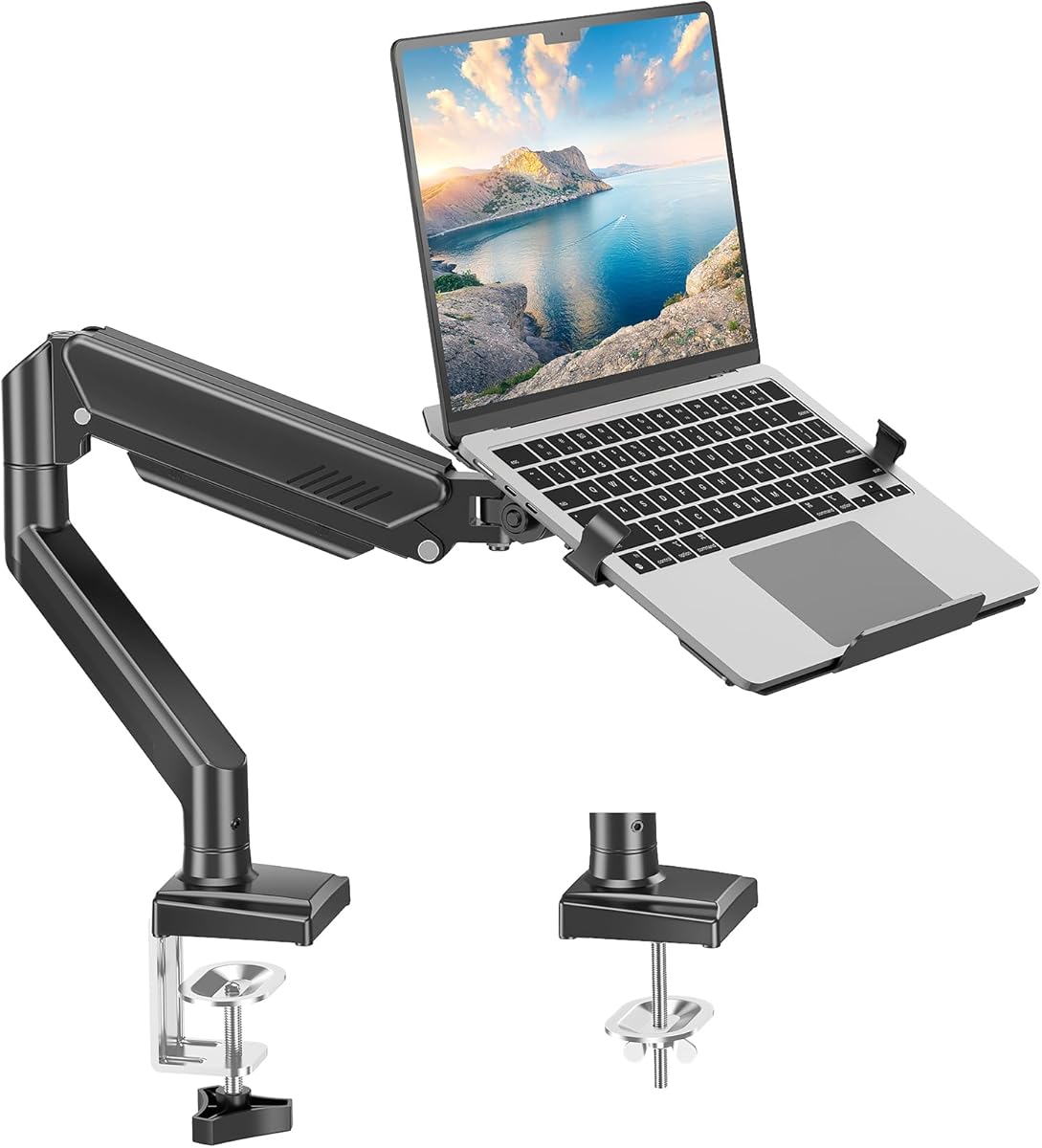


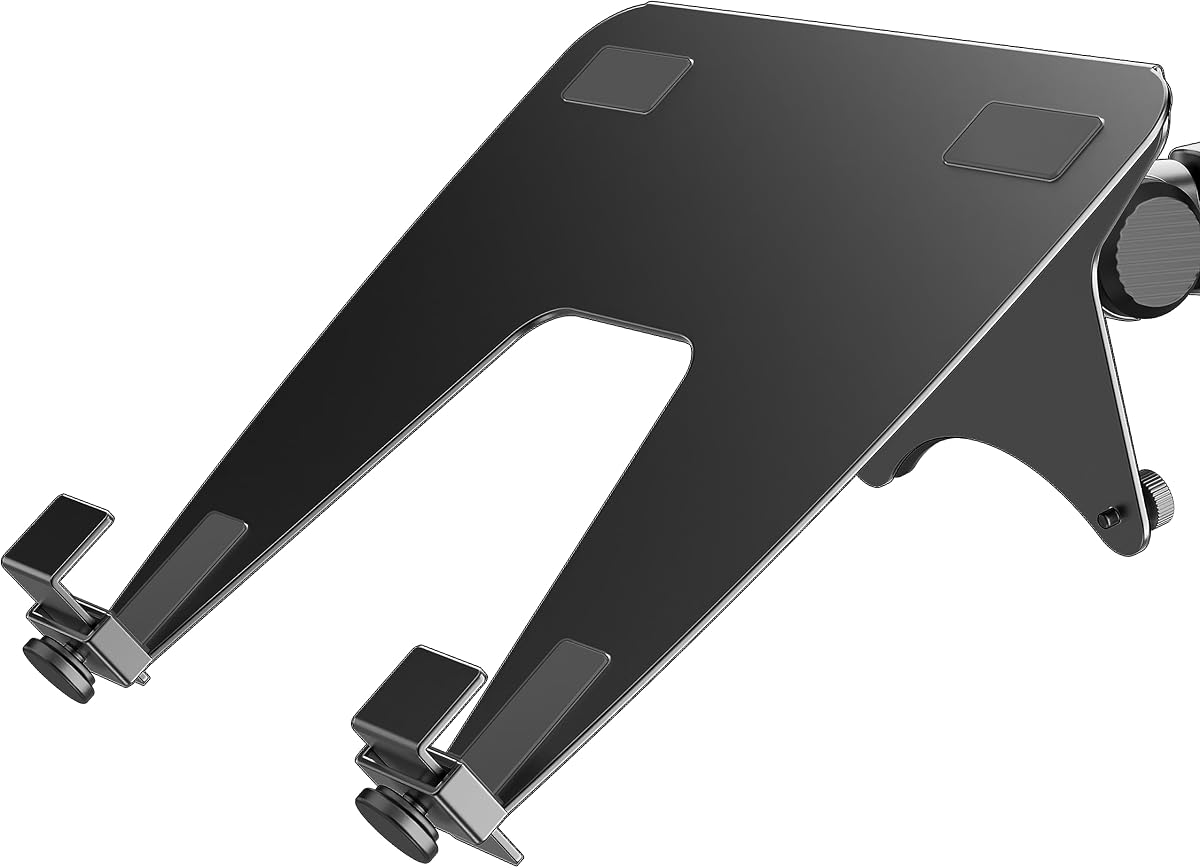
The VIVO Single Laptop Notebook Desk Mount Stand stands out as a top choice for users seeking a reliable and fully adjustable solution for their workspace. With a strong rating of 4.6 stars, this product has garnered trust from numerous buyers who appreciate its versatility and robust construction. It is designed to hold laptops up to 17 inches securely while offering extensive movement options to suit various ergonomic needs.
We may earn a commission when you buy through this link, at no additional cost to you.
Its key strength lies in the flexible articulation provided by the adjustable arm, which allows for a tilt from plus 90 to minus 90 degrees, a 180 degree swivel, and a full 360 degree rotation. The height adjustment along the 17 inch center pole ensures you can position your screen at the perfect eye level. Additionally, the integrated cable management system keeps your power and AV cords organized, reducing clutter on your desk.
While the stand is highly functional, some users might find the initial assembly slightly involved compared to simpler clamps, though all hardware is provided to make the process straightforward. The desk thickness requirements are specific, so ensuring your surface fits within the supported range is important for a secure fit. These minor trade-offs are acceptable given the superior stability and adjustability the unit offers.
This product is ideal for professionals who spend long hours at their computer and need to switch between different viewing angles frequently. Whether you are working from home or in an office, the VIVO stand provides a stable platform that enhances comfort and productivity. We recommend it as the best overall option for those who prioritize quality and flexibility in their laptop mounting solution.
The extensive adjustability allows you to find a viewing angle that reduces neck strain significantly during long work sessions.
Heavy duty clamping options ensure the mount remains steady even when you adjust the arm or type vigorously.
We may earn a commission when you buy through this link, at no additional cost to you.
The HUANUO Laptop Desk Mount offers an exceptional value for those looking to upgrade their workspace without breaking the bank. Rated 4.5 stars by users, this mount is a popular choice for its practical features and budget friendly price point. It supports both laptops up to 17 inches and monitors up to 32 inches, making it a versatile option for different setup needs.
We may earn a commission when you buy through this link, at no additional cost to you.
One of its standout features is the ventilated tray designed with 240 holes to improve airflow and prevent your device from overheating. This cooling design helps maximize performance and extend the lifespan of your laptop. The mount also includes cable management clips to keep wires neat, ensuring a tidy desk appearance. Installation is straightforward, with options for both C-clamp and grommet mounting.
While the product is affordable, some users might notice that certain components feel lighter than premium metal alternatives. Additionally, the tray is not as easily detachable as some competitors, which could be a limitation if you frequently switch between laptop and monitor modes. However, for the price, these are minor compromises that do not significantly impact daily usability.
This mount is perfect for students or home office workers who need a reliable solution that balances cost and functionality. If you are looking to free up desk space and improve ergonomics on a budget, the HUANUO mount is a highly recommended choice. It delivers solid performance and essential features that meet the needs of most standard workspace setups.
The numerous ventilation holes ensure your laptop stays cool during intensive tasks like gaming or video editing.
Compatibility with both laptops and monitors allows you to adapt the mount as your workspace evolves.
We may earn a commission when you buy through this link, at no additional cost to you.
The monTEK 2-in-1 Laptop & Monitor Desk Mount represents a premium option for users who demand durability and advanced features in their workspace setup. With a 4.6 star rating, this product is praised for its robust steel and aluminum construction and versatile compatibility. It supports laptops from 12 to 18 inches and monitors up to 32 inches, including curved screens, offering extensive flexibility.
We may earn a commission when you buy through this link, at no additional cost to you.
Its full motion adjustment capabilities allow for significant tilt, swivel, and rotation, ensuring you can find the perfect ergonomic posture for any task. The detachable tray is designed with a hollow structure for heat dissipation and stability, while built in cable management keeps wires organized. Installation supports both clamp and grommet mounting, fitting various desk thicknesses securely.
Despite its high quality, the unit comes with a higher price tag compared to budget options, which might not suit every buyer. Some users have also noted that the assembly instructions could be clearer, requiring a bit more patience during setup. However, the superior build quality and feature set justify the investment for those seeking a long term, high performance solution.
This mount is ideal for professionals or enthusiasts who need a reliable, high end solution for their multi device workspace. If you value sturdy construction and advanced adjustability, the monTEK mount delivers on all fronts. We recommend it as the best premium choice for those willing to invest in a superior ergonomic experience.
Constructed from durable steel and aluminum, this mount offers exceptional longevity and stability for daily heavy use.
Comprehensive motion adjustment options help prevent strain during extended work or gaming sessions.
We may earn a commission when you buy through this link, at no additional cost to you.
The WALI Adjustable Laptop Desk Mount is a solid contender for users seeking a versatile mounting solution that handles both laptops and monitors efficiently. With a rating of 4.5 stars, it is known for its compatibility with 17 inch notebooks and robust build that supports up to 22 lbs. The dual mounting options ensure it fits a wide range of desk configurations.
We may earn a commission when you buy through this link, at no additional cost to you.
Its ventilated tray design features holes to absorb cooling air from the laptop fan, helping to prevent overheating during extended use. The mount allows for significant adjustment, including height, tilt, swivel, and rotation, enabling a customized viewing experience. Installation is straightforward, with clear instructions provided to help you get started quickly.
Some users have reported that the arm might bend slightly if the laptop is placed unevenly or if extra weight is added. Additionally, the clamp size has limits that may not accommodate all desk thicknesses. These issues are generally manageable but worth considering if you plan to use heavier devices or have a non standard desk setup.
This product is a good choice for those who need a dependable mount that balances affordability with functionality. It is particularly suitable for users who want the option to switch between a laptop and a monitor setup easily. We recommend it for home office environments where ergonomic improvements are needed without a significant investment.
The dual mounting system allows you to choose between a clamp or grommet installation based on your desk type.
Ventilation holes in the tray help maintain optimal temperatures for your laptop during intensive tasks.
We may earn a commission when you buy through this link, at no additional cost to you.
The MOUNT PRO Laptop Arm Mount for Desk is designed to provide a stable and versatile mounting solution for laptops and monitors. With a 4.4 star rating, it is appreciated for its aluminum construction and ability to handle up to 22 lbs of weight. The mount supports notebooks up to 17 inches and monitors up to 32 inches, offering a 2-in-1 functionality.
We may earn a commission when you buy through this link, at no additional cost to you.
It features full-motion adjustment with tilt, swivel, and rotation options to help you find a comfortable viewing angle. The ventilated tray maximizes airflow to keep your device cool, while anti-slip pads and latches secure your laptop in place. Cable management guides keep wires organized, contributing to a tidy and modern workstation environment.
However, the product is not compatible with certain curved screens, which may limit its use for some users. Additionally, the tray should not be rotated vertically for safety reasons, which could be a constraint for specific viewing angles. These limitations are important to consider before purchase to ensure the product meets your specific needs.
This mount is well-suited for home office professionals and gamers who need a reliable setup for multitasking. If you value a sturdy build and effective cable management, the MOUNT PRO mount is a strong choice. We recommend it for those who prioritize stability and organization in their workspace setup.
Anti-slip pads and latches prevent your laptop from sliding or falling during adjustments or heavy typing.
Built-in cable management guides keep wires neatly routed along the arms for a clutter-free desk.
We may earn a commission when you buy through this link, at no additional cost to you.
The HUANUO Adjustable Monitor Arm with Laptop Tray offers a flexible 2-in-1 design that accommodates both laptops and monitors seamlessly. Rated 4.5 stars, this mount is praised for its large ventilated tray and support for VESA monitors up to 32 inches. The adjustable arm provides tilt, swivel, and rotation options to help you achieve a comfortable viewing angle.
We may earn a commission when you buy through this link, at no additional cost to you.
Its design includes a breathable tray to prevent overheating and integrated cable management to keep your desktop organized. The C-clamp and grommet options make installation easy for most standard wooden desks. The mount is sturdy and reliable, ensuring your devices stay secure during use.
Some users may find that the C-clamp is only suitable for wooden desks, limiting its versatility for other materials. Additionally, the screws need to be tightened tightly for adjustments, which might require extra effort. These minor issues do not detract significantly from the overall quality and functionality of the product.
This product is ideal for users who want a single mount that can handle both laptops and monitors without compromising on quality. It is particularly suitable for home office setups where versatility and organization are key. We recommend it for those seeking a practical and reliable solution for their desk space.
The ventilated tray helps avoid overheating by allowing air to circulate around your laptop during use.
Built-in guides keep wires neat and organized, reducing clutter on your desktop.
We may earn a commission when you buy through this link, at no additional cost to you.
The HUANUO 2 in 1 Function Laptop Mount with Tray is designed to support both notebooks and monitors with excellent versatility. With a 4.4 star rating, it is known for its ability to hold monitors up to 34 inches and laptops up to 17 inches securely. The full range of motion allows for tilt, swivel, and rotation to find the perfect viewing angle.
We may earn a commission when you buy through this link, at no additional cost to you.
Its pre-assembled components make setup quick and easy, saving you time during installation. The ventilated tray keeps your notebook cool with airflow-enhancing holes, and anti-slip pads along with Velcro straps ensure your device stays securely in place. The mount also includes cable management to keep your desk organized.
Some users may find the assembly process slightly tricky due to the number of components involved. Additionally, the weight capacity is lower than some competitors, which may not suit heavier gaming laptops. These considerations are important to weigh against the product's overall value and functionality.
This product is a good choice for users who need a versatile mount that can handle both laptops and monitors efficiently. It is suitable for those who value quick setup and effective cooling features. We recommend it for home office environments where multitasking and organization are priorities.
Pre-assembled components allow you to set up your workstation in minutes without needing extra tools.
Velcro straps and anti-slip pads keep your laptop firmly in place during use.
We may earn a commission when you buy through this link, at no additional cost to you.
The VIVO Black Clamp-on Rotating Laptop Tray offers a unique under-desk solution for users looking to save space and improve ergonomics. With a 4.3 star rating, it is appreciated for its 360-degree rotation feature and sturdy C-clamp base. The tray supports laptops up to 17 inches and can be rotated to free up desk space when not in use.
We may earn a commission when you buy through this link, at no additional cost to you.
Its design allows you to pivot the tray for a customized placement, providing ergonomic typing angles. The clamp attaches securely to your desk without damaging the top, and the installation is straightforward. This product is particularly useful for those with limited desk space who need a flexible setup.
However, the mount requires 31 inches of clearance to accommodate the rotation, which may not fit all desks. Additionally, it has limitations on desk thickness and is not compatible with lipped or beveled edges. These constraints should be carefully considered before purchase to ensure compatibility with your workspace.
This product is ideal for users who need a space-saving solution that can be discreetly stored when not in use. It is suitable for those who value flexibility and ergonomic typing angles. We recommend it for those with suitable desk configurations who want a unique approach to laptop mounting.
When not in use, rotate the tray under the desk for discreet storage that keeps your workspace tidy.
The 360-degree rotation allows you to find the perfect angle for comfortable typing.
We may earn a commission when you buy through this link, at no additional cost to you.
The Suptek Single Laptop Notebook Desk Mount with Tray is a versatile option for users needing a reliable mounting solution for laptops and monitors. Rated 4.4 stars, it supports monitors up to 27 inches and laptops up to 17 inches securely. The fully adjustable arm provides tilt, swivel, and rotation options to find the perfect ergonomic posture.
We may earn a commission when you buy through this link, at no additional cost to you.
Its ventilated tray prevents overheating, and the integrated cable management keeps your desk tidy. Installation is straightforward, with both C-clamp and grommet options available for different desk types. The mount is sturdy and provides a stable platform for your devices.
Some users may find that the weight capacity is lower than some competitors, limiting use with heavier laptops. Additionally, the assembly instructions could be clearer, requiring some patience during setup. These minor issues are acceptable given the overall value and functionality of the product.
This product is a good choice for users who need a mid-range solution that balances affordability with essential features. It is suitable for home office environments where ergonomic improvements are needed. We recommend it for those seeking a reliable and versatile laptop mounting option.
The ventilated tray helps prevent overheating by allowing air to circulate around your laptop.
Included cable management keeps wires organized and reduces clutter on your desktop.
We may earn a commission when you buy through this link, at no additional cost to you.
The ergounion Laptop Tray for Monitor Arm is a specialized accessory designed to transform your standard VESA mount into a high-performance ergonomic workstation. Rated 4.4 stars, it is praised for its ability to support heavy gaming laptops up to 28.6 lbs. The tray features a hollow design for effective heat dissipation and zero port interference.
We may earn a commission when you buy through this link, at no additional cost to you.
Its industrial-grade durability ensures a stable and jitter-free experience, even during intensive use. The integrated protective padding keeps your laptop safe and scratch-free. Installation is straightforward, and the tray can also be used independently as a desktop accessory with a fixed ergonomic slant.
However, the product requires a VESA 100mm mount, which may limit its use if you have a different configuration. Additionally, it is not a stand-alone arm but an accessory, which might not suit those looking for a complete mount solution. These factors are important to consider based on your existing setup.
This product is ideal for users who already have a VESA mount and want to add a robust tray for their laptop. It is suitable for those who prioritize durability and port accessibility. We recommend it for those seeking a specialized, high-capacity tray solution for their workstation.
Secure clips ensure all laptop ports remain accessible, preventing cable obstruction during use.
Crafted from heavy-duty alloy steel, this tray is built to withstand daily heavy use.
We may earn a commission when you buy through this link, at no additional cost to you.
Selecting the right laptop tray desk mount involves considering several key factors to ensure it meets your ergonomic and functional needs. This guide outlines the most important aspects to look for when evaluating different models.
Ensure the mount supports the size and weight of your laptop or monitor. Most models accommodate laptops up to 17 inches and weigh up to 22 lbs, but some offer higher capacity for gaming devices. Check the specifications to confirm it fits your specific device dimensions.
Look for mounts that clearly state the maximum screen size and weight they can handle to avoid purchasing an incompatible product.
Most mounts offer both C-clamp and grommet installation options. Ensure your desk thickness falls within the supported range, typically between 0.4 to 3 inches. Check if your desk material is compatible, as some mounts require wooden surfaces.
Choose a mounting method that aligns with your desk setup and stability requirements for a secure installation.
Full motion adjustment is crucial for ergonomic positioning. Look for mounts offering tilt, swivel, and rotation to find the perfect viewing angle. Some models also allow height adjustments along a central pole for customized setup.
Prioritize mounts with extensive adjustment ranges to reduce neck and eye strain during long work sessions.
Higher quality materials like steel and aluminum ensure durability and stability. Cheaper plastic components may bend under weight over time. Check reviews for feedback on long-term reliability and sturdiness.
Invest in a mount with robust materials to ensure it remains stable and secure for years of use.
Ventilated trays with holes help dissipate heat from your laptop, preventing overheating during intensive use. Look for designs that promote airflow to maintain optimal device performance.
Choose a tray with effective ventilation features to keep your laptop cool and extend its lifespan.
Integrated cable management systems keep wires organized and reduce clutter on your desk. Look for mounts with clips or channels to route power and AV cords neatly.
Select a model with built-in cable management to maintain a clean and tidy workspace.
Installation should be straightforward with clear instructions and all necessary hardware provided. Check if the assembly requires extra tools or complex steps that might prolong setup time.
Opt for a mount with a simple setup process to save time and avoid installation hassles.
Prices vary based on features and build quality. Determine your budget and prioritize models that offer the best balance of affordability and functionality for your needs.
Consider both the price and the long-term value of the mount to ensure you are making a cost-effective choice.
To get started, read the installation instructions carefully and choose the mounting method that suits your desk. Attach the base securely using the clamp or grommet option, ensuring it is tightened properly for stability.
Adjust the arm and tray to your preferred height and angle. Use the tilt and swivel features to find a comfortable viewing position that reduces strain. Once set, place your laptop on the tray and secure it if there are latches or straps.
Regularly check the tightness of screws and joints to maintain stability. Clean the tray with a soft cloth to remove dust and ensure the ventilation holes remain clear. Avoid placing extra weight on the tray beyond the specified limit to prevent damage.
Most mounts support up to 22 lbs, which is sufficient for standard laptops and notebooks. However, if you use heavier gaming laptops, look for models with higher capacity to ensure stability and safety. Always check the specific weight limit before purchasing to avoid strain on the mount.
Many modern laptop tray mounts are designed as 2-in-1 devices that allow you to remove the tray and attach a monitor using VESA holes. This flexibility lets you switch between devices as needed. Verify the VESA compatibility of your monitor before buying.
Yes, most mounts are compatible with standing desks as they attach to the desk surface. Ensure the clamp or grommet fits your desk thickness and material. This setup helps maintain ergonomic posture whether you are sitting or standing.
Choose a tray with a ventilated design that has holes for airflow. This helps dissipate heat effectively. Also, avoid blocking the vents with extra items on the tray to maintain proper cooling during use.
First, check that all screws and clamps are tightened securely. If the wobble persists, ensure your desk thickness is within the supported range and that the material is compatible. If problems continue, contacting customer support may help resolve the issue.
This depends on the manufacturer. Some models allow you to replace the tray separately, while others require purchasing a new unit. Check the product details or contact customer support to see if replacement parts are available for your specific model.
Use a soft, damp cloth to wipe down the tray and arm. Avoid harsh chemicals that might damage the finish. Ensure the mount is dry before use to prevent slipping or electrical issues.
Choosing the right laptop tray desk mount can significantly enhance your workspace ergonomics and organization. Our top picks, including the VIVO, HUANUO, and monTEK models, offer excellent value and features to suit different needs and budgets.
When selecting a mount, prioritize compatibility with your device size, sturdy build quality, and effective ventilation. Consider the adjustment options available to ensure you can find a comfortable viewing angle for extended use.
Remember that prices and availability may change, so check the latest details before purchasing. With the right mount, you can create a more comfortable and efficient environment for your daily tasks.