
HP 17.3 Large Screen Business Laptop
4.0Editor score
17.3-inch large display
Full-size keyboard with numpad
32GB RAM for multitasking
Finding a laptop with a dedicated numpad is essential for professionals who handle data entry, accounting, or spreadsheets daily. These devices streamline workflows by providing quick access to numbers without switching layers on the keyboard.
We have evaluated ten top-rated business laptops that include full-sized numeric keypads. Our comparison focuses on performance, display quality, port selection, and overall build quality to help you find the right tool for your specific needs.
Each product review highlights key specifications, pros, and cons based on real-world usage scenarios. Please note that prices and availability may change frequently, so check the linked product pages for the most current offers before purchasing.
4.0Editor score

4.8Editor score

4.2Editor score
As an Amazon Associate we earn from qualifying purchases.
This side-by-side comparison highlights the key differences between ten business laptops equipped with numeric keypads. We have organized the data to help you quickly identify the model that best fits your workflow requirements.


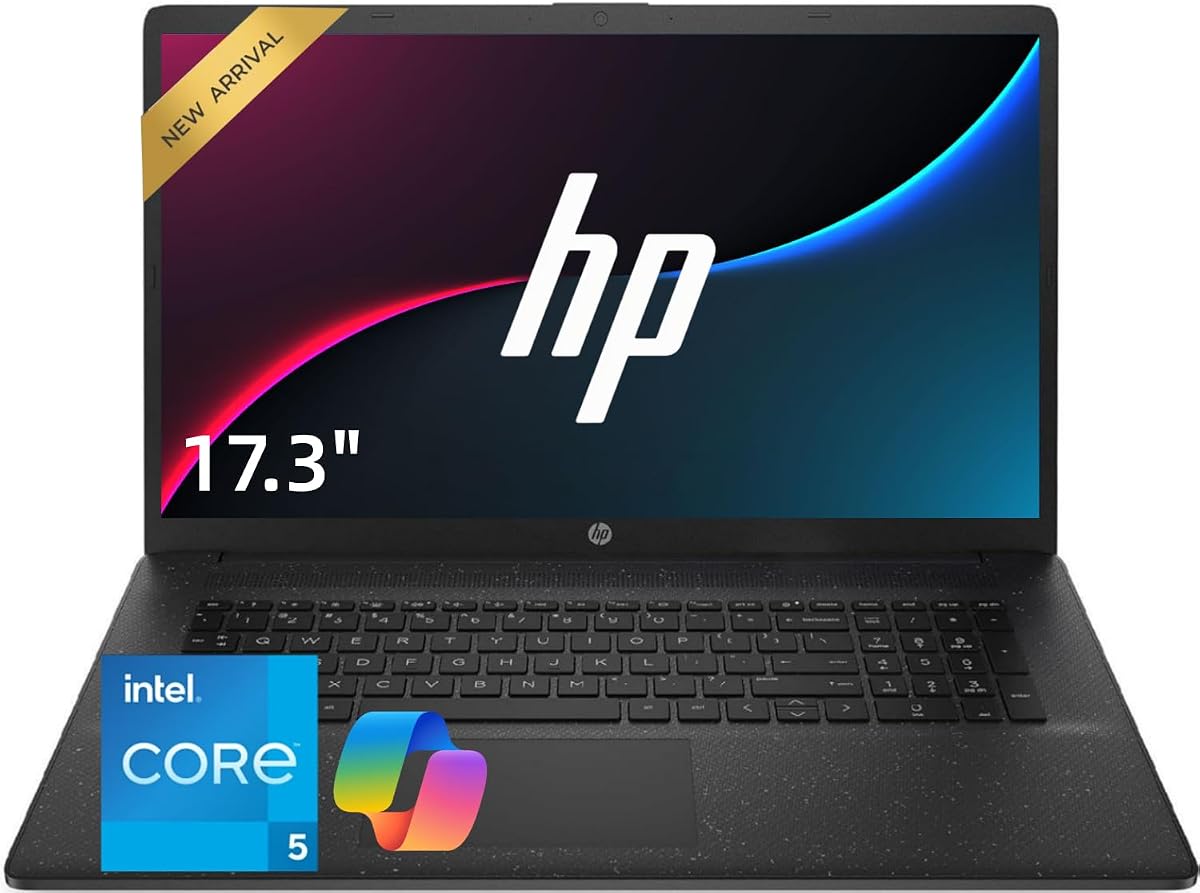


This HP business laptop stands out as a top choice for professionals needing a reliable numeric keypad. It features a crisp display and robust performance for everyday tasks. Its design balances portability with a comfortable typing experience.
We may earn a commission when you buy through this link, at no additional cost to you.
The AMD Ryzen 3 processor handles multitasking efficiently, making it suitable for office workflows. You can manage multiple browser tabs and applications without noticeable lag. The included AI features enhance productivity by assisting with common tasks.
While it lacks dedicated graphics for heavy creative work, it excels at business applications. The display quality ensures clear text for data entry. Battery life supports long work sessions without constant power access.
Ideal for accountants and students, this model offers solid value. The numeric keypad speeds up data entry significantly. It remains a strong recommendation for those prioritizing reliability and typing comfort.
The dedicated numeric keypad allows for rapid input of numbers and symbols. This feature is crucial for financial professionals managing spreadsheets daily.
The Full HD IPS screen provides wide viewing angles and accurate colors. This ensures comfortable viewing during long work hours.
We may earn a commission when you buy through this link, at no additional cost to you.
The Lenovo V-Series offers exceptional power with its high RAM and processor configuration. It is designed for users who demand speed and multitasking capability. The numeric keypad ensures productivity for data-heavy tasks.
We may earn a commission when you buy through this link, at no additional cost to you.
With 40GB of RAM, you can run virtual machines or heavy spreadsheets effortlessly. The large SSD provides ample space for storing files locally. Connectivity options like HDMI and RJ45 add versatility for office setups.
This laptop is best suited for power users who need robust performance. The build quality supports daily intensive use. However, it may be too heavy for frequent travelers.
Professionals requiring significant memory will appreciate this machine. The numeric keypad is well-positioned for accurate entry. It represents a strong investment for serious business workloads.
The 40GB RAM allows running dozens of applications simultaneously. This ensures smooth transitions between complex tasks.
Ethernet support via RJ45 provides stable internet for critical meetings. HDMI allows easy connection to external monitors.
We may earn a commission when you buy through this link, at no additional cost to you.
This model combines a strong processor with essential business features. The Ryzen 7 chip ensures responsiveness for demanding tasks. It includes a numeric keypad which is vital for accounting work.
We may earn a commission when you buy through this link, at no additional cost to you.
The display offers anti-glare properties to reduce eye strain. You can work comfortably in various lighting conditions. Connectivity is solid with modern USB and HDMI options.
While the screen brightness is modest, it remains suitable for indoor use. The overall performance justifies the price for most users. It is a reliable choice for general business needs.
Students and office workers will find this system dependable. The numeric keypad improves efficiency significantly. It is a good choice for those needing speed without extra bulk.
The Ryzen 7 processor boosts system responsiveness. This handles large data sets and applications better than standard units.
Anti-glare coating protects eyes during long sessions. The IPS panel offers decent color accuracy for documents.
We may earn a commission when you buy through this link, at no additional cost to you.
For those prioritizing screen space, this laptop delivers a massive viewing area. The 17.3-inch display provides ample room for side-by-side documents. The numeric keypad makes it a practical choice for data entry.
We may earn a commission when you buy through this link, at no additional cost to you.
The 32GB RAM supports running multiple office apps smoothly. Storage capacity is generous for keeping files local. Connectivity includes essential ports for modern peripherals.
The trade-off is increased size, making it less travel-friendly. However, for stationary office work, it offers great utility. The keyboard layout supports comfortable typing for long periods.
This is an excellent option for home office setups. The large screen reduces the need for a secondary monitor. It is a budget-friendly solution for heavy spreadsheet users.
The 17.3-inch screen accommodates multiple windows easily. This improves workflow efficiency for multitasking professionals.
The full-size keyboard with numpad reduces strain. Key travel is sufficient for prolonged typing sessions.
We may earn a commission when you buy through this link, at no additional cost to you.
This model combines business utility with media creation features. The 16-inch display offers more vertical space than standard 1080p screens. The numeric keypad is a welcome addition for business tasks.
We may earn a commission when you buy through this link, at no additional cost to you.
The H-series processor delivers power for demanding workflows. DDR5 RAM ensures faster data handling speeds. The privacy shutter adds a layer of security during virtual meetings.
While it is optimized for productivity, it handles light media editing well. The build is sturdy enough for daily transport. Fast charging helps minimize downtime between work sessions.
Professionals needing a mix of work and creative tools will appreciate this. The keypad aids in quick data input. It is a balanced choice for versatile needs.
The WUXGA resolution gives extra screen height. This helps viewing long spreadsheets or code without scrolling.
A physical shutter covers the webcam securely. This prevents unauthorized access to your camera.
We may earn a commission when you buy through this link, at no additional cost to you.
Security and screen size define this HP model. The privacy shutter ensures visual protection during sensitive calls. The large display is ideal for working on detailed documents.
We may earn a commission when you buy through this link, at no additional cost to you.
Storage and memory are configured for heavy usage. You can store vast amounts of data and run many apps. The numeric keypad supports fast numerical input for reports.
Battery life may vary depending on usage intensity. The design prioritizes function over minimalism. It is a solid choice for office environments.
Users valuing privacy will find this feature valuable. The large screen reduces eye strain. It serves well as a primary machine for administrative work.
The physical privacy shutter blocks the lens completely. This ensures peace of mind during online meetings.
Wi-Fi 6 provides stable connectivity in crowded networks. This is crucial for remote work reliability.
We may earn a commission when you buy through this link, at no additional cost to you.
This updated HP model focuses on endurance and utility. The battery life supports all-day productivity without constant charging. The large screen provides a comfortable work area.
We may earn a commission when you buy through this link, at no additional cost to you.
The brushed keyboard adds a premium feel to the device. Office integration simplifies document handling for users. The numeric keypad ensures efficiency for data entry tasks.
Performance is tailored for typical business workflows. It handles spreadsheets and web apps without issues. The fast charge feature helps when you need quick power.
Ideal for field work, this laptop offers flexibility. The numpad is a critical feature for financial professionals. It balances performance with long usage periods well.
The battery supports long sessions away from power. This is vital for professionals on the go.
Office 365 integration streamlines document work. This helps professionals collaborate and edit files easily.
We may earn a commission when you buy through this link, at no additional cost to you.
This lightweight option is built for mobility. The battery capacity is impressive for a slim unit. It includes a numeric keypad which is rare for portable laptops.
We may earn a commission when you buy through this link, at no additional cost to you.
The cooling system maintains performance under load. You can work for extended periods without overheating. The screen offers decent resolution for daily tasks.
While specs are basic, it handles essential business needs. The camera switch provides extra privacy. It is a practical choice for students or travel.
Those prioritizing weight and battery will like this. The numpad adds value for number entry. It is a good budget option for on-the-go work.
The slim design fits easily into backpacks. This makes commuting without hassle.
A physical slider controls the camera. This ensures hardware-level privacy.
We may earn a commission when you buy through this link, at no additional cost to you.
This laptop provides basic functionality for routine tasks. The FHD display ensures clarity for text and data. It supports storage expansion for growing file needs.
We may earn a commission when you buy through this link, at no additional cost to you.
Connectivity options include essential ports for peripherals. The operating system is ready for modern software. It is a straightforward choice for general computing.
Performance is adequate for web browsing and docs. However, heavy multitasking may be restricted. It remains a valid option for entry-level users.
Students or light users will find it suitable. The expandable storage offers flexibility. It is a practical device for essential daily work.
Internal storage can be expanded easily. This allows keeping more files locally.
Ports include HDMI and SD reader. This supports connecting to projectors.
We may earn a commission when you buy through this link, at no additional cost to you.
This HP model focuses on memory and storage capacity. The high RAM allows smooth operation of multiple tasks. It includes a numeric keypad which is essential for business.
We may earn a commission when you buy through this link, at no additional cost to you.
The NVMe SSD ensures fast boot times. Accessing large files happens quickly. Connectivity covers all necessary ports for external devices.
While the processor is standard, the memory compensates. It handles daily workflows effectively. It is a great choice for basic administrative work.
Users needing storage and memory will appreciate this. The numpad adds utility for data entry. It is a solid option for budget-conscious professionals.
NVMe technology provides rapid data access. This reduces wait times for applications.
Fast charge reduces downtime significantly. You can recharge the battery quickly.
We may earn a commission when you buy through this link, at no additional cost to you.
Selecting the right laptop requires balancing performance, screen size, and specific features like a numeric keypad. This section outlines the critical factors to consider before purchasing.
The processor determines how fast your laptop runs applications. For business tasks involving spreadsheets and multitasking, a mid-range processor like AMD Ryzen or Intel Core i5 is recommended. Higher-end chips offer better speed for complex calculations.
Always check the processor generation and core count. Newer models generally provide better efficiency and longevity.
RAM is crucial for multitasking. If you work with multiple open tabs and applications, aim for at least 16GB. More RAM allows smoother performance without system lag when switching between heavy tasks.
Ensure the RAM is upgradeable if possible. This extends the device life as software requirements increase.
A high-resolution display makes text sharp and easier to read. IPS panels offer better viewing angles than TN panels. Consider screen brightness to ensure visibility in well-lit offices.
Larger screens like 17 inches reduce eye strain but reduce portability. Choose based on your workspace needs.
Solid State Drives (SSD) are standard in modern laptops. NVMe SSDs are faster than SATA ones, improving boot times and file access. Ensure sufficient space for your operating system and large files.
Look for models with expandable storage slots. This allows you to add more storage later if needed.
The numeric keypad must be full-sized to avoid accidental presses. Key travel and layout comfort are vital for long typing sessions. Check if the numpad is integrated or requires a separate USB device.
A dedicated numpad saves time during data entry. Ensure the keyboard feels comfortable during a test.
Modern laptops may lack legacy ports. Check for HDMI or USB-C for monitors. An RJ45 port is useful for stable wired internet in offices.
Verify the number of USB ports to connect peripherals without a hub. This simplifies your workspace setup significantly.
Battery endurance is key for mobile workers. Look for laptops offering at least eight hours of mixed use. Fast charging technology reduces downtime when you need quick power.
Real-world usage varies based on brightness and applications. Always check independent reviews for battery performance.
Windows 11 Pro offers better security and management tools for businesses. Ensure the laptop comes with a genuine license for support and updates. This protects your data and simplifies administration.
Verify compatibility with your specific industry software. Some enterprise tools require specific OS versions for full functionality.
To maintain optimal performance, keep your numeric keypad clean. Use a soft cloth or a keyboard cleaning kit to remove dust and debris from the keys. Avoid eating or drinking near the keyboard to prevent spills.
Adjust your brightness and color settings to reduce eye strain during long work sessions. Most modern laptops allow you to toggle blue light filters through system settings. This helps maintain focus without headaches.
Ensure your laptop has proper ventilation. Do not block the cooling vents with soft surfaces like blankets. Using a cooling pad or hard desk surface helps regulate internal temperatures and prolongs hardware life.
No, not all 15-inch laptops include a dedicated numeric keypad. Many slim models omit it to save space. You must specifically check the product description for 'numeric keypad' or 'numpad' before purchasing to ensure it is included.
A numeric keypad significantly speeds up data entry tasks like accounting or inventory management. It allows for quick input of numbers without using the top row keys, which reduces errors and saves time for professionals working with spreadsheets.
Yes, you can purchase external USB or wireless numeric keypads separately. These connect easily to any laptop with a USB port. However, an integrated keypad is generally more reliable and convenient for daily use.
For heavy spreadsheet work with large datasets, 16GB of RAM is recommended. This allows you to run multiple applications and large files simultaneously without slowdowns. Lower RAM like 8GB may struggle with complex multitasking.
Laptops with 17-inch screens are generally heavier and bulkier than 15-inch models. They are often designed for stationary office use rather than daily travel. If portability is a priority, consider a 15-inch model with a USB numpad instead.
Most business laptops in this guide include HDMI or USB-C ports that support external monitors. This allows you to extend your workspace for better productivity. Check the specific model details to confirm compatibility with your display.
NVMe is a newer and faster type of SSD compared to traditional SATA SSDs. It connects directly to the motherboard via PCIe, offering quicker boot times and file access. This improves overall system responsiveness significantly.
Windows 11 Pro is better for business users due to advanced security and management features. It supports remote desktop connections and device encryption. Home is sufficient for basic use, but Pro offers more control for professionals.
Choosing the right laptop with a numeric keypad depends on your specific workflow needs. The HP 255 G10 offers a balanced experience for general professionals. Its speed and display quality make it a top choice for daily use.
For those needing more power, the Lenovo V-Series provides substantial memory and speed. It is ideal for heavy multitasking and complex calculations. Always prioritize performance specifications that match your job requirements.
Prices and availability fluctuate frequently, so check current offers on the provided links. Selecting a model that fits your budget while offering necessary features ensures long-term satisfaction and productivity in your work environment.