
GE BigEZ OneTouch Big Button Universal TV Remote for Seniors, Easy to Use
4.3Editor score
Backlit buttons for low light
Preset brand device buttons
US based support included
This guide compares the easiest TV remotes for seniors with big buttons, simple layouts, and clear labels to help elderly users control their televisions
Finding the right television controller can be a significant challenge for older adults who may struggle with complex menus or tiny buttons. This guide highlights devices designed specifically for clarity and ease of use.
We evaluated ten top-rated universal remotes based on button size, layout simplicity, programming ease, and compatibility with major television brands to find the most accessible options available.
Each selection includes detailed reviews and specifications to help you choose the best fit for your needs. Please note that product details and availability can change over time.
4.3Editor score
4.2Editor score

4.4Editor score
The following table provides a side by side overview of the key features and specifications for each remote to help you compare them quickly.


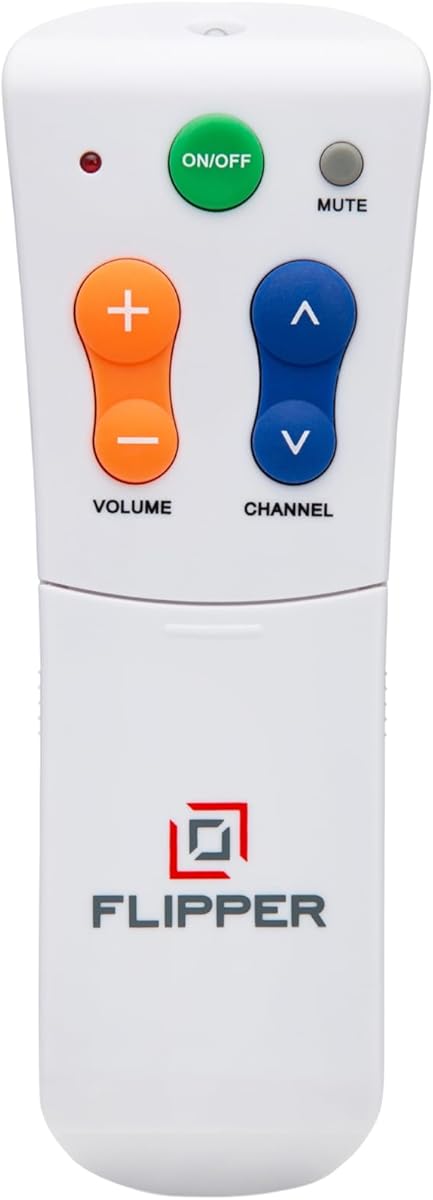
The Flipper remote stands out as a dedicated device designed to minimize confusion for seniors and those with dementia. Its rating of 4.2 reflects user satisfaction with its straightforward approach to television control.
We may earn a commission when you buy through this link, at no additional cost to you.
The front face displays only four essential buttons with clear color coding. This design prevents accidental presses of unnecessary functions and allows users to manage power volume and channels with ease.
While it cannot navigate streaming apps, this limitation ensures the interface remains clean. Users who primarily watch cable or satellite content will find this constraint acceptable for the sake of simplicity.
This remote is ideal for caregivers who want their loved ones to maintain independence without the stress of complex menus. It represents a thoughtful balance between functionality and accessibility.
The four button design ensures users never feel overwhelmed by options or menus that are not needed for daily viewing.
Caregivers can pre set up to twenty five favorite channels so users can easily cycle through their preferred shows.
We may earn a commission when you buy through this link, at no additional cost to you.
The GE BigEZ OneTouch remote offers an excellent entry point for those seeking a reliable and affordable remote. With a rating of 4.3 it delivers solid performance for everyday use without breaking the bank.
We may earn a commission when you buy through this link, at no additional cost to you.
Its backlit buttons are a significant advantage for users with low vision or those who watch TV in the dark. The clear color coding further assists in distinguishing between volume and channel controls.
Although it supports only five major TV brands out of the box it covers most common household needs. The included technical support provides peace of mind if setup issues arise.
This remote is a strong choice for budget conscious buyers who need a dependable replacement for a lost or broken original remote. It balances cost and functionality effectively.
Fully backlit buttons ensure that controls are visible even when the room is dim or the user struggles to see clearly.
Preset buttons for common brands simplify the initial setup process so users can start using the remote quickly.
We may earn a commission when you buy through this link, at no additional cost to you.
This Samsung specific remote combines high quality construction with premium features that enhance the user experience. It holds a 4.4 rating indicating strong approval from users who value reliability and ease of use.
We may earn a commission when you buy through this link, at no additional cost to you.
The standout feature is the automatic backlight that stays lit for thirty seconds after pressing a button. This is particularly helpful for users with vision challenges or those who need to locate the remote quickly in the dark.
Additional accessories like a silicone cover and mount hook add value and practicality to the package. These items protect the device and ensure it remains within easy reach when needed.
While limited to Samsung TVs this remote offers a tailored experience that generic universals cannot match. It is an excellent choice for Samsung owners who prioritize durability and convenience.
Buttons light up automatically when pressed and stay on for thirty seconds to help users see clearly in the dark.
The protective cover and mount hook help prevent damage and keep the remote easily accessible when not in use.
We may earn a commission when you buy through this link, at no additional cost to you.
The EZclicker Big Button remote is designed with compact dimensions that make it easy to store and hold. It maintains a 4.2 rating by focusing on essential features that appeal to seniors and those with limited dexterity.
We may earn a commission when you buy through this link, at no additional cost to you.
Its large buttons provide tactile feedback which helps users confirm when a button has been pressed. The simple auto programming feature reduces the setup time significantly so users can start watching TV quickly.
While it does not control cable boxes or streaming sticks its focus on TV control ensures reliability. This specificity avoids the confusion that often comes with trying to use a single remote for too many devices.
This remote is a practical choice for those who need a small yet functional device. It delivers on the core promise of simplicity without unnecessary bulk or complexity.
Measuring only seven inches long this remote is easy to hold and store in small living spaces or on side tables.
The tactile feedback from the buttons helps users with limited dexterity know when a command has been successfully entered.
We may earn a commission when you buy through this link, at no additional cost to you.
This EZclicker model takes simplicity to the next level by stripping away any non essential functions. It has a 4.2 rating among users who prefer a device that does exactly what is needed without extra options.
We may earn a commission when you buy through this link, at no additional cost to you.
The layout is designed to be intuitive so users can operate it without needing to memorize complex sequences. This is particularly beneficial for individuals with cognitive challenges or memory issues.
Because it focuses solely on television control it avoids the frustration of trying to navigate menus for other devices. This specialization ensures that the remote works reliably for its intended purpose every time.
For those who want the most basic and reliable solution this remote is an ideal pick. It serves the core needs of seniors who simply want to turn their TV on and off.
By removing extra buttons the remote reduces confusion and makes it easier for users to find the right control quickly.
The focus on TV only functionality ensures consistent performance without the complications of trying to control other media devices.
We may earn a commission when you buy through this link, at no additional cost to you.
This universal remote is notable for its ability to work without any programming or setup. It holds a strong 4.4 rating because users appreciate the convenience of using it immediately after inserting batteries.
We may earn a commission when you buy through this link, at no additional cost to you.
The wide compatibility list covers most major TV brands making it a versatile option for many households. This reduces the need to search for a model that matches a specific television brand.
While it lacks streaming functionality the extra large enter button provides clear feedback for confirmation actions. This is helpful for users who need a tactile response when confirming choices on screen.
It is an excellent choice for those who want a plug and play solution without any technical hurdles. The simplicity of use makes it accessible for anyone looking to replace a lost remote quickly.
Inserting the batteries is all that is required to start using the remote so users do not need to deal with complex setup steps.
The remote works with many major TV brands so it is likely to fit most standard household setups without extra configuration.
We may earn a commission when you buy through this link, at no additional cost to you.
The focus on clarity makes this remote a strong contender for users with vision challenges. Its 4.4 rating reflects the appreciation for a layout that is easy to read and navigate without confusion.
We may earn a commission when you buy through this link, at no additional cost to you.
Every button is clearly labeled and sized to prevent accidental presses. This thoughtful design ensures that users can control volume and channels without hesitation or repeated attempts.
The ergonomic build means it is easy to hold and maneuver for users with limited hand strength. The lightweight body reduces fatigue when holding the remote for extended periods.
This remote is well suited for those who value straightforward design over advanced features. It delivers reliable performance for traditional TV viewing needs with a focus on user comfort.
Large clear labels on every button help users identify controls quickly without needing to squint or guess what each button does.
The lightweight and ergonomic shape makes it easy to hold for long periods which helps reduce hand strain during use.
We may earn a commission when you buy through this link, at no additional cost to you.
The Philips BigEZ remote brings a trusted brand name to the category of senior friendly devices. While it has a 3.8 rating it still offers useful features for users who need a simple replacement remote.
We may earn a commission when you buy through this link, at no additional cost to you.
The OneTouch setup process is designed to be quick and straightforward. This is supported by backlit buttons that help users see controls in low light conditions.
It supports multiple devices including soundbars and cable boxes which adds versatility. The preset buttons for common brands simplify the process of getting started.
While the rating is slightly lower than others it may reflect specific setup issues or expectations. For users who value brand reputation and simple features it remains a viable option.
The OneTouch setup reduces the steps needed to program the remote making it easier for users to get started quickly.
A fully backlit keypad ensures that buttons are visible and easy to press even in dimly lit rooms.
We may earn a commission when you buy through this link, at no additional cost to you.
This remote offers a basic and functional design for seniors who need straightforward control. It holds a 3.0 rating which suggests mixed experiences among users but still serves its core purpose.
We may earn a commission when you buy through this link, at no additional cost to you.
The large button design helps ensure that controls are visible and easy to press. The simple layout aims to reduce frustration by limiting the number of options available on the device.
It works with most major brands which makes it a versatile choice for many households. The focus on traditional TV compatibility keeps the setup relatively simple for most users.
While it may not offer advanced features the basic functionality can be sufficient for simple viewing needs. It remains an option for those seeking an affordable and uncomplicated replacement.
The remote focuses on basic power and channel controls which is all that is needed for many seniors who use their TV daily.
For those looking for a budget friendly and uncomplicated replacement this remote provides the essential functions needed for daily use.
We may earn a commission when you buy through this link, at no additional cost to you.
The Anderic RR1004 remote features glow in the dark keys which is a unique benefit for low light environments. It maintains a 4.0 rating by delivering a reliable and simple control experience.
We may earn a commission when you buy through this link, at no additional cost to you.
The minimalist design removes clutter so users can focus on essential functions. This includes basic power volume and channel controls without extra buttons that might cause confusion.
While setup requires some programming it is straightforward once completed. The pre programmed option for LG TVs provides a quick start for those specific owners.
This remote is suitable for users who want glowing keys and a simple interface. It provides the necessary tools to control a TV effectively without unnecessary complexity.
The glow in the dark keys ensure that controls can be found easily in low light settings without needing a flashlight or backlight.
The minimalist design reduces button count and visual clutter so users are less likely to press the wrong button accidentally.
We may earn a commission when you buy through this link, at no additional cost to you.
Choosing the right remote requires considering several factors that affect usability and comfort for older adults. This guide outlines the key elements to look for when making a decision.
Buttons should be large enough to press without effort and should provide tactile feedback so users know when a button has been activated. This reduces accidental presses and increases confidence in using the device.
Look for remotes with extra large buttons that are easy to distinguish by touch alone.
The layout should be simple with clearly labeled buttons that are arranged logically. Color coding can help users identify volume and channel controls quickly. A cluttered layout can cause frustration and confusion.
Choose a remote with a minimal design and clear labeling for every button.
Ensure the remote works with your specific TV brand and any other devices like cable boxes. Simple setup processes like auto programming are essential for users who may not be tech savvy.
Select a remote that requires minimal setup and supports your main viewing devices without extra steps.
Many users watch TV in dimly lit rooms so having backlit or glowing buttons is a valuable feature. This ensures that controls can be found without needing additional lighting or assistance.
Prioritize remotes with backlighting or glow in the dark keys for better visibility.
The remote should be lightweight and easy to hold for users with limited hand strength. An ergonomic shape helps ensure that it fits comfortably in the hand and reduces fatigue over time.
Look for a lightweight remote with a shape that supports a natural grip and comfortable handling.
Some remotes come with accessories like protective covers or wall mounts which can add value. Features like favorite channel memory can further simplify the viewing experience for regular watchers.
Consider if extra accessories or features like favorite channels will benefit the specific user.
Choosing a well known brand may provide better reliability and access to customer support. Technical support can be helpful if the remote needs assistance during setup or daily use.
Select a remote from a reputable brand with good customer support options if needed.
While cost is a factor the primary focus should be on usability. A more expensive remote that is easier to use may be worth the investment if it reduces daily frustration.
Balance the cost with the features and reliability that matter most for the user.
Begin by inserting the required batteries into the remote compartment. Make sure they are oriented correctly according to the diagrams inside the battery cover.
If the remote requires programming follow the simple steps provided in the manual. For auto programming remotes simply point at the TV and hold the required buttons until it connects.
Keep the remote clean and dry to ensure it lasts longer. Store it in a designated place where it is easy to find and not at risk of falling or breaking.
Some remotes in this guide are designed to control both TVs and cable boxes while others focus only on TV control. Always check the product description to confirm compatibility with your specific cable provider device before purchasing.
Most of the remotes listed feature simple setup processes such as auto programming or OneTouch setup. This means you can usually get them working within minutes without needing to follow complex instructions.
Most basic remotes focus on power volume and channel controls and do not navigate smart apps like Netflix or YouTube. For app control you will need a specialized remote or voice assistant setup.
The majority of these remotes use standard AAA or AA batteries which are easy to find and replace. Always check the product specifications to ensure you have the correct batteries on hand.
Yes some remotes allow caregivers to pre program favorite channels so the user can cycle through them easily. This feature reduces the need to remember channel numbers or navigate complex menus.
These remotes are not waterproof and should be kept away from liquids to prevent damage. Using a protective cover can help safeguard against accidental spills or moisture exposure in the home.
If a remote does not work it may be due to incompatibility or a battery issue. Check the compatibility list provided with the product and try replacing the batteries to resolve common issues.
Some products offer free US based technical support or online step by step programming videos. These resources can help troubleshoot any setup challenges you may encounter during initial use.
We reviewed ten top options for seniors including the Flipper for simplified control and the GE BigEZ for budget friendly features. Each offers unique benefits tailored to different needs and preferences.
Prioritize features like button size and layout simplicity when choosing a remote. These factors directly impact how easily a user can control their TV without frustration or confusion.
Remember to check current product availability and details before buying. The right remote can significantly improve the viewing experience for older adults and their families.