
Brother HL-L2405W
4.1Editor score
Compact wireless design
Manual feed slot for envelopes
Mobile printing support
This guide compares the top laser printers with envelope feeders for home and office use, highlighting speed, connectivity, and paper handling features.
Finding the right laser printer with an envelope feeder is essential for businesses and home offices that need to handle mixed media efficiently. These machines combine high-speed monochrome printing with versatile paper handling capabilities that ensure professional results on every document type.
We evaluated ten top-rated models based on print quality, connectivity options, and specific features like manual feed slots designed for envelopes. Each product was selected for its ability to deliver consistent performance while maintaining ease of use for daily printing tasks.
Each review highlights key strengths, real-world performance metrics, and specific use cases to help you choose the best fit. Keep in mind that pricing and availability can change frequently, so check the current links before making your final purchase decision.
4.1Editor score

4.0Editor score

4.4Editor score
This comparison table provides a side-by-side overview of the top ten laser printers that support envelope printing. Each entry highlights key specifications including speed, connectivity, and paper capacity to help you make an informed decision.


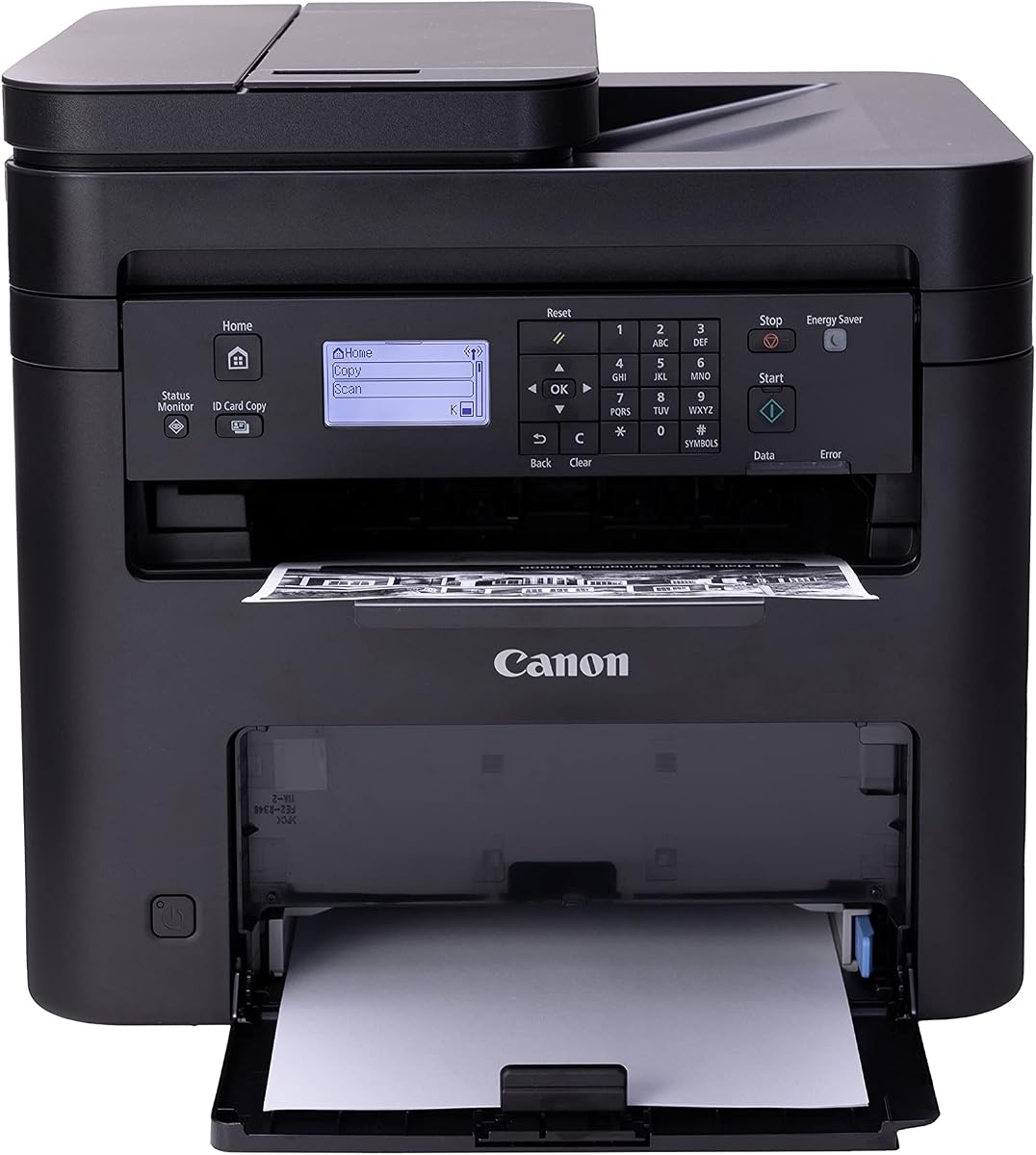


The Brother HL-L2405W is a solid entry-level laser printer designed for home offices needing reliable black and white output. It holds a 4.1-star rating and stands out for its compact design and ability to print on envelopes via a manual feed slot.
We may earn a commission when you buy through this link, at no additional cost to you.
Its standout features include a 30 pages per minute print speed and built-in dual-band wireless connectivity. The Brother Mobile Connect app allows for remote management and supplies ordering, making it ideal for small teams or individual users who value convenience.
While it lacks automatic duplex printing, which may increase paper usage over time, the manual feed slot ensures you can still handle special media like envelopes without needing a larger machine. This trade-off is acceptable given the low entry cost and high reliability.
This model is best suited for budget-conscious buyers who prioritize print quality and connectivity over advanced automation features. If you need occasional envelope printing and want a seamless wireless experience without breaking the bank, this is a strong choice.
Its small footprint allows it to fit on tight desktops while still offering robust wireless connectivity options for multiple devices.
The Brother Mobile Connect app enables users to print from smartphones or tablets easily, track toner levels, and order supplies directly.
We may earn a commission when you buy through this link, at no additional cost to you.
The Brother MFC-L8930CDW delivers professional color laser printing with advanced security and duplex capabilities. It earns a 4.4-star rating and is designed for businesses requiring secure, high-quality output along with flexible paper handling options.
We may earn a commission when you buy through this link, at no additional cost to you.
Its standout features include 33 pages per minute speed, two-sided scanning up to 104ipm, and robust security features like triple layer protection and NFC card authentication. The multipurpose tray enables custom printing on various media types including envelopes and card stock.
Although the upfront cost is higher, the inclusion of high-yield toner cartridges and advanced security makes it cost-effective for businesses needing secure, versatile printing. The compact design helps save space while maintaining a robust feature set for daily use.
This model is ideal for professional offices that require secure color printing and reliable performance. If you need advanced security, high-speed duplex scanning, and the ability to print on specialty media, this is the premium choice.
Triple layer security and integrated NFC card readers help protect documents and ensure that only authorized users can access printing functions.
The dedicated multipurpose tray allows for printing on various media types including envelopes and card stock without compromising print quality.
We may earn a commission when you buy through this link, at no additional cost to you.
The Brother HL-L2460DW is a versatile monochrome laser printer combining speed and efficiency for home offices. With a 4.0-star rating, it is recognized for its automatic duplex printing and manual feed slot that supports envelope printing tasks.
We may earn a commission when you buy through this link, at no additional cost to you.
Its standout features include 36 pages per minute speed, built-in dual-band wireless, and a manual feed slot for special media. The Brother Mobile Connect app simplifies remote management and helps users track toner usage efficiently over time.
While automatic duplex printing saves time and paper, envelope printing requires manual loading which may be slower for large batches. However, this trade-off is acceptable given the printer's speed and reliability for daily document production.
This model is best for teams needing fast monochrome printing with the occasional ability to print envelopes. If you value efficiency and connectivity, this is a balanced choice for small office environments.
Automatic two-sided printing reduces paper waste and helps maintain fast document turnaround times for busy office environments.
The Brother Mobile Connect app allows you to manage printer settings and track toner levels remotely from any mobile device.
We may earn a commission when you buy through this link, at no additional cost to you.
The HP LaserJet MFP M234sdw is designed for small teams needing fast black and white printing with scanning capabilities. It holds a 4.2-star rating and is known for its ease of setup and strong built-in security features for shared environments.
We may earn a commission when you buy through this link, at no additional cost to you.
Its standout features include 30 pages per minute speed, dual-band Wi-Fi, and an auto document feeder for hands-free scanning. The HP Smart app simplifies tasks like scanning to the cloud and managing settings from mobile devices easily.
While it supports envelope printing via a manual feed slot, it lacks automatic duplex printing which can impact paper usage over time. However, the security features and fast speeds make it a practical option for small teams prioritizing data protection.
This printer is best for small teams needing reliable multifunction printing with minimal setup. If you prioritize security and fast scanning over duplex features, this model delivers consistent daily performance.
Advanced security features help protect your printer from potential attacks and secure data in transit between devices and the printer.
The HP Smart app eliminates repetitive steps and enables scanning to cloud services directly from your smartphone or tablet.
We may earn a commission when you buy through this link, at no additional cost to you.
The Canon imageCLASS MF273dw offers efficient monochrome multifunction printing with wireless connectivity and auto duplex capabilities. It holds a 4.2-star rating and is valued for its ability to handle high-volume tasks while maintaining low operating costs.
We may earn a commission when you buy through this link, at no additional cost to you.
Its standout features include 30 pages per minute speed, auto document feeder, and automatic duplex printing. The wireless connectivity allows for seamless integration into existing networks, making it easy to share among multiple users.
While envelope printing requires manual feeding via a slot, the combination of duplex printing and auto feed ensures efficient paper usage and fast document production. This trade-off is acceptable for users who prioritize speed and reliability over specialized media features.
This model is best for small teams needing reliable multifunction printing with wireless access. If you want consistent performance and low toner costs, this printer delivers great value for everyday business needs.
Seamless wireless setup enables multiple users to connect easily and share printing resources across your office network efficiently.
Designed to work with high-yield toner options to keep running costs low without compromising on print quality or speed.
We may earn a commission when you buy through this link, at no additional cost to you.
The Brother MFC-L2820DW is a compact all-in-one printer combining high speed, fax functionality, and intuitive touchscreen navigation. It holds a 4.3-star rating and is designed for small offices needing versatile printing without taking up much desk space.
We may earn a commission when you buy through this link, at no additional cost to you.
Its standout features include 36 pages per minute speed, a 50-page auto document feeder, and a 2.7-inch touchscreen for easy menu access. The Brother Mobile Connect app helps manage printer remotely and track supplies seamlessly from mobile devices.
While envelope printing requires using the manual feed slot, the combination of fax and duplex printing makes this model highly functional for business environments. The compact footprint ensures it fits comfortably in shared workspaces without crowding.
This printer is ideal for small offices needing fax capabilities and fast scanning. If you prioritize space-saving efficiency without sacrificing functionality, this all-in-one solution offers strong daily performance.
Intuitive touchscreen navigation simplifies tasks like copy, scan, and fax operations with easy access to cloud-based apps.
The 50-page auto document feeder enables quick multi-page copying and scanning without manual page-turning for efficiency.
We may earn a commission when you buy through this link, at no additional cost to you.
The Canon imageCLASS MF462dw II delivers high-speed monochrome printing with a large touchscreen and expandable paper capacity. It holds a 4.2-star rating and is designed for environments requiring fast document processing and intuitive user interaction.
We may earn a commission when you buy through this link, at no additional cost to you.
Its standout features include 37 pages per minute speed, a 5-inch color touchscreen, and automatic duplex scanning. The expandable paper capacity ensures it can handle high-volume tasks without frequent paper refills throughout the day.
While envelope printing requires using the multipurpose tray, the combination of auto duplex scanning and fast speeds makes this model efficient for busy offices. The touchscreen simplifies navigation and reduces setup time significantly for new users.
This printer is ideal for teams needing fast document processing and user-friendly controls. If you want high speed with intuitive features, this model offers strong value for daily business printing needs.
A large color touchscreen provides an intuitive interface for navigating features and accessing the Application Library easily.
The ability to add an optional paper cassette increases capacity to 550 sheets for minimal refills during busy periods.
We may earn a commission when you buy through this link, at no additional cost to you.
The HP LaserJet Pro MFP 3101sdw offers award-winning reliability and fast monochrome printing for small teams. It holds a 4.5-star rating and is designed to handle high-demand business printing with consistent performance day after day.
We may earn a commission when you buy through this link, at no additional cost to you.
Its standout features include 35 pages per minute speed, auto document feeder, and reliable wireless connectivity. The duplex printing helps save paper while the auto document feeder streamlines scanning and copying tasks for multiple users.
While envelope printing requires manual feeding and the printer is designed to work only with HP cartridges, the reliability and speed make it a top choice for businesses prioritizing uptime and efficiency. The wireless features simplify connection for shared devices.
This model is best for small teams needing dependable printing and fast speeds. If you prioritize reliability and professional-quality outputs, this printer delivers excellent daily performance.
Designed for consistent performance and built to handle high demands without frequent jams or interruptions during work hours.
The 50-sheet auto document feeder makes scanning and copying multi-page documents hands-free and highly efficient for teams.
We may earn a commission when you buy through this link, at no additional cost to you.
The Brother Premium MFC-L2690DW is a compact all-in-one printer known for its sturdy construction and large paper capacity. It holds a 4.4-star rating and is designed for environments needing reliable printing without consuming much physical space.
We may earn a commission when you buy through this link, at no additional cost to you.
Its standout features include a 250-sheet paper tray, manual feed slot for envelopes, and wireless connectivity. The robust build ensures it can handle busy schedules and frequent use without compromising on print quality or durability over time.
While it prints slower than some competitors at 26 pages per minute, the large paper capacity and compact footprint make it ideal for smaller offices with space constraints. The manual feed slot allows for flexible media handling like envelopes.
This printer is best for small offices needing a durable compact printer. If you value space-saving and robust construction over raw speed, this model offers strong daily performance for basic needs.
Built to withstand frequent use in busy offices while maintaining compact dimensions to fit on limited desk space.
The 250-sheet adjustable paper tray helps improve efficiency by reducing the frequency of paper refills during work hours.
We may earn a commission when you buy through this link, at no additional cost to you.
The Brother MFC-L5915DW is a high-speed business laser printer designed for offices needing fast output and high-volume scanning. It holds a 4.3-star rating and delivers professional-quality documents with 50 pages per minute speed and advanced automation.
We may earn a commission when you buy through this link, at no additional cost to you.
Its standout features include 70-page auto document feeder, auto duplex printing, and Gigabit Ethernet. The duplex capabilities save paper while the high-speed scanning ensures documents are processed quickly for busy workflows and large teams.
While it requires manual feed slots for envelope printing and has a larger footprint, the combination of speed and automation makes it highly effective for demanding environments. The low-cost toner options help reduce operating costs significantly over time.
This printer is best for offices needing fast monochrome output and high-speed scanning. If you prioritize productivity and volume, this model offers exceptional performance for business printing needs.
The 70-page auto document feeder supports two-sided scanning up to 56ipm ensuring fast document processing for large batches.
Built-in Gigabit Ethernet allows seamless setup and sharing across wired networks to support busy office environments efficiently.
We may earn a commission when you buy through this link, at no additional cost to you.
Choosing the right laser printer with an envelope feeder requires evaluating several key factors to ensure the model meets your printing needs and office requirements.
Print speed determines how quickly you can complete documents and is crucial for busy offices. Look for models offering at least 30 pages per minute to maintain high productivity without delays during peak hours.
Prioritize printers with high speeds to ensure your team stays productive and meets tight deadlines consistently.
Envelope printing typically requires a manual feed slot since automatic feeders may damage envelopes. Ensure the printer includes a dedicated slot for specialty media to avoid paper jams and ensure high-quality output.
Always verify that the printer supports envelope printing through its manual feed options to handle specialized documents effectively.
High paper capacity reduces the frequency of refills and supports larger print jobs. Look for models with at least 250 sheets in the standard tray or expandable options to keep up with high-volume demands efficiently.
Choose printers with expandable trays to minimize downtime caused by running out of paper during busy work hours.
Modern printers should offer wireless, Ethernet, and mobile connectivity to support multiple users. Dual-band Wi-Fi ensures stable connections while USB ports allow for direct local printing without network dependencies.
Ensure the printer supports both wireless and Ethernet connections to fit seamlessly into your existing office network infrastructure.
High-quality laser printers deliver sharp text and graphics essential for professional documents. Look for models with high-resolution settings to ensure your outputs are crisp and legible in all types of documents.
Choose models that prioritize high-resolution settings to ensure your documents always look professional and clear.
Toner costs can significantly impact long-term expenses. Look for printers offering high-yield cartridges or subscription services that reduce the cost per page and minimize the frequency of replacements needed.
Prioritize printers with high-yield toner options to keep operational costs manageable over the printer's lifespan.
Security is vital for businesses handling sensitive documents. Look for built-in security features like data encryption, secure print, and authentication methods to protect your network and data from unauthorized access.
Select printers with advanced security features to safeguard sensitive information and maintain compliance with data protection standards.
Office space is often limited, making printer footprint an important factor. Choose models that balance functionality with compact design to ensure they fit comfortably on desks or shelves without obstructing workspace.
Opt for compact designs that maximize available workspace while still delivering robust performance and features.
When printing envelopes, load them carefully into the manual feed slot with the correct orientation to prevent jams. Adjust printer settings to match envelope size and weight to ensure smooth feeding and high-quality print results.
Regularly clean the printer rollers and interior components to avoid dust buildup that can cause paper jams or streaks on prints. Follow manufacturer guidelines for cleaning to extend the printer's lifespan and maintain optimal performance.
Store toner cartridges in a cool, dry place and replace them when print quality diminishes. Using genuine toner helps avoid print defects and ensures the printer maintains its efficiency over long-term use and daily operation.
Most laser printers require manual feeding for envelopes to avoid jams and ensure proper print quality. Check the product specifications to confirm the availability of a manual feed slot designed for specialty media.
Yes, printers with manual feed slots support various envelope sizes. Adjust printer settings to match the specific dimensions and ensure the printer's supported paper types include envelopes.
Print speeds typically range from 26 to 50 pages per minute depending on the model. Faster printers are suitable for high-volume environments while slower models work well for smaller offices or home use.
Many modern laser printers offer wireless connectivity to allow multiple users to print from different devices. Ethernet ports are also available for secure wired connections in office networks.
Use high-yield toner cartridges or subscription services to lower the cost per page. Avoid third-party toners if quality and warranty support are important for your specific use case.
Many modern laser printers include automatic duplex printing to save paper. Verify whether your chosen model supports two-sided printing if reducing paper usage is a priority.
Regular cleaning every few months helps maintain print quality and prevent jams. Refer to the manufacturer's guidelines for the recommended cleaning schedule and proper methods.
Many laser printers feature energy-saving modes and Energy Star certification to reduce power consumption. Look for these labels to ensure your printer meets efficiency standards.
The ten laser printers featured in this guide offer a range of options for home offices and small businesses. Each model balances speed, reliability, and envelope printing capabilities to meet diverse printing requirements.
Prioritize features like print speed, manual feed slots, and connectivity options based on your specific needs. Consider the total cost of ownership including toner prices and warranty support before finalizing your decision.
Prices and availability may change frequently, so verify current pricing and stock status before purchasing. Regularly check for firmware updates and maintenance to ensure your printer performs optimally for years to come.