
AULA WIN68 HE
4.5Editor score
8000Hz polling rate
Adjustable actuation points
Web based customization driver
Discover the top 10 best keyboard for Valorant ranked by speed, precision, and reliability to help you dominate in competitive tactical shooters like.
Finding the right input device is crucial for competitive play. A great keyboard offers fast response times and reliable actuation to ensure your movements register instantly during intense firefights in tactical shooters.
We compared ten top-rated mechanical and magnetic switch keyboards based on polling rates, switch technology, and layout flexibility. This guide highlights models that excel at counter strafing and rapid trigger mechanics for precision aiming.
Each pick showcases key features and performance strengths tailored for FPS gaming. Prices and availability can change, so check current listings before purchasing to ensure you get the best deal for your setup today.
4.5Editor score

4.1Editor score

4.6Editor score
This side by side comparison highlights the key specifications of ten leading keyboards designed for high performance gaming. We evaluate polling rates, switch types, and build quality to help you choose the right tool for competitive play.

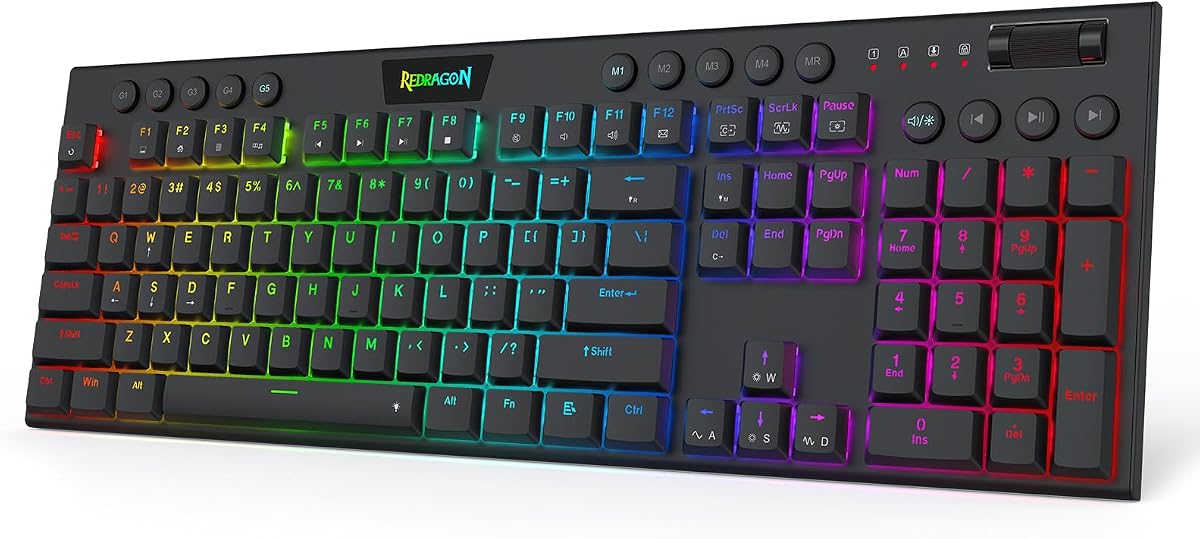





The Redragon K673 HE is a powerful entry in the magnetic switch category. It offers rapid trigger technology and high polling rates that are essential for fast paced competitive gaming.
We may earn a commission when you buy through this link, at no additional cost to you.
Its UltraMag POM switches provide precise actuation without physical contact. The anti wobble floating structure ensures stability during heavy usage while maintaining a clean typing feel.
Some users may find the software interface complex for simple adjustments. However, the flexibility it provides for tuning actuation points justifies the learning curve for serious gamers.
This model is ideal for budget conscious players seeking pro level performance. It balances cost and speed effectively making it a strong choice for Valorant setups.
Dynamic key activation cuts redundant keystrokes during quick direction changes.
Save multiple profiles between 0.1mm and 3.4mm for personalized response.
We may earn a commission when you buy through this link, at no additional cost to you.
The K686 HE mirrors many strengths of its sibling with added noise reduction. It supports rapid trigger and high speed polling for instant inputs during critical moments in matches.
We may earn a commission when you buy through this link, at no additional cost to you.
The dual module floating structure helps stabilize keys while dampening noise. This makes it suitable for environments where quiet operation is preferred without sacrificing speed.
Users looking for advanced macro programming might find the software limited. Still, the core magnetic performance remains robust for players focused on movement mechanics.
This keyboard is a reliable choice for those wanting a silent magnetic setup. It balances functionality and comfort well for daily gaming sessions.
Dampening layers reduce harsh clicks for quieter gameplay.
8000Hz polling ensures inputs register faster than standard devices.
We may earn a commission when you buy through this link, at no additional cost to you.
The K618 HE stands out with its low profile design that reduces travel time. This allows for quicker keystrokes and lighter touches which can reduce wrist fatigue over long sessions.
We may earn a commission when you buy through this link, at no additional cost to you.
It includes dedicated macro keys for instant commands without software installation. This feature is particularly useful for players who need quick adjustments during active play.
The shorter travel might feel less satisfying for typing enthusiasts. However, for gaming speed and responsiveness it delivers excellent results compared to taller switches.
Ideal for gamers seeking a sleek compact profile without sacrificing performance. It is a great fit for minimal setups needing rapid input registration.
Short travel distance means faster actuation times for rapid taps.
20 on-the-fly macro keys allow immediate access to complex commands.
We may earn a commission when you buy through this link, at no additional cost to you.
Corsair Clipper PRO offers advanced Hall Effect control in a tight layout. It supports rapid trigger and smart tap features that enhance movement precision significantly for competitive shooters.
We may earn a commission when you buy through this link, at no additional cost to you.
Built with durable PBT keycaps and IP57 resistance it handles intense use. The dual layer sound dampening ensures quieter keystrokes without impacting response speed.
The 60 percent layout may lack arrow keys for some users. But it maximizes mouse space which is critical for low sensitivity aiming strategies.
This is a premium option for those prioritizing speed and compactness. It delivers high performance reliability suitable for serious competitive environments.
IP57 rating protects against water and dust during long sessions.
FlashTap SOCD enables cleaner directional inputs for sharper strafing.
We may earn a commission when you buy through this link, at no additional cost to you.
The Razer Huntsman Mini uses optical switches that register inputs at the speed of light. Its Snap Tap feature optimizes movement by prioritizing the latest input for instant directional changes.
We may earn a commission when you buy through this link, at no additional cost to you.
With a matte aluminum frame and PBT keycaps it feels solid and long lasting. The Chroma RGB allows deep sync with games and other peripherals for immersion.
Some users may find Razer Synapse required for full feature access. However the hardware speed remains excellent for players focused on raw performance metrics.
A top choice for those invested in the Razer ecosystem. It balances compact design with high speed performance for competitive titles.
Prioritizes latest input between assigned keys for responsive movement.
Light based actuation eliminates bounce and wear compared to mechanical.
We may earn a commission when you buy through this link, at no additional cost to you.
The WIN60 HE delivers rapid trigger capabilities and magnetic consistency in a compact frame. It allows quick customization via a web driver for easy setup without heavy downloads.
We may earn a commission when you buy through this link, at no additional cost to you.
Its magnetic switches ensure precise actuation without physical contact. This design reduces wear and maintains performance over time for extended usage periods.
Mac users may find driver support limited to Windows systems only. Despite this it offers great value for gamers wanting fast inputs and compact design.
Best for players seeking quick setup and reliable magnetic performance. It is a practical choice for those wanting modern features at accessible price.
Access customization from any device with an internet connection.
Swap switches easily to tailor feel without soldering.
We may earn a commission when you buy through this link, at no additional cost to you.
The AULA WIN68 HE provides high polling rates and adjustable actuation at a low cost. Its magnetic switches enable fast trigger modes suitable for rapid shooting and complex combos.
We may earn a commission when you buy through this link, at no additional cost to you.
It includes a web based driver for key mapping and lighting without installation. This streamlined approach makes it easier to personalize settings quickly across different sessions.
Build materials might feel less premium compared to higher end options. Still the performance remains strong for the price making it a budget favorite.
Ideal for budget gamers needing fast and reliable magnetic performance. It offers modern features without the high price tag.
Set points from 0.02mm to 3.44mm for customized response.
Manage RGB and macros online without bulky software.
We may earn a commission when you buy through this link, at no additional cost to you.
The F75 Pro offers tri mode connectivity for versatile use across devices. Its pre lubed switches and hot swap base provide a smooth typing feel ideal for both work and play.
We may earn a commission when you buy through this link, at no additional cost to you.
Side printed PBT keycaps resist fading while allowing light to shine through. The control knob adds convenience for adjusting volume and lighting without extra clicks.
While it lacks rapid trigger its wireless stability is excellent. This makes it suitable for players who need connectivity freedom without latency issues.
Perfect for those wanting wireless flexibility and customizable aesthetics. It blends work and gaming features into one reliable unit.
Switch between Bluetooth, 2.4GHz, and USB easily.
Swap switches and tweak RGB to match your style.
We may earn a commission when you buy through this link, at no additional cost to you.
The X68 HE uses adjustable Hall Effect switches with rapid trigger for instant resets. Its web driver allows deep customization of actuation points and lighting effects for tailored performance.
We may earn a commission when you buy through this link, at no additional cost to you.
It features a top mount structure with PORON dampening for a stable feel. This ensures consistent keystrokes even during intense matches requiring fast reflexes.
The lack of dedicated arrow keys might inconvenience some users. However the compact layout supports high precision and minimal desk space usage.
Best for competitive players seeking rapid trigger accuracy. It offers modern features in a streamlined package for fast gaming.
True 0.01mm RT accuracy ensures fast reset for taps.
Remap keys and macros easily via online interface.
We may earn a commission when you buy through this link, at no additional cost to you.
The ROG Strix Scope II combines a 96 percent layout with premium wireless capabilities. It offers hot swappable switches and sound dampening foam for a superior acoustic experience.
We may earn a commission when you buy through this link, at no additional cost to you.
Its tri mode connectivity ensures flexible connection options for different devices. The battery life reaches up to 1500 hours making it reliable for long usage periods.
The larger size takes up more desk space but retains full functionality. This makes it ideal for users who prefer number pads and macro support.
A top tier option for those seeking full size performance and quality. It balances comfort and advanced features for extensive gaming sessions.
Integrated foam absorbs noise for cleaner sound during play.
1500 hours in wireless mode ensures weeks of use.
We may earn a commission when you buy through this link, at no additional cost to you.
Choosing the right keyboard depends on factors like switch type, polling rate, and layout. This guide breaks down the most critical elements to consider for competitive FPS performance.
Modern gaming keyboards often use Hall Effect magnetic or optical switches. These reduce physical contact and friction allowing faster and more consistent actuation.
Look for magnetic switches if you prioritize durability and customization.
A high polling rate like 8000Hz ensures inputs are sent to the system more frequently. This reduces latency and helps with precise counter strafing.
Higher rates mean more responsive gameplay in fast-paced scenarios.
Rapid trigger allows keys to reset instantly when released. This is essential for quick direction changes and rapid tapping in shooters.
Choose models supporting this feature for improved movement accuracy.
Layouts vary from full size to compact 60 percent. Smaller layouts free up mouse space while larger ones keep dedicated arrow keys.
Decide based on your mouse sensitivity and desk space.
Wired connections offer the most consistent performance. Wireless models with 2.4GHz provide flexibility without significant latency.
Choose wired for competitive play and wireless for mobility.
Good software allows customization of actuation points and lighting. Some brands offer web drivers for quick access without installation.
Ensure the tool is compatible with your operating system.
Materials like PBT keycaps and aluminum frames increase durability. They also improve the typing feel and reduce wear over time.
Invest in sturdy builds for long-term usage.
Ergonomic features like wrist rests and adjustable tilt help prevent strain. Consider key height and switch travel for comfort.
Comfort impacts performance during extended sessions.
Set up your software drivers first to customize actuation points. Adjust the rapid trigger settings to match your playstyle.
Keep the keyboard clean by gently wiping it with a dry cloth. Avoid spills to maintain performance and longevity of internal components.
Update firmware regularly for bug fixes and feature improvements. This ensures your device stays optimized for new game updates.
Rapid trigger technology allows keys to reset instantly when released. This helps players execute fast movement and quick directional changes accurately in games.
Hall Effect switches use magnets to detect keypresses instead of physical contact. This reduces wear and allows adjustable actuation points for better precision.
Modern 2.4GHz wireless tech introduces minimal latency. For most users this is imperceptible compared to wired connections.
Yes, many modern keyboards allow you to change actuation depth. This can be done through software to tailor sensitivity per key.
Compact layouts free up mouse space for better aim. Many pro players prefer TKL or 60 percent designs for this reason.
PBT keycaps resist shine and wear better than ABS. They maintain texture and look good over extended periods of use.
Check for updates every few months. Developers often release patches that improve performance or fix bugs.
Software unlocks customization like macros and lighting. However basic gaming works without it using onboard memory.
This guide reviewed ten top keyboards offering high speed and precision. The Redragon K673 HE stands out for value while the AULA WIN68 HE offers budget friendly performance.
Focus on features like rapid trigger and polling rate when choosing. These factors directly impact your movement and shooting accuracy in matches.
Always check current listings before buying to verify availability. Prices and stock vary often so act quickly when you find a deal.