
Redragon K617 HE
4.3Editor score
Rapid trigger Hall Effect switches
8000Hz polling rate
Compact 60% layout design
This guide compares the top keyboards for CS2 including Hall Effect models and mechanical options to help you choose the right gear for competitive play.
Finding the right keyboard for CS2 is essential for competitive players who need speed and precision. Modern keyboards offer features like rapid trigger and adjustable actuation that can give you an edge in intense matches.
We compared ten top models based on performance, build quality, and special features tailored for FPS gaming. Each product was evaluated for its responsiveness, durability, and overall value to ensure you get the best tool for your setup.
Each pick highlights key strengths and ideal use cases to help you decide quickly. Prices and availability can change frequently so always check the current listings before making your final purchase decision for your gaming station.
4.3Editor score
4.4Editor score
4.5Editor score
This side-by-side comparison highlights the key differences between each keyboard model to help you understand which features matter most for your CS2 gameplay style and budget preferences.



The Redragon K617 HE delivers competitive performance at an accessible price point for CS2 players. It features Hall Effect magnetic switches that provide rapid trigger capabilities essential for fast movements and precise aiming in intense matches.
We may earn a commission when you buy through this link, at no additional cost to you.
Its standout feature is the adjustable actuation range which allows users to fine tune key sensitivity for different actions. The 8000Hz polling rate ensures inputs are registered quickly and reliably giving you an edge in reaction based scenarios during gameplay.
The compact 60% layout maximizes mouse space which is beneficial for low sensitivity aimers. While the software may require some initial setup time the ability to save multiple profiles ensures your settings remain consistent across different gaming sessions.
This keyboard is ideal for budget conscious gamers who refuse to compromise on speed and responsiveness. If you want Hall Effect technology without the premium price tag this model offers excellent value and reliable performance for ranked CS2 matches.
Rapid trigger allows keys to reset immediately when released enabling faster counter strafing and directional changes essential for high level FPS play.
Users can adjust actuation points from 0.1mm to 3.4mm allowing customized sensitivity for keys like jump or crouch based on personal preference.
We may earn a commission when you buy through this link, at no additional cost to you.
The Redragon K686 HE builds on the rapid trigger foundation with added convenience features like a dedicated media knob. This makes managing volume and lighting easier without interrupting your focus during critical moments in CS2 matches.
We may earn a commission when you buy through this link, at no additional cost to you.
It utilizes UltraMag POM magnetic switches that offer a smooth feel with reduced noise due to internal dampening layers. This combination of speed and quiet operation creates a pleasant typing experience while maintaining the high performance needed for competitive FPS gaming.
The adjustable actuation feature lets you customize key sensitivity which is useful for balancing typing comfort and gaming speed. Although it costs slightly more than the K617 the added quality of life features make it a strong contender for daily use.
Players seeking a balance between performance and usability will appreciate the ergonomic improvements. This keyboard is well suited for those who stream or value a quieter desk environment while still needing top tier responsiveness for CS2.
The single control knob simplifies adjustments for backlight brightness and media playback removing the need for complex key combinations during gameplay.
Dampening layers within the dual module structure reduce harsh clacking sounds providing a softer and more refined keystroke experience.
We may earn a commission when you buy through this link, at no additional cost to you.
The Redragon K673 HE offers similar high speed performance to its siblings with added focus on customization and build comfort. It includes a media knob and floating switch structure that improves sound dampening and overall typing feel.
We may earn a commission when you buy through this link, at no additional cost to you.
Hall Effect magnetic switches enable rapid trigger and adjustable actuation which are crucial for fast movements in CS2. The driver software allows you to save profiles ensuring your settings persist across devices or game updates.
This model sits in the mid range price tier providing a good balance of features and cost. The anti wobble design ensures consistent actuation which helps maintain accuracy during intense firefights where precision matters most.
If you prioritize a comfortable typing experience alongside gaming performance this keyboard is a solid choice. It delivers the speed required for competitive play while offering the comfort needed for long sessions.
The dual module floating design separates the switch plate to reduce wobble and provide a more stable and comfortable typing feel.
A web based driver allows calibration of magnetic switches so your setup stays consistent and reliable across different gaming scenarios.
We may earn a commission when you buy through this link, at no additional cost to you.
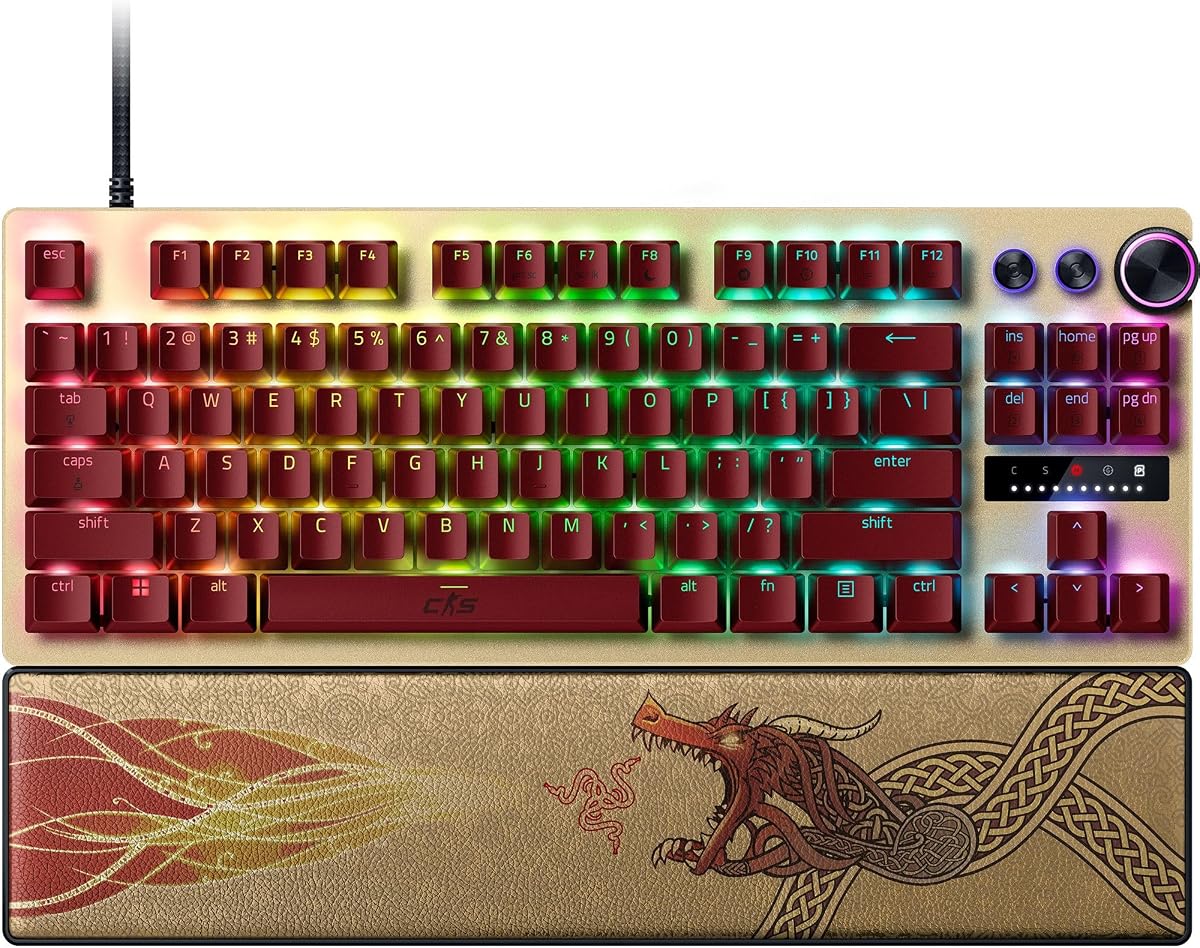
The Razer Huntsman V3 Pro TKL Counter Strike 2 Edition is tailored for competitive play with features designed to enhance FPS performance. It includes analog optical switches that offer precise actuation and rapid reset for quick inputs.
We may earn a commission when you buy through this link, at no additional cost to you.
Snap Tap mode prioritizes the latest input between two keys enabling near instant directional changes without releasing the previous key. This feature is particularly useful for strafing and movement in high intensity situations during ranked matches.
You can make onboard adjustments using the digital dial and LED array without needing external software. The keyboard is built to last with durable keycaps and a firm wrist rest that supports comfort during extended training sessions.
This keyboard is an ideal choice for serious players who want top tier performance and official CS2 branding. While it comes at a premium price the advanced features and build quality justify the investment for competitive environments.
Snap Tap allows prioritizing inputs between keys for faster directional changes which is critical for movement mechanics in CS2.
An onboard LED array helps visualize settings adjustments for actuation height and rapid trigger sensitivity without external software.
We may earn a commission when you buy through this link, at no additional cost to you.
The Corsair Clipper PRO MINI is a compact 60% keyboard designed to maximize mouse space for precise aiming. It features MGX Hyperdrive Hall Effect switches that provide rapid trigger and adjustable actuation for tailored performance.
We may earn a commission when you buy through this link, at no additional cost to you.
FlashTap SOCD ensures cleaner directional inputs which helps with smooth counter strafing. The IP57 rating offers protection against dust and spills making it durable for intense gaming sessions in various environments.
Despite its small size the keyboard includes features like Smart Tap and Tap Lock to reduce finger fatigue. The sound dampening design keeps keystrokes quiet so you stay focused on the game without distraction.
This keyboard is perfect for gamers with limited desk space who want high performance. Its compact form factor and speed features make it an excellent tool for low sensitivity users needing room to maneuver.
FlashTap SOCD enables cleaner directional inputs and sharper counter strafing to ensure every movement lands exactly when needed.
IP57 rating and double-shot keycaps provide resistance against wear and spills ensuring longevity during extended competitive play sessions.
We may earn a commission when you buy through this link, at no additional cost to you.
The Redragon K745 HE delivers rapid trigger performance with a focus on quiet and comfortable typing. It uses UltraMag magnetic switches that sense keypresses without physical contact for consistent and fast input registration.
We may earn a commission when you buy through this link, at no additional cost to you.
The five layer noise dampening creates a soft bounce instead of a harsh clack which improves the overall feel. You can save actuation profiles through software to maintain consistency across different games and setups.
With a competitive price point this keyboard offers strong value for those needing rapid trigger features. The vibrant RGB lighting adds an aesthetic touch that complements a gaming desk setup effectively.
Players looking for a balance of speed and comfort will find this model suitable. It is designed to provide the responsiveness needed for CS2 while maintaining a comfortable typing experience for daily use.
Five layers of dampening reduce harsh clacking sounds for a softer Hi-Fi bounce that is comfortable for long typing sessions.
Rapid trigger cuts redundant keystrokes during quick direction changes to improve responsiveness during fast-paced combat scenarios.
We may earn a commission when you buy through this link, at no additional cost to you.
The Keychron C0 HE is a specialized one-handed keypad that offers rapid trigger capabilities for quick command access. It is designed for MMO and MOBA players but can serve as a secondary device for utility keys in CS2.
We may earn a commission when you buy through this link, at no additional cost to you.
With 35 programmable keys and web based customization you can map essential commands for easy access. The 8000Hz polling rate ensures inputs are registered with low latency which is critical for competitive scenarios.
This keypad is also useful for streamers who need to control scenes without interrupting gameplay. The layout is compact and efficient allowing you to keep your main keyboard free for primary movement actions.
If you need quick access to macros or streaming controls this keypad is a practical addition. It complements a main keyboard setup by providing specialized control without adding bulk to your desk space.
The compact 35 key layout keeps essential commands within reach for efficient control and reduced hand movement during intense sessions.
Browser based customization allows mapping and RGB setup without installing software making it compatible with Windows and macOS easily.
We may earn a commission when you buy through this link, at no additional cost to you.
The Razer Huntsman V3 TKL renewed option offers the performance of a premium keyboard at a lower price point. It features analog optical switches with rapid trigger and adjustable actuation for responsive input and precise movement control.
We may earn a commission when you buy through this link, at no additional cost to you.
Snap Tap mode allows prioritizing inputs between keys for faster directional changes which is beneficial in competitive matches. The keyboard is built with an aluminum top plate that adds durability and a solid feel to the desk.
While it is a renewed product it retains the key features needed for high level gaming. The magnetic wrist rest ensures comfort during long sessions allowing you to focus on performance without physical strain.
This choice is suitable for gamers wanting premium features without the full cost of a new unit. It provides the speed and customization expected from Razer in a form factor that supports wide mouse movements.
Snap Tap mode prioritizes inputs for near-instant directional changes which is essential for movement mechanics in CS2 and FPS games.
Aluminum top plate and durable keycaps ensure the keyboard withstands intense play and provides a solid stable base for gaming.
We may earn a commission when you buy through this link, at no additional cost to you.
The Corsair K55 RGB PRO is a budget friendly membrane keyboard that offers essential features for gaming. It includes six dedicated macro keys and customizable RGB lighting to personalize your setup without a high cost.
We may earn a commission when you buy through this link, at no additional cost to you.
The detachable palm rest provides comfort for long sessions which is helpful when playing extended matches. Dust and spill resistance adds durability ensuring the keyboard can handle accidental accidents during intense gameplay.
While it lacks rapid trigger features it remains a viable option for casual players or those with limited budgets. The dedicated media keys allow easy volume control without interrupting your focus on the game.
This keyboard is ideal for entry level gamers or as a secondary desk solution. It delivers comfort and essential functionality making it a practical choice for those prioritizing affordability over speed.
Six dedicated macro keys allow one stroke activation of functions and shortcuts for easier command execution during gameplay.
Detachable palm rest reduces hand stress for longer comfort during extended play sessions and provides a textured surface to prevent slipping.
We may earn a commission when you buy through this link, at no additional cost to you.
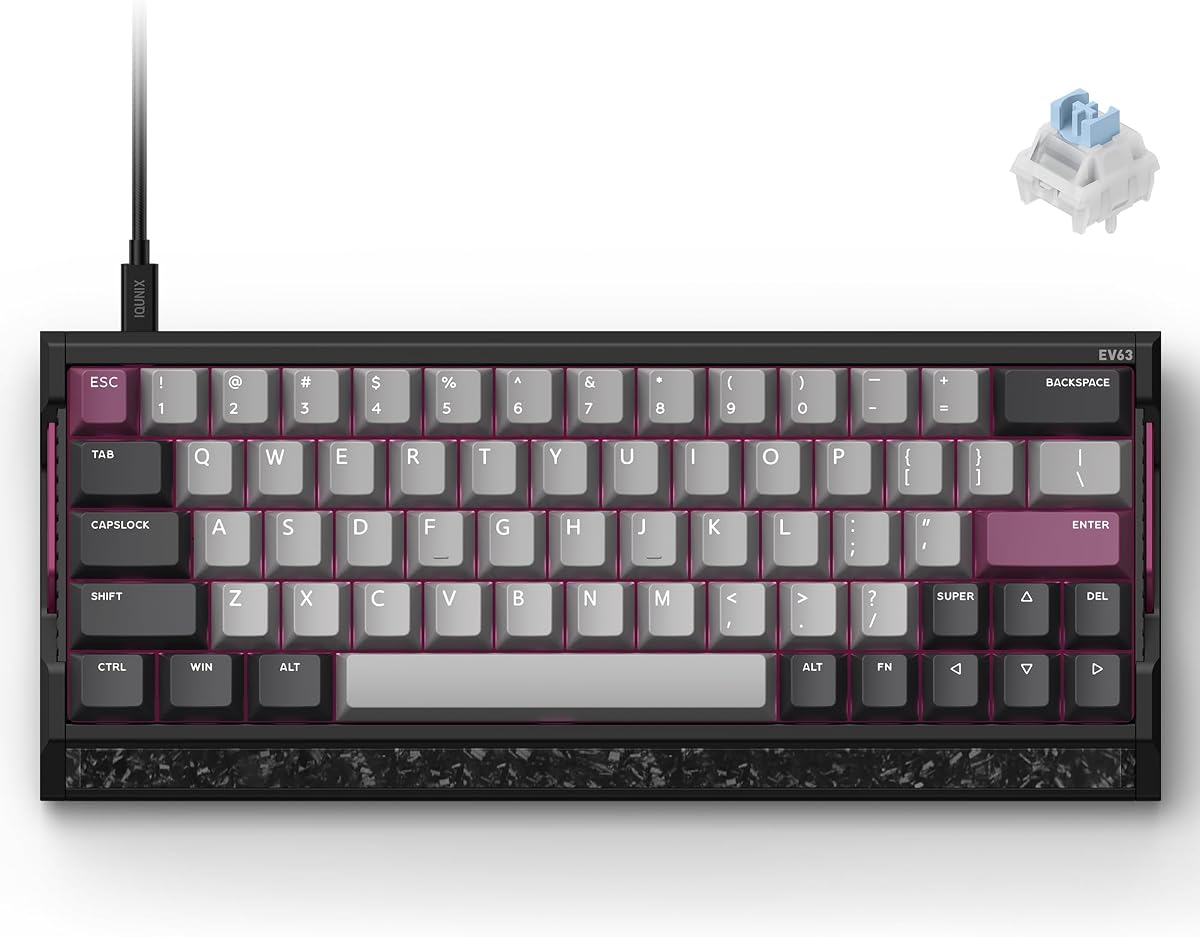
The IQUNIX EV63 delivers top tier precision with a 0.01mm rapid trigger and 8000Hz polling rate for minimal latency. It uses Magnetic X Ultra switches that ensure consistent input without missed clicks even during high speed movements.
We may earn a commission when you buy through this link, at no additional cost to you.
The chassis combines aircraft grade aluminum with a real forged carbon front plate for stability and a premium feel. This design reduces unwanted desk movement and vibration which helps maintain accuracy during intense aim sessions in CS2.
Driver software offers pro tuned presets and extensive customization for actuation and SOCD settings. The compact 64 key layout saves desk space while keeping essential keys accessible for fluid gameplay control.
This keyboard is designed for enthusiasts who demand the highest level of performance and build quality. The combination of precision engineering and premium materials makes it a standout choice for serious competitive players.
Real forged carbon and aluminum reduce vibration and desk movement for a solid stable base during high intensity gaming and typing.
Magnetic X switches with 0.01mm trigger provide zero dead zone control and reliable fast inputs for competitive FPS performance.
We may earn a commission when you buy through this link, at no additional cost to you.
Selecting the right keyboard requires understanding key features that impact performance and comfort. This guide outlines the factors you should prioritize to make an informed decision.
Hall Effect switches offer rapid trigger and adjustable actuation which are crucial for fast movements in FPS games. Mechanical switches provide tactile feedback but may lack the speed of magnetic options for competitive play.
Choose Hall Effect if you prioritize speed and customization or mechanical if you prefer a traditional feel with consistent actuation points.
Adjustable actuation allows you to set how far a key must travel before registering. This lets you balance typing comfort with gaming sensitivity for different keys like jump or aim.
Look for models with a wide range like 0.1mm to 4mm to ensure flexibility for both gaming and daily typing tasks.
A higher polling rate ensures the keyboard reports inputs to the computer more frequently. Rates like 8000Hz reduce latency and improve responsiveness during fast action sequences in games.
Prioritize keyboards with at least 1000Hz polling to ensure your inputs are registered quickly and accurately.
Compact layouts like 60% or TKL free up desk space for larger mouse movements which is vital for low sensitivity aiming. Full size boards offer numpads but may restrict mouse movement.
Choose a compact layout if you use low sensitivity mice and need room to maneuver during competitive play.
Durability depends on build materials and keycap quality. PBT double shot keycaps resist wear and shine better than ABS caps. Aluminum cases provide stability and a premium feel over plastic.
Select models with durable switches and sturdy materials to ensure the keyboard withstands intense gaming sessions.
Customization software allows you to save profiles and adjust settings. Reliable drivers make it easy to change actuation or RGB without reinstalling software or losing settings.
Ensure the keyboard has stable and accessible software for ongoing configuration and profile management.
Features like Snap Tap or multimedia knobs add convenience and competitive edges. Consider what extras align with your playstyle and daily needs for maximum utility.
Identify features that solve specific problems such as volume control or rapid directional changes before buying.
Prices vary from budget friendly options to premium models. Determine your budget to find a keyboard that meets performance needs without overspending on unnecessary features.
Balance cost with essential features like rapid trigger to get the best value for your gaming setup.
Install the official software and calibrate your Hall Effect switches to ensure accurate actuation points. Create profiles for CS2 with specific settings for movement keys to optimize performance.
Clean your keyboard regularly with compressed air and a soft cloth to prevent dust buildup. Regular cleaning maintains switch responsiveness and prolongs the lifespan of the keycaps.
Store your keyboard in a dry and stable environment away from direct sunlight. Proper care ensures consistent performance and protects the build materials from damage over time.
Yes a Hall Effect keyboard offers rapid trigger and adjustable actuation which are beneficial for fast movements in CS2. These features can improve responsiveness and precision giving you an edge in competitive play.
Rapid trigger allows keys to reset immediately when released without waiting for a full bottom out. This enables faster counter strafing and directional changes which is essential for high speed FPS gameplay.
A 60% keyboard is ideal for CS2 as it saves desk space for wider mouse movements. It keeps essential keys accessible while maximizing room for low sensitivity aiming and control.
Calibrate switches when you notice inconsistency or after firmware updates. Periodic calibration ensures actuation points remain accurate and performance stays optimal over time.
A wrist rest can improve comfort during long sessions and reduce strain. While optional it helps maintain a stable hand position for precise aiming and typing.
A polling rate of 1000Hz or higher is recommended for CS2 to ensure low latency input. Higher rates like 8000Hz offer even faster responsiveness for competitive environments.
Optical switches use light instead of contacts which can offer faster response times and better durability. They are well suited for fast paced FPS games requiring quick and reliable inputs.
Yes many keyboards allow individual actuation tuning for each key. This lets you set lighter triggers for movement keys and heavier ones for typing to suit your style.
We highlighted ten top keyboards for CS2 offering features from Hall Effect switches to specialized one-handed layouts. Each model brings unique strengths for competitive play and daily comfort.
Prioritize responsiveness build quality and layout when selecting a keyboard to match your gaming style and desk setup.
Prices and availability change frequently so always verify current listings before making your final purchase decision for your gaming station.