
RubensTab T11 Pro
4.4Editor score
Standalone drawing tablet
10.1 inch FHD screen
5800mAh battery life
Finding the right tool for digital art can be challenging when you want portability without sacrificing power. Many artists seek devices that allow them to create anywhere without needing a desktop computer nearby.
We evaluated ten top devices based on screen quality, pen performance, battery life, and software compatibility. Our analysis covers standalone tablets and connected displays to help you choose the perfect match for your workflow.
Each pick highlights key strengths and trade-offs so you can decide based on your specific needs. Please note that prices and availability change frequently, so check current listings before making a final purchase decision.
4.4Editor score

4.5Editor score

4.4Editor score
As an Amazon Associate we earn from qualifying purchases.
This side-by-side comparison highlights the core specifications of each device to help you quickly identify which tablet meets your technical requirements and creative budget.



The HUION KAMVAS Pad 12 stands out as a premium standalone option for serious digital artists. With a 4.5 star rating, it combines high-resolution visuals with advanced pen tech for a professional workflow.
We may earn a commission when you buy through this link, at no additional cost to you.
Its 2K+ resolution and 90Hz refresh rate ensure sharp details and smooth strokes. The 16K pressure levels and ±60° tilt support mimic real brush behavior. The Canvas Glass 3.0 reduces glare and offers a natural tactile feel.
While the price is higher, the included 8GB RAM and 256GB storage justify the cost for heavy users. Battery life lasts a full day. The only trade-off is weight, but it remains portable for most backpacks.
This tablet is ideal for designers who need color accuracy and performance without a computer. If you want a premium standalone device, the KAMVAS Pad 12 is a top-tier choice for modern creators.
The 99% sRGB coverage and factory calibration ensure your designs look accurate without extra setup. This is crucial for professional graphic design work where color consistency matters.
With a 90Hz refresh rate, strokes appear instantly without lag. This makes the drawing experience feel fluid and natural, similar to traditional media on paper.
We may earn a commission when you buy through this link, at no additional cost to you.
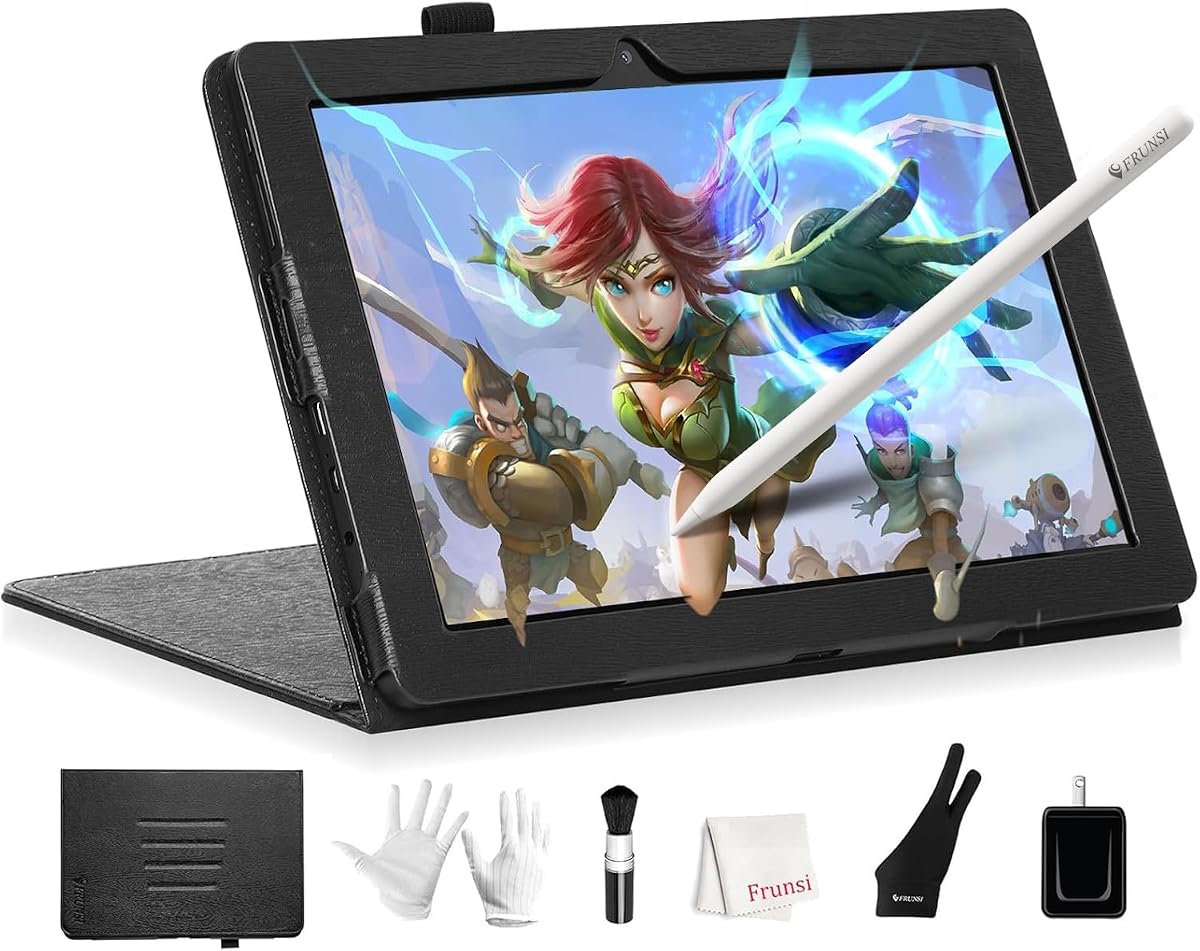
The RubensTab T11 Pro offers an accessible entry point for artists seeking a standalone drawing solution. With a 4.4 star rating, it balances cost and features for beginners and students.
We may earn a commission when you buy through this link, at no additional cost to you.
Its 10.1-inch Full HD screen provides vibrant colors and wide viewing angles. The battery-free pen ensures comfortable strokes. The built-in apps and tutorials make it easy to start creating immediately.
While the screen is smaller than premium models, it is perfect for travel and quick sketches. Battery life supports moderate sessions. The main limitation is the basic hardware, which suits casual users well.
Buy this if you want a portable device without spending much. It is a reliable budget-friendly tool for those transitioning from paper to digital art without needing a laptop.
You can create anywhere without needing a computer. This portability is key for students and artists who work in cafes or on public transport.
Pre-installed apps and tutorials help you learn quickly. The adjustable stand case adds versatility for different working angles and travel protection.
We may earn a commission when you buy through this link, at no additional cost to you.
The Wacom MovinkPad 11 delivers professional-grade performance with its Pro Pen 3 and paper-like glass. It holds a 4.4 star rating and is trusted by many digital artists for high-quality output.
We may earn a commission when you buy through this link, at no additional cost to you.
The etched glass reduces glare and provides natural friction. The Pro Pen 3 offers 8192 pressure levels and 3 buttons for shortcuts. Its lightweight design makes it ideal for sketching on the go.
While it costs more, the build quality and software support justify the price. Battery life is moderate. The main trade-off is the investment, but it pays off for professional productivity and longevity.
Choose this for professional use if you value pen feel and software compatibility. It is a top choice for creatives needing a reliable mobile workstation anywhere.
The Pro Pen 3 provides precise control with 8192 pressure levels. Its slim barrel and battery-free design ensure comfort during long drawing sessions without extra weight.
The matte etched glass feels like paper to reduce glare. This texture helps artists focus on creation without distractions from reflections on the screen.
We may earn a commission when you buy through this link, at no additional cost to you.
The RubensTab T14 offers a generous 14.1-inch canvas for artists needing more space without a computer. With a 4.4 star rating, it balances screen real estate and portability effectively.
We may earn a commission when you buy through this link, at no additional cost to you.
Its 10000mAh battery supports long sessions, while the Octa-Core CPU handles apps smoothly. The pen offers natural strokes. It is designed for versatility, allowing note-taking and creative work anywhere.
While it is larger and heavier, the screen size helps detail work. The battery life is a strong point. The trade-off is bulk, but it remains portable for most travel needs.
Buy this if you prioritize screen size on a budget. It is a great middle ground for students and professionals needing more space than smaller tablets offer.
The 14.1-inch display provides ample room for detailed drawings. This size helps avoid constant zooming and panning during complex creative projects.
With a 10000mAh battery, you can work for extended periods. This endurance is essential for long travel days or all-day workshops without power access.
We may earn a commission when you buy through this link, at no additional cost to you.
The PicassoTab 10 is a compact standalone option for beginners wanting to explore digital art. It holds a 4.2 star rating and includes valuable accessories to help new users start.
We may earn a commission when you buy through this link, at no additional cost to you.
Its laminated screen reduces glare for a smoother feel. The included apps and tutorials provide step-by-step guidance. With expandable storage and 6GB RAM, it handles basic tasks well.
While specs are basic, the bundle offers good value. The bonus items add utility. The trade-off is lower performance for advanced tasks, but it works well for learning and casual use.
This is ideal for beginners seeking a complete package. If you want a simple portable tool with guidance resources, this model fits that specific need perfectly.
Lifetime VIP upgrades give step-by-step lessons. This guidance helps beginners master drawing apps quickly and confidently without outside help.
Included items like the case and glove enhance the experience. These extras save money and ensure your device stays protected during daily use.
We may earn a commission when you buy through this link, at no additional cost to you.
The XPPen Artist 13.3 Pro V2 offers excellent performance for artists connected to a computer. With a 4.5 star rating, it provides high-quality visuals and responsive input for serious work.
We may earn a commission when you buy through this link, at no additional cost to you.
Its full-laminated screen eliminates parallax for precise drawing. The Red Dial helps manage brush size and zoom. With 16K pressure levels, the pen feels natural and responsive.
While it needs a computer, the cable setup is tidy. The color gamut supports professional output. The trade-off is portability, but it remains a top choice for desktop-based creativity.
Buy this for home studio use needing quality visuals. It is a strong option for those who prioritize screen fidelity and tool efficiency over standalone convenience.
With 123% sRGB and 91% AdobeRGB, colors appear vibrant. This accuracy is vital for professional designers needing accurate output on other devices.
The Red Dial allows quick zooming and brush adjustments. This physical control streamlines your workflow so you can focus on creativity.
We may earn a commission when you buy through this link, at no additional cost to you.
The PicassoTab X14 brings a spacious 14-inch canvas to portable digital art. With a 4.2 star rating, it offers a large workspace without needing a laptop for creative tasks.
We may earn a commission when you buy through this link, at no additional cost to you.
Its laminated display reduces glare for smooth drawing. The 128GB storage supports projects. It comes with app upgrades and accessories to enhance the user experience immediately.
While larger, it remains travel-friendly. The performance is suitable for art tasks. The trade-off is weight, but for those wanting space, this is a solid standalone option.
Choose this if you need a large portable screen. It is a great choice for artists who find smaller screens limiting for detailed illustration.
Despite being large, it remains light enough for travel. This allows you to take a spacious canvas on the go easily.
Accessories like cases and gloves add value. These items help you use the device effectively without buying extras separately.
We may earn a commission when you buy through this link, at no additional cost to you.
The T8 Standalone is the most compact option in this guide. With a 4.4 star rating, it is ideal for quick sketches and on-the-go creativity without a computer.
We may earn a commission when you buy through this link, at no additional cost to you.
Its 20-hour battery ensures all-day power. The Android 13 system supports apps like SketchBook. The small screen makes it fit easily in bags.
While resolution is basic, the portability is excellent. The battery life is a strong advantage. The trade-off is the small workspace, but it works for quick ideas.
This fits artists needing pocket-friendly portability. It is a great companion for recording ideas anywhere without heavy gear.
With 20 hours of life, you can sketch all day. This endurance is unmatched in its class for travel convenience.
The Android OS lets you install favorite apps. This flexibility helps you customize your workflow to personal preferences.
We may earn a commission when you buy through this link, at no additional cost to you.
The Callsky-Tab 12 offers impressive memory specs for its price. With a 4.2 star rating, it supports smooth multitasking for drawing apps and other productivity tools.
We may earn a commission when you buy through this link, at no additional cost to you.
Its 16GB RAM and 256GB storage handle large files. The 2K display provides clear visuals. The included case offers protection and multiple viewing angles.
While the pen is basic, the hardware supports complex apps. The display is vibrant. The trade-off is brand support, but for budget power users, it is a strong choice.
Choose this if multitasking and memory matter. It is a solid option for those needing capacity over premium pen features.
With 16GB RAM, you can run multiple apps. This helps you stay productive during long creative sessions.
The 2K visuals make artwork crisp. Clear display helps you see fine details in your drawings easily.
We may earn a commission when you buy through this link, at no additional cost to you.
The HUION Kamvas Pro 16 delivers a large screen experience for serious creators. With a 4.5 star rating, it acts as a high-quality secondary display for digital art.
We may earn a commission when you buy through this link, at no additional cost to you.
Its 15.6-inch screen and 120% sRGB cover vibrant colors. The touch bar and keys provide quick access to tools. The stand offers ergonomic flexibility for long sessions.
While not portable, the desktop experience is excellent. The pen feels natural. The trade-off is the need for a PC, but for studio work, this is a top choice.
This fits home studio users needing screen space. It is a great investment for those wanting desktop-level quality on a budget.
With 120% sRGB, colors look vibrant. This accuracy is key for professional illustration and design work.
The adjustable stand reduces neck strain. This ensures comfort during long drawing sessions at a desk.
We may earn a commission when you buy through this link, at no additional cost to you.
Choosing the right digital art tool involves weighing technical specs against your workflow needs. This guide breaks down the most critical factors to consider.
Screen size affects how much detail you can work with comfortably. Larger screens like 14 inches help with full layouts, while smaller screens like 8 inches are great for quick sketches. Resolution ensures clarity, so look for Full HD or higher to avoid pixelation.
Prioritize a size that fits your travel needs and budget. Ensure the resolution matches your detail requirements for sharp visuals.
Standalone tablets run on their own OS like Android, allowing you to draw anywhere. Connected displays require a computer, which is better for heavy software. Decide if you need mobility or desktop power.
Choose standalone for travel and connected for home studios. Your environment dictates the best form factor.
Pen quality is crucial for digital art. Look for high pressure levels like 8192 or 16000 for natural strokes. Battery-free pens are more reliable. Tilt support adds shading versatility.
Invest in a tablet with responsive pen tech. This ensures your digital strokes feel like traditional drawing tools.
Battery life determines how long you can work away from power. Standalone tablets should offer at least 5 hours. Some models provide up to 20 hours for all-day use.
Check battery specs for your daily needs. Long life is essential for travel and fieldwork.
Android offers access to mobile apps like Clip Studio Paint. Desktop connection supports professional software. Ensure compatibility with your preferred tools.
Verify app support for your workflow. The right OS saves time and frustration.
Accurate colors are vital for design. Look for sRGB coverage and factory calibration. Higher gamut values ensure your art looks correct on other devices.
Select devices with good color specs. This ensures your art translates well across platforms.
Large projects need storage. Look for 64GB or more. Expandable storage via SD cards is a plus. RAM helps multitasking.
Ensure enough memory for your files. This prevents slowdowns during heavy usage.
Prices range from budget to premium. Assess features like screen and pen quality against cost. High-end models offer better tech but cost more.
Balance your budget with needs. Often mid-range options offer the best value.
Always use the included stylus for optimal performance to avoid damaging the screen with sharp objects. Keep the pen charged if it is battery-powered or store it safely.
Use a screen protector if you prefer a paper-like texture. Clean the screen gently with a soft cloth to remove fingerprints and oils.
Update your system regularly to maintain performance. Backup your files to cloud storage to prevent data loss.
Standalone models like the RubensTab and PicassoTab do not need a computer. Connected displays like the Kamvas Pro require a PC or Mac. Check product details before buying.
Standalone tablets run apps like Clip Studio Paint or Procreate equivalents. Connected displays work with Adobe Photoshop. Ensure the OS supports your preferred tools.
Standalone tablets usually offer between 5 and 20 hours depending on usage. Connected displays rely on your computer. Always check specific battery specs.
Many standalone models support micro-SD cards to expand storage. Internal storage cannot be upgraded. Check if your device supports SD expansion.
Most standalone tablets include a pen. Some displays like the Kamvas include a pen but check packaging. Always verify included accessories before purchasing.
Standalone tablets with tutorials are great for beginners. They allow immediate practice. Budget models like RubensTab are ideal starting points.
We highlighted ten devices offering unique strengths for different needs. The HUION KAMVAS Pad 12 leads in premium features, while the RubensTab T11 Pro offers best value.
Consider your workflow needs like battery life and screen size. Ensure the device supports the software you need for your creative projects.
Prices fluctuate regularly, so check current listings for the best deal. Verify availability to ensure you get the right tool for your art.