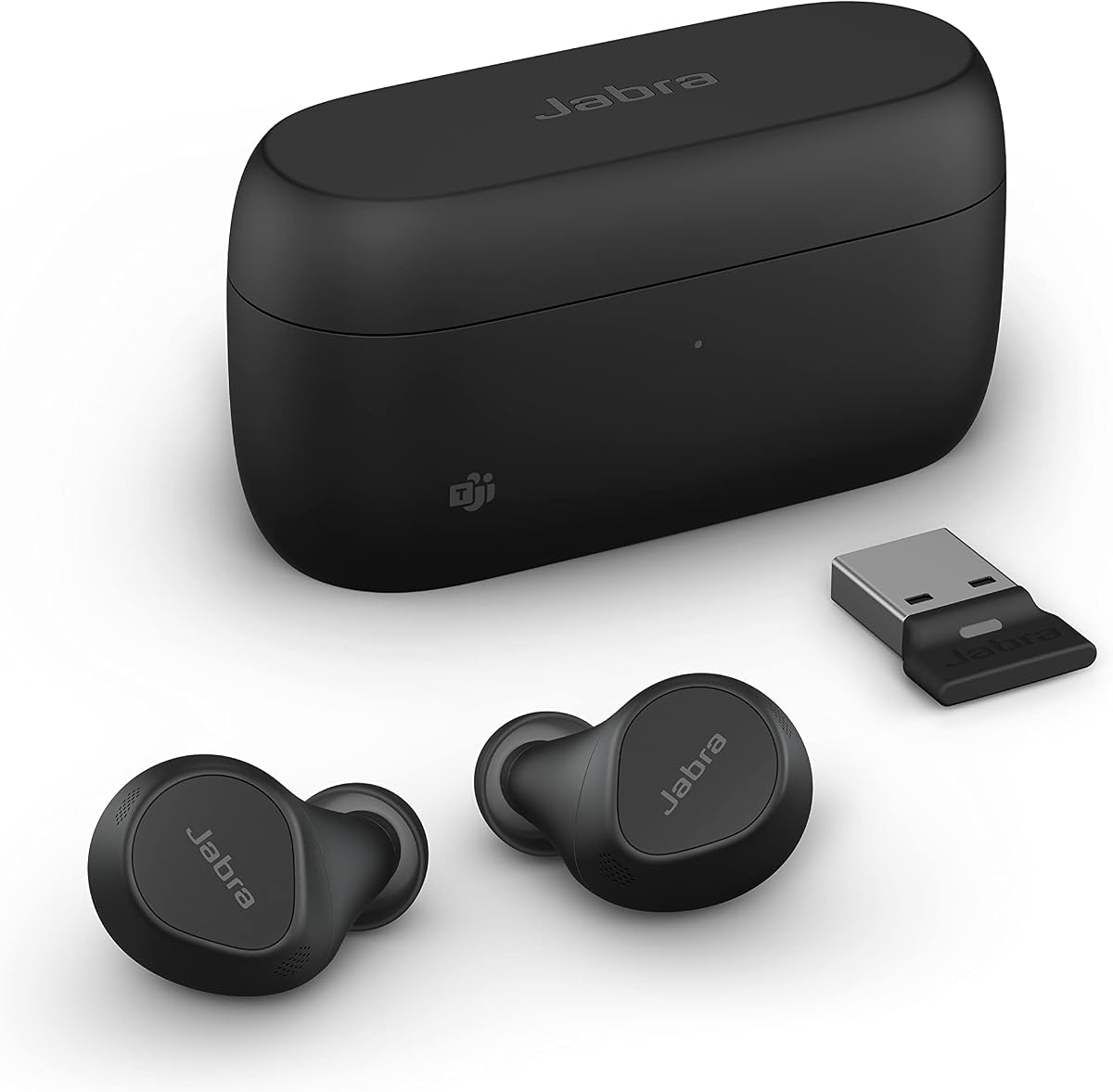
Jabra Evolve2 True Wireless Earbuds
3.5Editor score
Microsoft Teams Certified
4-Mic MultiSensor Voice
Bone Conduction Sensors
Discover the best earbuds for Teams Meetings with our expert guide comparing top models for call quality, noise cancellation, and comfort for remote workers.
Remote work has become the standard for many professionals, making reliable audio gear essential for daily communication. Finding the right earbuds for Teams Meetings ensures you stay connected without distractions or audio glitches during critical calls. This guide explores top models designed to deliver clear voice transmission and comfort throughout your workday.
We evaluated each candidate based on microphone performance, noise cancellation capabilities, battery life, and compatibility with conferencing platforms like Microsoft Teams. Our analysis focuses on how well these devices handle background noise and maintain a stable connection during long meetings. We also considered comfort and ease of use for all-day wear in home offices or co-working spaces.
Each pick below highlights key strengths and potential trade-offs to help you choose the right fit for your specific workflow. While features vary across models, all options prioritize call clarity and reliable connectivity. Please note that pricing and availability can change over time, so check current listings before making your final decision.
3.5Editor score

4.3Editor score

4.1Editor score
This side-by-side comparison highlights the key specifications and unique features of each model to help you decide which earbuds suit your meeting needs. We focus on microphone technology, battery performance, and connectivity options that matter most for professional conferencing environments.


The Dell Pro Plus Earbuds EB525 stand out as a strong choice for professionals seeking reliable call quality without breaking the bank. With a solid rating, these earbuds deliver clear audio transmission that ensures your voice is heard during Teams meetings.
We may earn a commission when you buy through this link, at no additional cost to you.
Its AI-based noise-cancelling microphone intelligently filters background noise, making it ideal for noisy home offices or coffee shops. The Adaptive ANC lets you switch between focus and awareness modes with a simple pinch, giving you control over your environment.
While it lacks some advanced features found in premium models, the straightforward design ensures ease of use. The comfortable fit and long battery life support extended work sessions without discomfort or frequent recharging.
This model is best for users who prioritize call clarity and simplicity. If you need dependable earbuds for daily meetings, the Dell Pro Plus EB525 offers excellent value and performance.
The built-in AI microphone distinguishes your voice from distractions, ensuring clear communication even in loud environments.
On-device touch controls make it easy to manage calls and adjust settings without reaching for your phone or laptop.
We may earn a commission when you buy through this link, at no additional cost to you.
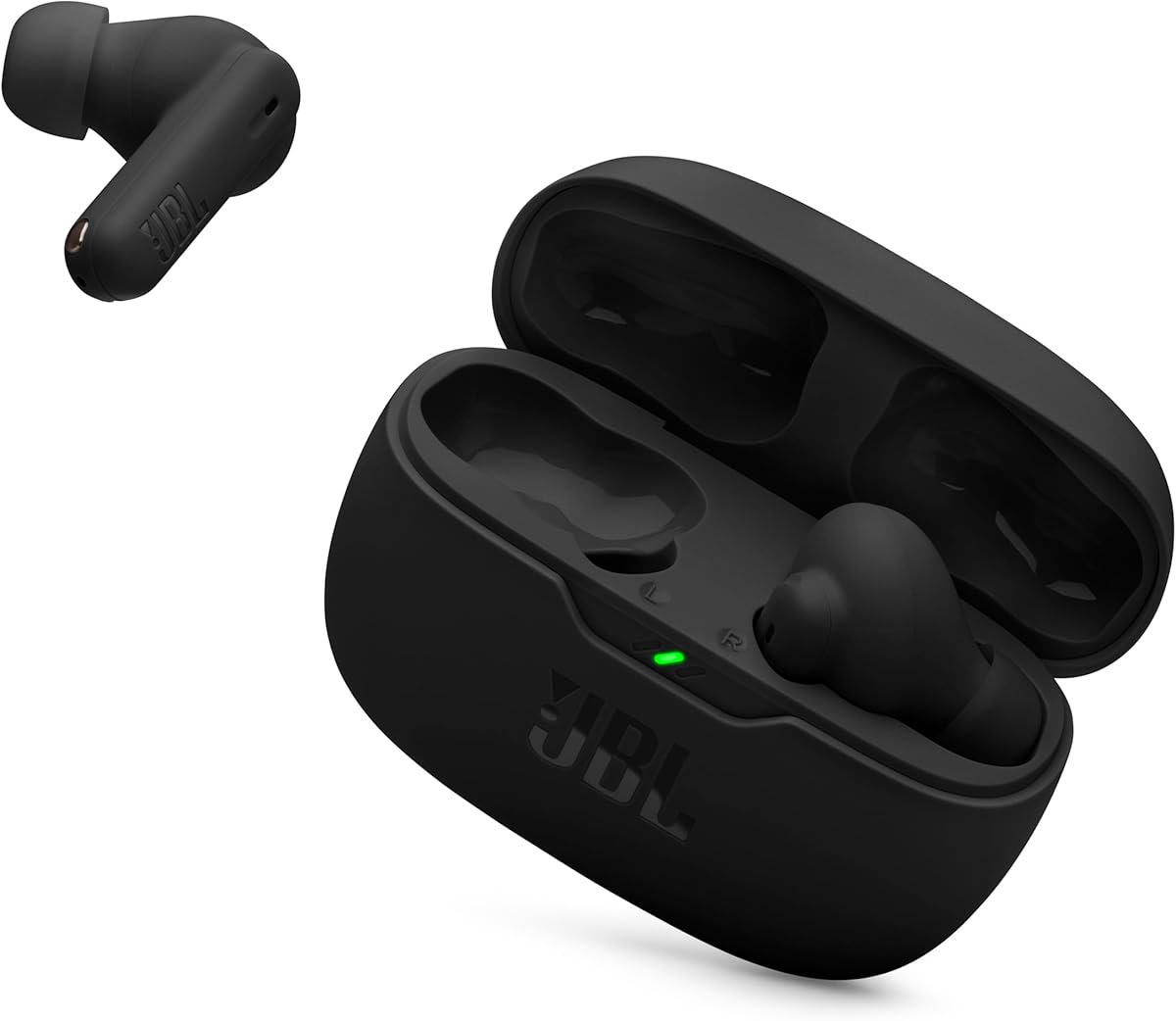
The JBL Vibe Beam 2 earbuds offer a balanced mix of features suitable for everyday meeting needs. With four microphones for crisp calls, they ensure your voice comes through clearly even when walking through busy areas.
We may earn a commission when you buy through this link, at no additional cost to you.
Active Noise Cancelling helps filter out ambient noise, while the Smart Ambient mode allows awareness when needed. The battery provides up to 40 hours of playback, so you won't need to recharge frequently during workweeks.
Though the ANC may not match top-tier models, it performs well for typical office noise. The JBL Pure Bass sound adds richness to music, but call quality remains the focus for professional use.
These earbuds are ideal for those seeking reliable performance at a mid-range price. They are a good fit for users who want long battery life and clear communication.
Dual microphones on each earbud capture and transmit voice while canceling ambient noise for cleaner calls.
Up to 40 hours total playback ensures you stay connected throughout the week without constant recharging.
We may earn a commission when you buy through this link, at no additional cost to you.
The Logitech Zone True Wireless earbuds are specifically designed for professional video calling, making them a top choice for Teams users. Certified for Microsoft Teams, Zoom, and Google Meet, they ensure seamless integration with your conferencing apps.
We may earn a commission when you buy through this link, at no additional cost to you.
Three mics in each earbud use advanced beamforming to distinguish your voice from other sounds. This results in high call quality. The Hybrid ANC blocks distractions, while Transparency mode keeps you aware of surroundings.
You can connect via native Bluetooth or the included USB receiver for reliable wireless connectivity to your computer. Customizable ear gels and EQ sliders let you tailor the fit and sound to your preference.
These earbuds are perfect for professionals who need certified, reliable performance. Despite a higher price, their focus on call quality and compatibility makes them a smart investment.
Logitech Sync allows device management and ensures seamless connection across common video calling platforms and operating systems.
Six microphones with noise reduction and processing isolate your voice for crystal clear communication during meetings.
We may earn a commission when you buy through this link, at no additional cost to you.
The Jabra Evolve2 True Wireless earbuds deliver enterprise-grade performance for professionals who demand the best call quality. Their four microphones and bone conduction sensors cut through background noise effectively, ensuring you are heard clearly.
We may earn a commission when you buy through this link, at no additional cost to you.
Microsoft Teams certification means these earbuds are optimized for seamless integration and reliability during critical meetings. Advanced Bluetooth Multipoint keeps you connected to both laptop and smartphone simultaneously for flexible work.
Despite the higher price, the ergonomic fit and water resistance make them suitable for all-day wear. The USB dongle option provides a more stable connection when using the meeting platform on your computer.
These earbuds are ideal for business users who prioritize professional features and durability. If you need the highest standard of call performance, the Evolve2 is worth the investment.
Bone conduction sensors work with mics to capture voice vibrations directly for unmatched clarity even in noisy spaces.
Stay connected to multiple devices at once, making it easy to switch between calls on your phone and laptop.
We may earn a commission when you buy through this link, at no additional cost to you.
The XIAOWTEK Wireless Earbuds offer impressive battery life and modern connectivity at an affordable price point. With up to 50 hours of total playtime and Bluetooth 5.4, these earbuds ensure long-lasting performance and stable connections.
We may earn a commission when you buy through this link, at no additional cost to you.
Four ENC microphones focus on noise reduction to provide crystal clear call experiences. The LED display on the case shows exact power levels, so you never run out of battery unexpectedly during a call.
While the brand is less known, the high rating suggests satisfaction with performance. The ergonomic fit and waterproofing add durability, making them suitable for various environments from offices to outdoor work.
These earbuds are best for users who prioritize battery longevity and value. If you need reliable earbuds that last throughout the week without frequent charging, this is a strong option.
Bluetooth 5.4 offers lower power consumption and stronger signal penetration for smoother audio and calls.
ENC technology picks up your voice precisely and blocks out significant background noise for better clarity.
We may earn a commission when you buy through this link, at no additional cost to you.
The TAGRY Hybrid ANC Earbuds are designed for active lifestyles while still supporting professional call needs. The earhook design provides a secure and comfortable fit, ensuring the earbuds stay in place during movement.
We may earn a commission when you buy through this link, at no additional cost to you.
Hybrid Active Noise Cancelling reduces ambient noise significantly, helping you focus on meetings. With up to 80 hours of total playtime, you get extended usage without frequent charging interruptions.
Hi-Res Audio quality ensures balanced sound for music and calls. The LED display keeps you informed on battery status, while wide compatibility ensures seamless pairing with various devices.
These earbuds are ideal for professionals who move around frequently. If you need secure comfort and long battery life for active workdays, the TAGRY Hybrid ANC earbuds are a strong fit.
Soft composite earhooks provide a comfortable and stable fit during workouts or active work environments.
Built-in Hi-Res technology tunes treble and bass for optimal sound quality across diverse environments.
We may earn a commission when you buy through this link, at no additional cost to you.
The Soundcore P30i by Anker is a top budget pick that doesn't compromise on call quality. With AI-enhanced four-mic technology, these earbuds ensure your voice is picked up with precision during meetings.
We may earn a commission when you buy through this link, at no additional cost to you.
Adaptive noise cancelling automatically adjusts to your environment for optimal silence. The battery provides up to 45 hours of total playtime, and the case doubles as a phone stand for hands-free viewing.
Although it is affordable, it delivers clear audio and comfortable fit for long sessions. Bluetooth 5.4 ensures quick and stable connections for uninterrupted calls throughout the day.
These earbuds are perfect for budget-conscious professionals. If you need reliable performance and clear communication without a high price tag, the P30i is an excellent choice.
Built-in microphones and AI algorithms filter noise to ensure your voice is heard clearly anywhere you go.
The case includes a built-in stand for your phone, allowing hands-free viewing while listening to audio.
We may earn a commission when you buy through this link, at no additional cost to you.
The Soundcore Liberty 5 Pro Max offers premium features including AI transcription and superior call quality. With ten sensors and a dedicated AI chip, these earbuds deliver whisper-clear calls in noisy environments.
We may earn a commission when you buy through this link, at no additional cost to you.
The case includes an AI Note-Taker that records and transcribes meetings for key points and action items. Encryption ensures your data remains private, meeting security standards for professionals handling confidential information.
While the price is high and some features require a subscription, the technology is unmatched. The AMOLED display on the case lets you manage settings without taking out your phone.
These earbuds are best for power users who want cutting-edge productivity tools. If you need advanced features and top-tier call quality, the Liberty 5 Pro Max is a standout.
The smart case records and transcribes meetings to generate summaries, helping you capture key points easily.
AES-256 encryption and compliance standards ensure your conversations remain private and secure during work.
We may earn a commission when you buy through this link, at no additional cost to you.
The JLab Work Buds feature a detachable noise-canceling boom mic that ensures crystal clear voice transmission. This design is ideal for users who want dedicated mic clarity for important meetings.
We may earn a commission when you buy through this link, at no additional cost to you.
With over 55 hours of total playtime, you get extended usage throughout the workweek. The USB-C Charging Dock keeps your earbuds and mic organized, making it perfect for on-the-go use.
Bluetooth Multipoint connects you to both laptop and phone simultaneously for easy switching. The compact dock is easy to carry, ensuring you stay organized and powered up.
These earbuds are best for professionals who prioritize mic clarity and organization. If you need a boom mic solution without sacrificing wireless convenience, the Work Buds are a great choice.
The noise-canceling boom mic ensures your voice is heard loud and clear even in noisy environments.
The USB-C dock keeps everything organized while providing extra playtime for uninterrupted work sessions.
We may earn a commission when you buy through this link, at no additional cost to you.
The TOZO NC3 Hybrid ANC earbuds are a strong all-ounder with impressive battery life and clear call features. With six built-in microphones and ENC technology, they ensure your voice comes through clearly during online meetings.
We may earn a commission when you buy through this link, at no additional cost to you.
Hybrid Active Noise Cancellation reduces ambient noise significantly, especially steady low-frequency sounds like AC hum or subway rumble. The 68 hours of total playtime ensures you stay connected without frequent charging.
Transparency mode helps you stay aware when needed, while Bluetooth 5.3 provides stable connections for video calls. The IPX8 waterproof rating adds durability for daily use or outdoor work.
These earbuds are ideal for users seeking reliable performance and long battery. If you need consistent call quality and strong noise reduction, the TOZO NC3 is a solid pick.
Six microphones with ENC technology reduce background noise so your voice is clear on calls and meetings.
The IPX8 rating protects against rain and sweat, making these earbuds ready for daily outdoor use.
We may earn a commission when you buy through this link, at no additional cost to you.
Selecting the right earbuds for professional meetings requires evaluating key factors that impact call quality, comfort, and connectivity. This section outlines what to look for to ensure your devices meet workplace standards.
Microphone technology is the most critical factor for Teams meetings. Look for multiple microphones with noise-canceling features or AI-based voice isolation to ensure your voice is clear even in noisy environments. Beamforming or ENC (Environmental Noise Cancellation) tech helps filter out background sounds effectively.
Prioritize models with dedicated mics designed for voice clarity rather than just music playback.
Active Noise Cancellation (ANC) helps reduce distractions during meetings. Hybrid ANC offers better performance by using both feedforward and feedback microphones. Transparency mode is also useful for staying aware of your surroundings when needed.
Choose models with strong ANC to maintain focus during long calls in busy environments.
For Teams users, certification ensures optimized performance with the platform. Models certified by Microsoft Teams or similar platforms guarantee seamless integration with conferencing apps. Bluetooth compatibility across devices is also essential.
Look for explicit platform certification to avoid connection issues or audio problems during meetings.
Long battery life prevents interruptions during all-day meetings. Aim for at least 20 hours of total playtime with the charging case. Fast charging features ensure you can top up quickly between sessions.
Prioritize models with extended battery life to stay connected without constant recharging.
Comfort is key for long wear during extended meetings. Look for ergonomic designs with multiple ear tip sizes to find a secure fit. Features like earhooks or lightweight materials help reduce fatigue over hours.
Ensure the earbuds stay comfortable and secure to avoid discomfort during long calls.
Bluetooth Multipoint allows connections to multiple devices simultaneously, making it easy to switch between laptop and phone. USB dongles or receivers provide more stable connections for desktop computers.
Choose models with Multipoint or USB options for flexible and reliable connectivity across devices.
Durability ensures your earbuds last through daily use and occasional exposure to elements. Look for IPX waterproofing ratings to protect against sweat or rain if you work outdoors. Durable materials and solid construction add longevity.
Prioritize models with strong build quality and water resistance for reliable daily use.
Intuitive controls let you manage calls, volume, and ANC settings without reaching for your device. Touch controls or physical buttons should be responsive and easy to operate during meetings.
Choose models with simple and accessible controls to manage your calls and settings efficiently.
Pair your earbuds with your computer or phone by enabling Bluetooth in your device settings and following the manufacturer's pairing instructions. For Teams meetings, select the earbuds as your audio device in the app settings to ensure clear audio output and input.
Use noise cancellation features during calls to minimize background distractions. Adjust microphone volume levels as needed to ensure you are heard clearly without distortion. Transparency mode can help you hear colleagues or announcements when needed without removing earbuds.
Clean the earbuds regularly with a dry soft cloth to maintain hygiene and performance. Store them in the charging case when not in use to protect against damage. Keep the charging contacts clean to ensure proper battery charging and long device life.
Many models listed are specifically certified for Microsoft Teams, ensuring seamless integration and optimized audio settings. Even non-certified models generally work well if you select them correctly in your Teams audio device settings for call output and input.
Models like the Logitech Zone True Wireless and Jabra Evolve2 True Wireless feature advanced microphone arrays with beamforming and bone conduction technology. These provide superior voice isolation and clarity during meetings in noisy environments.
ANC is highly important if you work in noisy environments, as it helps block out distractions so you can focus on calls. It also ensures your microphone doesn't pick up ambient sounds, improving overall call quality for all participants.
For daily use, aim for at least 20 hours of total playtime with the charging case to cover multiple meetings without recharging. Earbuds with 40 hours or more offer extra security for long workweeks or travel days without power access.
Yes, modern Bluetooth 5.3 or 5.4 earbuds offer stable connections suitable for calls. For extra reliability, models with USB dongles provide direct wireless connectivity to computers, reducing dropouts in busy network environments.
Most models support both music and calls seamlessly. Prioritize models with balanced sound profiles and strong microphone performance to ensure clear communication without compromising audio quality for entertainment.
We reviewed ten top earbuds suited for Teams Meetings, ranging from budget-friendly picks like the Soundcore P30i to premium options like the Jabra Evolve2 True Wireless. Each model offers unique strengths in microphone clarity, noise cancellation, and battery life.
When choosing, prioritize features that align with your daily workflow such as certification for Teams, strong microphone performance, and comfortable fit for long wear. Consider your budget and whether advanced features like AI transcription justify the higher cost.
Remember that prices and availability can change quickly, so check current listings before making your purchase. With the right earbuds, you can ensure professional audio quality and seamless communication during every meeting.