
VOYEE PC Controller
4.3Editor score
Windows 11 compatible
Rumble vibration feedback
Ergonomic grip design
Discover the top joysticks for Windows 11 flight simulation and gaming. This guide compares ten models to help you find the perfect controller for your setup.
Finding the right joystick for Windows 11 can transform your gaming experience. Whether you enjoy flight simulators or action games, a quality controller offers precision and comfort.
We evaluated ten top-rated joysticks based on compatibility, build quality, and user feedback. This list covers budget-friendly options and premium models designed for serious enthusiasts.
Each pick highlights key features and real-world performance. Prices and availability may change, so check current listings before purchasing your next gaming accessory.
4.3Editor score

4.4Editor score

4.0Editor score
This table provides a side-by-side overview of all ten selected joysticks. Compare key specifications and features to determine which model fits your specific needs.





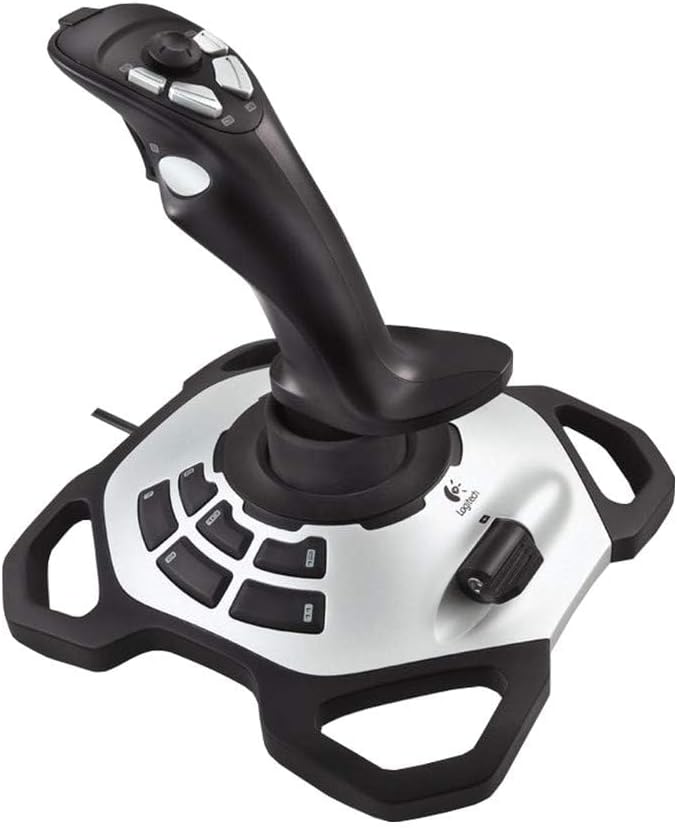

The Thrustmaster T.16000M FCS stands out as a top choice for Windows 11 users seeking precision. With a rating of 4.4 stars it delivers reliable performance for flight sims.
We may earn a commission when you buy through this link, at no additional cost to you.
Its H.E.A.R.T technology ensures consistent control without drift. The 16 action buttons allow complex commands while the ambidextrous design suits all hand orientations.
While it lacks an integrated throttle unit its modular design encourages upgrades. The ergonomic layout supports long sessions without discomfort for most users.
This joystick is ideal for pilots and gamers wanting professional-grade control. It balances advanced features with affordability making it a smart pick for many setups.
H.E.A.R.T technology uses magnetic sensors to eliminate wear and drift ensuring consistent accuracy over time.
Users can create specific mapping profiles for each game via the T.A.R.G.E.T software for tailored control layouts.
We may earn a commission when you buy through this link, at no additional cost to you.
The Logitech G X56 offers an unparalleled level of control for serious flight simulation enthusiasts. With 189 programmable controls it covers every aspect of complex aircraft systems.
We may earn a commission when you buy through this link, at no additional cost to you.
Features like RGB lighting and a mini analog stick enhance both aesthetics and functionality. The dual throttle design allows for precise engine management during missions.
While the price point is high the feature set justifies the cost for professionals. It requires two USB ports which may limit use on older machines.
This system is best suited for enthusiasts needing extensive customization. It delivers a comprehensive cockpit experience that few other controllers can match.
New mini analog stick controls allow for pitch roll yaw and weapon gimbal adjustments without extra hands.
The design places controls under your fingers making it ideal for virtual reality flight simulation setups.
We may earn a commission when you buy through this link, at no additional cost to you.
The VOYEE PC Controller offers an accessible entry point for casual gamers on Windows 11. With a 4.3 star rating it provides solid performance for the price.
We may earn a commission when you buy through this link, at no additional cost to you.
Its vibration feedback enhances action sequences while the ergonomic design ensures comfort. The long cord allows flexible positioning during extended play sessions.
Though it functions more like a gamepad than a flight stick it excels in general gaming. It is not optimized for complex simulation controls.
This controller is perfect for players seeking affordability without sacrificing quality. It serves well for casual use and basic gaming needs.
The contours are designed to fit your hands comfortably allowing for long gaming sessions without fatigue.
Rumble control responds to game events automatically enhancing immersion through tactile feedback.
We may earn a commission when you buy through this link, at no additional cost to you.
The PXN 2113PRO targets users interested in flight simulation on Windows 11. It features a dedicated vibration function to add realism to your cockpit experience.
We may earn a commission when you buy through this link, at no additional cost to you.
With 12 programmable buttons and an 8-Way hat switch it offers substantial control options. The software supports custom mappings for various flight titles.
Vibration sensitivity needs manual tweaking to feel effective. Users should ensure the switch is set to on for optimal feedback during gameplay.
This stick is a strong option for sim enthusiasts on a budget. It provides essential flight features without the premium cost of high-end models.
Compatible with popular titles like Microsoft Flight Simulator and War Thunder for immersive flying experiences.
Most users find plug-and-play functionality sufficient though drivers offer advanced calibration options.
We may earn a commission when you buy through this link, at no additional cost to you.
The Thrustmaster T-Flight Hotas One provides a versatile setup for Windows 11 users. Its detachable throttle allows flexible desk or lap configurations.
We may earn a commission when you buy through this link, at no additional cost to you.
Adjustable resistance helps pilots manage control forces during takeoffs and landings. The design prioritizes comfort for long simulation sessions.
While versatile the throttle separation means you might need extra hardware. The build quality is functional but less robust than premium options.
This is an excellent choice for those entering flight simulation. It balances ease of use with essential controls for a range of aircraft.
Use the stick and throttle together or separately depending on your available desk space and preference.
It is compatible with both PC and Xbox offering versatility across different gaming systems.
We may earn a commission when you buy through this link, at no additional cost to you.
The Thrustmaster SimTask FarmStick is tailored specifically for Farming Simulator 25. It ensures immediate compatibility for players seeking a dedicated tool.
We may earn a commission when you buy through this link, at no additional cost to you.
With Hall Effect sensors it delivers smooth and precise control for operating tractors and loaders. The 33 inputs allow management of complex machinery functions.
Its design assumes a racing wheel context which adds to the cockpit experience. It may be less useful for general flight or action gaming.
This joystick is perfect for serious farming simulation fans. It brings realistic heavy machinery interaction into the game seamlessly.
H.E.A.R.T technology ensures precision remains consistent over time without signal drift during extended use.
It is designed to work alongside racing wheels for a complete farming or industrial simulation setup.
We may earn a commission when you buy through this link, at no additional cost to you.
The V-one Wired USB controller supports a wide array of devices including Windows 11 and Android. It offers flexibility for users switching between PC and mobile gaming.
We may earn a commission when you buy through this link, at no additional cost to you.
Its Xinput and Dinput modes ensure compatibility with various software configurations. Vibration feedback adds a layer of immersion to supported titles.
While it does not offer specialized flight features it works well for standard gaming. It is a practical tool for casual users on multiple systems.
This option is great for those who need a versatile controller. It covers basic needs across different platforms without complex setup requirements.
Supports Android devices via OTG adapters enabling mobile gaming on phones and tablets.
Switch between input modes easily to adapt to different game engine requirements.
We may earn a commission when you buy through this link, at no additional cost to you.
The Thrustmaster USB Joystick provides a straightforward control solution for Windows users. It is designed for simplicity with essential buttons for basic gameplay.
We may earn a commission when you buy through this link, at no additional cost to you.
The dedicated Point of View button adds immersion without complex setups. The ergonomic handle ensures a comfortable grip for casual use.
Due to its limited feature set it suits entry-level users. It lacks the depth needed for serious simulation or competitive gaming.
This joystick is best for those wanting a no-fuss controller. It handles simple tasks reliably but may not scale with advanced needs.
The Point-Of-View button offers easy camera switching enhancing immersion in various game types.
The ergonomic handle with enlarged rest provides optimal comfort during typical gaming sessions.
We may earn a commission when you buy through this link, at no additional cost to you.
The Microsoft Sidewinder Precision 2 is a legacy model known for its reliability. It offers a rotating handle for precise rudder control essential in flight sims.
We may earn a commission when you buy through this link, at no additional cost to you.
With 16 programmable functions it provides decent customization for older and newer games. The integrated throttle adds convenience for simulation tasks.
Its design feels traditional which may limit appeal for modern gamers. Software support can vary depending on current Windows 11 updates.
This joystick suits users seeking a classic experience. It remains a solid option for those prioritizing precision over modern aesthetics.
The rotating handle allows precise rudder control without needing separate foot pedals.
Save and download commands into game-specific profiles for quick access and tailored control.
We may earn a commission when you buy through this link, at no additional cost to you.
The Logitech Extreme 3D Pro is a staple for flight simulation enthusiasts. It features a ratchet throttle lever for accurate engine management.
We may earn a commission when you buy through this link, at no additional cost to you.
Its precision design supports detailed inputs needed for combat and civilian flight scenarios. The ergonomic grip ensures stability during intense maneuvers.
While it lacks the latest connectivity standards it performs reliably. It offers a balance of quality and price that is hard to beat.
This stick is ideal for those wanting serious flight control. It delivers consistent performance for a wide range of simulation titles.
The ratchet throttle lever allows for precise engine control with distinct settings for different aircraft.
Designed for comfort the stick supports long hours of simulation without causing hand fatigue.
We may earn a commission when you buy through this link, at no additional cost to you.
Selecting the right joystick depends on your specific gaming needs and budget. This guide outlines key factors to consider before making your purchase.
Ensure the joystick explicitly supports Windows 11 to avoid driver issues. Check if it works with your specific games and platforms like Xbox or Steam.
Verify the system requirements listed by the manufacturer match your PC setup.
More buttons allow for complex command mappings which are vital for flight or racing sims. Evaluate if 12 or 16 buttons are necessary for your titles.
A higher count offers flexibility but can be overwhelming for casual gaming.
Comfort is critical for long gaming sessions. Look for contoured grips and adjustable resistance that fit your hand size naturally.
An ergonomic design reduces strain and improves overall control precision during use.
Vibration adds immersion by simulating engine movements or impacts. Check if the joystick includes adjustable vibration strength for different effects.
Good haptics enhance the feeling of being in the cockpit or vehicle.
Sturdy materials ensure longevity and consistent performance. Metal or high-quality plastic components often last longer under frequent use.
Durable construction prevents drift and maintains accuracy over the product's lifespan.
Advanced software allows custom profiles for specific games. Look for tools that support macro programming and button mapping.
User-friendly software simplifies setup and helps you optimize control layouts effectively.
A dedicated throttle lever is essential for flight simulation accuracy. Decide between combined units or modular systems based on your space.
Integrated throttles save desk space while modular ones offer flexibility for upgrades.
Prices range from affordable gamepads to premium flight systems. Determine a realistic budget that balances features with your financial limits.
Higher price often correlates with better materials and specialized features for simulations.
Connect the joystick to a USB port before launching your game to ensure proper detection. If drivers are required download them from the manufacturer's website.
Calibrate the device using the built-in Windows game controller settings for accurate movement response. This step ensures all axes align correctly with in-game actions.
Keep the joystick clean and free from dust to maintain sensitivity. Store it in a safe place to prevent accidental damage when not in use.
Most of the listed models support Windows 11 natively. Always check the product details for specific system requirements before buying.
Many modern joysticks are plug and play but some require drivers for advanced features. Refer to the user manual for installation instructions.
Yes several models are designed specifically for flight sims like Microsoft Flight Simulator. They offer necessary axes and buttons for realistic control.
Beginners often prefer affordable options like the VOYEE or V-one. These provide essential controls without overwhelming complexity or cost.
Go to Control Panel and open the Game Controllers section. Select your device and click Properties to run the calibration wizard.
Some models like the Thrustmaster T-Flight Hotas One work on Xbox. Verify compatibility if you plan to use it across multiple platforms.
The Thrustmaster T.16000M FCS leads our list with its precision and versatility. For budget shoppers the VOYEE PC Controller offers great value for casual play.
Prioritize compatibility and button count to match your specific gaming goals. A well-suited controller enhances immersion and performance significantly.
Prices and availability change frequently so verify current details before purchasing. Enjoy your next gaming adventure with the right controller for your needs.