
OMTech K40+ 45W Desktop CO2 Laser Engraver & Cutter
4.4Editor score
45W Upgrade Performance
LightBurn Compatible
Compact Desktop Design
This guide compares the top 10 CO2 laser cutters for 2026, evaluating power, workspace, safety features, and software compatibility to help you choose the
Choosing the right CO2 laser cutter can transform your creative projects into professional realities. Whether you are a hobbyist or a small business owner, finding a machine with the correct power output, workspace size, and safety features is essential for consistent results and operational efficiency.
We have carefully analyzed ten leading models available in the market today. Our evaluation focuses on critical aspects such as laser tube wattage, cutting speed, material compatibility, and the quality of included accessories like water chillers and air assist systems to ensure a comprehensive comparison.
Each pick in this list highlights specific strengths tailored to different user needs and budgets. Please note that product availability and pricing can change frequently, so verify the latest details on the official product pages before making your final purchase decision for your workshop.
4.4Editor score

4.5Editor score

4.0Editor score
The following table provides a side-by-side comparison of all ten selected CO2 laser cutters to help you quickly identify key specifications and differences between models ranging from entry-level desktop units to industrial-grade production systems.



The xTool P3 represents the pinnacle of desktop CO2 laser technology with its flagship 80W power and intelligent automation features. This machine is designed for professionals who demand industrial-grade cutting capabilities within a desktop footprint. It features a unique Class 1 safety rating and a revolutionary Automated Creation System that simplifies setup and operation significantly.
We may earn a commission when you buy through this link, at no additional cost to you.
Its standout qualities include the integration of LiDAR ranging for perfect autofocus and dual HD cameras for precise positioning. The AutoLift Base supports materials up to 8.7 inches high, and the AI-powered Smart Nesting achieves 98.7% material utilization. The machine can cut 20mm wood and 25mm acrylic at speeds up to 1200mm/s which outperforms many diode lasers.
While the P3 offers exceptional performance and safety, it comes with a higher price tag compared to entry-level models. Additionally, many advanced accessories like the conveyor feeder and air purifier are sold separately which can increase the total investment. However, these trade-offs are acceptable for users needing professional reliability and speed.
This laser is ideal for small to medium businesses or serious makers who prioritize automation and safety. The fully enclosed design allows for safer operation without direct exposure to laser light. If you need a machine that combines power with intelligent workflow features the P3 is our top recommendation for overall excellence.
The Automated Creation System integrates LiDAR ranging and cameras to minimize manual setup time for every job.
Class 1 safety rating with active detection ensures safe operation for users of all experience levels.
We may earn a commission when you buy through this link, at no additional cost to you.
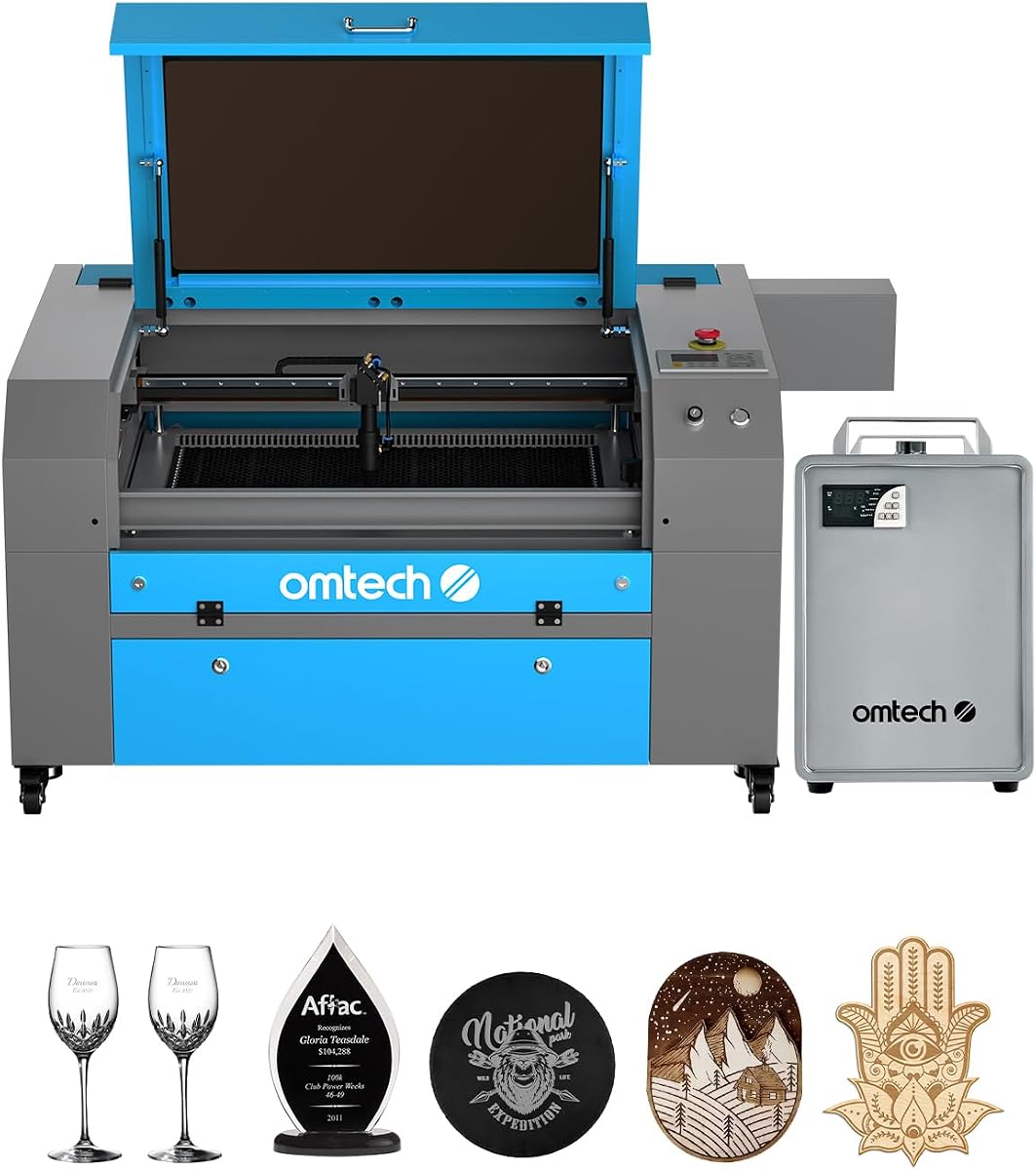
The OMTech K40+ is an excellent entry point for those seeking a reliable CO2 laser without breaking the bank. Upgraded to 45W it slices through acrylic and wood with impressive ease compared to older K40 models. It is perfect for hobbyists and small businesses looking to produce personalized items or prototypes efficiently.
We may earn a commission when you buy through this link, at no additional cost to you.
This model supports popular software like LightBurn and LaserGRBL which ensures flexibility in design and operation. The integrated air assist system helps clear smoke and debris protecting the lens and reducing fire risk during high-power cutting jobs. It also offers a detachable base for optional rotary axis compatibility expanding creative potential.
The main limitations are the compact 12×8 workspace and the lack of autofocus which requires manual adjustment. However, the 24/7 global support and comprehensive safety features like door protection add significant value. For beginners the trade-off of a smaller workspace is often worth the lower cost and ease of use.
We recommend this machine for DIY enthusiasts and small businesses that do not require large sheet cutting. It provides a balanced mix of power and affordability that makes laser engraving accessible. If you need a budget-friendly option that still delivers professional results this K40+ is a strong contender.
Full support for LightBurn and LaserGRBL gives users full control over engraving parameters and design.
Comprehensive safety features and 24/7 global support ensure peace of mind during operation.
We may earn a commission when you buy through this link, at no additional cost to you.
The OMTech Pro 130W is a powerhouse designed for industrial and professional applications where speed and precision are paramount. It features a massive workspace and powerful servo motors that enable engraving speeds up to 1200mm/s. This machine is ideal for users who need to process large volumes of material regularly.
We may earn a commission when you buy through this link, at no additional cost to you.
Key features include a built-in CW-5200 water chiller that maintains temperature within 0.5°F to protect the laser tube during long sessions. The Ruida 6445G touchscreen controller offers intuitive control and WiFi connectivity for seamless file transfers. The futuristic design includes a widened tempered glass viewing window for enhanced safety.
While this machine offers top-tier performance it is a significant investment and requires ample floor space due to its size. Users must also consider the electricity and cooling requirements for such a powerful unit. However, the productivity gains and reduced maintenance from the built-in chiller justify the costs for serious operations.
We suggest this model for established businesses needing high-volume production capabilities. The precision of servo motors ensures consistency in detailed designs. If you need a professional-grade CO2 laser that handles thick materials and high speeds this Pro 130W delivers unmatched value.
Servo motors and ball-bearing guide rails ensure precise and rapid engraving for complex designs.
The built-in chiller maintains optimal temperatures to extend tube life and ensure consistent power output.
We may earn a commission when you buy through this link, at no additional cost to you.
VEVOR delivers a robust 100W CO2 laser engraver that balances power with a spacious 24×35 workspace. This model is designed for users who need to cut larger materials without needing industrial-sized machinery. It supports a wide range of software making it versatile for various design workflows and operating systems.
We may earn a commission when you buy through this link, at no additional cost to you.
The machine features front and back pass-through doors which allow for handling longer items conveniently. An intelligent laser head ensures high cutting precision with smooth incisions and minimal burr. The red-dot pointer helps mark the working path effectively while the linear guide rail ensures smooth curve cutting.
Assembly can be a bit involved due to the size and weight of the unit. Additionally, the digital control panel may require some learning for beginners unfamiliar with laser machine interfaces. However, once set up the machine delivers reliable performance with high power for its price point.
We recommend this for workshops or studios that need to process larger sheets efficiently. The pass-through doors are a game changer for long projects. If you need a mid-range machine with significant workspace and power this VEVOR model is a strong choice.
Compatible with over 1000 non-metallic materials including wood, acrylic, and leather for diverse projects.
Linear guide rails and red-dot pointers ensure accurate cuts and detailed engraving results.
We may earn a commission when you buy through this link, at no additional cost to you.
The OMTech Maker 90W is a commercial laser cutter designed for consistent performance in small businesses. It comes bundled with a water chiller to ensure effective cooling during extended engraving sessions. The machine features a high-performance Yongli H2 tube that offers up to 8000 hours of usage.
We may earn a commission when you buy through this link, at no additional cost to you.
Its honeycomb and aluminum blade beds support a generous 20×28 work area with four-way pass-through doors for large items. The widened viewing window is made from flame retardant material for safety. The built-in air assist efficiently removes smoke and dust to protect lenses and mirrors.
While it offers significant power it lacks an autofocus feature which can slow down setup times. The larger footprint requires dedicated space in your workshop. However, the included chiller and long tube life make it a cost-effective choice for production environments.
We recommend this for businesses that need reliable cutting for wood and acrylic daily. The safety features ensure peace of mind during operation. If you need a sturdy machine with a chiller included this Maker 90W provides great value.
The Yongli H2 tube is designed for longevity reducing maintenance costs over time.
Flame retardant materials and cover interlocks enhance safety during high-power engraving.
We may earn a commission when you buy through this link, at no additional cost to you.
The OMTech Maker 60W is a commercial bundle that comes with essential accessories like a water chiller and LightBurn software. It offers a straightforward workflow with autofocus capabilities that adjust the workbeds at the touch of a button. This makes it easier for users to start cutting quickly without complex calibration.
We may earn a commission when you buy through this link, at no additional cost to you.
Its honeycomb and aluminum blade beds provide a solid 20×28 work area for most projects. The four-way pass-through doors accommodate larger items comfortably. The viewing window is flame retardant ensuring safe use. The air assist removes smoke to protect optical components.
The main trade-off is the 60W power limit which might struggle with very thick materials compared to 90W or 130W models. However, the included software and chiller add significant value. For beginners and small businesses this bundle saves time and money.
We recommend this model for those wanting an all-in-one solution. The autofocus feature reduces setup frustration significantly. If you need a balanced machine with software included this Maker 60W is an excellent starting point.
Autofocus allows for quick setup and consistent focus without manual adjustments.
LightBurn software is industry standard and simplifies design to cutting workflows efficiently.
We may earn a commission when you buy through this link, at no additional cost to you.
This version of the OMTech K40+ offers a compact solution for makers with limited space. It delivers upgraded 45W performance with engraving speeds up to 300 mm/s. The design supports both standard and irregular materials and the detachable base allows for rotary axis customization.
We may earn a commission when you buy through this link, at no additional cost to you.
The integrated air assist system auto-adjusts airflow based on laser power protecting the lens. The honeycomb bed handles flat items well while the high-powered exhaust fan ensures a clean workspace. Comprehensive safety features include emergency stop functions and door protection.
The compact size means you cannot cut large sheets which limits production scale. However, for small items like jewelry or business cards it is highly effective. The global support team ensures assistance is available for technical guidance.
We recommend this for hobbyists with tight workspace constraints. The speed and precision meet the needs of bulk small orders. If you need a desktop laser that fits easily in a home office this K40+ works well.
Designed to fit easily in home offices without sacrificing cutting power.
Optional rotary axis support allows engraving on cylindrical objects like bottles.
We may earn a commission when you buy through this link, at no additional cost to you.
The OMTech Pronto 100W focuses on efficiency with revolutionary engraving speeds up to 39.4 inches per second. This is significantly faster than traditional models allowing you to transform visions into reality in record time. The powerful laser tube delivers 100W of power for consistent cuts.
We may earn a commission when you buy through this link, at no additional cost to you.
Autofocus technology takes the guesswork out of setup ensuring consistent results. The machine handles a variety of non-metal materials with ease. A powerful air pump and fan ensure clean cuts by reducing material burn. Safety features include water protection and cover alarms.
The main trade-off is the investment cost and power requirements for a unit this size. However, the speed increases productivity for businesses. If you need high throughput for small to medium projects this machine offers a competitive edge.
We recommend this for users needing fast turnaround times. The autofocus ensures high quality without manual tuning. If you need speed and power this Pronto 100W delivers.
Engraving speeds up to 1000 mm/s transform creative visions quickly.
Powerful air pump ensures clean cuts and reduces material burn during operation.
We may earn a commission when you buy through this link, at no additional cost to you.
The OMTech Pronto 130W offers a massive 51×35 workspace suitable for large format projects. It delivers engraving speeds up to 1000 mm/s with 130W of power for deep cuts. The machine is built for users who need to process large materials efficiently.
We may earn a commission when you buy through this link, at no additional cost to you.
Autofocus capabilities ensure the bed adjusts easily for the right focal distance. The tube offers up to 12000 hours of usage for long term reliability. Comprehensive safety features include water protection and temperature alarms to keep you safe.
Its size requires a dedicated workshop space which might not fit all environments. However, the capacity for large projects is unmatched in its class. The global support team ensures help is available when needed.
We recommend this for businesses producing large signs or decor. The power and size make it a versatile tool. If you need to cut large sheets this Pronto 130W is a great choice.
The 51×35 work area fits most projects including large custom decor and signs.
High-performance tube delivers up to 12000 hours of reliable usage.
We may earn a commission when you buy through this link, at no additional cost to you.
This OMTech K40+ is designed as a reliable starter machine for beginners. It features a compact desktop size that fits easily in home studios. With 45W power it handles small projects like keychains and business cards with precision.
We may earn a commission when you buy through this link, at no additional cost to you.
The integrated air assist and exhaust fan keep the workspace clean and safe. It supports standard software for design and operation. The safety features like emergency stops ensure users are protected during the learning process.
The small workspace limits larger production runs. Manual focusing requires some patience. However, it is an affordable way to enter the world of laser engraving. For hobbyists starting out this machine provides good value.
We recommend this for those testing the waters of laser cutting. It allows you to learn without a large investment. If you need a simple desktop solution this K40+ is a solid start.
Designed for easy operation and safety for those new to laser engraving.
Provides a low cost entry point for learning professional engraving techniques.
We may earn a commission when you buy through this link, at no additional cost to you.
Selecting the right CO2 laser cutter requires understanding your specific needs regarding power, workspace, and budget. This section outlines key factors to consider before making a purchase.
Laser power determines how quickly and thickly you can cut materials. Lower wattage like 45W is suitable for thin acrylic and wood while higher wattage like 130W allows for deep cuts and speed. Always choose a machine that meets the maximum material thickness you plan to cut regularly.
For most hobbyists 40 to 60 watts is sufficient. Professionals should look for 90 to 130 watts to ensure production efficiency.
The work area dictates the maximum sheet size you can process. Desktop units usually offer smaller beds while industrial models provide larger footprints. Consider the physical space available in your shop to accommodate the machine safely.
Ensure you have enough clearance for ventilation and pass-through doors if you plan to cut long materials.
Check which software the machine supports such as LightBurn or LaserGRBL. Open software support allows for more design flexibility and custom settings. Proprietary software may be simpler but less versatile.
LightBurn is industry standard for versatility and ease of use so prefer machines that support it.
Safety is paramount when working with high-powered lasers. Look for enclosed designs with interlock switches that stop the laser when the door opens. Class 1 safety ratings indicate the machine is safe for general use.
Always ensure there is an emergency stop button and proper exhaust filtration to protect your health.
CO2 tubes generate significant heat and require a water chiller to maintain performance. Some machines come with built-in chillers while others require external units. Integrated systems save space and simplify setup.
A stable temperature ensures consistent power output and extends the lifespan of your laser tube.
CO2 lasers are ideal for non-metallic materials such as wood, acrylic, leather, and glass. Ensure the machine supports the materials you intend to work with. Some accessories may be needed for specific tasks like engraving glass.
Avoid attempting to cut metals with standard CO2 lasers as they reflect the beam and can be dangerous.
Prices vary significantly from under $1000 to over $10000. Consider the cost of accessories and maintenance when calculating your total investment. A higher initial cost may pay off in speed and reliability.
Evaluate the return on investment based on how quickly you plan to produce and sell items.
Laser machines can be complex and may require technical assistance. Choose brands that offer good warranty terms and accessible customer support. Global support teams can be vital if you face shipping delays.
Check user reviews for experiences with parts availability and repair services before buying.
Always start by calibrating the focus height using the provided jig or autofocus feature to ensure clean cuts. Verify the material is positioned correctly on the bed to avoid shifting during operation.
Run small test cuts to determine the optimal speed and power settings for your specific material. Adjust the air assist to blow away smoke and prevent burns on the cut edges.
Clean the lens and mirrors regularly with appropriate lens cleaning solution to maintain beam quality. Drain and replace the chiller water to prevent algae growth and keep the cooling system efficient.
CO2 laser cutters are excellent for cutting and engraving non-metallic materials such as wood, acrylic, leather, cardboard, glass, and some fabrics. They cannot cut metals directly without special attachments. Always check the material safety data before cutting to avoid toxic fumes.
Yes a water chiller is necessary to keep the laser tube cool during operation. Without it the tube can overheat and lose power or become damaged permanently. Integrated chillers simplify the setup but external units work just as well.
A typical CO2 laser tube lasts between 4000 to 12000 hours depending on usage and cooling. Proper maintenance like regular cleaning and stable cooling can extend its life. Replacing the tube is often cheaper than buying a new machine.
No you should never leave a laser cutter completely unattended even if it has safety features. Fire risk is real when cutting flammable materials so supervision is crucial. Always keep a fire extinguisher nearby and ensure ventilation is active.
Engraving involves removing a shallow layer of material to create designs while cutting goes all the way through to separate pieces. This is done by adjusting the speed and power settings in your software. Cutting requires more power and slower speeds than engraving.
While many machines come with tinted windows you should wear laser safety glasses specifically rated for CO2 wavelengths. This provides extra protection especially when working outside the enclosure or maintaining the optics. Never look directly at the beam.
LightBurn is widely considered the best software due to its intuitive interface and broad support. Other options like LaserGRBL offer basic control for beginners. Always verify the machine's driver requirements before purchasing software.
You need enough space for the machine footprint plus clearance for exhaust and material handling. Industrial units require a dedicated workshop while desktop models can fit on a large table. Ensure good ventilation is available for the exhaust system.
We have reviewed ten of the best CO2 laser cutters available in 2026 ranging from budget desktop units to industrial production machines. Each option offers unique benefits tailored to specific needs such as speed, workspace, and safety features.
Your choice should depend on your primary use case whether it is hobbyist projects or commercial manufacturing. Prioritize safety features and software compatibility to ensure a smooth workflow for your creative endeavors.
Remember to check current prices and availability before buying as these can change frequently. We hope this guide helps you find the perfect tool to bring your designs to life with precision and power.