
abxylute C6 Wireless PC Controller
4.3Editor score
Hall Effect Joysticks
1000Hz Polling Rate
Mac and iOS Compatible
Discover the top Mac game joysticks for 2026. This guide compares flight sticks, arcade controllers, and gamepads optimized for macOS gaming setups.
Finding the right Mac game joystick can transform your gaming experience significantly. Whether you prefer flight simulation or retro arcade action, having a dedicated controller enhances precision and immersion beyond standard keyboards.
We evaluated ten top-rated controllers compatible with macOS to create this comprehensive list. Our comparison focuses on build quality, connectivity options, and specific features that ensure smooth performance on Apple systems.
Each pick highlights unique strengths for different gaming styles and budgets. While prices fluctuate, the selected models offer reliable performance and strong community support for Mac users seeking an upgrade.
4.3Editor score
4.6Editor score

4.0Editor score
This side by side comparison outlines the key specifications and compatibility details for each of the ten selected models. We highlight connectivity types and specific features to help you find the right fit for your Mac gaming setup.


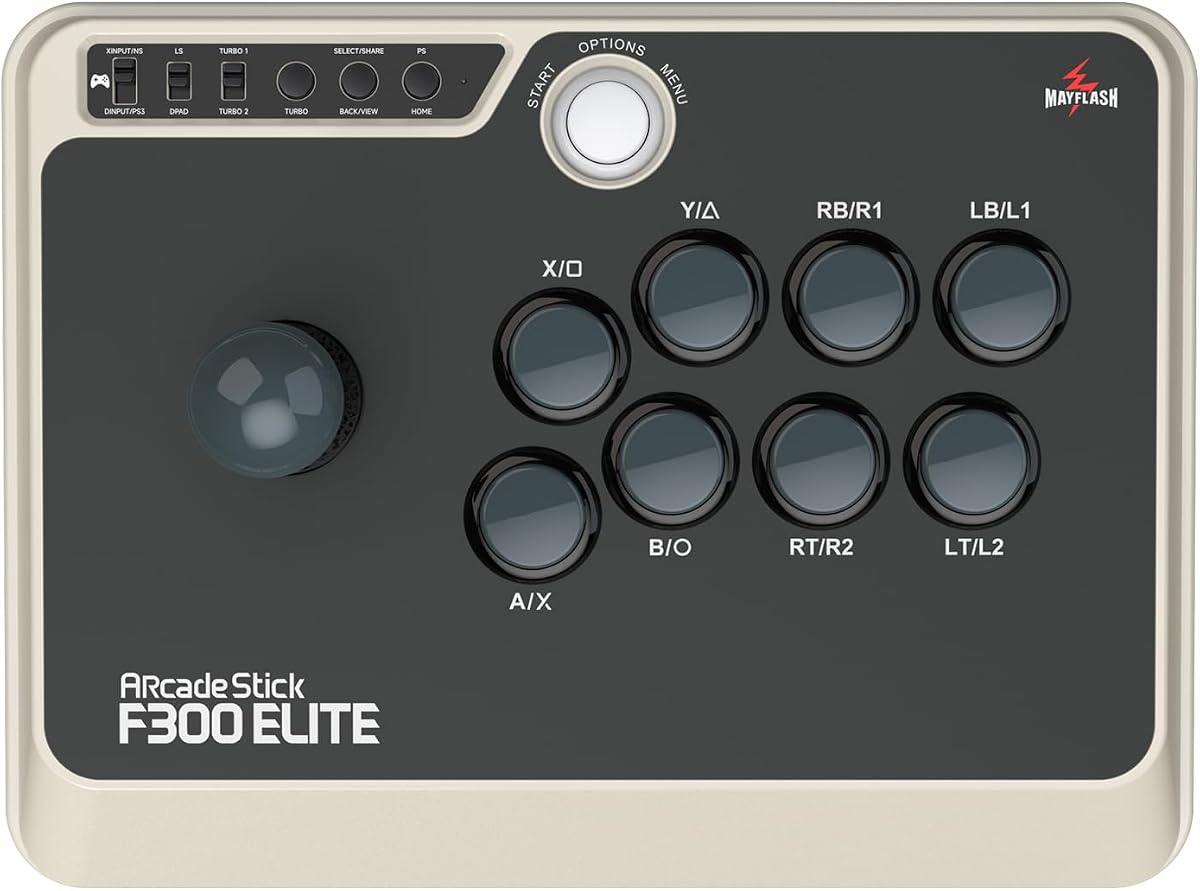
The MAYFLASH Arcade Stick F300 Elite stands out as a top choice for retro gaming on Mac. With a 4.6 rating, it delivers professional quality controls right out of the box. The inclusion of Sanwa components ensures precise inputs for fighting games.
We may earn a commission when you buy through this link, at no additional cost to you.
Its design allows enthusiasts to modify the stick and buttons to match their exact play style. The platform is accessible for customization, making it ideal for players who want to tweak their setup. Support for XINPUT and DINPUT ensures seamless recognition on computers.
While the price point is higher than standard arcade sticks, the durability justifies the cost. The need for an adapter on PS5 might be a minor inconvenience for console users. However, the overall build quality offers excellent long term value.
We recommend this stick for serious retro gamers who prioritize build quality and customization. It is perfect for those who play fighting games or classic arcade titles on their Mac. The reliability and performance make it a solid investment for any setup.
The use of genuine Sanwa Denshi parts ensures that the joystick and buttons withstand heavy use without degrading performance over time.
Compatibility with a wide range of systems including macOS, Windows, and various consoles ensures you can use this stick wherever you game.
We may earn a commission when you buy through this link, at no additional cost to you.
The abxylute C6 Wireless PC Controller offers impressive features at a budget friendly price point. Rated at 4.3 stars, it brings Hall Effect technology to a wider audience. This makes it a great option for Mac users seeking precision without breaking the bank.
We may earn a commission when you buy through this link, at no additional cost to you.
Its 1000Hz polling rate ensures minimal input lag during competitive gaming sessions. The dual Hall Effect joysticks eliminate drift issues common in cheaper controllers. Users also appreciate the 18 hour battery life which supports long gaming marathons.
The dongle for 2.4G connectivity must be purchased separately, which is a slight downside. The software lacks advanced customization options compared to premium rivals. However, these limitations are acceptable given the affordable price and solid performance.
This controller is perfect for casual gamers and students looking for a reliable input device. It works seamlessly with Mac systems for most popular games. The combination of wireless freedom and drift free performance makes it a top budget pick.
Hall Effect sensors use magnetic fields to detect stick position, removing physical contact and preventing the annoying drift that ruins gaming sessions.
Support for both Bluetooth and wired modes provides flexibility to switch between devices easily while maintaining a stable connection.
We may earn a commission when you buy through this link, at no additional cost to you.
The Logitech G X56 H.O.T.A.S is a powerhouse for flight simulation enthusiasts. With over 189 programmable controls, it offers unparalleled customization. The 4.0 rating reflects its high end nature and the commitment it requires from serious pilots.
We may earn a commission when you buy through this link, at no additional cost to you.
The dual throttle and joystick setup allows for realistic aircraft control. Hall effect sensors ensure accurate inputs for critical maneuvers in simulators. The RGB backlighting adds a stylish touch to the cockpit setup for a complete experience.
This unit demands a large desk and can be complex to set up properly for all features. The USB requirements mean you need multiple ports for full functionality. These factors make it less suitable for casual users with limited space.
We recommend this system for hardcore flight sim pilots who want realism. It is best suited for those building a dedicated simulation station. The performance and depth of control make it a benchmark for premium flight controllers.
Hall effect sensors provide 16-bit axis accuracy allowing for extremely subtle and precise movements essential for advanced flight simulation.
The RGB lighting can be customized to match your gear, creating a visually striking environment that enhances the immersion of your cockpit.
We may earn a commission when you buy through this link, at no additional cost to you.
The Thrustmaster T-Flight Stick X provides an accessible entry point into flight simulation. Rated 4.2 stars, it offers essential controls without the complexity of high end models. Mac users will appreciate the instant recognition upon connection.
We may earn a commission when you buy through this link, at no additional cost to you.
Its integrated throttle and rudder twist handle save valuable desk space. The adjustable resistance allows you to tune the stick to your preference. The weighted base keeps the unit steady during aggressive maneuvers in sims.
The lack of extensive programmable buttons limits advanced customization options. The design is somewhat dated compared to newer flight sticks on the market. However, for beginners, these trade offs are acceptable for the ease of use.
This joystick is ideal for those trying out flight sims for the first time. It works well with popular Mac flight simulators out of the box. The ergonomic design and stability make it a reliable companion for learning to fly.
The integrated throttle and rudder twist eliminate the need for separate pedals or throttle units, saving space on your gaming desk.
Adjustable resistance lets you change the stick tension to match your flying style whether you prefer light or heavy control.
We may earn a commission when you buy through this link, at no additional cost to you.
The 8Bitdo Ultimate 2 wireless controller is a top choice for general gaming on Mac. With a 4.5 rating, it balances performance and convenience exceptionally well. The TMR joysticks provide high precision for all genres of games.
We may earn a commission when you buy through this link, at no additional cost to you.
Its exclusive wireless technology delivers a stable 2.4G connection with under 1ms latency. The charging dock makes it easy to keep the controller ready for long sessions. Hall effect triggers add a layer of durability often missing in gamepads.
The software is primarily desktop focused which might limit some mobile specific features. Macro customization is not as deep as dedicated arcade sticks. Despite this, the hardware quality and wireless performance are outstanding for the price.
We recommend this controller for users who want a reliable wireless option for Mac. It suits general gaming and action titles perfectly. The inclusion of a dock and strong battery life make it a convenient choice for daily play.
The 8Speed wireless technology ensures strong anti interference and a long range providing a seamless gaming experience without wires.
TMR sensors offer enhanced durability and precision, ensuring your sticks remain accurate and responsive over time.
We may earn a commission when you buy through this link, at no additional cost to you.
The Thrustmaster SimTask FarmStick is designed specifically for farming simulator enthusiasts. With a 3.7 rating, it caters to a niche audience who need precise machinery control. Mac users can connect it easily for simulation gameplay.
We may earn a commission when you buy through this link, at no additional cost to you.
It features up to 33 programmable inputs to manage every function without a keyboard. The 3-axis joystick offers realistic control for tractors and loaders. Hall effect sensors ensure accuracy and long term reliability for demanding simulation tasks.
This controller is not versatile for general gaming outside of simulation titles. The rating reflects its specialized nature and complexity for some users. However, for farming fans it provides a level of control a keyboard cannot match.
We recommend this joystick for dedicated farming simulation players on Mac. It enhances the experience by adding realism to machinery operation. The specific design makes it a unique addition for those deep into agricultural simulations.
The 3-axis joystick allows for smooth and precise operation of heavy machinery making the simulation experience more lifelike.
With 33 inputs you can assign commands to every action ensuring you stay in control without reaching for your keyboard.
We may earn a commission when you buy through this link, at no additional cost to you.
The Hyperkin Trooper 2 brings a classic arcade feel to modern Mac systems. Rated 4.1 stars, it offers a nostalgic experience with modern reliability. The design is ideal for those who prefer traditional controller layouts.
We may earn a commission when you buy through this link, at no additional cost to you.
Its ergonomic design and chamfered corners provide comfort during long gaming sessions. The joystick is quiet and responsive which ensures smooth inputs for older games. The 10 foot USB cable provides good reach for desktop setups.
Modern programmable features are absent which limits customization for newer titles. The fixed cable length might restrict some seating arrangements. However, the durable construction ensures it lasts for many years of retro gaming.
We recommend this controller for fans of classic arcade and retro games. It is simple to use and works well with Mac emulation software. The combination of style and comfort makes it a great choice for nostalgia gaming.
The controller mimics the feel of vintage arcade sticks providing a nostalgic experience for retro gaming enthusiasts.
Ergonomic corners and soft rubber grommets make it comfortable to hold for extended periods without hand fatigue.
We may earn a commission when you buy through this link, at no additional cost to you.
The MAYFLASH F300 Arcade Fight Stick is a versatile entry point into stick gaming. With a 4.5 rating, it supports a wide range of platforms including Mac. It serves as a great base for future customization.
We may earn a commission when you buy through this link, at no additional cost to you.
It supports both DINPUT and XINPUT modes on computers ensuring broad recognition. The platform is designed for modding enthusiasts who want to swap in better buttons. Turbo functions add utility for various gaming scenarios.
The stock buttons are standard and might feel basic to serious players. A full upgrade is often desired to get the best performance experience. Despite this the value proposition is strong for a modding platform.
We recommend this stick for users planning to customize their setup. It is perfect for those new to arcade sticks on Mac. The versatility and compatibility make it a flexible choice for different gaming styles.
The F300 allows easy access to internal components for those who wish to upgrade to higher end parts later.
Support for multiple operating systems and consoles ensures you can use this stick across different platforms easily.
We may earn a commission when you buy through this link, at no additional cost to you.
The Moonag Wireless PC Controller stands out with its dynamic RGB lighting. Rated 4.3 stars, it combines visual appeal with strong performance for Mac users. The Hall Effect joysticks prevent drift and ensure smooth inputs.
We may earn a commission when you buy through this link, at no additional cost to you.
It features a massive 800mAh battery which supports long play sessions. The 1000Hz polling rate ensures minimal lag for competitive play. Turbo functions and dual vibration provide extra immersion during gaming.
The RGB lighting can reduce battery life significantly when kept on max brightness. Software support for Mac is limited compared to PC specific apps. However, the hardware performance and visual style are compelling for gamers.
We recommend this controller for those who want style and function combined. It is a solid choice for Mac users looking for a wireless option. The battery life and precision make it a strong contender in its price range.
The dynamic RGB lighting allows you to create an immersive atmosphere that matches your desk setup and personal style.
Hall Effect sensors use magnetic fields to prevent wear and drift ensuring your controller remains accurate over time.
We may earn a commission when you buy through this link, at no additional cost to you.
The SPEEDLINK Competition PRO offers a nostalgic look for arcade enthusiasts. With a 3.9 rating, it focuses on a traditional digital stick design. The anniversary edition includes a game bundle for added value on Mac.
We may earn a commission when you buy through this link, at no additional cost to you.
It features a solid base that keeps the stick stable during gameplay. The design is reminiscent of old arcade machines providing a cool aesthetic. It is a good budget option for simple retro gaming needs.
The digital stick may feel less responsive to players used to analog inputs. The basic button layout limits complex game support. However for the price it offers a unique look and a decent experience for casual play.
We recommend this controller for casual gamers who appreciate retro design. It works well with simple arcade games on Mac. The combination of style and affordability makes it an interesting choice for collectors.
The design pays homage to original arcade machines offering a classic look that many retro fans will appreciate.
A solid and weighted base ensures the controller stays in place during intense gaming sessions.
We may earn a commission when you buy through this link, at no additional cost to you.
Choosing the right joystick for Mac requires considering compatibility and gaming style. This guide outlines the key factors to help you make an informed decision.
Ensure the device supports macOS explicitly. Some controllers require specific drivers or adapters to work correctly on Apple systems.
Check the product description for macOS support to avoid setup issues.
Wired connections offer zero latency while wireless provides freedom of movement. Consider your desk setup and need for mobility.
Select wired for competitive gaming and wireless for a cleaner desk.
Hall Effect joysticks use magnets to prevent drift and wear. Traditional potentiometers are cheaper but may degrade over time.
Look for Hall Effect sensors if you want long term reliability.
Advanced users may want modding or programmable buttons to map complex commands. Basic models might lack this flexibility entirely.
Choose a moddable stick if you plan to upgrade parts later.
A solid base prevents the unit from moving during use. High quality buttons ensure precise inputs without mushy feel.
Prioritize durable materials like Sanwa components for longevity.
Flight sticks need throttle integration while arcade sticks require specific button layouts. Match the device to your favorite games.
Verify that the stick fits the specific needs of your genres.
Higher priced models often offer better durability and features. Budget options may lack advanced technologies like Hall Effect sensors.
Balance your budget with the features you actually need for gaming.
Connect your joystick to your Mac via USB or Bluetooth as per the device manual. Most modern sticks are plug and play and will be recognized automatically by the system.
Adjust the tension or settings in the controller software if available. Customizing button mappings can significantly improve your control over different game types.
Clean your joystick regularly with a soft dry cloth to remove dust and debris. Store it in a dry place to prevent corrosion on the buttons and sticks.
Most modern controllers are plug and play on macOS and do not need drivers. However, advanced customization software may require specific downloads from the manufacturer.
Yes you can use a flight stick for general gaming. However, standard gamepads are often more comfortable for titles not designed around flight simulation controls.
Hall Effect technology uses magnetic sensors to detect stick movement. This prevents physical wear and eliminates the common issue of stick drift found in older controllers.
Some specialized sticks may require adapters for full functionality on Mac. Always check the system requirements listed in the product details before purchasing.
Drift is often caused by worn potentiometers. Using a Hall Effect controller prevents this issue. For older models cleaning the internal contacts may help.
Yes arcade sticks are excellent for fighting games on Mac. They provide precision and speed that standard gamepads often cannot match in competitive play.
Our top picks include the MAYFLASH Elite for arcade fans and the abxylute C6 for budget conscious gamers. Each model brings unique strengths to the Mac gaming ecosystem.
Prioritize build quality and compatibility when making your choice. The right controller can make a huge difference in your overall gaming experience.
Always check current prices and availability before buying. Deals change frequently so timing your purchase can help you save money on these quality devices.