
NetumScan USB 1D Barcode Scanner
4.4Editor score
Wired USB connection
Durable anti-shock design
Plug and play setup
This guide compares the top barcode scanners for libraries, evaluating wireless connectivity, battery life, and decoding accuracy to help you choose the right
Libraries require reliable tools to manage collections efficiently. A good barcode scanner must handle various book formats, support seamless integration with library systems, and offer durability for daily use by staff members.
We compared ten top-rated scanners based on connectivity options, battery performance, and decoding capabilities. Each product was evaluated for its suitability in library environments, focusing on ease of use and compatibility with common operating systems.
Each pick highlights key features and potential limitations to help you decide. Remember that availability and pricing can fluctuate over time, so verify current details before making a purchase decision for your library.
4.4Editor score

4.4Editor score

4.3Editor score
The following table provides a side-by-side comparison of all ten scanners, highlighting their key specifications to help you quickly identify the model that best fits your library management needs.




The NETUM Bluetooth Barcode Scanner stands out as a top choice for library environments. With a 4.4 rating, it offers reliable performance for scanning ISBNs and other book barcodes quickly. Its versatile connectivity ensures compatibility with various devices used by library staff.
We may earn a commission when you buy through this link, at no additional cost to you.
This scanner features a 2500 pixels high-resolution CCD sensor that decodes 1D and stacked barcodes efficiently. It can read worn or damaged codes, which is essential for older library books. The battery supports continuous scanning up to 200,000 times on a full charge.
While the programmable settings offer great flexibility, users must scan specific barcodes from the manual to configure the device. Additionally, it does not work with square POS systems, so verify compatibility with your library software before purchasing.
Librarians who need a durable and flexible scanner will find this model suitable. It balances performance and convenience effectively, making it a strong recommendation for most library operations.
Supports Bluetooth, 2.4G wireless, and wired modes for maximum flexibility.
The 2600mAh battery ensures extended use without frequent recharging needs.
We may earn a commission when you buy through this link, at no additional cost to you.
The NetumScan USB 1D Barcode Scanner provides an affordable solution for libraries needing basic scanning functionality. It holds a 4.4 rating and delivers consistent performance for standard book barcodes. The wired connection ensures stable data transmission without battery concerns.
We may earn a commission when you buy through this link, at no additional cost to you.
Equipped with an advanced CCD sensor, this scanner captures 1D codes from paper and screens accurately. Its sturdy design can withstand drops from 2 meters, making it suitable for high-traffic library areas. The ergonomic shape reduces hand fatigue during long scanning sessions.
However, the lack of wireless connectivity limits mobility within the library space. Users must remain near a USB port, which could hinder inventory checks on distant shelves. Additionally, it does not support 2D QR codes if your library uses them.
For libraries operating on a tight budget, this scanner offers excellent value. It prioritizes durability and reliability, making it a practical choice for fixed stations like checkout counters or circulation desks.
The anti-shock design protects the device from accidental drops and rough handling.
Plug and play USB connectivity eliminates the need for driver installations.
We may earn a commission when you buy through this link, at no additional cost to you.
The Eyoyo Mini 1D Bluetooth Barcode Scanner is designed for portability and convenience. With a 4.3 rating, it appeals to libraries needing a lightweight device for mobile inventory checks. Its compact size allows staff to carry it easily between shelves.
We may earn a commission when you buy through this link, at no additional cost to you.
This scanner supports 2.4G wireless, Bluetooth, and USB connections. The vibration mode is particularly useful in quiet library environments, allowing silent operation without disturbing patrons. It decodes common 1D barcodes effectively, including damaged or reflective ones.
One limitation is its incompatibility with square POS systems, which may affect integration with specific library software. Additionally, it cannot scan 2D QR codes from screens, limiting its use for digital content tracking.
Staff members who prioritize mobility will appreciate this scanner's design. It offers a balance of features and size, making it ideal for on-the-go tasks like shelf auditing or event registration.
Weighing only 35 grams, it is easy to carry for extended periods.
Vibration mode ensures scanning feedback without audible beeps.
We may earn a commission when you buy through this link, at no additional cost to you.
The Tera Barcode Scanner with Battery Indicator offers practical features for library use. With a 4.5 rating, it excels in reliability and user-friendly design. The battery indicator light helps staff avoid interruptions caused by unexpected power loss.
We may earn a commission when you buy through this link, at no additional cost to you.
This model features IP54 technology to protect against dust, which is beneficial in storage areas. Its curved handle and widened grip ensure comfort during prolonged use. The wireless transmission distance reaches up to 328 feet, allowing flexibility in large spaces.
However, it is limited to 1D barcodes, so libraries using 2D codes will need an alternative. The purple color option is specific, and availability may vary. These factors should be considered based on your library's aesthetic preferences.
Libraries seeking a dependable wireless scanner with clear power management will find this model appealing. It combines durability with functional design to support daily operational tasks.
The indicator light provides immediate visual feedback on remaining power.
IP54 rating safeguards the device from dust accumulation.
We may earn a commission when you buy through this link, at no additional cost to you.
The Tera Barcode Scanner Wireless with Screen delivers premium capabilities for advanced library needs. With a 4.3 rating, it combines versatility with user-friendly settings. The built-in screen allows quick customization without external devices.
We may earn a commission when you buy through this link, at no additional cost to you.
This scanner excels in reading both 1D and 2D barcodes, including PDF417 on IDs. The CMOS imaging handles challenging formats like reflective materials or silver paper. A 2500mAh battery supports all-day operation, and the cradle simplifies charging.
While the feature set is robust, the price is higher than basic models. Its weight may be less ideal for prolonged handheld use compared to lighter alternatives. Consider whether the advanced features justify the investment for your workflow.
Libraries requiring 2D scanning or extensive customization will benefit from this model. It offers a comprehensive solution for modern collection management and identification tasks.
Adjust language, volume, and connection settings directly on the scanner.
CMOS sensor reads diverse barcode types efficiently.
We may earn a commission when you buy through this link, at no additional cost to you.
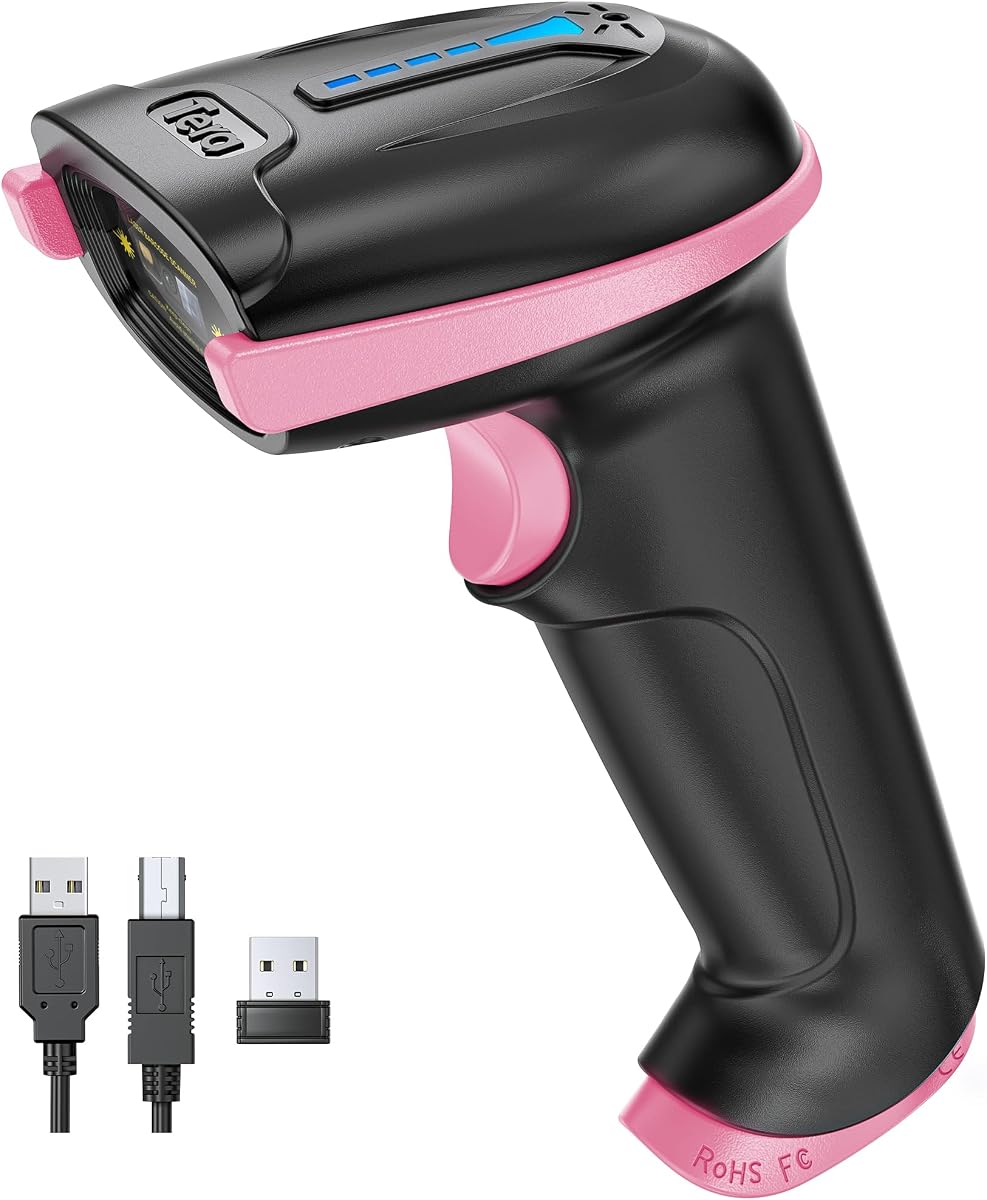
The Tera Barcode Scanner with Battery Indicator in Pink offers the same reliable features as its counterparts. With a 4.5 rating, it ensures consistent performance for library staff. The battery indicator helps maintain workflow continuity by preventing unexpected shutdowns.
We may earn a commission when you buy through this link, at no additional cost to you.
This model includes IP54 dust protection, making it suitable for various library environments. Its ergonomic design supports comfortable handling during shifts. The wireless range allows freedom of movement within the facility.
Like the purple version, it supports only 1D barcodes. If your library uses 2D codes, this may be a limitation. The pink color provides a distinct look, which may appeal to teams preferring variety.
Staff who appreciate aesthetic choices will find this scanner attractive without sacrificing functionality. It remains a solid option for wireless scanning in standard library operations.
The pink design adds a touch of color to professional tools.
Consistent performance matches the purple model's capabilities.
We may earn a commission when you buy through this link, at no additional cost to you.
The WoneNice USB Laser Barcode Scanner provides fast and reliable scanning for libraries. With a 4.5 rating, it delivers high-speed performance ideal for checkout lines. The laser technology ensures accurate reads on printed barcodes.
We may earn a commission when you buy through this link, at no additional cost to you.
It offers 200 scans per second, which accelerates processing times. Compatibility with Windows, Mac, and Linux makes it versatile for diverse library IT setups. The plug and play design simplifies installation for technical staff.
However, the wired connection restricts mobility compared to wireless options. Additionally, laser scanners typically cannot read barcodes from electronic screens. Verify these limitations align with your scanning requirements.
Libraries prioritizing speed and compatibility at fixed stations will find this scanner effective. It balances performance and cost for high-volume scanning environments.
High scan rate reduces wait times for patrons.
Works across major operating systems for broad usability.
We may earn a commission when you buy through this link, at no additional cost to you.
The Symcode Wireless Barcode Scanner offers impressive range for library inventories. With a 4.4 rating, it supports scanning up to 400 meters in open areas. This feature benefits large facilities where staff move between distant sections.
We may earn a commission when you buy through this link, at no additional cost to you.
It includes an offline storage mode for up to 100,000 barcodes, allowing data collection away from the receiver. The rechargeable battery provides over a week of continuous scanning. Multiple scanners can connect to one receiver for team operations.
Note that it does not support square or Shopify POS software. Ensure compatibility with your specific library management system before purchasing. Also, laser technology may not read codes from screens.
Libraries needing extensive wireless coverage will appreciate this scanner's capabilities. It enables flexible workflows without compromising data integrity during remote scanning.
Long-distance connectivity supports wide library layouts.
Stores data securely for later synchronization.
We may earn a commission when you buy through this link, at no additional cost to you.
The Eyoyo Portable Mini 1D Bluetooth Barcode Scanner in Pink combines style with utility. With a 4.3 rating, it serves as a functional tool and a thoughtful gift. Its design appeals to staff who value aesthetics alongside performance.
We may earn a commission when you buy through this link, at no additional cost to you.
It supports Bluetooth, 2.4G wireless, and USB connections for flexibility. The vibration mode ensures quiet operation in library settings. The 650mAh battery provides several hours of use per charge, sufficient for daily tasks.
As with other Eyoyo models, it is limited to 1D barcodes. Battery life is modest compared to higher-capacity options. Ensure these factors align with your usage patterns.
This scanner is ideal for libraries needing portable devices with a distinctive look. It offers reliable functionality while standing out from standard equipment.
Pink color adds personality to library tools.
Multiple connection options adapt to various devices.
We may earn a commission when you buy through this link, at no additional cost to you.
The Barcode Scanner with Stand offers hands-free convenience for libraries. With a 4.0 rating, it provides reliable performance for standard tasks. The adjustable stand allows users to set the optimal angle for scanning.
We may earn a commission when you buy through this link, at no additional cost to you.
This model supports both 1D and 2D barcodes, expanding its utility. Auto-sensing scanning reduces manual triggers, speeding up checkout processes. Plug and play connectivity ensures quick setup without technical hurdles.
The wired connection limits mobility, restricting use to fixed stations. Its rating is slightly lower than other models, suggesting potential inconsistencies. Consider these trade-offs against the benefits of hands-free operation.
Libraries needing a hands-free solution at circulation desks will find this scanner practical. It simplifies workflow for staff handling multiple items simultaneously.
Stand design allows scanning without holding the device.
Handles both 1D and 2D formats for versatility.
We may earn a commission when you buy through this link, at no additional cost to you.
Selecting the right barcode scanner involves evaluating several key factors that impact efficiency and usability in a library setting.
Libraries should decide between wired, wireless, or Bluetooth scanners based on their workflow. Wireless options offer mobility for shelf checks, while wired models ensure stability at fixed stations. Consider your library's layout and infrastructure.
Choose connectivity that aligns with where staff will scan most frequently to avoid interruptions.
Battery capacity determines how long a scanner lasts before recharging. For busy libraries, a long-lasting battery prevents downtime. Look for models with high mAh ratings and clear battery indicators.
Prioritize scanners with extended battery life to support uninterrupted daily operations.
Ensure the scanner supports the barcode types your library uses. Most books have 1D barcodes, but some systems use 2D QR codes. Verify decoding capabilities to avoid compatibility issues.
Select a scanner that reads all necessary barcode formats for your collection.
Library environments can be demanding, with frequent drops or exposure to dust. Durable models with anti-shock designs and protective ratings will last longer. This reduces replacement costs over time.
Invest in rugged scanners to withstand daily wear and tear.
The scanner must work seamlessly with your library management system. Check compatibility with your software before purchasing. Incompatible devices can cause data entry errors or workflow disruptions.
Confirm system compatibility to ensure smooth data transfer.
Cost is a significant factor for library procurement. Determine a budget range that balances features and affordability. Basic models offer essential functions, while premium options provide advanced capabilities.
Choose a model that fits your budget while meeting core requirements.
Staff use scanners for extended periods, so comfort is important. Ergonomic designs reduce hand strain and fatigue. Lightweight options are preferable for mobile tasks.
Select ergonomic scanners to support staff health and productivity.
Regular cleaning and updates maintain scanner performance. Models with simple maintenance requirements save time. Dust covers or protective cases can extend device life.
Opt for low-maintenance scanners to reduce upkeep efforts.
Begin by connecting the scanner to your computer or device according to the manufacturer's instructions. For wireless models, pair the device via Bluetooth or plug in the USB receiver. Ensure the scanner is charged or powered on.
Test the scanner by reading a sample barcode to confirm it transmits data correctly. Adjust settings like volume or prefixes using the provided manual or configuration barcodes. Familiarize staff with proper scanning techniques.
Maintain the scanner by keeping it clean and stored properly. Avoid exposing it to extreme temperatures or moisture. Regularly update firmware if applicable to ensure optimal performance and compatibility.
Most barcode scanners can read barcodes from screens if they use image-based technology like CCD or CMOS. Laser scanners typically cannot read screen barcodes. Check the product specifications to confirm screen scanning capabilities.
1D scanners read linear barcodes found on most books, while 2D scanners read square codes like QR codes. Libraries using modern identification methods may need 2D support. Verify your library's needs before purchasing.
To set up a wireless scanner, plug in the USB receiver or enable Bluetooth on your device. Follow the pairing instructions in the manual. Ensure the scanner is charged before connecting for optimal performance.
Not all scanners work with every library system. Some brands exclude compatibility with certain POS software. Review the product's compatibility list or contact the vendor to confirm support for your specific library platform.
Battery life varies by model and usage intensity. Some scanners last hours on a single charge, while others support days. Look for high-capacity batteries if you need extended use without frequent recharging.
Yes, portable scanners allow inventory checks outside the library. Ensure the device has wireless capabilities and sufficient battery life for outdoor use. Some models offer storage modes for offline data collection.
We reviewed ten top scanners for libraries, highlighting strengths and weaknesses. The NETUM, NetumScan, and Tera models stand out for their reliability and features.
Prioritize connectivity, battery life, and compatibility when selecting a scanner. Align the choice with your library's operational needs to maximize efficiency and staff satisfaction.
Always verify current product details and pricing before purchase. Regular updates may change availability or performance claims, so stay informed about the latest options.