
Akai Professional LPK25
4.7Editor score
Simple plug and play setup
Built-in arpeggiator
Lightweight portable design
This guide compares the top 25 key MIDI controllers for producers and beginners, covering features, DAW integration, and portability to help you choose the
Choosing the right 25 key MIDI controller can transform your music production workflow significantly. These compact devices offer essential control over virtual instruments without taking up much desk space. Whether you are a beginner or a seasoned producer, finding a model that balances portability with functionality is key to creative success.
We have evaluated ten leading models based on build quality, key feel, and software integration capabilities. Our analysis focuses on how well each controller works with popular digital audio workstations and what unique features they bring to the table. This ensures you get a tool that adapts to your specific musical needs and workflow preferences.
Each pick in this list highlights specific strengths like pad quality, knob assignment, or standalone capabilities. Remember that product availability and pricing can shift frequently across different retailers and regions. We recommend checking the latest details before making a final decision to ensure you get the best value for your investment today.
4.7Editor score

4.6Editor score

4.6Editor score
This table provides a side-by-side comparison of the top 25 key MIDI controllers available today. We highlight key specifications and unique features to help you quickly identify which model fits your studio setup and creative requirements best.



The Akai Professional MPK Mini MK3 stands out as a top choice for producers needing reliable control over virtual instruments. With a high rating from users, it delivers consistent performance for both live sets and studio sessions. Its blend of keys and pads makes it versatile for melody creation and drum programming alike.
We may earn a commission when you buy through this link, at no additional cost to you.
Key strengths include the innovative four-way thumbstick which offers precise modulation and pitch control. The included MPC style pads are velocity sensitive and backlit, making them perfect for triggering samples or recording drum patterns. Additionally, Native Kontrol Standard integration ensures seamless workflow with Native Instruments software environments.
Honest trade-offs involve the keybed which can feel a bit stiff compared to full-size keyboards. Some users may also miss the ability to use it without a computer connection. However, these limitations are acceptable given its size and primary focus on DAW integration and mobile production workflows.
This controller is ideal for beat makers and producers who prioritize pad quality and software connectivity. It offers a professional experience in a portable package. We highly recommend it for anyone building a compact setup that requires deep control over their digital audio workstation.
The MPC style pads provide a tactile experience that rivals larger controllers, enabling precise rhythmic programming.
Included bundles like MPC Beats and sound libraries give new users everything they need to start producing immediately.
We may earn a commission when you buy through this link, at no additional cost to you.
The Akai Professional LPK25 is an excellent entry point for those seeking a simple and effective MIDI controller. Its high user rating reflects its reliability and ease of use for beginners. The focus on core functionality ensures you spend more time creating music and less time configuring complex settings.
We may earn a commission when you buy through this link, at no additional cost to you.
Standout qualities include the built-in arpeggiator which adds creative flair to melodies without needing external software. The dedicated octave buttons allow you to access the full range of your instruments easily. Its USB-only power requirement means you can run it directly from laptops without extra adapters or cables.
While it lacks pads and faders found on more advanced units, this simplicity is often a benefit for focused melody writing. The keybed is responsive enough for expressive playing despite being compact. These trade-offs make it a perfect secondary controller or a first device for students learning music production.
Buyers looking for a straightforward tool to capture ideas quickly will find this model ideal. It fits easily into backpacks and small desks. We recommend this for anyone on a tight budget who values portability and essential MIDI controls above advanced features.
By removing unnecessary buttons and knobs, the LPK25 focuses purely on the basics of playing and recording notes.
Its slim profile makes it the ultimate travel companion for songwriters who need to compose on the go.
We may earn a commission when you buy through this link, at no additional cost to you.
The Novation Launchkey Mini 25 MK4 offers a premium experience with full-size drum pads that feel great under the fingers. Its rating highlights strong satisfaction among users who value deep integration with music software. The device is designed to make clip launching and mixing feel seamless within your digital audio workstation.
We may earn a commission when you buy through this link, at no additional cost to you.
Key strengths include Scale Mode which helps beginners avoid hitting wrong notes while composing melodies. The FSR pads support polyphonic aftertouch adding a layer of expressiveness often found on more expensive gear. Integration with major DAWs allows for instant parameter mapping without manual configuration efforts.
The main trade-off is the cost compared to basic controllers, but the added features justify the investment for serious producers. Some users might find the keybed slightly compact compared to full 61 key units. However, the workflow benefits and control surface quality make up for these minor physical constraints.
This controller is perfect for producers who want a complete creative hub in a small footprint. It balances performance and functionality exceptionally well. We recommend it for those willing to invest in quality tools that enhance creativity and reduce technical friction during the production process.
Scale Mode ensures that every note you play fits your current key signature, keeping your ideas harmonically consistent.
The full-size FSR pads allow for dynamic drum programming that feels responsive and natural during performances.
We may earn a commission when you buy through this link, at no additional cost to you.
The Arturia MiniLab 3 offers a distinct design with four faders that provide extra control over mixing and automation. Its high rating reflects its appeal to users who want more than just keys and pads. The build quality is robust and the included software adds significant value to the purchase.
We may earn a commission when you buy through this link, at no additional cost to you.
Key strengths include the customizable button layout which allows you to tailor the controller to your workflow. The faders can be assigned to volume or effect parameters giving you hands-on control during live sessions. Additionally, the Analog Lab Lite software provides a vast library of sounds right out of the box.
Some users may find the unique layout takes time to master compared to standard MIDI controller designs. The faders are smooth but might lack a tactile click for some users. However, these aspects contribute to its sleek aesthetic and allow for a different kind of expressive control.
This controller is best suited for producers who want a modern design with mixing capabilities built in. It works well with various DAWs and synthesizers. We recommend it for those who appreciate thoughtful design and want more than basic key control for their studio setup.
The four included faders let you manage track levels and automation directly from the controller during playback.
Analog Lab Lite offers thousands of presets from Arturia classic synthesizers ensuring you never run out of sounds.
We may earn a commission when you buy through this link, at no additional cost to you.
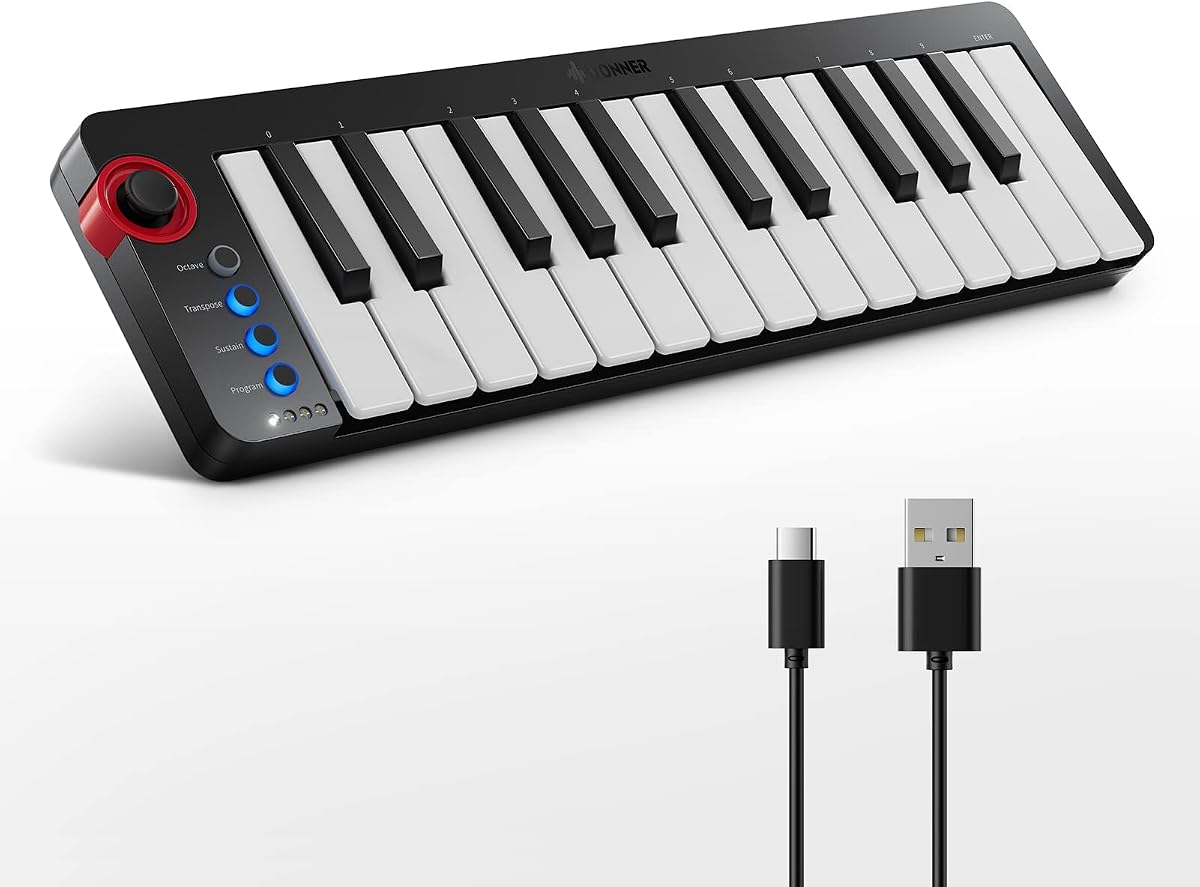
The Donner Mini MIDI Keyboard N-25 is designed with beginners in mind offering extra tools to help learn music production. Its features include light-up rocker buttons that provide visual feedback during play. The inclusion of teaching courses makes it a great gift for someone starting their musical journey today.
We may earn a commission when you buy through this link, at no additional cost to you.
Key strengths are its compatibility with mobile devices allowing you to connect via OTG adapters easily. The arpeggiator and tap tempo functions help create complex rhythms without deep music theory knowledge. This accessibility ensures that anyone can start making beats or melodies immediately without frustration.
The build quality is functional but primarily plastic which may feel less premium than heavier units. The software bundle is basic compared to industry leaders. However, these trade-offs are acceptable given the price point and the educational value it provides to new users.
This controller is perfect for students or hobbyists looking for an affordable way to get started with MIDI. It prioritizes ease of use over advanced features. We recommend it for families or educators wanting a simple and educational tool for music creation on any device.
Light-up buttons show you which notes to play making it easier to follow along with online tutorials.
Connecting to phones via OTG allows you to practice and create music anywhere with your favorite apps.
We may earn a commission when you buy through this link, at no additional cost to you.
The Rhymo 25 Key MIDI Controller brings modern connectivity to compact music production with USB-C and Bluetooth support. This allows for flexible setup options without being tethered to a computer port. It is designed for users who need a reliable portable solution for recording ideas on the go.
We may earn a commission when you buy through this link, at no additional cost to you.
Key strengths include the X-Y joystick which gives expressive control over pitch and modulation parameters. The loop function and arpeggiator add creativity to simple inputs making it fun to experiment. With support for major DAWs it integrates well into existing production workflows seamlessly.
Some users might experience slight latency when using Bluetooth which can affect timing during drum recording. The knobs are functional but not highly customizable for deep parameter mapping. Still these constraints are minor compared to the convenience of wireless connectivity and portability.
This controller is best for travelers or mobile producers needing a lightweight tool for sketching ideas. The USB-C power is a significant advantage for laptop users. We recommend it for anyone looking for a flexible controller that fits easily into a small travel bag.
Bluetooth MIDI lets you control software apps on tablets without needing extra cables or adapters.
The X-Y stick provides dynamic modulation and pitch control that adds life to simple melodies.
We may earn a commission when you buy through this link, at no additional cost to you.
The M-VAVE 25 Key USB MIDI Controller offers a comprehensive feature set including Bluetooth and backlit pads at a competitive price. Its high rating indicates strong satisfaction with its build quality and performance features. The ability to run on batteries makes it a robust choice for outdoor gigs or travel sessions.
We may earn a commission when you buy through this link, at no additional cost to you.
Key strengths include the 8 RGB backlit pads which look great and provide clear visual feedback during performance. The 8 rotary encoders offer ample control for synthesizer parameters or mixing tasks. The 2000 mAh battery provides hours of uninterrupted use without needing a power outlet nearby.
The weight is higher than some competitors due to the battery and larger frame which may reduce portability slightly. Users may need to install specific drivers for full Bluetooth functionality on some systems. However, these issues are minor compared to the versatility it brings to the table.
This controller is ideal for users who want a lot of features without breaking the bank. It is suitable for both studio work and casual jam sessions. We recommend it for anyone seeking a balanced device with wireless capability and a good number of physical controls.
The high capacity battery ensures your sessions won't be cut short by a dead power source or low charge.
RGB pads light up to show active clips or notes making live performance more engaging for you and the audience.
We may earn a commission when you buy through this link, at no additional cost to you.
The Akai Professional MPK Mini Play MK3 is unique because it functions as a standalone keyboard without needing a computer. This feature makes it ideal for jamming or traveling where a laptop is not always available. It combines the utility of a controller with the convenience of a portable synthesizer.
We may earn a commission when you buy through this link, at no additional cost to you.
Key strengths include the built-in speaker system which lets you hear your creations immediately. The internal sounds include drums and instruments giving you a complete music creation tool in one box. You can run on batteries or USB power giving you flexibility in how you use it.
The speakers are convenient but limited in volume and quality for serious monitoring. The unit is heavier than the standard MPK Mini due to the added electronics and battery. These factors make it less suitable as a pure DAW controller but great for portable use.
This controller is best for people who want to compose music anywhere without technical complexity. It is great for beginners or travelers who need instant sound generation. We recommend it for anyone needing a versatile tool that bridges the gap between a keyboard and a controller.
Battery operation lets you take the entire music creation process anywhere without hunting for power outlets.
With internal sounds and speakers you can start making music the moment you open the case.
We may earn a commission when you buy through this link, at no additional cost to you.
The Akai Professional APC Key 25 MK2 is a specialized controller built specifically for Ableton Live users. Its grid of RGB pads is designed to launch clips instantly making it perfect for live electronic music performance. The integration with Ableton Live Lite makes it a strong value for those starting with that software.
We may earn a commission when you buy through this link, at no additional cost to you.
Key strengths include the large 40 RGB pad matrix which offers extensive control for launching clips and scenes. The 8 knobs can be mapped for automation and track control giving you hands-on tweaking capability. Navigation buttons help move between tracks and scenes easily during live sets.
Its functionality is somewhat tied to Ableton Live limiting its usefulness in other DAWs compared to generic controllers. The focus on clip launching means it is less about playing notes than triggering sounds. However for Ableton users this specific workflow optimization is a major benefit.
This controller is best for live performers and producers using Ableton Live exclusively. It transforms how you interact with your arrangement window. We recommend it for those who want a reliable tool for triggering loops and samples during performances or rehearsals.
The large clip grid lets you launch complex arrangements on stage with simple one-touch button presses.
Pre-mapped controls reduce the setup time needed to get live sounds running quickly during a show.
We may earn a commission when you buy through this link, at no additional cost to you.
The M-VAVE 25 Key USB MIDI Controller offers a comprehensive feature set including Bluetooth and backlit pads at a competitive price. Its high rating indicates strong satisfaction with its build quality and performance features. The ability to run on batteries makes it a robust choice for outdoor gigs or travel sessions.
We may earn a commission when you buy through this link, at no additional cost to you.
Key strengths include the 8 RGB backlit pads which look great and provide clear visual feedback during performance. The 8 rotary encoders offer ample control for synthesizer parameters or mixing tasks. The 2000 mAh battery provides hours of uninterrupted use without needing a power outlet nearby.
The weight is higher than some competitors due to the battery and larger frame which may reduce portability slightly. Users may need to install specific drivers for full Bluetooth functionality on some systems. However, these issues are minor compared to the versatility it brings to the table.
This controller is ideal for users who want a lot of features without breaking the bank. It is suitable for both studio work and casual jam sessions. We recommend it for anyone seeking a balanced device with wireless capability and a good number of physical controls.
The high capacity battery ensures your sessions won't be cut short by a dead power source or low charge.
RGB pads light up to show active clips or notes making live performance more engaging for you and the audience.
We may earn a commission when you buy through this link, at no additional cost to you.
Selecting the right controller involves considering your workflow needs, software environment, and portability requirements. This guide breaks down the most critical factors to help you make an informed decision.
The way keys feel under your fingers impacts your ability to play expressively. Look for velocity-sensitive keys that respond to how hard you press. Some models offer semi-weighted keys which feel closer to a real piano but are heavier to transport.
Choose velocity sensitivity for dynamic playing and consider weight if you play frequently or use it as a primary instrument.
Drum pads and rotary knobs extend your control beyond notes to include mixing and triggering. More pads mean more simultaneous triggers for samples or clips. Encoders let you tweak synth parameters without clicking a mouse during production.
If you program beats or automate tracks often choose a model with at least eight pads and knobs for flexibility.
Deep integration with your specific Digital Audio Workstation saves time during setup and performance. Controllers pre-mapped for Ableton or Logic allow you to start mixing immediately without custom mapping efforts. Check if the manufacturer provides specific scripts for your software.
Prioritize controllers with dedicated software support to ensure seamless communication between your hardware and digital environment.
For users who travel or work from cafes, weight and power source matter greatly. USB-only powered controllers are light but tethered to a laptop. Battery options or USB-C charging offer freedom from outlets but add bulk and cost to the unit.
Decide if you need wireless freedom or if a static studio setup works best for your routine.
Many controllers come with free versions of DAWs or virtual instruments. These bundles can save significant money if you do not already own software. Check the limits of these lite versions to ensure they meet your long-term needs.
Valuable software packages add extra worth to the hardware making the overall deal more attractive.
Modern controllers offer various ways to connect including USB, Bluetooth, and MIDI outputs. USB ensures low latency for studio work while Bluetooth allows mobile use. MIDI outs help connect to hardware synths if you use external gear alongside your computer.
Ensure the ports match your setup needs so you can connect all your devices without extra adapters.
To start using your controller connect it to your computer via USB. Most models are class-compliant so no drivers are needed. Select the device in your DAW preferences so the software recognizes it immediately.
Keep your controller clean by wiping it with a dry cloth regularly. Avoid placing liquids near the device to prevent damage to internal components. Store it in a padded case if you travel often to prevent accidental drops.
Most controllers need a computer or tablet to process sound. However some models have built-in speakers and sounds to work standalone. Check the specific model features to see if it supports battery operation.
Yes they are excellent for beginners because they are affordable and easy to use. Their compact size means they fit on any desk. They provide all the basic functions needed to learn music production basics.
You will need a USB OTG adapter to connect the USB cable to the iPad. For Bluetooth models pair the device directly via system settings. Ensure your music app supports external MIDI inputs.
Velocity sensitive keys change volume or tone based on how hard you press. Non-sensitive keys play at a fixed volume regardless of touch. Velocity sensitivity is essential for expressive playing dynamics.
Yes most modern controllers work with mobile apps like GarageBand or Koala Sampler. You just need the right cable or Bluetooth pairing to establish a connection between devices.
Many include a basic DAW like Ableton Live Lite or Logic Pro for Mac. They also come with bundles of virtual instruments and samples. Always check the package contents for these software inclusions.
We have reviewed ten top models ranging from budget-friendly options to feature-rich controllers. The Akai MPK Mini MK3 and Novation Launchkey stand out for their advanced control features. Each option offers unique benefits depending on your production style.
When choosing prioritize the features you use most like pads or knobs. Ensure the controller fits your main DAW workflow for the smoothest experience. Quality controls make the difference between a frustrating setup and a creative one.
Prices and availability change frequently so check the current listings before buying. We hope this guide helps you find the perfect tool to bring your musical ideas to life. Your creative journey starts with the right equipment.