
ARCTIC P8 Silent (5 Pack)
4.4Editor score
Optimized for static pressure
Virtually silent motor
Excellent value pack
This guide compares the top 80mm case fans for quiet cooling, high static pressure, and reliable performance in compact PC builds and servers.
Finding the right 80mm case fan is crucial for maintaining optimal airflow in compact computer builds. These small fans are essential for ITX cases, NAS devices, and server racks where space is limited. A quality fan ensures your components stay cool without generating excessive noise that can be distracting in quiet environments.
We evaluated ten top-rated models based on performance, noise levels, and build quality. Our analysis focuses on static pressure capabilities, bearing types, and PWM control options. Each product was reviewed to understand its suitability for specific use cases ranging from home servers to high-performance gaming rigs.
Every selection highlights unique strengths like whisper-quiet operation or aggressive cooling power. Prices and availability may change, so verify current listings before purchasing. This comprehensive guide helps you make an informed decision for your specific cooling needs without guesswork.
4.4Editor score

4.9Editor score

4.8Editor score
The following table provides a quick overview of key specifications for all ten fans to help you compare performance metrics at a glance.



The Noctua NF-A8 PWM stands out as the premier choice for users prioritizing silence and reliability. With a near-perfect user rating and proven track record, it delivers outstanding cooling without audible disturbance.
We may earn a commission when you buy through this link, at no additional cost to you.
Its Flow Acceleration Channels and advanced frame design optimize airflow while minimizing turbulence noise. The included Low-Noise Adaptor allows further speed reduction for ultra-quiet setups without sacrificing thermal efficiency.
While it commands a premium price, the included mounting hardware and warranty support justify the investment for quality-conscious builders. The brown and grey aesthetic may not suit every visual theme though.
This fan is ideal for silent PCs and compact builds where performance must not come at the cost of noise. Buy this if you demand the best balance of acoustic comfort and cooling power.
Advanced frame design reduces noise while maintaining high airflow efficiency for quiet environments.
With a lifespan exceeding 150,000 hours, this fan ensures years of stable cooling performance.
We may earn a commission when you buy through this link, at no additional cost to you.
The ARCTIC P8 five-pack offers exceptional value for users needing multiple fans for server racks or large case setups. Each unit delivers solid static pressure performance suitable for radiators and heatsinks.
We may earn a commission when you buy through this link, at no additional cost to you.
Its Fluid Dynamic Bearing ensures quiet operation and long service life without lubricant leakage concerns. The high-speed capability allows it to push air through restrictive components effectively.
The absence of PWM control means speeds are fixed or managed via voltage controllers only. Noise levels can rise noticeably when running at the maximum 3000 RPM setting.
This pack is perfect for budget builds requiring multiple exhaust or intake points without breaking the bank. Consider this if you need quantity and static pressure performance over silent PWM features.
Blades engineered to push air through high-resistance components like dense radiators efficiently.
Fluid Dynamic Bearing reduces friction and prevents oil leakage for extended usage life.
We may earn a commission when you buy through this link, at no additional cost to you.
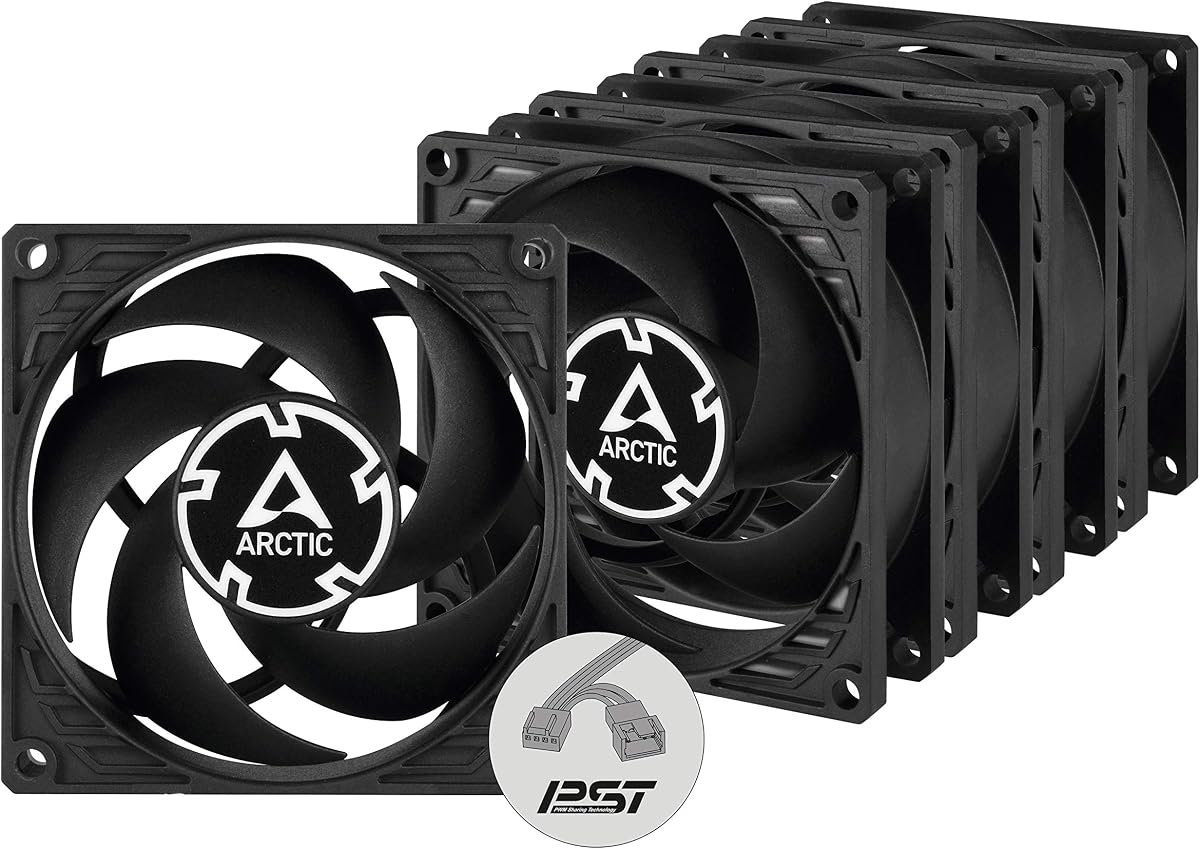
The ARCTIC P8 PWM PST combines the affordability of a multi-pack with sophisticated PWM Sharing Technology. This allows all five fans to be controlled via a single motherboard header.
We may earn a commission when you buy through this link, at no additional cost to you.
Its motor uses advanced Neodym-Iron-Boron magnets for better efficiency and quieter operation compared to standard models. The redesigned blades maintain high static pressure for effective cooling under pressure.
While slightly pricier than the standard P8 pack, the convenience of PWM control without daisy-chaining wires is valuable. Some motherboards may not support PST daisy-chaining without adapter splitters.
This set is ideal for ITX systems or NAS enclosures needing coordinated fan speeds without complex wiring. Choose this if you want the convenience of PWM control across multiple fans.
Connect all fans to one header for synchronized speed control using motherboard signals.
New generation magnetic ring improves efficiency and reduces noise at lower speeds.
We may earn a commission when you buy through this link, at no additional cost to you.
The Noctua NF-R8 redux provides access to renowned cooling performance at a more accessible price point. It shares the core design philosophy of premium Noctua fans but simplifies some features.
We may earn a commission when you buy through this link, at no additional cost to you.
Its optimized low-noise design balances static pressure and airflow perfectly for chassis ventilation. Automatic speed control ensures it remains virtually silent during idle while delivering power when needed.
The redux edition excludes some premium accessories found in standard packages, such as extra cables. However, the core performance and reliability remain intact for most general cooling tasks.
This fan is perfect for users seeking trusted reliability without the highest price tag. Opt for this if you value Noctua engineering quality at a mid-range price.
Streamlined engineering maintains high efficiency while keeping operational noise remarkably low.
Proven technology from award-winning series at a streamlined affordable price point.
We may earn a commission when you buy through this link, at no additional cost to you.
The Kingwin Silent Fan offers basic reliable cooling for those with very tight budgets. Its universal fit makes it suitable for various applications including replacement in older cases.
We may earn a commission when you buy through this link, at no additional cost to you.
Optimized blade design delivers decent airflow to prevent overheating in standard chassis setups. The long-life bearing ensures it runs consistently without failure over moderate periods.
It lacks advanced features like PWM control or specialized noise reduction tech. Noise levels are acceptable but not comparable to premium acoustic-optimized models.
This fan is best for mining rigs or secondary systems where basic airflow is prioritized over silence. Consider this if you need a cheap, functional replacement fan quickly.
Fits standard 80mm mounts in cases, coolers, and radiators without modification.
Housed in a rugged black frame for lasting use in demanding environments.
We may earn a commission when you buy through this link, at no additional cost to you.
The ARCTIC P8 Silent is engineered specifically to minimize noise while maintaining effective cooling. With a noise level of only 0.08 Sone, it is virtually inaudible in quiet rooms.
We may earn a commission when you buy through this link, at no additional cost to you.
Despite its low speed, the motor delivers high static pressure to push air through dense heatsinks efficiently. The bearing technology developed in Germany ensures smooth operation over time.
The fixed 1600 RPM limit restricts its ability to ramp up during intense thermal loads. Without PWM, speed adjustments must be handled externally via voltage controllers.
This fan is perfect for HTPC builds where silence is paramount. Choose this if your priority is absolute quietness over maximum airflow performance.
German engineered motor reduces friction to near-zero operational noise levels.
High static pressure allows efficient cooling even with increased air resistance.
We may earn a commission when you buy through this link, at no additional cost to you.
The chromax.Black.swap edition combines Noctua's legendary performance with a sleek modern aesthetic. It shares the same core performance as the NF-A8 but offers visual customization options.
We may earn a commission when you buy through this link, at no additional cost to you.
Its advanced acoustic frame maintains superior quiet cooling performance even under load. Swappable pads allow you to match colors to your build without sacrificing anti-vibration function.
The higher price reflects the added aesthetic value and customization features. Installing different colored pads requires manual replacement for each fan corner.
This fan is ideal for premium builds where aesthetics and performance must both excel. Opt for this if you demand a high-quality black fan with premium engineering.
Swappable anti-vibration pads in six colors allow personalized build themes.
Award-winning Flow Acceleration Channels ensure quiet high-efficiency cooling.
We may earn a commission when you buy through this link, at no additional cost to you.
This five-pack of P8 Silent fans delivers consistent low-noise performance across multiple installation points. Each unit operates at 1600 RPM ensuring balanced airflow without loud peaks.
We may earn a commission when you buy through this link, at no additional cost to you.
The motor design prioritizes silent operation while maintaining static pressure for radiators and heatsinks. It is a reliable choice for setups needing multiple quiet exhaust points.
Speed is limited to 1600 RPM and cannot be adjusted via PWM. This ensures silence but limits cooling potential during extreme heat events.
Buy this pack for server cabinets or NAS units requiring uniform silent cooling. It is best suited for low-heat environments where noise is the primary concern.
Multiple units deliver identical noise profiles for consistent acoustic experience.
Optimized for static pressure ensures efficient cooling even in dense chassis.
We may earn a commission when you buy through this link, at no additional cost to you.
The ARCTIC P8 Max is a high-performance beast capable of reaching speeds up to 5000 RPM. It is designed for extreme cooling needs in server racks and high-density hardware.
We may earn a commission when you buy through this link, at no additional cost to you.
Its high static pressure ensures air pushes through dense components effectively. The Fluid Dynamic Bearing supports long service life even under demanding high-RPM conditions.
Running at maximum speed generates significant noise making it unsuitable for office environments. It is best reserved for remote server racks or industrial setups.
Choose this if your priority is maximum airflow and static pressure above all else. It excels in 2U racks where heat density requires aggressive cooling.
Up to 5000 RPM provides maximum airflow for high-heat server environments.
Designed for dense heatsinks ensuring cooling where airflow is restricted.
We may earn a commission when you buy through this link, at no additional cost to you.
The Thermalright TL-8015 is ideal for tight spaces where standard 25mm fans will not fit. Its 15mm depth allows installation in compact cases or on CPU coolers.
We may earn a commission when you buy through this link, at no additional cost to you.
With 28.4 CFM max airflow, it punches above its weight despite the thin profile. PWM support allows it to adapt to thermal needs via motherboard control.
The S-FDB V2 bearing minimizes noise and wear over time effectively. While noise is slightly higher than premium options, it remains acceptable for most uses.
This fan is perfect for cases with limited clearance or specific CPU cooler requirements. Consider this if thinness is your primary constraint without sacrificing PWM control.
15mm thickness allows installation where standard fans cannot fit.
S-FDB V2 bearings keep noise minimal while maintaining airflow.
We may earn a commission when you buy through this link, at no additional cost to you.
Selecting the right 80mm case fan involves weighing factors like noise, airflow, and physical constraints. This guide breaks down the essential features to consider.
While all listed fans are 80mm wide, their depth varies. Most are 25mm thick, but some like the Thermalright TL-8015 are 15mm. Always check your case clearance before purchasing.
Ensure your chassis can accommodate the fan thickness to avoid mounting issues during installation.
4-pin PWM fans allow precise speed control via motherboard headers for silence. 3-pin fans run at full speed unless voltage controlled via older headers.
If silent automatic cooling is a priority, choose a 4-pin PWM model like the Noctua NF-A8.
Static pressure fans push air through restrictive components like radiators or dense heatsinks. Airflow-focused fans move more volume in open spaces.
For compact cases or heatsinks, prioritize static pressure models like the ARCTIC P8 series.
Bearing type dictates longevity and noise. Fluid Dynamic Bearings are quiet and durable. Sleeve bearings may wear faster or produce more noise.
Always check bearing specs to ensure long service life and minimal operational noise.
Noise is measured in decibels (dB) or Sones. Lower is quieter. Premium fans like Noctua focus heavily on acoustic optimization.
If noise is a critical factor, select models rated below 20 dB(A) or 0.1 Sone.
Premium brands often offer warranties up to six years. Budget fans may have shorter or no warranties.
Check return policies and support options if you are buying a single unit or pack.
Standard fans often come in brown or black. Black fans like the Noctua chromax.black swap match modern builds.
If you care about internal visuals, choose models with black frames or customizable accessories.
Some fans include screws, adapters, or extension cables. This saves time on extra purchases.
Verify the box contents if you need specific hardware like Y-cables for shared headers.
Install fans so intake pulls fresh air from the front or bottom and exhaust pushes hot air out the rear or top. This creates effective airflow for cooling.
Ensure mounting screws are tight enough to prevent vibration but not overtightened to avoid stressing the frame. Use anti-vibration pads if provided.
Periodically dust fans with compressed air to prevent buildup that reduces efficiency. Avoid spinning blades by hand during cleaning to protect bearings.
Generally no because mounting holes differ. If your case has 80mm mounts, stick to 80mm fans. Some adapters exist but are rare and often unstable. Always verify compatibility with case manuals.
It depends on RPM and bearing quality. Quiet models like Noctua are very silent even at full speed. High-RPM cheap fans can be quite loud. Check noise ratings before buying.
PWM stands for Pulse Width Modulation. It allows the motherboard to control fan speed precisely by sending electrical signals. This enables quieter operation at low temperatures.
Yes, many 80mm fans are designed for servers. Ensure you choose models with high static pressure and airflow. The ARCTIC P8 Max is ideal for high-density server cases.
Fans usually have arrows indicating airflow direction. The arrows on the frame show which way air flows. Align intake fans to pull air in and exhaust to push air out.
Most 80mm fans use 3 or 4-pin headers. Some USB hubs offer fan control but are rare. Standard practice is connecting to motherboard headers for stability.
No, 120mm fans generally move more air quietly due to larger blades. However 80mm fit in compact spaces where 120mm cannot. Choose based on space availability.
High-quality fans last over 100,000 hours. Cheaper ones may fail sooner. Look for MTTF ratings of 50,000 hours or more for reliability.
We recommend the Noctua NF-A8 PWM for overall excellence balancing silence and performance. For budget needs, the ARCTIC P8 silent pack offers incredible value per unit.
Prioritize PWM support and static pressure if you need reliable cooling in tight cases. Always check your case dimensions and mounting hole spacing before finalizing your purchase.
Prices fluctuate regularly so compare current listings before buying. Use this guide to find the perfect fit for your specific cooling requirements.