
Arduino UNO R3
4.8Editor score
ATmega328P microcontroller
14 digital I/O pins
Classic Arduino IDE support
This guide compares the top Arduino Uno Q boards and kits, highlighting hybrid processing, AI capabilities, and connectivity options for developers.
The Arduino Uno Q represents a significant leap in embedded development, blending classic microcontroller simplicity with powerful AI and Linux capabilities. This hybrid board allows creators to tackle complex projects like computer vision and voice recognition without sacrificing the familiar Arduino ecosystem. Whether you are building robots or smart home devices, choosing the right configuration matters.
To compile this list, we evaluated each product based on processing power, memory capacity, included accessories, and overall value for developers. We focused on how well these boards support advanced tasks such as running Debian OS, handling multiple sensors, and integrating with cloud services. Our analysis ensures you find a solution that matches your specific technical requirements.
Each pick in this guide highlights key strengths, from budget-friendly starter kits to premium configurations with extensive peripherals. You will see detailed breakdowns of specs, pros, and cons to help you make an informed decision. Please note that prices and availability can change frequently, so verify current details before purchasing.
4.8Editor score

4.4Editor score
3.7Editor score
The following table provides a side-by-side look at the key specifications and features of the top ten Arduino Uno Q related products available today.


The Arduino UNO Q 4GB stands out as the premier hybrid board for modern development. With a 4.4 rating, it combines the speed of an MPU with the reliability of an MCU. This makes it perfect for projects requiring both high-level AI and real-time control.
We may earn a commission when you buy through this link, at no additional cost to you.
Its standout quality lies in the dual-brain hybrid power. The Qualcomm Dragonwing QRB2210 handles AI acceleration, while the STM32U585 manages low-power tasks. You get 4GB of RAM and 32GB storage, enabling complex models and multi-process workflows without lag.
Trade-offs include a higher price compared to standard boards and a steeper learning curve for Linux setup. However, these are acceptable for users needing edge AI capabilities. The Debian OS support and Python integration offer flexibility that traditional Arduino boards lack.
Developers building robots or IoT systems should buy this board. It empowers you to mix Sketches, Python scripts, and AI models in one interface. This unified experience saves time and unlocks advanced functionalities for professional prototyping.
Runs Debian OS for Python coding and supports Arduino libraries simultaneously for powerful development.
Dual-band Wi-Fi 5 and Bluetooth 5.1 enable robust wireless communication for smart devices.
We may earn a commission when you buy through this link, at no additional cost to you.
This kit offers the core power of the UNO Q with the convenience of included power. Although it lacks a specific user rating, it provides the high-performance specs needed for edge AI. The inclusion of a 45W USB-C supply ensures stability under heavy loads.
We may earn a commission when you buy through this link, at no additional cost to you.
The key strength is its ready-to-run status. Developers get the 4GB AI board instantly without worrying about compatible power adapters. This setup supports scalable AI and industrial IoT systems effectively. The connectivity options match the full board capabilities.
The main drawback is the lack of reviews to verify long-term durability. Additionally, it comes with fewer peripherals than bundled starter kits. However, for those focused on the board itself, this is a practical and cost-effective choice.
Engineers building scalable systems should buy this option. It delivers the necessary computing power and power stability. The focus remains on the core hardware, allowing you to add custom accessories as needed for your project.
The included 45W USB-C supply ensures reliable operation during heavy workloads and peripheral usage.
You get the complete 4GB RAM and connectivity features for advanced robotic applications.
We may earn a commission when you buy through this link, at no additional cost to you.
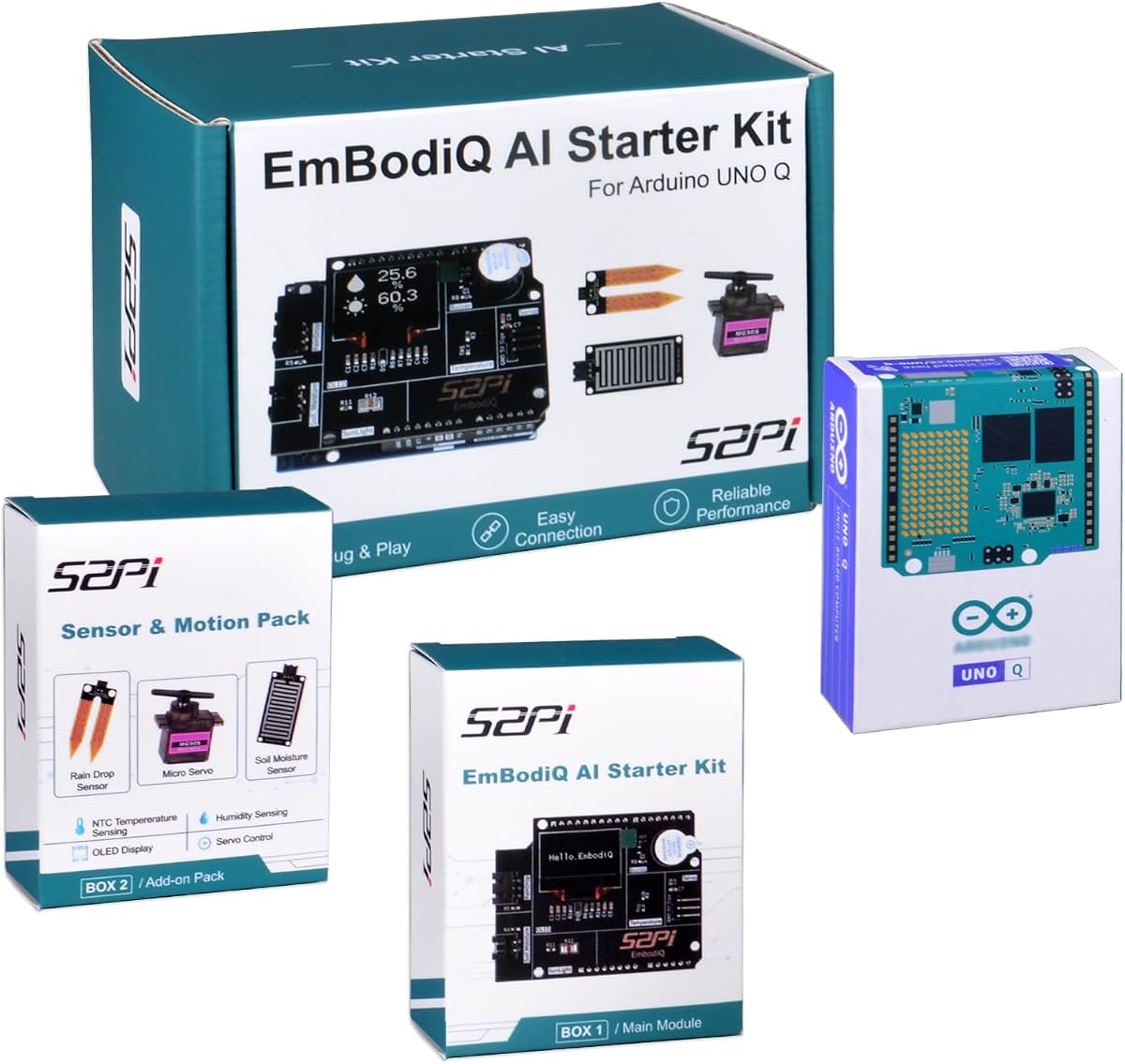
The EmbodiQ kit transforms how you interact with Arduino hardware. With a 3.7 rating, it emphasizes ease of use through natural language control. Instead of complex code, you can tell the AI what to do. This is ideal for educators and makers new to programming.
We may earn a commission when you buy through this link, at no additional cost to you.
Its standout feature is the EmbodiQ AI Agent HAT. It enables real-time reasoning and multi-step task execution. The kit includes sensors like soil moisture and a servo motor, perfect for smart gardening. You can switch AI providers via a web interface.
Trade-offs include the premium price and a mixed user rating reflecting complexity. Not everyone will need such advanced AI capabilities. However, for those seeking intuitive control, the investment provides a unique learning experience and automation power.
Makers wanting intuitive automation should buy this kit. It removes coding barriers for controlling hardware. The included tools and flexibility make it a strong choice for exploring AI-driven projects without deep technical knowledge.
Control sensors and servos using natural language without needing complex coding skills.
Built-in AI Agent allows real-time reasoning and conditional logic for complex tasks.
We may earn a commission when you buy through this link, at no additional cost to you.
The Arduino Uno REV3 remains a gold standard for learning electronics. With a 4.8 rating, it is trusted by millions worldwide. It offers the classic experience that everyone knows. This makes it the safest choice for first-time users or basic projects.
We may earn a commission when you buy through this link, at no additional cost to you.
Its key strength is compatibility and simplicity. The ATmega328P microcontroller runs at 16MHz with ample flash memory. You can access thousands of libraries and examples. The USB port allows direct programming, simplifying the development process significantly.
Trade-offs include limited speed compared to modern AI boards. It lacks native wireless features like Wi-Fi or Bluetooth. However, for simple DIY projects and prototyping, these limits are rarely an issue. The simplicity is its biggest asset.
Beginners and educators should buy this board. It is perfect for teaching logic and circuits. The broad compatibility means your skills transfer easily to other Arduino boards in the future.
Standard in educational environments for learning electronics and programming basics effectively.
Full compatibility ensures easy access to vast libraries and community-driven projects.
We may earn a commission when you buy through this link, at no additional cost to you.
This kit provides everything needed to start developing with the UNO Q immediately. With a 4.6 rating, it balances hardware quality and accessory value. You get the UNO Q with 2GB RAM and 16GB storage. The aluminum case protects the board and manages heat.
We may earn a commission when you buy through this link, at no additional cost to you.
The comprehensive accessory package is its main strength. It includes a USB-C hub with Ethernet, HDMI cable, and power supply. This allows you to run it as a standalone computer. The versatile connectivity options expand the board for professional apps.
Trade-offs include the higher cost compared to buying parts separately. You are locked into the 2GB RAM configuration. However, for those who want a complete solution without hunting for cables, this kit offers significant convenience and durability.
Engineers needing a robust setup should buy this kit. It allows immediate work in standalone mode. The durable case and included hubs make it ready for professional and embedded projects right out of the box.
Use as a standalone computer with monitor or connect via USB-C for familiar experience.
Includes USB-C hub, Ethernet, power supply, HDMI, and cables for full setup.
We may earn a commission when you buy through this link, at no additional cost to you.
The UNO R4 WiFi brings modern connectivity to the classic UNO line. With a 4.7 rating, it is highly rated for IoT work. It combines the Renesas RA4M1 and ESP32-S3 chips for dual-core performance. This board handles wireless control and data processing efficiently.
We may earn a commission when you buy through this link, at no additional cost to you.
Key strengths include comprehensive wireless connectivity and analog precision. The 12-bit DAC and OP-AMP allow high-quality signal generation. The built-in LED matrix provides instant visual feedback. The USB-C port improves ease of use over older USB types.
Trade-offs include less raw AI power compared to the UNO Q. It uses a different architecture which might require code adjustments. However, for standard IoT and robotics, its connectivity and features make it a strong alternative for advanced projects.
Developers building smart devices should buy this board. It offers robust wireless and precision analog features. The modern USB-C and LED matrix make it ideal for interactive and connected systems.
Wi-Fi and Bluetooth ensure robust communication for IoT projects and remote sensors.
USB-C allows efficient power delivery while CAN supports real-time industrial communication.
We may earn a commission when you buy through this link, at no additional cost to you.
This kit is designed to teach the logic of electronics and coding. With a 4.7 rating, it is popular for beginners. It includes a UNO R3 controller and many components like LCDs and motors. The 22+ lessons guide you through real-world results.
We may earn a commission when you buy through this link, at no additional cost to you.
Its key strength is the organized variety of projects. You get modules that plug in without soldering. This helps beginners focus on wiring and code. The tutorial supports setting up the IDE and checking component polarity easily.
Trade-offs are that it uses the older R3 controller. It does not include advanced AI features like the Q. However, for learning the fundamentals and logic of electronics, it provides a solid foundation for all projects.
Homeschoolers and new makers should buy this kit. It turns code into real-world results effectively. The guided lessons and clear support make it ideal for family builds or STEM classrooms.
Follow guided lessons to make LEDs blink, read sensors, and control motors.
Plug-in modules and solderless breadboard help focus on wiring and code testing.
We may earn a commission when you buy through this link, at no additional cost to you.
This board offers the core experience of Arduino at a low price. With a 4.7 rating, it is trusted for daily tasks. It features the ATmega328P core with ample I/O pins. The included USB cable helps you start coding immediately.
We may earn a commission when you buy through this link, at no additional cost to you.
Its key strength is reliability and clarity. The USB interface supports sketch uploads easily. Clearly labeled headers simplify connections to wires and modules. This makes it practical for maker desks and classrooms.
Trade-offs include the lack of additional components or shields. It is just the board and cable. However, for those who already have a project in mind, this provides a cost-effective and capable controller.
Those on a budget should buy this board. It allows you to start projects without high costs. The reliable USB and clear wiring make it a practical choice for general electronics work.
The ATmega16U2 interface supports sketch uploads and serial communication effectively.
Run from USB or external supply and add shields for various custom projects.
We may earn a commission when you buy through this link, at no additional cost to you.
This board delivers core performance for robotics and smart home tech. With a 4.0 rating, it serves basic needs well. It features 32KB flash and 2KB SRAM. The 14 digital I/O pins support PWM for precise control of actuators.
We may earn a commission when you buy through this link, at no additional cost to you.
Its key strength is compatibility with the standard IDE. You get UART, SPI, and I2C interfaces for seamless connections. The included cable helps you connect to your computer immediately. It works with many shields and boards.
Trade-offs include fewer extras and a lower user rating. It is a standard basic board. However, for straightforward prototyping and education, it provides a solid foundation without unnecessary complexity.
Students and hobbyists should buy this board. It is compatible with various sensors and modules. The broad compatibility ensures it works well with your existing projects and tools.
Compatible with Arduino IDE and many shields for flexible project building.
14 digital and 6 analog pins provide versatile connectivity for sensors.
We may earn a commission when you buy through this link, at no additional cost to you.
This board unlocks creativity with a versatile development environment. With a 4.5 rating, it offers reliable performance for projects. It features high-performance ATmega328P controller. The open-source design allows customization for innovative applications.
We may earn a commission when you buy through this link, at no additional cost to you.
Its key strength is broad compatibility and interfaces. It connects with UART, SPI, and I2C. The voltage range supports standard power supplies. This makes it easy to prototype and realize electronic dreams with minimal friction.
Trade-offs include it being a third-party compatible board. It may lack official support features. However, for those who value cost and flexibility, it offers strong value. The performance is reliable for most DIY needs.
Hobbyists and professionals should buy this board. It integrates with the ecosystem seamlessly. The reliable performance and broad compatibility make it a must-have for interactive systems.
Offers seamless integration with the ecosystem and vast code resources.
User-friendly environment and I/O pins bring ideas to life easily.
We may earn a commission when you buy through this link, at no additional cost to you.
Selecting the right Arduino Uno Q depends on your project needs and technical skills.
The UNO Q uses a hybrid processor with both an MPU and MCU. This allows you to run Linux for heavy tasks and use the MCU for real-time control. If your project involves AI or complex logic, prioritize models with higher RAM like the 4GB version.
Choose the highest processing power that fits your budget for smooth AI operations.
Memory is critical for running models and storing data. Boards with 4GB RAM handle multitasking better than 2GB. Storage like eMMC lets you keep your OS and files directly on the board without external drives. This is vital for standalone operation.
Look for 32GB eMMC and at least 4GB RAM for advanced standalone projects.
Unlike traditional boards, the UNO Q runs Debian OS. This opens up Python scripting and standard Linux tools. Ensure the version you buy supports the software you need. Linux support is key for developers who want more than just embedded C++.
Verify Linux Debian support if you plan to use Python or scripts.
Wireless capabilities are essential for IoT. Most boards include Wi-Fi 5 and Bluetooth 5.1. For stationary projects, Ethernet options via USB-C hubs are useful. Consider how you will power your board and if USB-C power delivery is sufficient for your setup.
Check for Wi-Fi 5 and consider USB-C power for stable wireless performance.
Starter kits often include cables, power supplies, and cases. These save time and money if you need them. A rugged case protects the board from physical damage. Kits with specific sensors like soil moisture are great for themed projects.
Evaluate if you need included hubs and cables or prefer to buy them separately.
The UNO Q keeps the classic UNO form factor. This means many existing shields will still fit. However, high-performance peripherals might need more power than the headers provide. Ensure your legacy hardware matches the new power requirements.
Confirm shield compatibility before mixing old hardware with the new hybrid board.
Specific kits like EmbodiQ offer natural language control. This lowers the barrier to entry for beginners. If you want to use cloud AI models, check API support. Tools like Arduino App Lab simplify the initial setup significantly.
Choose kits with tools that match your coding skill level for ease of use.
For simple robotics, older boards like the Uno R3 or R4 WiFi may suffice. If you need vision or voice recognition, the UNO Q is necessary. Match the complexity of your project to the hardware capabilities to avoid overspending.
Select hardware based on whether you need basic control or advanced AI vision.
To begin, connect the board via USB-C and install the Arduino IDE. Use the App Lab to set up the Debian OS environment. Download necessary libraries for your project. Test basic connectivity by uploading a simple sketch to ensure communication works.
For physical setups, avoid overloading the power supply. Use the provided 45W adapter for AI tasks to ensure stability. Connect sensors through the headers or Qwiic connectors. If using Linux mode, keep your system updated for security and performance.
To care for your board, store it in a dry place. If using a case, ensure ventilation remains open. Avoid static electricity when handling the board directly. Regularly backup your code and OS data to prevent loss during updates.
Yes, the UNO Q supports Debian OS which allows Python scripts. This is a major upgrade from traditional Arduino boards. You can run Python alongside C++ Sketches for powerful hybrid applications.
Yes, it retains the classic UNO form factor and pinout. This means many standard shields will fit physically. However, check power requirements as some shields may draw more current than typical MCU pins provide.
The main difference is RAM capacity. The 4GB models handle multitasking and complex AI models better. If you run a full OS or multiple heavy processes, the 4GB version provides necessary headroom.
While USB-C works for basic tasks, heavy AI workloads may need more power. The official 45W USB-C adapter ensures stability. Avoid using weak chargers when running high-performance applications.
Yes, the UNO Q can run as a standalone single-board computer. You can connect a monitor via HDMI and use a keyboard. This makes it great for kiosks or embedded devices that do not need a PC.
Switching is seamless with Arduino App Lab. You can choose to run pure Sketches or deploy Linux code. The development environment is unified so you do not need complex tools to manage both modes.
Yes, the board includes dual-band Wi-Fi 5. It supports both 2.4GHz and 5GHz bands for better connectivity. Bluetooth 5.1 is also integrated for wireless peripheral communication.
The Arduino Uno Q series offers a powerful leap into hybrid development. Our top picks range from the standard UNO Q 4GB to specialized kits like the EmbodiQ AI Starter. Each provides unique benefits for robotics, IoT, and embedded tasks.
Prioritize processing power and connectivity based on your specific goals. If you need AI vision, the 4GB RAM is essential. For standard projects, the classic R3 remains a reliable budget option. Choose the kit that saves you setup time.
Prices and stock levels can change quickly in the market. Always verify the current pricing and availability before buying. Check the product details to ensure you are getting the right memory and accessories for your project needs.