
ASUS Prime AP201 Micro-ATX PC Case
4.7Editor score
High airflow mesh panels
Compact spatial efficiency
Tool-free side panels
Discover the top ASUS PC Case models for 2026 featuring thermal performance build quality and design in this comprehensive comparison guide for builders.
Finding the right housing for your system is critical for longevity and aesthetics. ASUS offers a diverse range of chassis designed for gamers and professionals alike.
We analyzed ten top models based on airflow efficiency cable management and build materials. This list highlights the most reliable options available in the current market.
Each pick showcases unique strengths tailored to different build needs and budgets. Please note that product availability and pricing may fluctuate frequently online.
4.7Editor score

4.8Editor score

4.6Editor score
This side-by-side comparison evaluates ten distinct chassis models focusing on form factor cooling capabilities and unique design elements to help you choose the right fit.


The ASUS TUF Gaming GT501 stands out as a top-tier option for high-performance builds with its E-ATX support and robust chassis. It holds a strong 4.8 rating due to its efficient cooling and aesthetic appeal featuring a unique spatter pattern.
We may earn a commission when you buy through this link, at no additional cost to you.
Its standout features include three pre-installed 120mm Aura Sync RGB fans and a 140mm rear PWM fan ensuring excellent thermal performance. The case supports massive custom liquid cooling loops with top or front mounted 360mm radiators and has ergonomic carry handles for easy transport.
While the case is heavier than standard mid-towers and priced higher than basic models the durability justifies the investment. The included tempered glass panels and ample space for vertical GPU setups make it ideal for enthusiasts who prioritize both performance and style.
Enthusiast builders seeking a reliable and spacious chassis with premium cooling features should choose this model. It balances aesthetics and function perfectly making it the best choice for complex gaming rigs or workstation setups.
The semi-open structure and multiple fan mounting points ensure optimal airflow even with high-power components installed.
The custom spatter pattern and thick tempered glass provide a rugged yet sophisticated look for any desk setup.
We may earn a commission when you buy through this link, at no additional cost to you.
The ASUS Prime AP201 offers exceptional value for builders needing a compact yet capable chassis. It holds a 4.7 rating for its innovative mesh design that maximizes airflow without compromising on style or build integrity.
We may earn a commission when you buy through this link, at no additional cost to you.
It features over 57,000 precision-machined holes in the mesh panels allowing for superior cooling of high-performance hardware. Despite its small size it supports ATX PSUs up to 180mm long and graphics cards up to 338mm long making it surprisingly versatile.
The trade-off is limited expansion space compared to full towers which may restrict multi-GPU setups. However for single-GPU gaming or productivity builds the efficiency and ease of access via tool-free side panels make it an excellent choice.
Budget-conscious builders looking for a compact efficient case with high cooling potential should select this model. It delivers premium features at an affordable price point making it a standout in the micro-ATX category.
The quasi-filter mesh design allows air to flow freely preventing thermal throttling during intensive workloads.
Side panels clip securely yet remove easily enabling quick hardware swaps or maintenance without tools.
We may earn a commission when you buy through this link, at no additional cost to you.
The ASUS ROG Hyperion GR701 is a flagship chassis designed for ultimate performance and style. It receives a 4.6 rating for its exceptional cooling capabilities and premium materials that support even the most demanding gaming setups.
We may earn a commission when you buy through this link, at no additional cost to you.
Its semi-open structure allows for up to two 420mm radiators making it ideal for custom water cooling loops. The sturdy diecast aluminum-alloy frame ensures durability and the top bars can be used as carry handles supporting up to 80KG.
The high price and large size may not suit smaller desks or budget builds but the features justify the cost for enthusiasts. The built-in storage drawer and integrated graphics card holder add convenience that is often missing in other premium cases.
High-end enthusiasts seeking maximum cooling and premium build quality should invest in this case. It offers a unique blend of robust construction and user-friendly features that elevate the building experience.
Support for massive radiators ensures stable temperatures even under extreme overclocking or gaming loads.
The diecast aluminum frame provides rigidity and a high-end feel unmatched by standard steel chassis.
We may earn a commission when you buy through this link, at no additional cost to you.
The ASUS TUF Gaming GT502 Horizon redefines visibility with its boundless panoramic design. It holds a 4.5 rating for its unique dual-chamber chassis that separates CPU and GPU cooling zones while offering an unobstructed view.
We may earn a commission when you buy through this link, at no additional cost to you.
The front and side tempered glass panels create a window into the system allowing builders to showcase their hardware. It features a USB 10 Gbps Type-C port for high-speed data transfer and tool-free side panels for easy access during assembly.
The glass panels require careful cleaning to avoid fingerprints and the modular design adds complexity to cable management. However the aesthetic appeal and independent cooling zones make it a compelling choice for those who want their build to stand out.
Visual-focused builders wanting a modern spacious case with independent cooling zones should choose this model. It delivers a striking aesthetic that complements high-end components while maintaining solid performance.
Separating CPU and GPU zones prevents heat buildup ensuring consistent performance during long sessions.
Detachable panels streamline hardware installation making upgrades or maintenance significantly easier.
We may earn a commission when you buy through this link, at no additional cost to you.
The ASUS A31 PLUS is designed for builders prioritizing a clutter-free look with its hidden connector readiness. It holds a 4.1 rating for its innovative approach to cable management and compatibility with modern motherboards.
We may earn a commission when you buy through this link, at no additional cost to you.
It supports motherboards featuring hidden connectors which optimizes cable management for a cleaner setup. The case includes four pre-installed ARGB fans providing effective cooling while delivering a vibrant lighting display that enhances aesthetics.
The angled base design enhances airflow efficiency and widens the viewing angle for a more immersive experience. While the build quality is standard the thoughtful design features make it a strong contender for those seeking a tidy appearance.
Builders focused on clean aesthetics and modern motherboard compatibility should consider this model. It offers a practical solution for cable management without sacrificing visual appeal.
Optimized for motherboards with concealed connectors to ensure a seamless and tidy internal layout.
The 8-degree tilt improves airflow while creating a visually dynamic angle for your desk setup.
We may earn a commission when you buy through this link, at no additional cost to you.
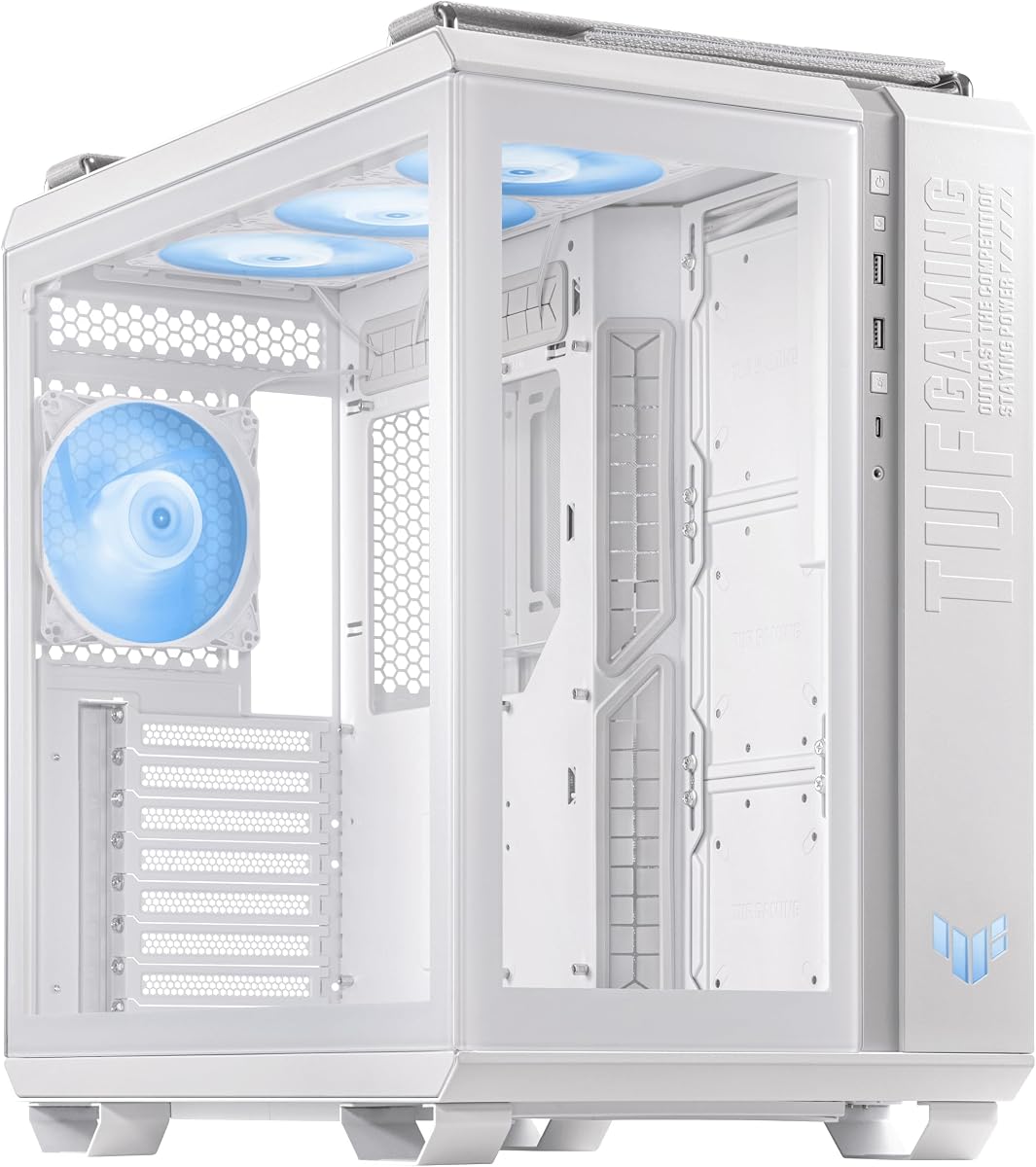
The ASUS TUF Gaming GT501 White Edition brings a fresh look to the classic full-tower design. It earns a 4.7 rating for maintaining the same structural integrity and cooling efficiency as the black version while offering a distinct visual appeal.
We may earn a commission when you buy through this link, at no additional cost to you.
The custom TUF Gaming spatter pattern on the white front panel stands out visually and is paired with a smoked tempered glass side panel. It supports both front and top mounted 360mm water-cooling radiators ensuring thermal stability for powerful components.
White cases often show dust more easily requiring more frequent cleaning to maintain their pristine appearance. Despite this the ergonomic carry handles and optimized placement for TUF Gaming gear make it a top choice for white-themed builds.
Gamers seeking a high-performance white-themed build should choose this model. It combines robust cooling capabilities with a clean striking aesthetic that enhances any gaming setup.
The white finish complements matching motherboards and components creating a cohesive and professional look.
Software optimization allows precise control over fan speeds for better noise and cooling management.
We may earn a commission when you buy through this link, at no additional cost to you.
The ASUS TUF Gaming GT301 is a compact mid-tower designed to maximize cooling in a smaller footprint. It holds a 4.6 rating for its perforated honeycomb front panel which aids airflow effectively within the compact space.
We may earn a commission when you buy through this link, at no additional cost to you.
It includes an integrated 6 port Aura Sync addressable RGB controller hub allowing for stunning lighting effects. The case also features a dedicated headphone hanger and supports up to 280/360mm water-cooling radiators in the front.
The compact size limits the maximum graphics card length which may restrict the use of larger triple-fan cards. However for standard gaming setups the high airflow and included accessories offer excellent value for money.
Budget builders needing a compact case with strong airflow and lighting control should pick this model. It balances performance and convenience in a space-saving design.
The honeycomb front panel ensures air enters efficiently cooling components without obstruction.
A dedicated hub simplifies managing lighting without needing an external controller or motherboard port.
We may earn a commission when you buy through this link, at no additional cost to you.
The ASUS TUF Gaming GT502 Horizon ARGB combines modular design with dual chamber efficiency in a white chassis. It earns a 4.7 rating for its high-speed connectivity and clean aesthetic appeal suitable for modern workstations.
We may earn a commission when you buy through this link, at no additional cost to you.
The interior is divided into two chambers creating independent cooling zones for the CPU and graphics card to prevent heat buildup. It features a USB 20Gbps Type-C port on the front panel ensuring rapid data transfer speeds for connected devices.
The white modular panels require careful handling and cleaning to keep them looking pristine over time. Despite this the combination of high-speed USB and superior airflow design makes it a compelling choice for users needing fast connectivity.
Professionals wanting high-speed data transfer and clean cooling should select this case. It offers advanced connectivity features that enhance productivity alongside solid thermal performance.
The 20Gbps Type-C port supports fast external storage transfers essential for creative workflows.
Separating key components into distinct zones ensures they remain cool even during heavy loads.
We may earn a commission when you buy through this link, at no additional cost to you.
The ASUS A31 Plus TG ARGB Black ATX PC Case is designed for a clean modern build experience. It holds an impressive 4.9 rating for its user-friendly design features and high compatibility with long graphics cards.
We may earn a commission when you buy through this link, at no additional cost to you.
It is built for motherboards with concealed connectors to optimize cable management for a clutter-free setup. The panoramic design features tempered glass panels on the front and sides providing an unobstructed view of the main chamber.
The angled base improves thermal performance and creates a more immersive viewing angle for users. While it requires compatible motherboards for the best results the high rating reflects strong user satisfaction with its design.
Modern builders seeking high compatibility and sleek design should choose this model. It excels in providing a tidy and visually appealing environment for components.
Concealed connectors reduce visible clutter leading to a cleaner and more organized internal layout.
The angled base design enhances the view of internal components for a more immersive experience.
We may earn a commission when you buy through this link, at no additional cost to you.
The ASUS TUF Gaming GT502 Plus offers a dual chamber design at a competitive price point. It holds a 4.6 rating for its balanced approach to cooling and aesthetics making it ideal for mid-range builders.
We may earn a commission when you buy through this link, at no additional cost to you.
Internals are divided into two chambers configuring independent cooling zones for the CPU and GPU. It features a USB 3.2 Gen 2 Type-C port for fast data transfer and tool-free side panels for convenient hardware installation.
While it lacks some high-end aesthetic flourishes of premium models it delivers solid performance and cooling. The modular design allows panels to be removed easily easing hardware installation without special tools.
Value seekers wanting dual chamber cooling and modern connectivity should pick this model. It provides essential premium features at an accessible price point.
Separating CPU and GPU zones prevents heat overlap ensuring consistent system stability.
The Gen 2 Type-C port supports high-speed data transfer essential for modern peripheral use.
We may earn a commission when you buy through this link, at no additional cost to you.
Selecting the right chassis involves evaluating form factor cooling needs and design features. This guide outlines key factors to consider for a successful build.
Ensure the case supports your motherboard size such as ATX or E-ATX to avoid fitting issues. Check the dimensions to guarantee your specific motherboard will fit securely.
Verify the motherboard type matches the internal space available for mounting components properly.
Look for mesh panels or honeycomb designs that maximize air intake for high-performance hardware. Proper airflow prevents overheating during intensive tasks.
Prioritize cases with ample fan mounting points and radiator support for custom liquid cooling setups.
Steel and aluminum frames offer durability and rigidity to protect components from damage during transport. Sturdy construction ensures the case remains stable over time.
Choose a case with reinforced edges and quality panel materials to maintain aesthetic integrity.
Extended motherboard trays and cutouts help hide cables for a clean look and better airflow. Good management reduces clutter and improves system cooling efficiency.
Look for features like hidden connector compatibility to simplify routing and reduce visual noise.
USB 3.0 or Type-C ports on the front allow for high-speed data transfer and convenient connectivity. These features enhance usability for everyday peripherals.
Check for headphone jacks and microphone inputs to avoid reaching for rear ports frequently.
Vertical GPU expansion slots allow for a stylish vertical mounting option for your graphics card. This feature can improve airflow and showcase the card better.
Ensure there are enough standard slots for additional cards like capture or sound cards if needed.
Cases with pre-installed ARGB fans save time and ensure consistent lighting effects out of the box. RGB controllers or hubs simplify managing complex light setups.
Select a case with adequate space for custom lighting strips if you plan to add extra LEDs.
Ergonomic carry handles make moving the system easier especially for large and heavy chassis. This feature is essential for LAN parties or regular system relocation.
Check weight capacity and handle sturdiness to ensure safe transport of the complete build.
Install components following the manufacturer manual ensuring you secure screws properly to avoid damage. Check that cables are routed neatly using the included tie-downs to maximize airflow.
Clean the mesh panels periodically using compressed air to prevent dust buildup that can restrict airflow. Use a soft cloth to wipe down glass panels to remove fingerprints and smudges effectively.
If moving the chassis use the handles if available and ensure internal components are stable. Regularly inspect fans for noise or vibration to maintain long-term system performance.
Many modern ASUS cases like the GT501 and GT502 support vertical GPU mounting via a dedicated expansion slot. Always verify the specific model compatibility before purchasing to ensure proper fit.
Most ASUS cases come with pre-installed RGB or PWM fans depending on the model. Check the product details to confirm the number and type of fans included with your purchase.
Yes many models support radiators up to 360mm or 420mm at the front or top. Verify the specific dimensions to ensure your AIO or custom loop fits correctly.
A Micro-ATX case typically supports Micro-ATX and Mini-ITX motherboards comfortably. Larger ATX boards may not fit so check the case compatibility list carefully.
Many models feature tool-free clips or buttons allowing easy removal of side panels. This design simplifies hardware installation and maintenance without needing additional tools.
Specific models like the A31 Plus are designed for motherboards with hidden connectors. This feature optimizes cable management for a cleaner setup.
Yes most models use 4mm thick tempered glass panels for safety and durability. This material resists shattering and provides a clear view of your internal components.
Many newer models include USB 3.2 or 3.1 Gen 2 Type-C ports on the front panel. This ensures fast data transfer capabilities for modern peripherals.
The ASUS TUF GT501 and Prime AP201 stand out as top choices for enthusiasts and budget builders respectively. Each offers unique features tailored to different build requirements.
Prioritize cooling performance and motherboard compatibility when selecting a case to ensure long-term stability. A well-ventilated chassis protects components from thermal stress over time.
Always check current prices and availability as stock fluctuates frequently on retail sites. This guide helps identify the best options for your specific hardware needs.