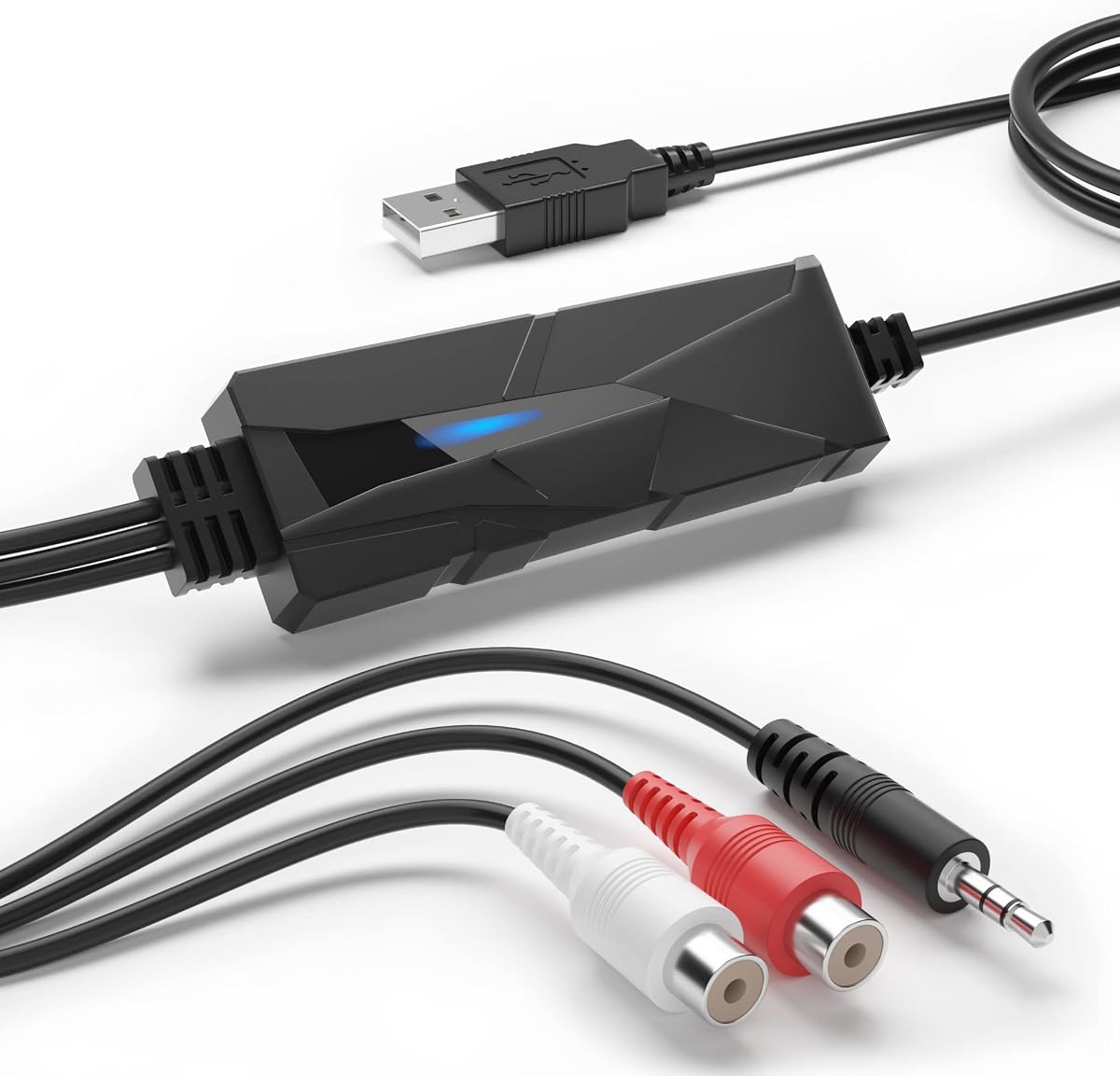
DriverGenius AudioXfer USB Audio Capture Card Device
4.2Editor score
Analog to digital conversion
3.5mm and RCA inputs
Includes recording software
Discover the top audio converters for Mac to enhance your sound quality and connectivity across various devices and professional audio setups efficiently.
Finding the right audio converter for your Mac can transform your listening experience significantly. These devices bridge the gap between digital sources and analog outputs, ensuring high fidelity and clear sound reproduction.
We compared ten top-rated models based on compatibility, audio quality, ease of use, and value. Our selection includes budget-friendly options and premium units designed for audiophiles and professionals alike.
Each pick highlights key features and ideal use cases to help you decide. Prices and availability may change, so verify details on the manufacturer site before purchasing today.
4.2Editor score

4.3Editor score

4.5Editor score
This side-by-side comparison outlines the core capabilities of each model to help you identify the best fit for your specific Mac audio needs and budget constraints.


The DriverGenius AudioXfer is a budget-friendly option for converting analog audio to digital formats on Mac. It features a 3.5mm and RCA input to capture audio from old tapes or devices. The included Audacity software helps you edit and save your recordings easily.
We may earn a commission when you buy through this link, at no additional cost to you.
This device excels at simple conversion tasks like transferring cassette tapes to MP3. It supports sample rates of 44.1 and 48kHz which are standard for most digital audio. The LED indicator shows when it is actively recording audio signals.
Users must ensure they update Audacity to version 2.3.1 for 64-bit Mac systems. While it lacks high-end specs, it serves well for preserving memories without spending much. The build is compact and requires minimal desk space.
If you need a cost-effective way to digitize old audio on Mac, this is a solid choice. It is ideal for casual users who want to archive music or podcasts from analog sources.
This converter makes it easy to move audio from cassettes to your Mac using simple cables and software.
Audacity is included to help you edit and save recordings directly on your computer.
We may earn a commission when you buy through this link, at no additional cost to you.
The Fosi Audio K5 Pro offers excellent sound quality for both gaming and music on Mac. It converts USB-C optical and coaxial signals into analog outputs with low distortion. The built-in microphone function adds versatility for calls or streaming.
We may earn a commission when you buy through this link, at no additional cost to you.
Powered by the Texas Instruments NE5532 op-amp, this DAC delivers a clean sound with a low noise floor. It supports sample rates up to 24 bit per96 kHz via USB and higher via optical inputs. Volume controls are integrated into a single button for ease of use.
While it is slightly more expensive than basic models, the audio performance justifies the cost. It connects well to powered speakers or headphones up to 300 Ohm. The design ensures it fits nicely on a desktop setup.
This model is perfect for Mac users who want a significant upgrade over built-in audio ports. It balances performance and features well making it a top pick for most users.
The op-amp chip ensures clean audio with minimal distortion for a better listening experience.
Inputs like USB-C and optical allow you to connect various devices to your Mac setup.
We may earn a commission when you buy through this link, at no additional cost to you.
The Shure MVX2U Gen 2 is a premium interface designed for professional streaming and recording on Mac. It connects XLR microphones directly to USB-C with advanced onboard processing for consistent audio. Features like Auto Level Mode adjust gain in real-time automatically.
We may earn a commission when you buy through this link, at no additional cost to you.
This device offers zero-latency monitoring which is crucial for live streaming or podcasting. You can customize tone using Dark Natural or Bright settings via the MOTIV app. It provides up to 60dB of clean gain and supports 48V phantom power.
Although it is pricier than basic converters, its performance and features are unmatched in this category. It is built to handle professional tasks that require high reliability and sound quality. Setup is straightforward with no complex drivers needed.
If you need a top-tier interface for podcasting or music production on Mac, this is an ideal choice. It ensures your voice or instruments are captured with clarity and precision.
Onboard DSP tools like noise reduction and pop filters ensure clean audio output.
Manage settings and customize sound using the MOTIV app on desktop or mobile.
We may earn a commission when you buy through this link, at no additional cost to you.
The PROZOR 192KHz DAC converts digital optical or coaxial signals to analog outputs efficiently. It supports high sample rates up to 192kHz and 24-bit depth for clear sound. The aluminum housing helps with heat dissipation and signal shielding.
We may earn a commission when you buy through this link, at no additional cost to you.
This unit connects directly to headphones via 3.5mm or to speakers via RCA outputs. It works well with Apple TV and gaming consoles but also pairs with Mac for optical audio input. The detachable design allows easy cable replacement if needed.
Setup requires a 5V power source which is not always included with the device. Users should ensure their Mac or TV supports PCM output for best results. The lack of a volume knob means you must control volume on the source device.
For those needing basic digital to analog conversion on Mac, this offers great value. It is compact durable and provides reliable performance for home cinema or desktop audio setups.
The aluminum alloy housing protects internal components and reduces electromagnetic interference.
Choose between RCA for speakers or 3.5mm for headphones based on your needs.
We may earn a commission when you buy through this link, at no additional cost to you.
The Douk Audio U2PRO converts USB signals to clean digital outputs for DACs or amplifiers. It uses the XMOS XU316 chip to ensure stable transmission with virtually no latency. It supports high-resolution formats like PCM up to 32-bit 768kHz.
We may earn a commission when you buy through this link, at no additional cost to you.
The device includes a UAC mode switch for plug-and-play compatibility or high-res support. Indicators show sample rates in real-time which helps users verify audio settings. It connects easily to Mac via USB-C for audio expansion.
Audiophiles may appreciate the ability to upgrade the internal clock crystal for better jitter reduction. This is a niche product for those building custom high-end audio systems. It is less suitable for simple headphone use without external DACs.
If you need to route high-quality digital audio from Mac to external DACs, this is a strong tool. It bridges USB inputs to optical outputs efficiently for better system performance.
Supports PCM and DSD formats up to 32-bit and 768kHz for detailed sound.
Real-time indicators confirm sample rates and ensure stable digital output.
We may earn a commission when you buy through this link, at no additional cost to you.
The SMSL SU-1 is a compact DAC that supports MQA decoding for high-resolution audio on Mac. It uses the AKM AK4493S chip to achieve distortion levels below 0.00013%. This allows it to reproduce studio-quality sound with clarity and precision.
We may earn a commission when you buy through this link, at no additional cost to you.
This unit supports sample rates up to 32-bit 768kHz and DSD512 for audiophile listening. It connects to Mac via USB and includes software drivers for optimal performance on older OS versions. The MQA feature restores original high-resolution signals from CDs.
Users should install necessary drivers to ensure compatibility with their specific Mac OS version. The build is simple but effective for desktop setups. It is best suited for listeners who stream or play high-res files frequently.
For Mac users seeking a small but powerful DAC, this model delivers excellent performance. It balances size and specs well to fit into modern workspaces efficiently.
Decodes MQA files to restore original studio quality sound on your Mac.
Advanced DAC chip minimizes signal distortion for accurate audio reproduction.
We may earn a commission when you buy through this link, at no additional cost to you.
The SMSL PO100 PRO is a portable converter that handles MQA and DSD formats on Mac. It uses a USB Type-C input and supports I2S optical and coaxial outputs. The XU316 chip ensures asynchronous transmission for stable audio signals.
We may earn a commission when you buy through this link, at no additional cost to you.
This unit supports PCM up to 32-bit 768kHz and DOP64 for wide compatibility. It includes switches to change between UAC and I2S modes depending on your needs. The compact design makes it easy to carry in a bag.
Users need to select the correct output mode to avoid audio issues during playback. It is ideal for connecting to high-end DACs or sound systems while on the go. The high rating reflects its reliability and performance quality.
If you need a travel-ready converter for Mac that supports high-res audio, this is a top pick. It offers advanced features in a small package for flexible audio use.
Compact enough for travel while supporting high-quality audio streaming formats.
Switch between modes to connect with various DACs and audio systems easily.
We may earn a commission when you buy through this link, at no additional cost to you.
The Sound Blaster Play! 3 is a basic USB adapter for Mac users needing simple audio output. It offers 24-bit 96kHz playback without requiring any driver installation. This makes it perfect for quick setups with headsets or speakers.
We may earn a commission when you buy through this link, at no additional cost to you.
It supports various analog headsets including those with split connectors. The included software provides enhancements for better audio control and profiles for different earphones. It works straight out of the box for most users.
While it lacks advanced DAC features, it is reliable for everyday tasks. It is great for travelers or students needing a backup audio port on their Mac. The design is small and fits into a pocket easily.
For straightforward audio needs on Mac without complex requirements, this adapter is a safe choice. It delivers clear sound and simplicity for general use cases effectively.
Plug and play functionality ensures quick setup without installing extra software.
Connects to most analog headsets including gaming and mobile earbuds easily.
We may earn a commission when you buy through this link, at no additional cost to you.
The iFi Audio Go Link Max is a portable dongle that delivers high-resolution audio on Mac. It uses dual ESS Sabre DAC chips to produce balanced and clean sound. It supports up to 384kHz PCM and DSD256 for premium listening.
We may earn a commission when you buy through this link, at no additional cost to you.
The device features a 4.4mm balanced output providing up to 241mW power. It includes Dynamic Range Enhancement and THD compensation for accurate audio reproduction. The silver-plated copper conductors help maintain signal purity.
This is a top option for listeners who want desktop-quality sound on the go. It fits easily into pockets and connects directly to USB-C ports. The gold-plated connectors ensure durability over time.
If you need a portable DAC that supports high-res formats on Mac, this model stands out. It balances performance and portability for an immersive audio experience.
Provides balanced 4.4mm output for better channel separation and power.
Supports high sample rates and DSD formats for audiophile-grade sound.
We may earn a commission when you buy through this link, at no additional cost to you.
The Fosi Audio Q6 is a mini desktop DAC designed to enhance stereo amplifiers and speakers on Mac. It uses the AK4493S chip for low noise and high clarity. It supports inputs like USB-C optical and coaxial for flexible connections.
We may earn a commission when you buy through this link, at no additional cost to you.
This unit supports PCM up to 32-bit 768kHz and DSD512 for detailed sound quality. It features RCA and Sub-Out outputs for easy connection to home audio systems. The compact design keeps your workspace neat.
It does not drive headphones directly so you will need an external amplifier. The SNR is high ensuring clean signal conversion for speakers. It is well-built with aluminum to dissipate heat effectively.
For Mac users wanting to connect to a stereo system, this is a powerful option. It delivers high-performance audio conversion in a small package for desktops.
The AK4493S chip ensures clean and accurate audio conversion with minimal noise.
Connect to RCA speakers and Subwoofers for full home audio system support.
We may earn a commission when you buy through this link, at no additional cost to you.
Selecting the right audio converter depends on your specific needs and the type of audio devices you plan to connect to your Mac.
Check if the converter supports the inputs available on your Mac like USB-C or optical ports. Ensure outputs match your speakers or headphones such as RCA or 3.5mm.
Match input and output types to your existing setup for seamless connectivity.
Look for sample rates like 24-bit 96kHz or higher for better sound fidelity. High-resolution support ensures your audio files play back with detail and clarity.
Prioritize high sample rates for professional or audiophile listening.
Some converters work instantly without drivers while others need software setup. Verify that the device supports Mac OS versions you are running for smooth operation.
Choose plug-and-play models if you want minimal setup time.
Portable dongles are great for travel while desktop units often offer more features and power. Consider where you will use the converter most often.
Select based on whether you need a travel solution or a permanent desktop upgrade.
Basic converters are affordable but may lack advanced features like MQA or balanced outputs. Determine what extra features are necessary for your use case.
Balance your budget with the features you actually need for audio tasks.
Metal housings provide better shielding and heat dissipation than plastic. A durable build ensures the device lasts longer under regular use.
Opt for metal enclosures if you plan to move the device often.
Some models include apps for adjusting tone or monitoring levels. This can simplify control and customization of your audio stream.
Check for app support if you need detailed audio adjustments.
Define if you need the converter for gaming music listening or recording. Different devices excel in different areas like latency or input types.
Choose a model that fits your main activity to get the best value.
Connect the converter to your Mac using the provided USB or optical cable. Ensure your system settings are configured to output audio through the external device.
Install any necessary drivers and software updates to ensure compatibility. Adjust settings like sample rates and volume in your system preferences.
Keep the device away from moisture and extreme heat to maintain performance. Regularly check connections for signs of wear or damage.
Not all converters need drivers. Many modern USB-C models support plug-and-play. Check the product description to confirm if you need to install software for specific features or older OS versions.
MacBook Pros generally do not have built-in optical ports but USB-C converters work well. You can use a USB-C to optical adapter or a converter with USB-C inputs to route digital audio effectively.
DAC stands for Digital to Analog Converter which is a type of audio converter. Most USB audio converters include a DAC to translate digital signals to analog for speakers or headphones.
Most modern converters listed support macOS versions including Sonoma. Verify with the manufacturer if you use newer features or specific chip requirements for full functionality.
Open System Settings and go to Sound. Select the converter from the output list. Ensure volume levels are set appropriately to avoid low sound.
Most converters allow one input at a time but some offer switches to toggle sources. Check the product details for multi-input capabilities if you need to switch devices.
We have reviewed ten excellent options ranging from budget to premium audio converters for Mac. Each model brings unique strengths like high-res support or simple plug-and-play use.
Prioritize your main use case whether it is music streaming or professional recording when selecting a device. Balance price with features to ensure you get the value you need.
Remember to verify current prices and availability before making your final choice. These devices can significantly improve your audio experience when chosen correctly.