
WWZMDiB CH341A EEPROM BIOS Programmer
4.1Editor score
Supports 24 25 series chips
Includes SOP8 clip for easy use
No welding required for operation
This guide compares the top bios flash tools for programmers and IT pros, covering CH341A kits, clip adapters, and recovery USBs for efficient firmware updates
Finding the right bios flash tool can save hours of troubleshooting when dealing with firmware issues. Whether you are a hobbyist or a professional technician, having a reliable programmer ensures you can update, backup, or recover essential system data quickly and safely without risking hardware damage.
We evaluated ten highly rated products based on compatibility, speed, ease of use, and user feedback. Our list includes dedicated programmers, test clips, and bootable recovery drives designed to handle various chip series and system types. Each option offers unique features suited for different needs and budgets.
Each pick highlights key strengths and limitations to help you choose the best fit for your workflow. Note that availability and pricing may change frequently due to market demand. Always verify compatibility with your specific hardware before purchasing to ensure a smooth and successful flashing experience.
4.1Editor score
4.4Editor score

4.3Editor score
The following table provides a side-by-side comparison of all ten selected bios flash tools. It highlights core specifications and capabilities to help you quickly identify the most suitable option for your specific programming or recovery needs.





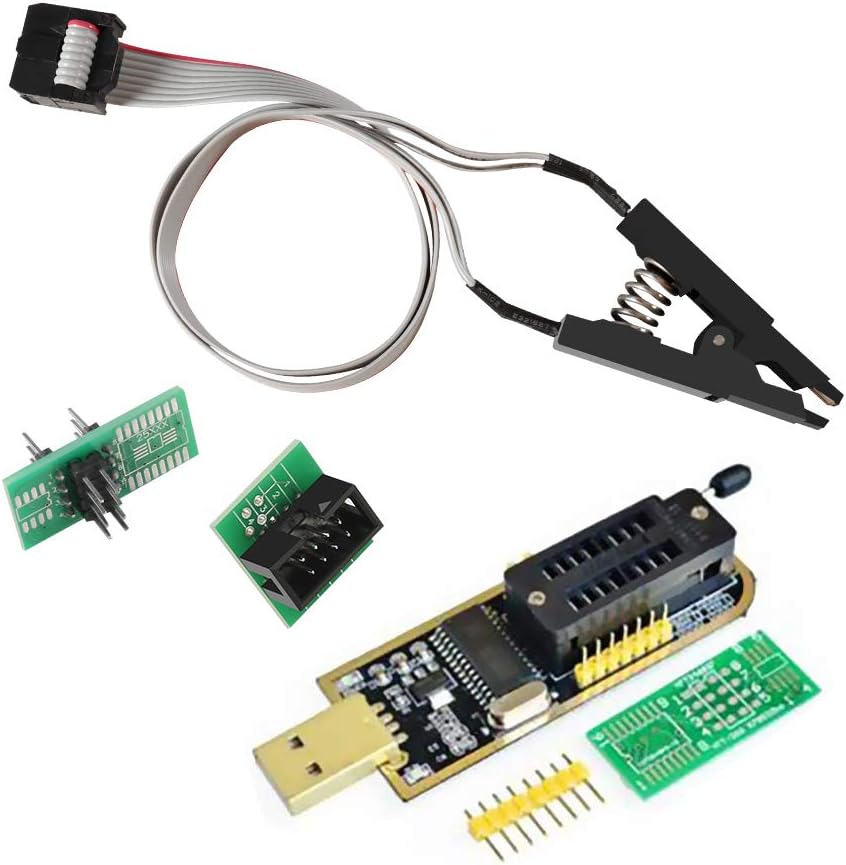
The WWZMDiB CH341A EEPROM BIOS Programmer stands out as the most affordable option in our lineup. With a solid user rating, it offers essential functions for backing up, erasing, and programming various software on compatible chips. This makes it an ideal starting point for hobbyists or those needing occasional access without breaking the bank.
We may earn a commission when you buy through this link, at no additional cost to you.
Its primary strength lies in its direct compatibility with most 24 and 25 series chips like SOP8 and SOP16. The inclusion of a test clip means you can clamp directly onto chips without welding, significantly reducing setup time. The 3.3V to 5V voltage switching ensures you can handle different board requirements safely when configured correctly.
However, users should be aware that the build quality reflects the budget price point. The clips may feel less durable than premium alternatives, and the accompanying software might require some configuration to work smoothly. Additionally, verifying chip voltage before connecting is critical to avoid accidental damage to your hardware.
This tool is best suited for beginners, DIY enthusiasts, or IT professionals who need a reliable backup solution without high costs. If you prioritize cost-effectiveness over premium build quality and want a quick way to flash or backup common BIOS chips, this is a strong recommendation for your toolkit.
At a very low price point, this programmer makes firmware work accessible to anyone interested in learning about chip operations without a large upfront investment.
The included SOIC8 clip allows for non-invasive programming, saving you the time and risk associated with desoldering components from a motherboard for simple backup tasks.
We may earn a commission when you buy through this link, at no additional cost to you.
The ACEIRMC SOIC8 SOP8 Flash Chip IC Test Clips package is highly regarded for its ability to streamline the BIOS flashing process. With a strong rating from users, it effectively enables in-circuit programming without the need to disassemble chips. This feature alone makes it a top contender for technicians who value efficiency and speed in their daily repairs.
We may earn a commission when you buy through this link, at no additional cost to you.
Its design supports a broad range of EEPROM types including 24CXX, 25CXX, and 93CXX, ensuring versatility across different motherboard types. The inclusion of two clips in the set allows for continuous workflow or backups for different projects simultaneously. Users appreciate how the SOP8 clip reduces the time spent on manual chip handling and installation.
One notable limitation is that peripheral circuits on some boards can interfere with direct clipping, requiring physical removal of the chip in certain cases. Additionally, specific chip classes like ESMT SST may only support reading but not writing with the CH341A base unit. Always check the chip location and compatibility before attempting in-circuit programming.
For professional technicians and power users seeking a balance of affordability and functionality, this kit is an excellent choice. It provides the necessary tools to handle most common recovery tasks safely and efficiently. If you frequently deal with firmware updates on various devices, this reliable set deserves a spot in your repair inventory.
By allowing programming without chip removal, this tool saves significant time on routine backups and flashes, keeping your repair workflow smooth and uninterrupted.
Having a double clip set means you can prepare multiple devices or have a spare ready, reducing downtime when one clip wears out or needs cleaning.
We may earn a commission when you buy through this link, at no additional cost to you.
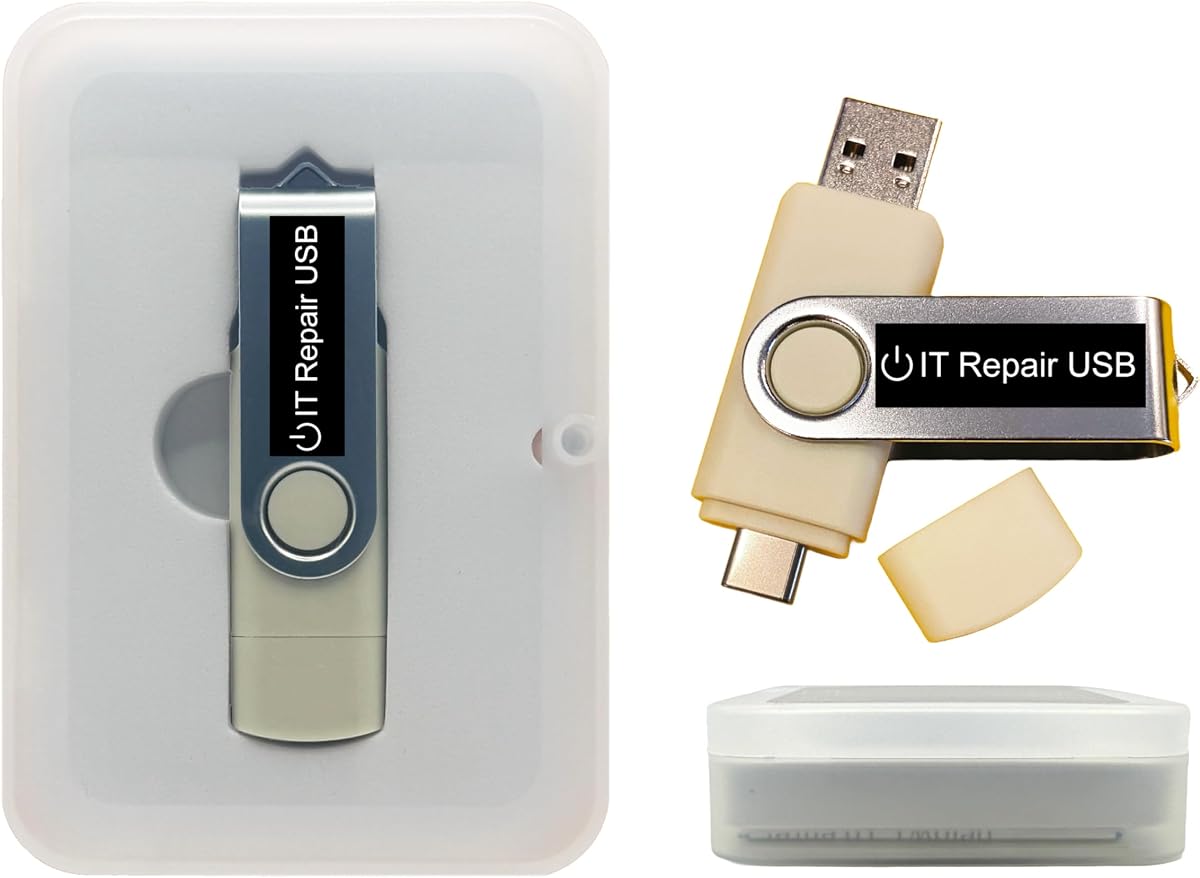
This bootable USB drive offers a specialized solution for users who have forgotten passwords on their Windows or Linux systems. Its design allows for secure password reset without reinstalling the operating system or losing personal files. This capability is invaluable for IT admins and home users facing locked-out situations where quick access is critical.
We may earn a commission when you buy through this link, at no additional cost to you.
The drive supports both legacy BIOS and UEFI boot modes, ensuring compatibility with a wide range of machines from older models to modern laptops. It works with nearly all major Windows versions and most Linux distributions, making it a versatile tool for mixed environments. The interface is designed to be intuitive, guiding users through steps with on-screen instructions.
While functional, this product has received mixed reviews compared to dedicated programmers. Its primary focus is on password recovery rather than deep firmware flashing, which limits its utility for hardware-level BIOS updates. Some users may find the hardware build less robust than other recovery tools available on the market.
This tool is ideal for scenarios where you need to regain system access quickly without data loss. It serves as a reliable emergency disk for IT professionals and administrators who need to manage multiple systems. If your main goal is unlocking accounts rather than chip-level programming, this drive provides a straightforward path to restore access.
Supporting both Windows and Linux systems ensures you are prepared for a variety of devices, reducing the need for multiple recovery tools in your kit.
Since no internet connection is required, you can safely recover access to sensitive systems even in disconnected environments without risking data exposure.
We may earn a commission when you buy through this link, at no additional cost to you.
This USB drive simplifies the installation of Windows 11 on hardware that might not meet official TPM requirements. It serves as a practical recovery and setup tool for users who need to reinstall or repair their operating system without losing functionality. This is particularly useful for older PCs that are otherwise capable of running the OS but lack specific security chips.
We may earn a commission when you buy through this link, at no additional cost to you.
Designed for compatibility with both UEFI and legacy boot modes, it offers flexibility across different machine ages. The 8GB capacity is sufficient to store the necessary installer files and recovery utilities. Users appreciate the clear instructions and the ability to boot from it to access setup menus or repair functions when the system is unresponsive.
It is important to note that this tool is strictly for software installation and recovery; it cannot fix physical hardware failures like bad RAM or dead motherboards. Additionally, it is not compatible with ARM-based systems, Chromebooks, or Apple silicon Macs. Buyers should verify their device can access BIOS setup before purchasing to ensure the tool will function as expected.
For IT professionals managing diverse fleets of PCs or home users upgrading older machines, this drive removes the TPM barrier. It provides a reliable means to get systems running again quickly. If you need a straightforward way to install Windows 11 or recover an existing setup on legacy hardware, this option is worth considering.
The ability to install Windows 11 without TPM requirements extends the life of capable older PCs, allowing users to stay updated without forced hardware upgrades.
Supporting both UEFI and legacy modes means you can use this drive on a wider range of computers, from very old systems to modern laptops.
We may earn a commission when you buy through this link, at no additional cost to you.
This kit expands on the standard CH341A programmer by including essential accessories like a 1.8V adapter and various sockets. It is designed for amateur programmers who need to handle a wide variety of flash chips including those found in routers, set-top boxes, and motherboards. The inclusion of these adapters makes it a versatile solution for more advanced recovery tasks.
We may earn a commission when you buy through this link, at no additional cost to you.
Performance is a key highlight as the erasing speed is notably faster than some other common alternatives. This efficiency helps when working on multiple devices or when time is critical. The package includes a full set of adapters including DIP8 and test clips, reducing the need for extra purchases. Users find this complete setup very convenient for home labs.
While robust, the quality of clips can vary, and some may loosen with frequent use. Users should ensure the voltage is set correctly to avoid burning chips, as the software and hardware settings must align. This tool requires a bit of technical knowledge to operate effectively compared to simpler plug-and-play options.
This kit is best for DIY enthusiasts who deal with various electronics beyond standard PCs. It provides the tools needed to unlock software, backup data, and repair firmware on diverse devices. If you need a comprehensive solution that covers multiple voltages and chip types without buying separate adapters, this set is highly recommended.
The included 1.8V adapter allows you to work with low-voltage memory chips that standard 3.3V or 5V setups cannot handle safely or reliably.
Having multiple adapters in one box means you can handle different chip packages like SOP8 to DIP8 without needing to order extra parts separately.
We may earn a commission when you buy through this link, at no additional cost to you.
The EZP2023 USB Programmer distinguishes itself with blazing fast read and write speeds that save time on large files. It is marketed as the fastest BIOS chip programmer available, making it a top choice for professionals handling bulk operations. Its automatic identification feature simplifies workflow by recognizing chip models without manual setup for many devices.
We may earn a commission when you buy through this link, at no additional cost to you.
It supports a broad range of memory chips including 24, 25, 93, and 95 series, ensuring compatibility with almost any board. The package includes 15 adapters to support different chip formats, reducing the need for additional purchases. Users praise its ability to detect supply voltage automatically, which lowers the risk of hardware damage during programming.
While it offers premium performance, the cost is higher than basic CH341A kits. It is designed for frequent use and reliability, but users should still handle it with care to ensure longevity. The software is optimized for Windows to provide a smooth experience when managing multiple devices or complex firmware files.
For professional repair shops and power users who need speed and reliability, this tool is a premium investment. It ensures efficient workflow and reduces errors associated with manual settings. If you require a high-performance programmer that handles various chip types effortlessly, this is a strong contender for your professional toolkit.
With write times under ten seconds for common chips, this tool significantly cuts down the time spent on routine flash tasks compared to slower alternatives.
Automatic voltage detection and chip recognition reduce the risk of user error, protecting valuable hardware from accidental damage during operation.
We may earn a commission when you buy through this link, at no additional cost to you.
This toolkit offers a comprehensive approach to repairing unbootable Windows systems through a versatile bootable drive. It includes tools for diagnostics, malware removal, and file recovery, making it a multi-purpose utility for IT technicians. The ability to run offline without internet access is crucial for restoring systems in disconnected environments.
We may earn a commission when you buy through this link, at no additional cost to you.
Its customizable interface allows you to update the ISO apps and utilities as needed, keeping your toolkit current. This flexibility helps you adapt to new Windows versions or emerging system issues without buying new hardware. Users appreciate the lightweight rescue environments that help diagnose and restore older machines efficiently.
While versatile, it is not a specialized BIOS flash tool for chip-level operations. Its focus is on system-level recovery and repair which complements but does not replace dedicated programmers. Some users report mixed results with specific system configurations, so testing before critical use is recommended.
This product is ideal for IT professionals and resellers who need a reliable recovery drive for general system issues. It helps you manage multiple system faults with a single device. If your workflow involves frequent Windows repairs and password resets alongside general troubleshooting, this toolkit is a practical addition to your arsenal.
Designed to fix startup problems and recover files without reinstalling, this tool helps maintain data integrity during emergency recovery scenarios.
The ability to add or replace bootable apps ensures your drive stays relevant as software updates occur and new recovery needs arise.
We may earn a commission when you buy through this link, at no additional cost to you.
This SOP16 IC test clip provides a specialized connection solution for working with 16-pin flash chips on various boards. It is designed to simplify refreshing and programming by offering a stable and efficient physical interface. The hardened construction ensures durability during repeated use, which is vital for professionals using the clip daily.
We may earn a commission when you buy through this link, at no additional cost to you.
The gold-plated pin connector guarantees stable contact reducing the risk of connection errors during read-write cycles. Users note that the clip is suitable for both wide and narrow body chips within the 25 series range. This specificity makes it a valuable accessory for programmers who handle 16-pin chips regularly without needing custom solutions.
One limitation is that some boards with heavy peripheral circuits may interfere with online programming, requiring chip removal. Additionally, the clip is optimized for 16-pin chips and may not work with other pin counts without additional adapters. Users should verify chip location and board compatibility to avoid troubleshooting issues.
This tool is best for technicians who specialize in devices using SOP16 chips like TVs and industrial controllers. It offers a reliable physical connection that complements higher-level programmers. If you frequently encounter 16-pin packages and need a durable clip that ensures stable contact, this product is a worthy investment.
The gold-plated pins and hardened clip design ensure consistent electrical contact, reducing read errors and increasing confidence in your flashed data.
Tailored specifically for 16-pin components, this clip fills a niche need for technicians working with SOP16 packages that standard clips might not handle well.
We may earn a commission when you buy through this link, at no additional cost to you.
This bootable USB is designed to reinstall Windows 11 and 10 with a focus on Secure Boot compatibility. Unlike many recovery tools that require disabling security features, this one works with Secure Boot enabled. This capability simplifies the process for users who want to maintain system integrity while performing essential recovery or setup tasks.
We may earn a commission when you buy through this link, at no additional cost to you.
It downloads genuine files directly from Microsoft ensuring you always have the latest official versions without dealing with outdated ISOs. This helps avoid issues related to old security patches or compatibility bugs. The clear instructions guide users through the process, making it accessible even for those less familiar with recovery procedures.
The tool does not include a product key so you will need your existing license or purchase one separately. Additionally, it supports only UEFI BIOS systems meaning it is not suitable for older machines using Legacy BIOS. Users should verify their system's boot mode before using this drive to ensure compatibility.
This product is ideal for users needing a clean and secure way to reinstall Windows on modern PCs. It is especially useful for those who prefer not to tweak security settings like Secure Boot. If you want to reinstall your OS with confidence in the integrity of the files, this tool provides a reliable solution.
Maintaining Secure Boot during recovery helps ensure system safety and reduces vulnerability to unauthorized changes during the reinstallation process.
By downloading directly from Microsoft, you avoid risks associated with third-party or outdated system files ensuring a clean and reliable installation.
We may earn a commission when you buy through this link, at no additional cost to you.
This Kali Linux bootable USB serves as a powerful platform for ethical hacking and cybersecurity tasks. It comes pre-installed with over 600 tools for network, web, and wireless auditing making it a comprehensive solution for security researchers. The drive allows you to run Kali directly or install it permanently depending on your needs.
We may earn a commission when you buy through this link, at no additional cost to you.
It supports both Legacy BIOS and UEFI modes across Intel, AMD, and ARM processors ensuring wide compatibility. This flexibility is valuable for testing on diverse hardware architectures. Users appreciate the ability to customize the drive by adding or upgrading utilities keeping it aligned with evolving testing requirements.
While highly effective for security work, this tool is not designed for traditional BIOS flashing or system recovery tasks. Its focus is entirely on penetration testing which may not align with users seeking general repair capabilities. Additionally, it requires a bit of technical knowledge to navigate effectively for those new to Linux.
This product is perfect for IT experts and cybersecurity enthusiasts who need a portable testing environment. It offers professional-grade capabilities for assessing vulnerabilities and performing audits. If your work involves network security or system analysis and you need a ready-made Linux environment this USB is a reliable and versatile choice.
Having hundreds of tools ready to use saves setup time and allows immediate deployment for security audits and vulnerability assessments.
Support for both x86 and ARM builds ensures you can test on a wide variety of devices from standard PCs to modern mobile platforms.
We may earn a commission when you buy through this link, at no additional cost to you.
Selecting the right bios flash tool involves considering your technical needs, the types of chips you handle, and your budget. The following factors will help you narrow down the options available.
Ensure the tool supports the specific series of memory chips you work with such as 24, 25, or 93 series. Some programmers handle a broader range of voltages and formats which can be critical for mixed environments.
Check if the tool supports in-circuit programming or if it requires chip removal to save time and reduce risk of damage.
Speed matters when handling large firmware files or multiple devices. Look for tools that advertise fast read and write cycles to minimize wait time during operations.
Faster speed often correlates with better hardware quality which can lead to more consistent results over time.
User-friendly software and clear instructions are essential for reducing errors. Tools that offer automatic chip detection simplify workflow and reduce manual configuration.
Consider how intuitive the interface is especially if you are a beginner or need to train others on its use.
Durability of clips and connectors is vital for daily use. Look for hardened clips and gold-plated contacts to ensure stable connections over time.
High-quality build reduces the risk of physical damage to both the tool and your devices during operation.
Modern chips often require specific voltages like 1.8V or 3.3V. Verify that the tool supports switching between these voltages to prevent hardware damage.
Automatic voltage detection is a premium feature that adds safety and convenience for less experienced users.
If you work on multiple sites choose a tool that is compact and easily transportable. USB-powered devices are generally easier to manage than those needing external power.
Lightweight designs help you carry the tool in a repair kit without adding unnecessary bulk.
Check for regular software updates and support from the manufacturer. This ensures compatibility with new chips and operating systems.
Good customer support can be a lifesaver when troubleshooting errors or compatibility issues with specific devices.
Balance the cost with the features offered. Basic models may be cheaper but lack advanced features that save time in the long run.
Consider the total cost including any adapters or accessories you might need to operate the tool effectively.
Begin by connecting the programmer to your computer via USB and installing the necessary drivers. Ensure the software recognizes the device before proceeding with any operations to avoid communication errors.
Always verify the chip type and voltage settings before starting a write operation. This simple check prevents accidental damage to the chip or motherboard during the flashing process.
Store the clips and adapters in a dry place to avoid oxidation and ensure long-term reliability. Regularly inspect the connectors for damage or dirt to maintain optimal performance.
A bios flash tool is used to update, backup, or restore the firmware on devices like computers and routers. It allows technicians to recover systems after failed updates or install new features.
Not always. Many tools support in-circuit programming using test clips which means you can flash the chip without removing it from the board.
Most standard flash tools are designed for Windows PCs. Some may support Linux via virtualization but native macOS support is rare.
Common voltages include 3.3V and 1.8V. Always check the chip's datasheet and use a programmer that supports voltage switching to avoid damage.
Speeds vary by tool and chip size. Basic tools may take minutes while premium models can complete writes in seconds for smaller chips.
Yes some tools allow you to backup chip contents which can help recover data lost due to corruption or hardware failure.
In conclusion selecting the right bios flash tool depends largely on your specific workflow and the types of hardware you service. For budget-conscious users the CH341A options offer great value while professionals might prefer the speed and reliability of the EZP2023.
Prioritize tools that offer compatibility with your target chip series and include necessary adapters to save time and money. Speed and build quality should also play a significant role in your final decision.
Remember that prices and availability change frequently so always verify the current offers and compatibility before purchasing. This ensures you get the best value and a smooth experience with your chosen tool.