
Captel MDL 200
Affordable captioned phone
Corded landline design
Basic captioning features
Compare the top captioned telephones for hearing impaired users. This guide reviews features, clarity, and ease of use to help you choose the best device.
Choosing the right communication device is essential for maintaining connections with loved ones. Captioned telephones offer a unique solution by displaying real-time text alongside audio calls. This technology ensures clarity and confidence during conversations for those with hearing loss.
We have carefully evaluated the leading models available on the market today. Our analysis focuses on sound amplification, captioning accuracy, and user-friendly design. Each product was selected based on its ability to enhance the calling experience for seniors.
Every review below highlights specific strengths and potential limitations of each phone. Prices and availability can change frequently, so please verify details before purchasing. We aim to provide a comprehensive resource to support your decision-making process effectively.

4.3Editor score

This side-by-side comparison highlights the key specifications and features of each top-rated device. Use this table to quickly identify which model best fits your specific communication needs and preferences.




The Hamilton CapTel 2400iSPNBT stands out as a top choice for users needing visual confirmation of conversations. It displays real-time captions on a large touchscreen while you listen to the call. This dual-mode approach ensures you miss no words during important discussions.
We may earn a commission when you buy through this link, at no additional cost to you.
This device offers up to 40dB of amplified sound to enhance audio clarity. You can choose between auto captions or assisted captions with live operator support. The voicemail feature also displays text captions so you can review messages easily.
While the internet requirement is a consideration, the captioning service is free for US residents. Users must register to confirm their hearing loss status. This ensures compliance with FCC regulations and service availability.
Anyone needing reliable communication support should consider this phone. It bridges the gap between audio and visual information. The large screen and customizable settings make it suitable for various levels of hearing loss.
The system captures spoken words instantly and displays them as text. This helps users follow complex conversations without strain.
You can adjust caption size and tone control to fit your preferences. The interface is designed to be simple and accessible.
We may earn a commission when you buy through this link, at no additional cost to you.
The Geemarc Ampli550 is designed specifically for hard-of-hearing individuals who need loud audio. It delivers up to 55dB of amplified sound for clear listening. The device also includes a bright flashing strobe to alert you to incoming calls.
We may earn a commission when you buy through this link, at no additional cost to you.
Key features include talking Caller ID and talking keys for ease of use. The extra-large keypad has easy-to-read numbers and three emergency keys. You can save frequently used numbers on nine one-touch memory dial buttons.
While it lacks advanced captioning, the amplification is robust for voice clarity. It is compatible with various audio accessories like headsets and neck loops. The design focuses on preventing missed calls at home.
This phone is ideal for those who rely on volume rather than text. The bright display and talking features reduce confusion when dialing. It is a reliable option for straightforward communication needs.
TrueSound technology provides clear audio even in noisy environments. The volume settings are adjustable for comfort.
The strobe light and loud ringer ensure you never miss a call. This is helpful for users with severe hearing loss.
We may earn a commission when you buy through this link, at no additional cost to you.
The Captel MDL 200 offers an affordable entry point into captioned telephones. It provides essential captioning features without advanced extras. This makes it a practical choice for users seeking basic support.
We may earn a commission when you buy through this link, at no additional cost to you.
The design is straightforward with a corded landline connection. It focuses on the core function of displaying text during calls. Setup is simple, and it is easy to navigate for seniors.
While it does not have a touchscreen, the core utility remains intact. Users can rely on it for daily communication needs. The price point makes it accessible for many households.
Consider this model if budget is a primary concern. It fulfills the basic need for captioning support. For more advanced features, you might look elsewhere, but this serves well for essentials.
This phone removes financial barriers to captioning technology. It ensures everyone has access to clear communication tools.
The interface avoids complex menus. Seniors can start using it immediately with minimal setup.
We may earn a commission when you buy through this link, at no additional cost to you.
The Clarity AltoPlus is a high-performance amplified phone certified for severe hearing loss. It offers up to 53dB of amplification to ensure clear audio. The device also boosts your outgoing speech so the other caller hears you better.
We may earn a commission when you buy through this link, at no additional cost to you.
This model features a loud 100dB ringer with visual indicators. You will not miss a call even in a noisy environment. The talking keypad and Caller ID provide auditory cues for dialing.
Ergonomic controls make it easy to adjust volume and tone. It is designed for users with arthritis who need accessible buttons. The headset jack allows connection to specialized accessories for further customization.
Choose this if you need maximum audio amplification without text. It is a premium solution for those who prefer voice clarity. The build quality and features justify the investment for daily use.
OSA technology amplifies your voice so others hear you clearly. This reduces the need to shout during calls.
The visual indicators ensure you know when a call is coming. This is critical for users who may not hear the ringer.
We may earn a commission when you buy through this link, at no additional cost to you.
The Serene Innovations SI-CL-65 brings mobility with its cordless design. It features HD audio for improved call clarity. This phone is ideal for seniors who need to move around while talking.
We may earn a commission when you buy through this link, at no additional cost to you.
Key features include talking Caller ID and amplified sound for better hearing. The device connects to a base for charging and service. It is designed to simplify communication at home.
While it lacks a visual display, the audio enhancements are significant. You can carry the handset to different rooms easily. This flexibility is a key advantage over corded models.
Consider this if you value movement and sound quality. It addresses hearing loss through audio clarity and convenience. The design fits well into active households.
The cordless handset allows you to walk while talking. This convenience is great for multitasking at home.
HD technology reduces background noise interference. Calls sound clearer and more natural to the ear.
We may earn a commission when you buy through this link, at no additional cost to you.
The VTech SN5147 combines corded and cordless features for reliability. It works during power outages with the corded base. The hybrid system is designed specifically for seniors and hard of hearing users.
We may earn a commission when you buy through this link, at no additional cost to you.
Features include oversized buttons and a large backlit display. You can program photo speed dial to contact loved ones easily. The built-in answering machine records messages with remote access.
The call blocker helps manage unwanted robocalls effectively. Visual alerts ensure you see when a call comes in. This reduces frustration from missed communications.
This phone offers a balanced solution for modern needs. It combines traditional reliability with smart features. Consider it for households that need both mobility and backup power.
Photo slots allow you to press a picture to call. This makes it easy to remember who to contact.
The corded base remains functional during blackouts. This ensures safety and connection when power fails.
We may earn a commission when you buy through this link, at no additional cost to you.
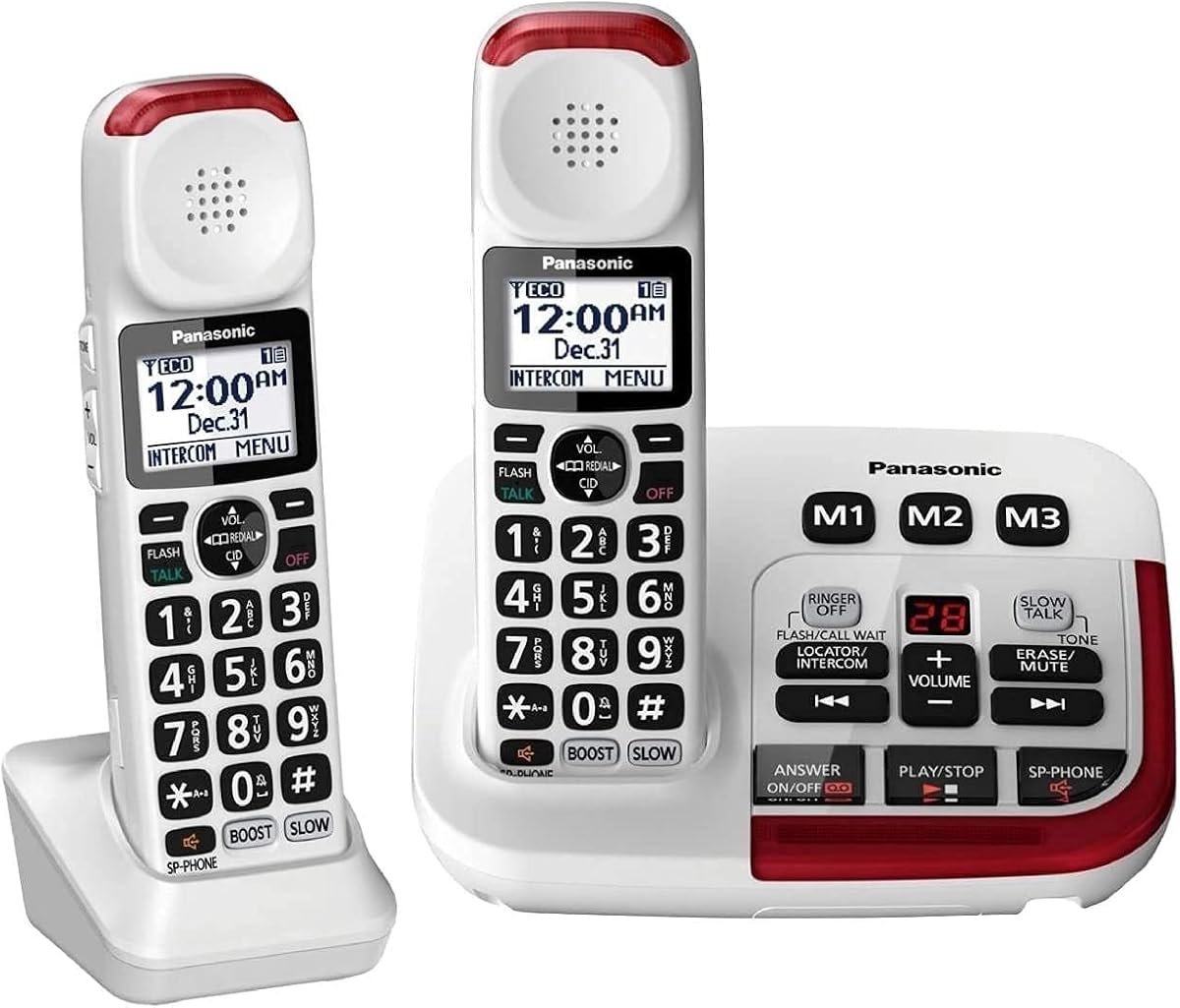
The Panasonic KX-TGM420W offers a complete cordless system with amplified sound. It includes two handsets for flexibility around the house. The voice volume booster amplifies caller voice up to 40 dB.
We may earn a commission when you buy through this link, at no additional cost to you.
This model suppresses background noise with advanced noise reduction technology. It also features a Slow Talk mode to help understand speech better. The system is expandable to six handsets for larger homes.
Visual ringers and talking Caller ID enhance accessibility. You can block 250 numbers to reduce unwanted calls. The intercom feature allows communication between handsets easily.
Choose this for homes needing multiple handsets and clarity. The expansion capability makes it future-proof. It is a robust system for multi-user households.
Background noise is filtered out for clearer listening. This is useful in busy environments or near appliances.
This feature slows down speech to improve understanding. It helps users process conversations at their own pace.
We may earn a commission when you buy through this link, at no additional cost to you.
The SWISSVOICE 3355 simplifies contact with large photo memory buttons. You can see who you are calling visually. This is ideal for elderly users or those with unsteady hands.
We may earn a commission when you buy through this link, at no additional cost to you.
It includes two handsets, one corded and one cordless. The ringer volume can be increased to 90dB for high visibility. Each base unit supports up to three additional handsets.
The call block feature helps manage incoming calls effectively. It is designed to improve daily life for those with impairments. The buttons display photos and numbers for clarity.
Consider this for simplified contact management. The visual aid reduces the chance of dialing wrong numbers. It is a solid choice for family-focused homes.
Photos make it easy to identify contacts. Just press a photo to reach your loved one.
Extra large keys accommodate visual impairments. The design supports users with unsteady hands.
We may earn a commission when you buy through this link, at no additional cost to you.
This kit includes three handsets for larger homes. It offers the same amplified sound and features as the two-handset model. You get a complete system ready for multi-user access.
We may earn a commission when you buy through this link, at no additional cost to you.
The volume boost ensures clear calls on every handset. Visual ringers and talking features enhance usability significantly. It is expandable to six handsets if you need more.
You can set up intercoms to talk within the house. The call block feature reduces interruptions from unwanted numbers. This is a comprehensive solution for family communication.
Choose this if you need multiple devices immediately. The value lies in having extra handsets included. It covers all bases for home telephone needs.
Extra handsets mean more phones in more rooms. This ensures coverage throughout a large home.
Use intercom to talk between rooms without phone lines. This simplifies internal communication.
We may earn a commission when you buy through this link, at no additional cost to you.
This landline phone delivers an extra loud 100dB ringer. It is ideal for seniors who need strong alerts to hear a call. The LED flashes when a call comes in to ensure no miss.
We may earn a commission when you buy through this link, at no additional cost to you.
It includes 3 picture buttons for one-touch speed dial. The handset volume goes up to 80dB receiver gain. This provides clear audio for mild and moderate hearing loss.
The phone is compatible with hearing aids for smooth use. It has a reliable wired design that avoids losing handsets. The large buttons make redial effortless.
Consider this for high volume alerts and simplicity. It is a practical desk telephone for seniors and caregivers. The visual and auditory alerts ensure you stay connected.
The bright LED flashes for calls. This visual cue helps those with hearing loss.
Picture buttons store emergency contacts. Press a photo to call family instantly.
We may earn a commission when you buy through this link, at no additional cost to you.
Selecting the right phone involves evaluating features that match your hearing needs. This section outlines key factors to consider for a successful purchase.
Captioned telephones provide text alongside audio. This helps users verify words they hear. Some models offer assisted captions with operators while others are fully automated.
High amplification is crucial for clear audio. Look for devices offering 50dB or more of gain. This ensures you can hear the caller without straining.
A large screen makes reading captions easier. Touchscreen models provide intuitive navigation. Consider your visual needs when selecting the display size.
Compatibility with hearing aids prevents feedback loops. T-coil compatible phones work with neck loops. Check for compatibility markers before buying.
Some phones require internet for captioning. Others work on standard landlines. Decide based on your home network setup.
Loud ringers with strobe lights help detect calls. Visual indicators are vital if you cannot hear audio. Look for adjustable ringer settings for convenience.
Simple interfaces reduce frustration. Large buttons and clear labels help navigation. Avoid complex menus if possible.
Reliable support helps with setup issues. Check for warranty coverage. Good service ensures long-term satisfaction.
Set up your phone by connecting it to a power source. If it requires internet, plug it into a router. Follow the manual to register for services.
Adjust the volume and contrast settings to match your needs. Test a call to ensure captions appear correctly. Make sure the hearing aids are set to T-coil mode if applicable.
Keep the keypad clean by wiping it regularly. Check cables for wear and tear. This ensures your phone stays functional and lasts longer.
Many captioning services are free for US residents with hearing loss. However, you must register for the service. Verify with the provider for eligibility.
Most captioned phones are landline based. They do not work on cellular networks directly. Some models offer cordless handsets but require a base.
Yes, most amplified phones have headset jacks. Look for 2.5mm or 3.5mm ports. Headsets can improve focus during calls.
You need to register with the provider. They verify your hearing loss status. This ensures FCC compliance for service access.
Some phones are for mild to moderate loss. For profound loss, consider specialized equipment. Ask professionals for recommendations.
Many models include call blocking features. You can block robocalls or specific numbers. This reduces interruptions effectively.
We reviewed ten top models to help you connect clearly. The Hamilton CapTel leads with real-time captions. Other models excel in amplification and visual alerts.
Prioritize features that match your daily habits. If you read well, captions are a great start. If you prefer audio, focus on amplification.
Check current availability before making a decision. Prices may vary based on retailer and time. We hope this guide helps you find the perfect phone.