
HP DeskJet 2955
3.7Editor score
Compact design for small spaces
Wireless dual band connectivity
HP AI formatting tools included
Finding a reliable printer that fits your budget can be challenging. You need a device that handles printing, scanning, and copying without breaking the bank. This guide explores affordable all in one printers designed for everyday home tasks.
We evaluated ten models based on speed, print quality, wireless features, and ease of use. Our analysis focuses on value for money, ensuring you get the best performance possible for a low upfront investment in your home office setup.
Each pick highlights specific strengths like mobile printing or duplex capabilities. Note that availability and pricing may change frequently. Always verify current stock and deals before making your final purchase decision online today.
3.7Editor score

4.0Editor score

4.3Editor score
As an Amazon Associate we earn from qualifying purchases.
The following table provides a side by side comparison of all ten affordable models reviewed in this guide. It highlights key specifications to help you quickly identify the right fit for your needs.



The HP DeskJet 2955 is a strong contender for those seeking the most affordable all in one solution. With a rating of 3.7 stars, it offers basic printing, scanning, and copying capabilities that suit light home users. Its standout quality lies in its compact design and reliable dual band wireless connectivity.
We may earn a commission when you buy through this link, at no additional cost to you.
Key strengths include the integration of HP AI, which optimizes web pages and emails for precision printing. This feature helps reduce wasted paper by removing unwanted content automatically. The 60 sheet input tray ensures you do not need to reload paper constantly during small jobs.
Honest trade-offs involve its slower print speed for color documents and a basic icon LCD panel. While the color speed is limited, the black speed is adequate for text heavy tasks. These limitations are acceptable given the very low entry price point.
This printer is ideal for students or families needing a reliable backup device. It handles everyday documents well and supports mobile printing via the HP app. We recommend this model for budget conscious buyers who value connectivity over high speed.
HP AI ensures your web pages print exactly as you intend without cutting off text or headers.
The dual band Wi-Fi connection automatically detects and resolves issues to keep you printing without interruption.
We may earn a commission when you buy through this link, at no additional cost to you.
The Canon PIXMA TS3720 is designed for basic home printing needs with a focus on simplicity. Rating at 4.0 stars, it provides reliable print, copy, and scan functions for everyday tasks. Its standout quality is the fast setup process that gets you running in minutes.
We may earn a commission when you buy through this link, at no additional cost to you.
Key strengths include a fast black print speed of 7.7 pages per minute and support for borderless photos up to 5×7 inches. The streamlined setup allows you to connect to Wi-Fi without needing a computer. It also integrates well with mobile devices and Chromebooks for school work.
Honest trade-offs include the lack of automatic duplex printing and a very small 1.5 inch LCD screen. Manual two-sided printing may be tedious for longer documents. These limitations are acceptable for users who prioritize speed and simplicity over advanced features.
This model is best for families or students who need a no fuss printer. It handles envelopes and high resolution paper well. We recommend it for those who want a clean design and quick connectivity without complex configuration steps.
You can create stunning square photos and borderless prints using the included PosterArtist online software.
The Canon PRINT app ensures easy printing from your phone while Mopria and AirPrint offer broader device support.
We may earn a commission when you buy through this link, at no additional cost to you.
The Canon PIXMA TS4320 stands out as an excellent choice for hybrid workers and home users needing versatile performance. With a 4.0 star rating, it balances cost and features effectively. Its standout quality is the inclusion of automatic two-sided printing which saves paper and time.
We may earn a commission when you buy through this link, at no additional cost to you.
Key strengths include the hybrid ink system which delivers sharp text and vivid colors efficiently. The dual band Wi-Fi ensures a stable connection throughout your home or office. It is also EPEAT Silver and ENERGY STAR certified making it an eco-conscious choice for your workspace.
Honest trade-offs involve the lack of an auto document feeder for scanning multiple pages and a basic control panel. Users needing to scan books or large stacks of documents may find this limiting. These compromises are acceptable for the price point and environmental benefits.
This printer is ideal for home offices where document quality and efficiency matter. It supports a wide range of media from standard paper to photos. We recommend this model for users who value sustainability and duplex printing without paying premium prices.
Automatic two-sided printing significantly reduces paper consumption while speeding up your workflow for reports.
The hybrid ink system allows you to produce vibrant photos and crisp text using just two cartridges.
We may earn a commission when you buy through this link, at no additional cost to you.
The HP DeskJet 4355 offers a step up from basic models by including an auto document feeder. Rating at 3.5 stars, it is designed for home users who need to scan or copy multi-page documents easily. Its standout quality is the combination of AI tools and faster black print speeds.
We may earn a commission when you buy through this link, at no additional cost to you.
Key strengths include a 35 sheet auto document feeder which simplifies copying stacks of paper. The black print speed reaches 8.5 pages per minute while HP AI optimizes your emails and web pages for better output. It also includes a three month trial of the Instant Ink service.
Honest trade-offs involve a slower color print speed compared to black text and a relatively small input tray capacity. The color speed may bottleneck large photo jobs. These limitations are acceptable for users who prioritize document handling over heavy photo printing.
This model fits households that frequently manage paperwork and letters. The HP app allows for easy mobile scanning and printing. We recommend it for users who want convenience and AI features without spending significantly more money.
The 35 sheet auto document feeder makes scanning and copying multi-page reports much easier than manual feeding.
HP AI removes unwanted elements from web pages ensuring your prints look clean and professional.
We may earn a commission when you buy through this link, at no additional cost to you.
The Canon PIXMA TS6520 impresses with a modern OLED display and reliable wireless performance. With a high rating of 4.2 stars, it is a top choice for users who value intuitive controls. Its standout quality is the combination of duplex printing and a stylish compact design.
We may earn a commission when you buy through this link, at no additional cost to you.
Key strengths include the 1.42 inch OLED display which makes monitoring ink levels and settings effortless. The hybrid ink system produces sharp text and vivid colors while the auto two-sided printing saves paper. It connects reliably via dual band Wi-Fi for smooth printing anywhere in your home.
Honest trade-offs involve the absence of an auto document feeder and limited media size support compared to larger office models. Users with high volume scanning needs might find this restrictive. These limitations are acceptable for home users focused on document and photo printing.
This printer is perfect for hybrid workers who need a clean and efficient device. The OLED screen improves the user experience significantly. We recommend this model for those who want a balance of style and practical features without paying premium prices.
The monochrome OLED screen provides clear visibility of ink levels and printer status at a glance.
Automatic two-sided printing reduces paper waste and speeds up your workflow for lengthy documents.
We may earn a commission when you buy through this link, at no additional cost to you.
The Canon PIXMA TR4720 is a versatile 4-in-1 device that includes a built-in fax function. Rating at 3.9 stars, it suits home offices needing fax capabilities alongside standard printing. Its standout quality is the Alexa integration that simplifies ink ordering and monitoring.
We may earn a commission when you buy through this link, at no additional cost to you.
Key strengths include an auto document feeder and auto two-sided printing which improve efficiency. The 100 sheet capacity reduces refill frequency while the 1 year warranty offers peace of mind. You can ask Alexa to order ink when levels are low ensuring you never run out unexpectedly.
Honest trade-offs include the lack of an advanced display and slightly inconsistent speed performance. It handles 4×6 borderless photos well but may take longer for black documents. These limitations are acceptable for users who need faxing and convenience features.
This model is best for home offices managing official documents and faxes. The Alexa integration is a unique advantage for convenience. We recommend it for users who want a reliable workhorse with smart features.
Alexa integration allows automatic smart reorders so you never face downtime due to empty ink cartridges.
A 100 sheet capacity and auto document feeder mean you can handle larger jobs without constant refilling.
We may earn a commission when you buy through this link, at no additional cost to you.
The Brother Work Smart 1360 is designed for home office users who need speed and reliability. Rating at 3.8 stars, it stands out for its fast black print speed and large paper capacity. Its standout quality is the 150 sheet tray which reduces manual refilling.
We may earn a commission when you buy through this link, at no additional cost to you.
Key strengths include a black print speed of 16 pages per minute which is fast for this class. The 1.8 inch color display offers intuitive navigation and the 20 sheet auto document feeder handles multi-page tasks. It connects via cloud apps including Google Drive and Dropbox.
Honest trade-offs involve a higher price compared to entry models and a larger physical footprint. The design is less compact than typical home printers. These trade-offs are acceptable for users who need higher performance and capacity for daily work.
This printer is ideal for small businesses or heavy home users. The mobile app provides easy management of ink and settings. We recommend it for those who prioritize speed and paper capacity over size and budget.
A black print speed of 16 pages per minute ensures you get documents quickly during busy workdays.
The 150 sheet paper tray reduces interruptions and refills making it suitable for larger print jobs.
We may earn a commission when you buy through this link, at no additional cost to you.
The Canon PIXMA TR7120 leads the category with top-tier features and user experience. Rating at 4.3 stars, it is the highest rated model in this guide. Its standout quality is the combination of a large auto document feeder and an OLED display.
We may earn a commission when you buy through this link, at no additional cost to you.
Key strengths include seamless multi-page handling with the ADF and a hybrid ink system that delivers vivid prints. The compact design fits well in any workspace while the OLED display allows easy monitoring of ink and settings. It connects reliably via dual band Wi-Fi.
Honest trade-offs include a higher price and lack of built-in fax compared to some rivals. Users needing fax capabilities might look elsewhere. These limitations are acceptable for most home offices prioritizing printing scanning speed and modern control features.
This model is perfect for users who want premium features without a professional budget. It handles diverse media well and offers reliable mobile printing. We recommend it for those who want the best overall balance of performance and usability.
The auto document feeder lets you tackle large multi-page documents quickly without tedious manual scanning.
A clear OLED display makes adjusting settings and checking ink levels intuitive and user friendly.
We may earn a commission when you buy through this link, at no additional cost to you.
The HP DeskJet 2855e offers solid performance for basic home printing needs. Rating at 3.6 stars, it delivers reliable print copy and scan functions. Its standout quality is the inclusion of AI formatting tools that optimize your emails and web pages.
We may earn a commission when you buy through this link, at no additional cost to you.
Key strengths include a 60 sheet input tray and HP AI which removes unwanted content to prevent layout issues. The HP app makes scanning and copying easy from your phone. It includes a three month trial of Instant Ink to help manage costs.
Honest trade-offs involve support for 2.4 GHz Wi-Fi only and a basic control panel. This may limit performance on networks requiring 5GHz. These limitations are acceptable for most standard home networks and basic users.
This model is ideal for simple home tasks. It is easy to use and reliable for daily documents. We recommend it for users who need a straightforward device with smart printing features.
HP AI removes clutter from web pages ensuring your printed emails and documents look clean and precise.
The HP app allows seamless printing scanning and copying directly from your smartphone without a computer.
We may earn a commission when you buy through this link, at no additional cost to you.
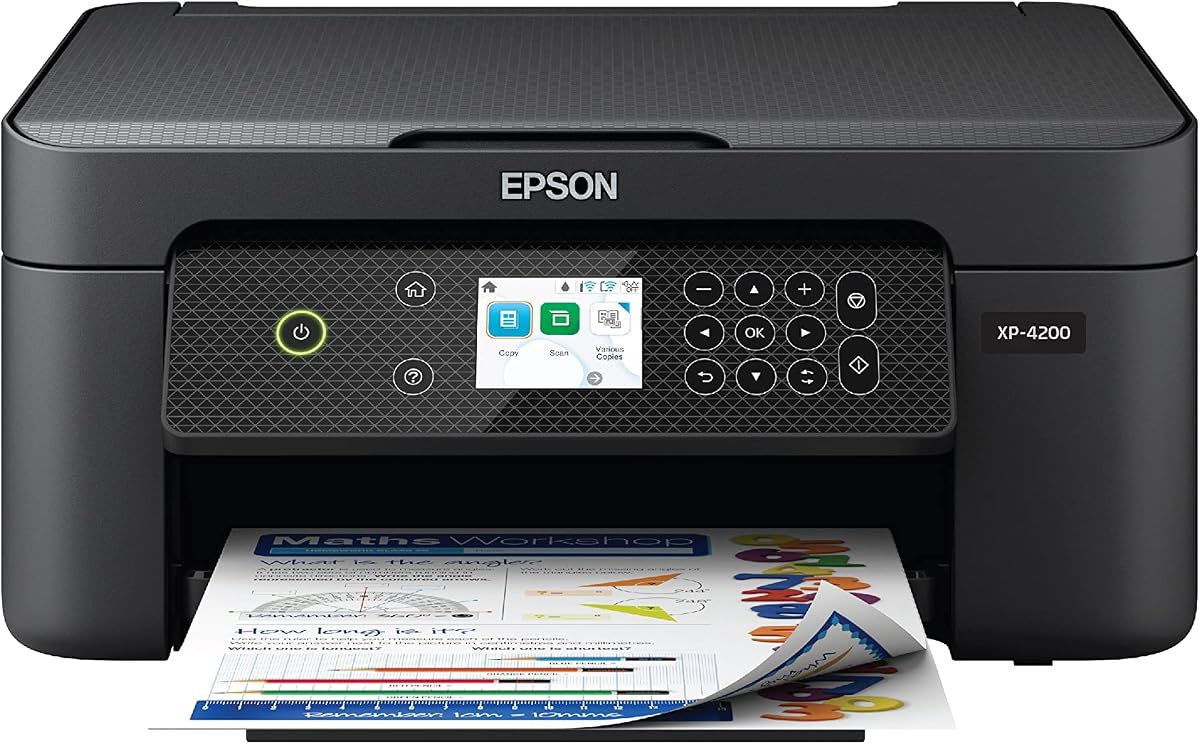
The Epson Expression XP-4200 is a versatile option featuring a permanent printhead for longevity. Rating at 3.8 stars, it offers reliable wireless printing and scanning for home use. Its standout quality is the Heat Free technology and permanent printhead design.
We may earn a commission when you buy through this link, at no additional cost to you.
Key strengths include individual ink cartridges which allow you to replace only the color you need. The permanent printhead helps ensure consistent high-quality prints over the life of the device. Voice activated printing via Alexa adds convenience for hands-free operation.
Honest trade-offs involve slower print speeds and proprietary ink cartridges which might cost more than third party alternatives. However the Heat Free tech reduces energy consumption significantly. These trade-offs are acceptable for users valuing reliability and eco efficiency.
This printer is best for households needing a reliable and green device. It handles photo and document printing well. We recommend it for users who want energy efficiency and smart voice features.
The permanent printhead is designed to last the life of the printer reducing maintenance and clogs.
Connect to Alexa to print content hands free using simple voice commands for added convenience.
We may earn a commission when you buy through this link, at no additional cost to you.
Choosing the right cheap all in one printer requires understanding your specific needs and technical requirements. This section outlines key factors to help you make an informed decision.
Print speed is measured in pages per minute and varies between black and color documents. For home use, look for at least 5 to 8 pages per minute for black text to avoid delays. Ensure the printer produces crisp text and vibrant colors for your documents and photos.
Modern printers should support Wi-Fi to connect multiple devices seamlessly. Dual-band Wi-Fi offering both 2.4 GHz and 5 GHz bands provides better stability and speed. Check compatibility with your devices like Android iOS or Chromebooks before buying.
Consider the paper tray capacity and whether the model supports automatic duplex printing. A larger tray reduces refill frequency while duplexing saves paper and time. If you scan multi-page documents, an auto document feeder is essential for efficiency.
Ensure the printer supports mobile apps or cloud services for easy remote access. Features like AirPrint Mopria or proprietary apps allow printing from smartphones without complex drivers. This convenience is vital for modern home offices.
Look for printers with affordable ink options or subscription trials. Some models use individual cartridges so you replace only what is used. Check the cost of replacement cartridges to avoid hidden expenses after the initial purchase.
Compact designs fit better in small spaces while large trays hold more paper. Consider the physical footprint and how it fits your desk or workspace. A well-designed unit should balance size with functionality and aesthetics.
Features like voice activation fax capabilities or smart displays add convenience. Alexa integration can simplify ink orders while an OLED screen makes settings easier to navigate. Choose based on how much automation you need daily.
Setup your printer by following the manufacturer guidelines for installation. Connect to Wi-Fi using the provided app or control panel to ensure all devices can reach it. Download necessary drivers for your computer or phone to enable seamless printing.
Yes, most affordable models are designed for moderate home printing needs. They offer reliable scanning copying and printing for everyday tasks. Just ensure you use genuine ink and follow maintenance tips to extend their lifespan.
Almost all models in this guide support mobile printing via apps or AirPrint. You can scan and print directly from smartphones without needing a computer. Check compatibility with iOS Android or Chromebooks for your devices.
Single band uses only 2.4 GHz while dual band supports both 2.4 and 5 GHz. Dual band provides faster speeds and less interference especially in crowded homes. This helps maintain stable wireless connections during printing.
Many models include automatic duplex printing to save paper and time. However budget models might require manual flipping. Always check the specs before buying if you want this feature included.
You can use third-party ink but some brands may void warranties or reduce quality. Using genuine ink ensures optimal performance and prevents damage. Consider subscription services to lower long-term ink costs.
Models with hybrid ink systems and high DPI usually produce better photos. Look for ones supporting borderless printing up to 5×7 inches. Canon and Epson often excel in photo quality for home users.
An auto document feeder is essential if you scan many pages regularly. It allows batch scanning and copying without lifting every page. If you mostly print documents this feature can be skipped for cost savings.
We have reviewed ten top affordable options balancing speed features and reliability. Our top picks highlight models like the Canon PIXMA TR7120 and HP DeskJet 2955 for their unique strengths. Choosing the right one depends on your specific home or office needs.