
CRUA 34 Inch 165Hz
4.2Editor score
165Hz Refresh Rate
IPS Panel Technology
PIP PBP Modes
Finding a cheap ultrawide monitor does not mean sacrificing performance or visual fidelity for your workspace or gaming setup. Modern displays now offer immersive 21:9 aspect ratios at price points that fit modest budgets without compromising on essential features like high refresh rates or accurate color reproduction.
We evaluated ten top-rated models based on panel technology, connectivity options, ergonomic design, and user feedback to ensure each recommendation delivers real value. Our analysis focuses on how well these monitors handle multitasking, competitive gaming, and content creation while staying within an affordable price range for most consumers.
Each pick highlights specific strengths such as speed, color accuracy, or build quality so you can match a display to your unique workflow needs. Please note that prices fluctuate frequently due to market demand and seasonal sales, so check current listings before finalizing your purchase decision.
4.2Editor score

4.4Editor score

4.6Editor score
As an Amazon Associate we earn from qualifying purchases.
This side-by-side comparison highlights the core specifications of each model so you can quickly identify which monitor offers the features you need for your specific use case and budget constraints.


The SANSUI 34-inch curved monitor stands out as a top contender for those seeking high performance without breaking the bank. It delivers a crisp 3440×1440 resolution paired with a remarkable 200Hz refresh rate that ensures smooth visuals during intense gaming sessions.
We may earn a commission when you buy through this link, at no additional cost to you.
Its built-in AI features like AI Blue Light Reduction and AI Crosshair enhance both comfort and gameplay accuracy. The monitor supports HDMI 2.1 which is rare at this price point allowing modern consoles and GPUs to utilize higher bandwidth for better performance.
While it lacks built-in speakers which may require external audio solutions this trade-off helps keep the cost low. The VA panel offers decent contrast but viewing angles are not as wide as IPS models which is typical for this technology.
This monitor is ideal for budget-conscious gamers and multitaskers who prioritize speed and resolution over perfect color uniformity from every angle. Its ergonomic stand and VESA compatibility ensure it fits well in various desk setups.
The 200Hz refresh rate ensures smooth motion in competitive games reducing motion blur significantly.
Built-in AI tools help reduce eye strain and improve aiming precision during gameplay.
We may earn a commission when you buy through this link, at no additional cost to you.
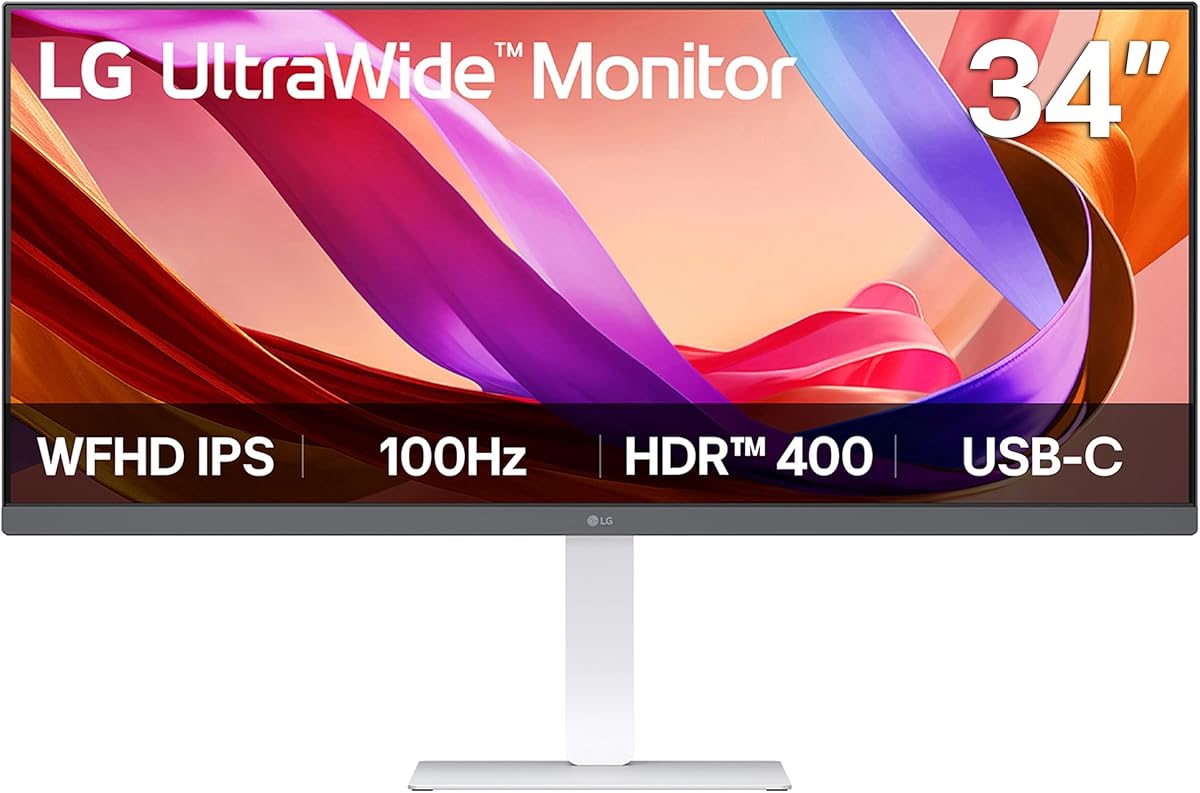
The LG 34U530A-W offers an accessible entry point into ultrawide computing with its 2560×1080 resolution and reliable IPS panel. This setup provides vibrant colors and wide viewing angles making it excellent for productivity and media consumption.
We may earn a commission when you buy through this link, at no additional cost to you.
Connectivity is a strong suit with a USB Type-C port that simplifies connections for laptops reducing cable clutter. The included speakers with Waves MaxxAudio deliver surprising depth and clarity without needing external peripherals.
While the lower resolution might not satisfy pixel-peepers it keeps costs down and performance smooth for general office work. The adjustable stand allows height and tilt adjustments improving ergonomics for long work sessions.
This model is perfect for students or office workers who value color accuracy and convenience over ultra-high pixel density. Its sleek white design also adds a touch of style to modern desks.
IPS technology ensures colors remain consistent even when viewed from off-center angles.
USB Type-C allows single cable connection for video data and sometimes charging.
We may earn a commission when you buy through this link, at no additional cost to you.
The MSI PRO MP341CQ balances performance and health features with its TÜV Rheinland certified flicker free and low blue light technology. It delivers a high 3440×1440 resolution that sharpens text and images for detailed work.
We may earn a commission when you buy through this link, at no additional cost to you.
A 120Hz refresh rate ensures fluid motion which is beneficial for dynamic content and casual gaming. The monitor also supports firmware updates allowing MSI to improve performance or fix bugs after purchase.
The stand is tiltable but lacks height adjustment which might require a VESA arm for optimal ergonomics. Additionally as a VA panel it may suffer from black smearing in very dark scenes.
This unit suits professionals who need clear visuals and eye comfort over long hours without premium price tags. Its robust connectivity ensures it pairs well with various computing hardware.
Certified low blue light and flicker-free tech reduce fatigue during extended screen time.
Support for firmware updates extends the monitor's useful life and feature set.
We may earn a commission when you buy through this link, at no additional cost to you.
The LG 34WR55QK-B excels with a premium build and exceptional ergonomic adjustability that suits demanding workstations. Its curved WQHD panel provides an immersive experience while maintaining sharp text for productivity tasks.
We may earn a commission when you buy through this link, at no additional cost to you.
The USB Type-C port supports up to 65W power delivery allowing you to charge a laptop while using the monitor reducing cable clutter. OnScreen Control software enhances multitasking with flexible screen layouts.
HDR10 support adds depth to supported content though it is not a true HDR peak brightness standard. The stand allows both height and tilt adjustments ensuring comfortable viewing for any user height.
This model is ideal for users who want a polished desktop look with robust connectivity and ergonomic comfort. It justifies its higher price with features that improve daily workflow efficiency.
65W USB-C power delivery simplifies laptop setups by reducing the need for separate chargers.
Curved screen design enhances peripheral vision and reduces eye strain during extended use.
We may earn a commission when you buy through this link, at no additional cost to you.
The LG 34U650A-B combines the color accuracy of an IPS panel with the immersion of a curved design. It supports up to 96W laptop charging via USB-C making it a powerhouse for docked workflows.
We may earn a commission when you buy through this link, at no additional cost to you.
Built-in speakers with DepthSound provide rich audio reducing the need for external speakers in casual viewing. The 99% sRGB color coverage ensures precise tones for creative work and media consumption.
While the 100Hz refresh rate is adequate for most tasks it may not satisfy high-speed competitive gamers. The price is on the higher side but justified by its premium feature set.
This monitor is a strong choice for creative professionals and power users who need a unified hub for their devices. Its seamless connectivity and visual quality make it a standout premium option.
With 96W power delivery this monitor can power high-performance laptops single-handedly.
Integrated high-quality speakers save desk space while delivering immersive sound.
We may earn a commission when you buy through this link, at no additional cost to you.
Samsung's ViewFinity S50GC prioritizes user comfort with advanced eye care features including an ambient light sensor that adjusts brightness automatically. This helps reduce eye strain in varying lighting conditions throughout the day.
We may earn a commission when you buy through this link, at no additional cost to you.
The ultra-wqhd resolution offers sharp visuals while PIP and PBP modes allow you to view multiple input sources simultaneously. HDR10 support adds depth to compatible content enhancing the visual experience.
However the stand offers limited adjustment options which might require a separate arm for perfect ergonomic positioning. The 100Hz refresh rate is smooth but not the fastest available for gaming.
This monitor is excellent for long hours of reading or coding where comfort is more important than speed. Its borderless design also makes it a great candidate for multi-monitor setups.
An ambient light sensor adjusts display brightness to match your environment automatically.
PIP and PBP modes enable multitasking with two sources on one large screen.
We may earn a commission when you buy through this link, at no additional cost to you.
This Samsung model features a minimal bezel design that makes it ideal for tiling multiple monitors side by side without distracting gaps. The eye care technology ensures your vision stays protected during long workdays.
We may earn a commission when you buy through this link, at no additional cost to you.
AMD FreeSync keeps gameplay smooth by syncing refresh rates with your graphics card eliminating tearing and stuttering. The HDR10 support ensures vivid colors and better contrast for media consumption.
While it lacks USB-C connectivity which limits laptop integration it remains a solid choice for traditional PC setups. The stand's tilt is limited so adjust your desk height accordingly for comfort.
This monitor fits well into professional studios or setups where multiple screens are used for complex workflows. Its seamless edge design creates a unified visual field across displays.
Minimal bezels allow for nearly gapless tiling when used in dual or triple setups.
Flicker free and eye saver modes protect your vision during extended use.
We may earn a commission when you buy through this link, at no additional cost to you.
The CRUA 34-inch monitor is a standout for gamers on a tight budget who still want high performance. Its 165Hz refresh rate provides fluid motion while the IPS panel ensures vibrant and accurate colors.
We may earn a commission when you buy through this link, at no additional cost to you.
Dual built-in speakers are included which is rare at this price point saving you from buying external audio. The monitor also supports PIP and PBP modes for effective multitasking between work and entertainment.
The stand is basic offering tilt only so you may need a VESA mount for better positioning. However the price-to-performance ratio is difficult to beat for those prioritizing frame rate over ergonomics.
This model is perfect for students or entry-level gamers who need a large immersive display without overspending. It delivers smooth performance and decent audio out of the box.
165Hz refresh rate ensures smooth gameplay competitive edge in fast-paced titles.
Built-in speakers reduce clutter and costs while providing adequate sound quality.
We may earn a commission when you buy through this link, at no additional cost to you.
The Acer Nitro ED300C X1 is built for speed with a 1ms response time and 200Hz refresh rate that eliminate blur and tearing. It is a compact 29.5-inch curved option that fits well in smaller gaming setups.
We may earn a commission when you buy through this link, at no additional cost to you.
AMD FreeSync Premium ensures that your frame rates sync perfectly with the monitor for a stutter-free experience. While the resolution is 2560×1080 it keeps costs low and performance high for FPS games.
The curved screen wraps around your vision providing a more immersive experience than flat panels. Its lightweight design also makes it easy to transport if you move between locations.
This monitor is best for competitive gamers who prioritize speed and responsiveness over pixel density. It delivers a fluid experience in fast-paced games at an accessible price point.
1ms response time ensures crisp motion with minimal ghosting in fast games.
The curved 29.5-inch design brings a focused and immersive view to gamers.
We may earn a commission when you buy through this link, at no additional cost to you.
The KTC 34-inch monitor offers a robust combination of high refresh rate and high contrast from its HVA panel. This makes it suitable for both gaming and dark room media viewing where deep blacks are valued.
We may earn a commission when you buy through this link, at no additional cost to you.
It features a fully ergonomic stand with height pivot and swivel adjustments which is rare at this price point. The three-year warranty provides added peace of mind for long-term use.
The 180Hz refresh rate ensures smooth motion but the HVA panel may show slower pixel transitions in very bright scenes. However for most users this trade-off offers a balanced experience.
This monitor is a versatile choice for gamers and creators who need high contrast and flexible mounting options. Its comprehensive adjustability makes it a practical choice for any desk environment.
HVA panel technology provides deeper blacks and better contrast for immersive visuals.
Full stand adjustability ensures comfort with height pivot and swivel options.
We may earn a commission when you buy through this link, at no additional cost to you.
Choosing the right cheap ultrawide monitor involves balancing resolution, panel type, and features that match your workflow needs and budget.
Resolution determines how sharp text and images appear on screen. For a 34-inch monitor aim for at least 3440×1440 (WQHD) to ensure readability and detail without needing to zoom in.
Lower resolutions like 2560×1080 save money but can appear slightly softer when reading small text or editing fine details.
Refresh rate affects how smoothly motion appears on screen especially for gaming and scrolling. A 60Hz rate is acceptable for office work but 144Hz or higher provides noticeable smoothness for gaming.
Higher refresh rates also reduce blur in fast-moving visuals making them worth the extra cost if you value fluidity.
IPS panels offer the best color accuracy and viewing angles which are great for creative work. VA panels provide higher contrast and deeper blacks which are better for movies and dark rooms.
TN panels are rare now but offer the fastest response times. For most users IPS or VA provide the best overall experience.
Modern connectivity is key for a clean setup. USB-C ports that support video and power delivery simplify laptop connections reducing cable clutter significantly.
Multiple HDMI and DisplayPort inputs allow you to switch between devices easily without unplugging cables manually.
An adjustable stand is crucial for long-term comfort. Look for models that allow height tilt and swivel adjustments to match your posture.
If the stand lacks adjustability consider a VESA mount bracket to lift the monitor and save desk space for a better view.
For photo editing or color-sensitive work look for monitors with 99% sRGB coverage or better. This ensures colors are represented accurately across different devices.
Budget monitors may not meet these standards perfectly but many now offer decent coverage suitable for general creative tasks.
A reliable warranty protects your investment against defects or pixel issues. Most brands offer one to three years of coverage which varies significantly by manufacturer.
Check customer support reviews to ensure you can get help quickly if the monitor develops issues after purchase.
Some monitors include built-in speakers or eye care features like flicker-free technology. These extras can add value by reducing peripheral needs and eye strain during long sessions.
Features like Picture-by-Picture allow multitasking without a second monitor which is highly efficient for complex workflows.
Begin by connecting your devices using the appropriate high-bandwidth cables like DisplayPort 1.4 or HDMI 2.1 for full refresh rate support. This ensures you get the best performance the monitor is capable of.
Calibrate your display settings using the built-in menu to adjust brightness and color temperature to match your room lighting. This reduces eye strain and improves overall visual accuracy.
Keep your screen clean using a soft microfiber cloth and avoid harsh chemicals that might damage the coating. Regular dusting also helps maintain image clarity and prolong the monitor's lifespan.
Yes many budget ultrawide monitors now offer high refresh rates and adaptive sync which are essential for smooth gaming. The key is to choose models with 144Hz or higher and low response times for competitive play.
Absolutely ultrawide monitors provide more horizontal space for timelines and toolbars. Just ensure the model has good color accuracy and sRGB coverage to keep your edits consistent across devices.
Running native ultrawide resolution requires a capable GPU especially for gaming. However general productivity tasks will work fine on most modern integrated or entry-level dedicated graphics cards.
Curved monitors reduce edge distortion and improve immersion by matching your natural field of view. Flat monitors are better for tasks that require perfect straight lines like architectural drafting or design.
Built-in speakers are convenient for casual use or video calls but lack the depth and volume of dedicated speakers. They are useful for saving space but external audio is recommended for media consumption.
Use a dry or slightly damp microfiber cloth to wipe the screen gently. Never spray liquid directly on the screen as it can seep into the edges and cause damage to internal components.
Most 34-inch ultrawide monitors use a standard 100x100mm VESA pattern. This size allows compatibility with a wide range of monitor arms and wall mounts for flexible desk setups.
Quality ultrawide monitors can last between five to seven years with normal use. Proper care such as avoiding physical shocks and keeping them dust free helps extend their operational lifespan significantly.
Choosing the right cheap ultrawide monitor depends on your specific needs whether that is high refresh rates for gaming or accurate colors for productivity. The top picks offer a balance of features and value to fit various budgets.
Prioritize panel technology and connectivity to ensure your monitor grows with your needs over time. Investing slightly more in a model with USB-C and better ergonomics can save money on accessories later.
Remember to check current pricing and promotions before buying as deals can shift quickly. A little research ensures you get the most performance for your money without overspending.