
WiFi Extender Signal Booster
3.7Editor score
Up to 5000 sq ft coverage
Dual band technology support
Ethernet port included
This guide compares the top cheap WiFi booster models for home use, analyzing coverage, speed, and setup ease to help you find the best value solution.
Finding a reliable cheap WiFi booster can transform your home network without breaking the bank. These devices extend wireless signals to eliminate dead zones and ensure stable connections throughout your space.
We evaluated ten top-rated models based on coverage area, device capacity, setup simplicity, and real-world performance. Our analysis focuses on value and functionality to highlight the most effective options available.
Each pick highlights unique strengths like dual-band support, ethernet ports, or mesh compatibility. Please note that product availability and terms may change over time, so verify details before purchasing.
3.7Editor score

4.2Editor score

4.3Editor score
The following table provides a side-by-side comparison of all ten selected models, highlighting key specifications and core features to help you make an informed decision quickly.


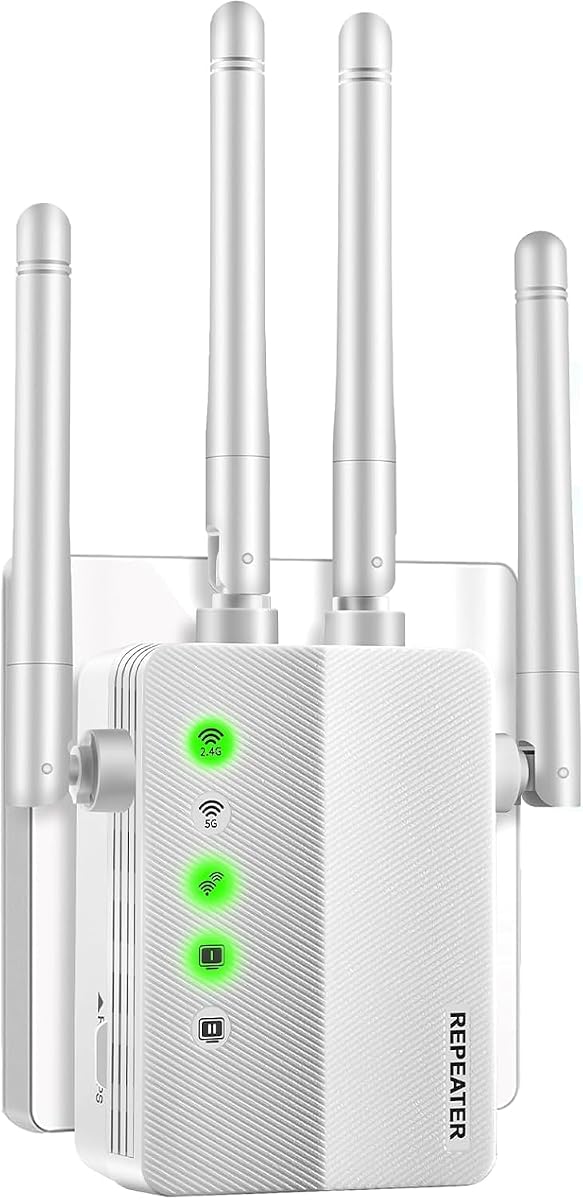


This WiFi extender offers extensive coverage up to 5000 square feet at a budget-friendly price. It supports up to 45 devices and features dual band technology for stable connections.
We may earn a commission when you buy through this link, at no additional cost to you.
Its central processing unit and new-generation chips help extend signals to hard-to-reach areas effectively. The included Ethernet port allows for wired connectivity to eliminate speed drops.
While it lacks advanced mesh features, it provides reliable repeater and AP modes for flexible setup. Security protocols like WPA2 ensure your network remains protected from unauthorized access.
Ideal for homeowners needing large coverage without high costs, it balances performance and affordability. Verify compatibility with your specific router for optimal results.
With up to 5000 square feet of coverage, this extender reaches corners and rooms that typical routers miss.
Supporting both 2.4GHz and 5GHz bands ensures you can choose the best signal for streaming or browsing.
We may earn a commission when you buy through this link, at no additional cost to you.
The TP-Link RE315 delivers strong performance powered by Adaptive Path Selection for seamless roaming. It supports up to 32 devices and covers up to 1500 square feet effectively.
We may earn a commission when you buy through this link, at no additional cost to you.
Setup is quick using the Tether app which finds optimal locations via signal indicators. Security is a priority with advanced protocols to protect your data and prevent leaks.
Although it does not integrate with Deco systems, it works well with EasyMesh compatible routers. The ethernet port provides a reliable wired connection for stationary devices like consoles.
This model stands out for reliability and ease of use in mid-sized homes. It balances cost with essential features needed for consistent everyday connectivity.
This feature automatically connects your device to the strongest signal path as you move through your home.
Expand your network seamlessly by connecting to routers that support the EasyMesh standard for whole-home coverage.
We may earn a commission when you buy through this link, at no additional cost to you.
This extender boasts an impressive coverage of up to 10000 square feet and connects up to 80 devices. It uses two external high-gain antennas to provide strong reliable network signals.
We may earn a commission when you buy through this link, at no additional cost to you.
One touch connection via WPS makes setup fast, often within seconds. Signal lights help find the best location for optimal WiFi coverage without technical expertise.
Its capacity for many devices makes it ideal for smart homes with numerous IoT gadgets. Plug and play functionality ensures minimal hassle during installation.
Users seeking maximum coverage and device support will appreciate its robust performance. Confirm your network needs match its high capacity before purchase.
Connecting up to 80 devices simultaneously ensures no one gets bumped offline in busy households.
Two external antennas enhance signal strength and range to reach distant rooms effectively.
We may earn a commission when you buy through this link, at no additional cost to you.
The RE220 offers 44% more bandwidth than single band extenders for improved performance. It covers up to 1200 square feet and connects up to 30 devices effectively.
We may earn a commission when you buy through this link, at no additional cost to you.
Dual band support provides speeds up to 300Mbps on 2.4GHz and 433Mbps on 5GHz. OneMesh compatibility allows seamless integration with compatible routers for whole home coverage.
Its small size fits discreetly into any outlet without blocking adjacent sockets. The ethernet port enables wired connections for devices needing stable throughput.
Best for small to medium homes, it balances price with essential dual band features. Verify router compatibility if using OneMesh for expanded networks.
Dual band technology delivers up to 44% more bandwidth than single band models for smoother streaming.
Its wall plug design saves space and prevents blocking other outlets in crowded rooms.
We may earn a commission when you buy through this link, at no additional cost to you.
This premium extender offers total bandwidth of 1900Mbps with speeds up to 1300Mbps on 5GHz. It covers up to 2100 square feet and connects up to 32 devices reliably.
We may earn a commission when you buy through this link, at no additional cost to you.
Three adjustable external antennas optimize Wi-Fi coverage for reliable connections. The Gigabit Ethernet port supports high-speed wired connections for demanding devices.
AP mode allows converting wired connections into powerful hotspots easily. Smart adaptive roaming ensures you stay connected to the strongest signal as you move.
Ideal for users needing top-tier speeds and stability, it delivers premium features. Check your mesh system compatibility before purchasing for seamless integration.
A Gigabit Ethernet port ensures you can run wired devices at maximum available internet speeds.
Three antennas allow you to direct the signal towards specific areas for better penetration.
We may earn a commission when you buy through this link, at no additional cost to you.
This model holds a perfect 5.0 rating with coverage extending up to 10000 square feet. It supports 65 devices and offers five distinct operating modes including Repeater and Access Point.
We may earn a commission when you buy through this link, at no additional cost to you.
One click setup via WPS connects devices within seconds for immediate use. Security protocols like WPA2 prevent unauthorized access and keep your browsing confidential.
Teche offers 24 months after-sales service with a dedicated technical team in the US. The included Ethernet cable facilitates easy setup and wired connections.
Perfect for users wanting reliability and flexible connectivity options at a low cost. Verify your router supports mesh features if that is your priority.
Support for Repeater, Bridge, Access Point, Router, and Client modes adapts to various network needs.
Embedded encryption modules detect and prevent risks in real time to keep your network secure.
We may earn a commission when you buy through this link, at no additional cost to you.
This extender delivers 50% more bandwidth than single band models with 1200Mbps total speed. It covers up to 3000 square feet and connects up to 20 devices effectively.
We may earn a commission when you buy through this link, at no additional cost to you.
Dual band support offers 300Mbps on 2.4GHz and 867Mbps on 5GHz for stable performance. Wall plug design ensures it fits anywhere without obstructing adjacent sockets.
WEP and WPA/WPA2 security protocols prevent network theft and privacy issues. Repeater and AP modes meet diverse needs in homes or offices easily.
Ideal for travel or small homes, it combines portability with reliable performance. Check if your router supports WPS for the easiest setup experience.
Enjoy 50% more bandwidth than single band extenders for smoother HD streaming.
Compact size ensures you can plug it into any outlet without blocking others.
We may earn a commission when you buy through this link, at no additional cost to you.
This extender combines 1200Mbps dual-band performance with four high-gain antennas for minimal data loss. It covers up to 3600 square feet and handles up to 80 devices simultaneously.
We may earn a commission when you buy through this link, at no additional cost to you.
Repeater mode extends wirelessly while AP mode converts wired lines into dual-band hotspots. WPA/WPA2-PSK encryption blocks unauthorized users to safeguard your data effectively.
Signal lights guide you to the best location for optimal coverage without technical steps. Ethernet port allows hardwiring gaming consoles or desktop PCs for maximum speed.
Highly rated by users, it offers excellent value for larger homes with many devices. Verify that 802.11ac routers are supported for best performance.
Supporting up to 80 devices ensures no one gets bumped offline in busy smart homes.
Combine 2.4GHz range with 5GHz speed to balance coverage and performance.
We may earn a commission when you buy through this link, at no additional cost to you.
This extender provides high range coverage up to 5800 square feet to eliminate dead zones. It supports 55 devices and offers transmission rates up to 300Mbps for stable streaming.
We may earn a commission when you buy through this link, at no additional cost to you.
Compatible with 802.11N/B/G standards, it works with most routers and modems easily. One-touch WPS setup connects devices within minutes without complicated technical steps.
Security protocols prevent network theft and ensure your data remains protected. Repeater and AP modes allow you to turn wired connections into wireless access points.
Suitable for large homes needing extensive range at a budget-friendly price. Verify your current router settings match before attempting setup for success.
Coverage up to 5800 square feet ensures even distant corners receive strong signals.
WPA/WPA2 encryption ensures your network remains safe from unauthorized access attempts.
We may earn a commission when you buy through this link, at no additional cost to you.
This booster delivers flawless 360 signal radiation with coverage up to 16500 square feet. It supports 105 devices simultaneously and features four high-gain antennas for stable performance.
We may earn a commission when you buy through this link, at no additional cost to you.
Dual-band speeds combine 2.4GHz penetration with 5GHz transmission for 1200Mbps total bandwidth. Intelligent indicator lights and guides ensure tool-free setup for novice users quickly.
Encryption protocols block illegal access and protect user privacy and transaction data. Three modes ensure adaptability to high-load smart homes or office environments.
Perfect for multi-story houses or large estates needing extensive wireless reach. Ensure your router supports dual bands before purchasing to leverage all features.
With up to 16500 square feet of coverage, this extender reaches every corner of large properties.
Supporting up to 105 devices ensures stable connectivity even with massive smart home setups.
We may earn a commission when you buy through this link, at no additional cost to you.
Selecting the right cheap WiFi booster requires understanding your home size, device count, and network needs. This guide outlines the critical factors to consider.
Ensure the booster covers your specific square footage including hard-to-reach rooms. Larger homes need models with wider range to eliminate dead zones effectively.
Choose a model rated for at least your home size to avoid underperformance.
Modern smart homes have many connected devices requiring a booster that supports high counts. Check the maximum number of devices each model can handle reliably.
Higher capacity prevents slowdowns when multiple users stream or game simultaneously.
Dual band extenders offer both 2.4GHz for range and 5GHz for speed. This flexibility ensures better performance across different types of wireless traffic.
Prioritize dual band models if you require high-speed streaming or gaming.
An Ethernet port allows wired connections for stationary devices like TVs or consoles. This provides stable speeds that wireless connections often lack due to interference.
Verify the booster includes an Ethernet port if you need wired access.
Look for models with WPS one-touch setup or intuitive mobile apps for easy configuration. Quick setup reduces frustration and ensures you get online faster.
Check for plug-and-play capabilities to avoid complex technical steps.
Security is essential to prevent unauthorized access to your network. Ensure the booster supports modern encryption standards like WPA2 or WPA3.
Secure models protect your data and prevent network theft effectively.
If you plan to expand your network later, mesh compatibility is key. Some boosters integrate with existing systems to create seamless whole-home coverage.
Check if your current router supports the booster's mesh protocol.
Compare costs relative to features like coverage and device capacity. A higher initial price may offer better long-term value if it supports your needs fully.
Always check for warranty or support options for peace of mind.
Start by plugging the booster into a central outlet halfway between your router and dead zone. This ensures the signal reaches your main devices effectively.
Use the WPS button to connect your router and booster quickly. Follow the app or manual instructions to finalize the network name and password settings.
Keep the device clean and away from direct heat to maintain performance. Ensure firmware is updated regularly for security and stability improvements.
A booster improves signal range and stability but does not increase your ISP speed limit. It helps devices connect faster by reducing interference and weak spots.
No, most boosters work with existing routers as long as they support standard WiFi protocols. Check compatibility before purchasing to ensure seamless integration.
Use Repeater mode to extend wireless signals and AP mode to create a new network from a wired source. Select based on your specific home layout needs.
Yes, most models support standard smart devices like lights and cameras. Verify the device capacity matches your total number of connected gadgets.
2.4GHz offers longer range while 5GHz provides higher speeds. Dual band models allow you to switch based on your usage needs.
Yes, all WiFi boosters require a power outlet to function. Ensure your chosen model fits your available wall socket locations.
We highlighted top options including the budget-friendly 5000 sq ft booster and high-capacity models. Each provides unique benefits depending on your home size and device needs.
Prioritize coverage area and device capacity to avoid underperformance in the long run. Features like dual band and Ethernet ports add significant value for stability.
Prices and availability may change, so verify current terms before purchasing. Our guide aims to simplify your choice for reliable affordable network expansion.