
WALI Computer Monitor Stand
4.7Editor score
Adjustable height settings
44 lbs weight capacity
Vented metal shelf
This guide compares the top desktop monitor riser options for ergonomics and storage, helping you choose the best stand to improve your workspace setup.
A desktop monitor riser is an essential tool for creating a comfortable and organized workspace. By elevating your screen to eye level, you reduce strain on your neck and back during long hours of computer use. Choosing the right stand involves considering material, weight capacity, and storage features to match your specific needs.
We compared ten leading models based on stability, adjustability, and design. Each product was evaluated for its ability to support various devices while offering under-stand storage for accessories. Our analysis focuses on real-world usability, durability, and how well each riser integrates into modern home and office environments.
Each pick highlights unique strengths such as adjustable height, dual monitor support, or built-in storage. These summaries help you identify the best fit for your desk setup quickly. Please note that prices and availability can change frequently, so always verify current details before making a purchase decision.
4.7Editor score
4.7Editor score

4.6Editor score
The following table provides a side-by-side comparison of all ten selected monitor risers. It highlights key specifications such as dimensions, weight limits, and unique features to help you differentiate between similar models quickly.


The WALI Computer Monitor Stand offers a practical solution for users seeking an affordable way to elevate their screens. With a 4.7 rating from numerous customers, it is known for its durability and functional design. The stand features a large metal shelf that supports various devices while keeping your desk organized.
We may earn a commission when you buy through this link, at no additional cost to you.
Its standout quality is the adjustable height mechanism that allows you to choose between three specific positions to suit your viewing comfort. The ventilated design ensures that laptops or monitors placed on top do not overheat during extended use. Rubber pads on the bottom protect your desk surface from scratches and slipping.
While the height settings are fixed rather than infinitely adjustable, they cover most ergonomic needs for standard desk setups. The assembly process requires attaching the shelf to the legs, which is straightforward but takes a few minutes. This minor trade-off is acceptable given the low cost and high weight capacity.
This stand is ideal for home offices or students who need a reliable riser without spending much. It supports up to 44 pounds making it suitable for heavy monitors or multiple devices. We recommend it for anyone prioritizing value and stability in a desktop monitor riser.
Raising your screen to eye level reduces neck strain and improves posture during long work sessions.
The vented holes allow air to circulate preventing overheating for laptops or monitors placed on the stand.
We may earn a commission when you buy through this link, at no additional cost to you.
The TEAMIX 20 Inch Monitor Stand brings a stylish wood finish to your desk while providing solid support for your devices. Rated 4.6 by users it is praised for its sturdy build and elegant design. It fits seamlessly into home decor with its black MDF construction.
We may earn a commission when you buy through this link, at no additional cost to you.
This stand can hold up to 80 pounds which is significantly higher than many plastic alternatives. The spacious shelf accommodates large monitors or multiple devices allowing you to keep your workspace tidy. Underneath there is ample room for keyboards and other accessories to reduce clutter.
Assembly is simple and involves screwing the shelf onto the base legs. However the material is MDF which can be prone to scratches if not handled carefully. The height is fixed meaning you cannot adjust it for different ergonomic preferences once installed.
This product is best for those who value aesthetics and high weight capacity over adjustability. It works well in offices where a professional look is desired. Consider this option if you need a robust riser that blends with modern furniture.
The black MDF wood board offers a modern look that complements most home office furniture and decor styles.
With an 80 pound capacity this stand supports heavy monitors and multiple devices without wobbling or collapsing.
We may earn a commission when you buy through this link, at no additional cost to you.
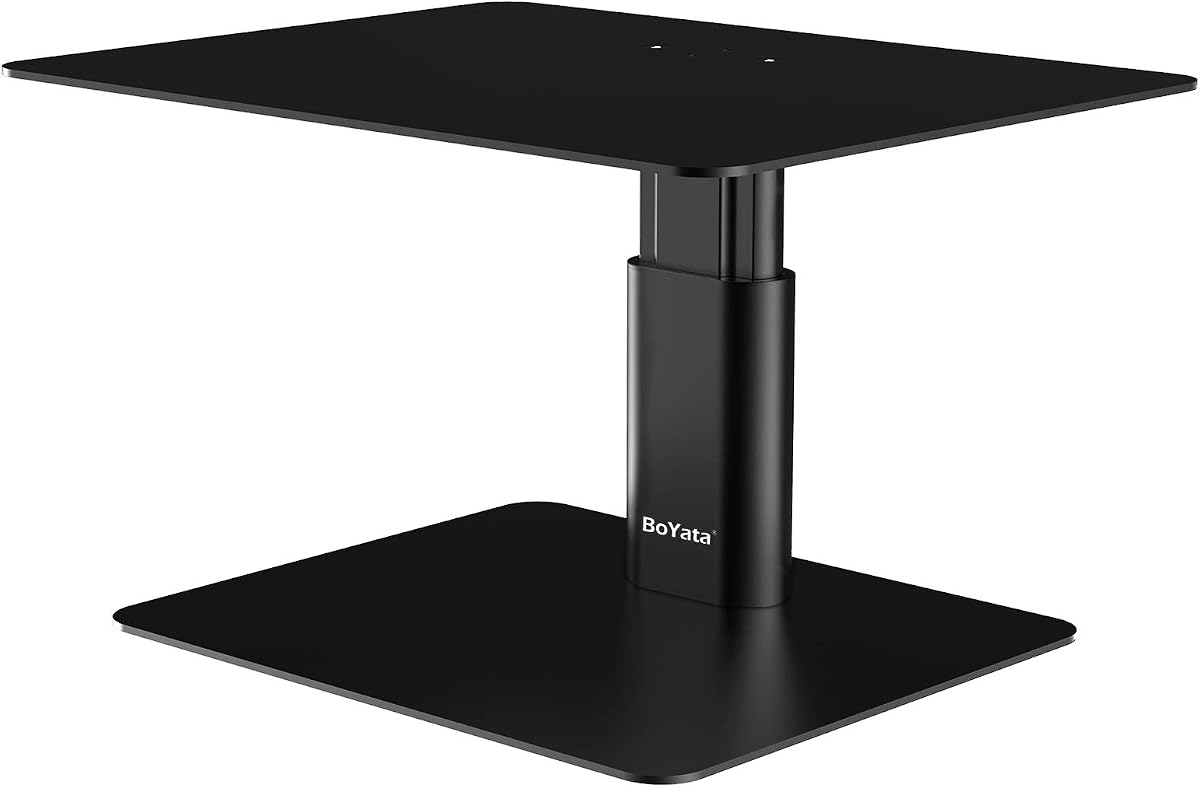
The BoYata Monitor Stand stands out with its twist knob adjustment feature that allows you to set the exact height you need. It has a 4.7 rating reflecting its popularity among users who value precision in their workspace setup. The metal construction ensures it remains sturdy over time.
We may earn a commission when you buy through this link, at no additional cost to you.
Unlike other stands with fixed legs this model lets you fine-tune the position for optimal viewing angles. The metal plates are strong enough to hold typical monitors and laptops securely. A screwdriver is included to make assembly quick and hassle-free for most users.
The weight capacity is lower than some competitors but sufficient for standard devices. The shelf is smaller which might be tight for very large monitors or multiple screens. However the stability provided by the skidproof pads prevents unwanted movement on smooth surfaces.
We recommend this stand for users who prioritize ergonomic flexibility and durability. It is a great choice for anyone tired of fixed-height stands. If you need precise control over your monitor position this is a top contender in the category.
The twist knob allows for fine-tuned height changes helping you achieve the perfect eye-level viewing position.
Constructed from strong metal this stand resists bending and denting ensuring long-term durability for daily use.
We may earn a commission when you buy through this link, at no additional cost to you.
The Amazon Basics Height Adjustable Monitor Stand offers a flexible solution with its stackable design that lets you choose between three heights. It holds a 4.6 rating and is appreciated for its lightweight nature. The ABS plastic construction makes it easy to move around when needed.
We may earn a commission when you buy through this link, at no additional cost to you.
This stand includes a storage organizer which helps keep desk accessories within reach. The top surface is tapered but provides enough space for standard monitors or laptops. Non-skid feet ensure it stays in place on your desk without sliding during use.
While the plastic construction is durable it may not feel as robust as metal or wood options. The weight capacity of 22 pounds limits its use to lighter devices. However this is acceptable for most laptops and smaller monitors found in home offices.
This product is suitable for users who need portability and basic height adjustment. It is a good choice for temporary setups or shared workspaces. Consider this if you want a simple and effective riser from a trusted brand.
The detachable legs allow you to customize the height to fit your specific ergonomic needs easily.
Made from ABS plastic this stand is easy to lift and move around your office or home space.
We may earn a commission when you buy through this link, at no additional cost to you.
The YAOHUOO Dual Monitor Stand is designed for power users who need space for multiple screens. With a 4.6 rating it is recognized for its incredible stability and wide surface area. The wooden desktop shelf combined with steel legs provides a premium look and feel.
We may earn a commission when you buy through this link, at no additional cost to you.
This stand can hold up to 100 pounds making it one of the strongest options available. The length allows you to place two monitors side by side easily. Underneath the shelf provides plenty of room for keyboards and storage accessories to keep the desk clear.
Assembly takes about ten minutes with included tools and instructions. The fixed height may not suit everyone but the stability compensates for this. It is quite wide so ensure your desk can accommodate the footprint before purchasing.
We recommend this for professionals or gamers who use dual setups. It offers robust support that can handle heavy equipment without wobbling. This is an excellent choice if you need a reliable base for multiple devices.
The wide design accommodates two monitors or larger displays allowing for an efficient multi-screen workflow.
Steel legs and anti-slip pads ensure the stand remains stable even with heavy loads during daily work.
We may earn a commission when you buy through this link, at no additional cost to you.
This product offers two monitor risers in one package providing great value for households or multiple workstations. It has a 4.7 rating due to its practical features like the phone holder and ventilation. The metal construction ensures durability while keeping the design simple and functional.
We may earn a commission when you buy through this link, at no additional cost to you.
You can choose from three height settings by pressing buttons on the legs to find your preferred viewing position. The 150 heat dissipation holes help keep devices cool and extend their lifespan. There is also a phone holder integrated into the design for easy access.
Assembly is quick and requires no tools as the legs simply screw into place. However the rubber pads should be checked to ensure they protect your desk surface fully. The buttons for height adjustment might feel less premium than other mechanisms.
This is a smart buy for families or offices needing multiple stands. It covers basic ergonomic needs effectively while adding useful storage features. Consider this if you want to outfit more than one desk without buying separate units.
An integrated phone holder allows you to keep your device visible and accessible while working at the desk.
The 150 ventilation holes promote airflow to prevent overheating of laptops or monitors placed on the shelf.
We may earn a commission when you buy through this link, at no additional cost to you.
The Klearlook Foldable Monitor Stand offers unique flexibility with its foldable design that adjusts width to fit different spaces. It has a 4.7 rating and is praised for its all-in-one convenience. The white finish gives it a clean look that suits modern offices.
We may earn a commission when you buy through this link, at no additional cost to you.
This stand includes a storage drawer which is rare in this category helping you keep small items organized. The tablet and phone holder add extra utility for keeping devices within reach. It requires no assembly so you can use it immediately after unboxing.
The width adjusts to accommodate various keyboard sizes or monitor setups. However the white surface might show dust or scratches more than darker colors. The drawer space is limited to small accessories rather than full-sized items.
This product is ideal for users who want a compact solution with extra storage. It works well in home offices where space and organization are priorities. Consider this if you need a versatile stand that adapts to your desk layout.
A built-in drawer provides hidden storage for office supplies keeping your desk surface neat and clutter free.
The adjustable width feature allows you to expand or contract the stand to fit your specific workspace needs.
We may earn a commission when you buy through this link, at no additional cost to you.
The OPNICE Desk Organizers Stand focuses on organization with built-in pen holders and a drawer for your accessories. It holds a 4.6 rating and is valued for its solid metal construction. The black finish blends well with most office equipment and decor styles.
We may earn a commission when you buy through this link, at no additional cost to you.
This stand allows you to support dual monitors while keeping essential items accessible. The drawer offers extra space for storing office supplies like paper clips or notes. There is no installation required so you can set up your workspace quickly.
Since it has a fixed height it may not work for everyone's ergonomic needs. The width is standard and might not fit very wide screens perfectly. However the organization features make it stand out compared to basic risers.
This is a good choice for busy professionals who need a tidy desk. It combines functionality with storage to reduce clutter effectively. Consider this if you prioritize organization and immediate usability in a monitor stand.
Two pen holders and a drawer keep writing tools and small items organized and easily accessible on your desk.
The design supports two monitors or a large printer providing a versatile base for different office setups.
We may earn a commission when you buy through this link, at no additional cost to you.
The WESTREE Dual Monitor Stand combines wood and steel for a unique rustic look that enhances office aesthetics. It has a 4.6 rating and is appreciated for its sturdy build and quick assembly. The finish adds warmth to the workspace environment.
We may earn a commission when you buy through this link, at no additional cost to you.
This stand can hold two monitors or other devices like printers. The pre-drilled holes make assembly simple so you can use it in minutes. It includes all necessary parts so there is no need to buy extra tools.
While it offers a distinctive look it lacks height adjustment options. The fixed design means you should measure your setup before purchasing. However the stability provided by the steel legs is reliable for daily use.
This product suits users who want a stylish addition to their desk. It is functional for dual setups while maintaining a decorative appeal. Consider this if you value design and ease of setup over adjustability.
The brown wood finish paired with steel legs provides a unique look that enhances office decor.
Pre-drilled holes and included tools allow you to set up the stand in just minutes without hassle.
We may earn a commission when you buy through this link, at no additional cost to you.
The gianotter Dual Monitor Stand features a patented design with magnetic pen holders and a drawer for organization. It holds a 4.5 rating and is noted for its no-assembly convenience. The metal build ensures it supports various devices securely.
We may earn a commission when you buy through this link, at no additional cost to you.
This stand is designed to maximize desktop space by elevating monitors and offering storage underneath. The magnetic holders allow you to place pens easily without worrying about them rolling away. It transforms cluttered areas into organized workspaces instantly.
The magnetic feature can be inconsistent depending on the weight of your pens. The drawer is small so it is better for lightweight items. However the overall design is practical for those seeking instant organization.
We recommend this for users who want quick setup and storage features. It is a solid choice for home offices needing a tidy workspace. Consider this if you prioritize convenience and design in a monitor stand.
Magnetic pen holders keep writing tools securely in place and easy to find when working.
No assembly is required meaning you can start using this stand immediately after unboxing without tools.
We may earn a commission when you buy through this link, at no additional cost to you.
Selecting the right desktop monitor riser involves understanding your specific needs and workspace constraints. This guide outlines key factors to help you make an informed decision.
Weight capacity determines how much your stand can support. If you have a heavy monitor or multiple devices ensure the stand can handle the load without wobbling. Always check the manufacturer's specifications to confirm safety.
Choose a stand with a weight limit higher than your heaviest device.
Adjustability is key for ergonomics. Fixed-height stands are cheaper but may not fit your eye level perfectly. Adjustable models let you customize the position to reduce neck strain.
Look for stands with twist knobs or stackable legs for better flexibility.
Materials like metal and wood offer durability while plastic is lighter. Metal stands tend to last longer and resist bending. Wood adds style but can scratch easily.
Select materials that match your longevity and aesthetic preferences.
Many risers offer space underneath for keyboards or notebooks. Consider if you need drawers or open space to keep your desk organized. A good storage area reduces clutter significantly.
Prioritize designs that maximize under-stand storage for your accessories.
Check the width and depth of the stand to ensure it fits your devices. Oversized stands may dominate smaller desks. Measure your monitor and desk space before buying to avoid fit issues.
Ensure the stand accommodates your device dimensions comfortably.
Laptops and monitors generate heat during use. Vented designs allow air to circulate preventing overheating. This extends the lifespan of your electronics.
Look for stands with holes or open designs for better airflow.
Some stands need tools and time to assemble while others are ready to use. If you prefer convenience look for no-assembly options. Check what tools are included if assembly is required.
Opt for tools-assembly stands if you value quick setup.
Your monitor stand should complement your office decor. Black or wood finishes blend well with most setups. Consider the style that enhances your workspace look.
Choose a finish that aligns with your existing furniture and equipment.
Start by placing the stand on a flat stable surface to ensure balance. Check that all legs are securely attached if assembly was required before placing your devices.
Adjust the height according to your comfort ensuring the screen is at eye level. Use the available storage space to keep keyboards and accessories organized under the stand.
Clean the stand regularly with a soft cloth to remove dust. Avoid harsh chemicals that could damage the finish or material. If using metal stands check for rust periodically and apply protective coatings if needed.
Most monitor risers include rubber pads or non-slip feet to protect your desk from scratches. Ensure these pads are intact and clean to prevent debris from causing damage. If your stand lacks padding consider adding felt protectors.
Yes, most monitor risers support laptops as well as monitors. Ensure the stand can hold the weight of your laptop. Some models include ventilation holes to help keep laptops cool during use.
The ideal height depends on your sitting position and screen size. Generally, the top of your monitor should be at or slightly below eye level. Adjustable stands help you find this position easily.
Not all risers support dual monitors. Some are designed for single use while others have wider surfaces. Check the weight capacity and dimensions to see if it fits two screens.
Use a dry or slightly damp cloth to wipe wooden stands. Avoid excess water which can damage the finish. Apply wood polish occasionally to maintain the look.
Most stands come with clear instructions and tools. Assembly typically takes minutes. If you prefer no-assembly options look for ready-to-use models.
Some models allow stacking but check specifications. Stacking may affect stability so ensure the stand is designed for it. Verify weight limits when stacking to avoid accidents.
Yes they improve ergonomics and reduce strain on neck and back. They also help organize desk space. This makes them a valuable addition to any workspace.
We reviewed ten top monitor risers covering various needs from budget-friendly to premium options. Each product offers unique features like adjustability storage and durability. The WALI stands offers great value while BoYata provides precise adjustment.
Prioritize ergonomics and weight capacity when making your choice. Ensure the stand fits your space and supports your devices. These factors will help you choose a long-lasting and useful solution.
Prices may vary so check current listings before buying. This guide helps narrow down options to fit your requirements. Investing in a good riser improves comfort and productivity daily.