
Kayoubi LCD Writing Tablet
4.6Editor score
14.5 Inch Screen
One-Click Erase
Eye-Friendly Display
This comprehensive guide compares the top electronic sketch pads available in October 2026, evaluating features, performance, and value for digital artists and
Electronic sketch pads have revolutionized the way artists, students, and professionals capture their creative ideas. These devices blend the tactile feel of traditional paper with the versatility of digital technology, allowing for easy editing, sharing, and storage of artwork. Choosing the right one depends on your specific needs, whether you prioritize portability, screen quality, or advanced features.
We have rigorously evaluated the leading electronic sketch pads on the market to bring you this definitive list. Our comparison considers factors such as display technology, pressure sensitivity, battery life, software compatibility, and overall user experience. This ensures that you can find a device that aligns perfectly with your workflow and budget without compromising on quality.
Each pick in this guide highlights unique strengths and potential trade-offs to help you make an informed decision. We cover a wide range of options from budget-friendly LCD tablets to high-end standalone drawing displays. Please note that prices and availability can change frequently, so it is always a good idea to check the latest offers before purchasing.
4.6Editor score

4.4Editor score

4.4Editor score
The following table provides a side-by-side comparison of all ten electronic sketch pads featured in this guide. It highlights key specifications and unique selling points to help you quickly identify the device that best suits your creative requirements.




The XPPen Magic Note Pad stands out as a top contender in the electronic sketch pad category, earning an Editor's Choice badge for its exceptional balance of features. It combines the convenience of a standalone tablet with a highly realistic drawing experience, making it ideal for artists who want portability without sacrificing quality. The device scores highly for its advanced screen technology and intuitive user interface.
We may earn a commission when you buy through this link, at no additional cost to you.
At the heart of this device is the 10.95-inch X-Paper display, which uses AG nano-etching technology to mimic the friction of traditional paper. This texture, combined with 16384 pressure levels and tilt support, allows for incredibly precise control over line weight and shading. The 90Hz refresh rate ensures that your strokes appear on screen instantly, eliminating lag and making the creative flow uninterrupted. Additionally, the inclusion of Android 14 means you can run various creative apps directly on the device without needing a computer.
While the device is powerful, it does have some trade-offs. The battery life is decent but may require charging during long sessions away from an outlet, which can be inconvenient for travel. It is also heavier than standard notebooks, which might make holding it for extended periods slightly less comfortable. However, these drawbacks are minor compared to the versatility it offers, and the anti-glare screen significantly reduces eye fatigue during long drawing sessions.
This electronic sketch pad is best suited for artists, students, and professionals who need a versatile tool that can handle everything from note-taking to professional sketching. If you want a device that feels natural to draw on and offers the freedom to work anywhere, the XPPen Magic Note Pad is a highly recommended investment. It effectively bridges the gap between traditional paper and digital innovation.
The paper-like texture provides natural friction similar to real paper, enhancing control and realism.
Built-in Android 14 allows direct app installation for sketching, note-taking, and reading without a PC.
We may earn a commission when you buy through this link, at no additional cost to you.
The Kayoubi LCD Writing Tablet is a fantastic entry-level option for families looking to introduce children to digital drawing without the complexity of advanced tablets. It offers a large 14.5-inch screen that provides plenty of space for little hands to explore their creativity. With a rating that reflects high customer satisfaction, this device is praised for its simplicity and durability, making it a standout choice in the budget category.
We may earn a commission when you buy through this link, at no additional cost to you.
This tablet focuses on the essentials: a large, eye-friendly canvas and an easy-to-use erase button. The screen produces vibrant colors without emitting harmful blue light, ensuring safe screen time for young children. The pressure-sensitive technology allows lines to vary in thickness based on how hard the stylus is pressed, adding a layer of interactivity that mimics traditional drawing. The single-button erase function makes it simple for kids to clear their canvas and start anew instantly.
The main limitation of this device is its lack of digital storage. You cannot save or share drawings digitally, which means the focus is purely on the act of creation rather than the output. Additionally, the screen is monochrome or limited color depending on the variant, which is less advanced than full-color displays. However, for a toy or a basic practice tool, these features are often unnecessary and add to the low cost.
Ideal for parents seeking a mess-free alternative to paper and crayons, this electronic sketch pad is perfect for travel, waiting rooms, or quiet time at home. It encourages creativity without the risk of ink stains or lost paper. If you want a simple, robust drawing tool for children aged three to eight, the Kayoubi LCD Writing Tablet offers exceptional value for money.
Reusable writing surface saves thousands of sheets of paper and eliminates the need for ink or crayons.
Blue light-free screen protects young eyes, making it safe for extended periods of use.
We may earn a commission when you buy through this link, at no additional cost to you.
The XP-PEN Artist12 is a professional-grade pen display that offers a premium electronic sketch pad experience for serious digital artists. It features a vivid 11.6-inch Full HD screen that provides accurate colors and crisp details, essential for illustration and design work. With a strong rating from users, it is recognized for its build quality, precise pen control, and comprehensive software support, making it a top choice for professionals.
We may earn a commission when you buy through this link, at no additional cost to you.
This device excels in its color accuracy and pressure sensitivity. The 100% SRGB color gamut ensures that what you see on screen is true to life, which is crucial for tasks like photo editing and digital painting. The battery-free pen offers 8192 levels of pressure sensitivity, allowing for nuanced strokes and shading. The included anti-reflective screen protector reduces glare, while the customizable shortcut keys streamline your workflow for maximum efficiency.
While highly capable, the Artist12 is not a standalone device and must be connected to a computer to function. This limits its portability compared to tablets with built-in operating systems. Additionally, it requires both HDMI and USB ports on your host machine, which may necessitate adapters for modern laptops. Despite these connectivity requirements, the quality of the display and pen performance often outweigh these inconveniences for desktop-based creators.
For illustrators, animators, and designers who work primarily from a desk or workstation, this electronic sketch pad is an excellent tool. It provides a near-traditional drawing feel with the power of digital software. If you are looking for a reliable, high-performance monitor that integrates seamlessly into your existing creative suite, the XP-PEN Artist12 is a robust investment.
100% SRGB coverage delivers precise color representation essential for professional digital art and editing.
Eight express keys allow you to map frequently used functions to physical buttons for faster editing.
We may earn a commission when you buy through this link, at no additional cost to you.
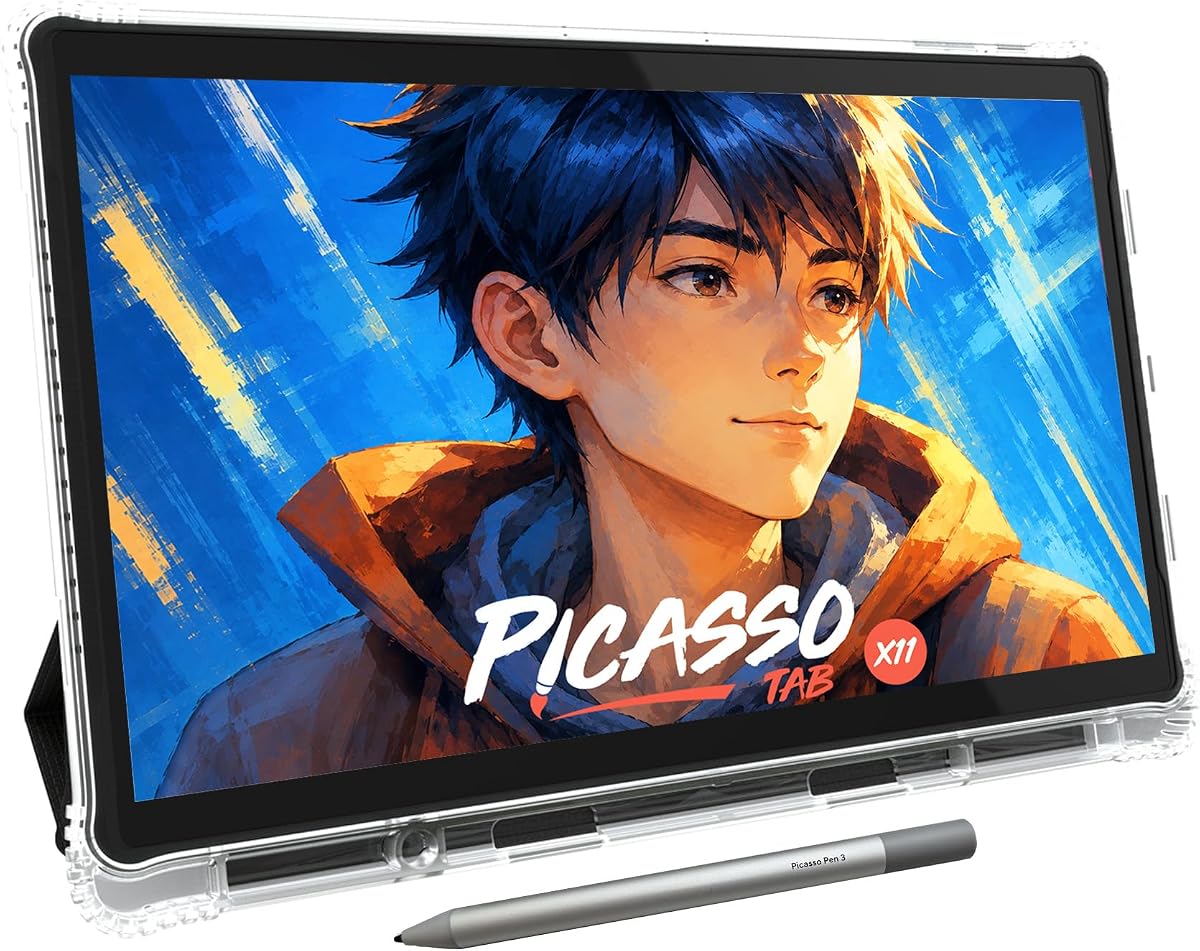
The PicassoTab X11 is designed to be an all-in-one creative tool, especially for beginners who want a device ready to use out of the box. It includes lifetime VIP tutorials that guide users through various drawing techniques, making it a comprehensive learning package. The tablet features a high-quality laminated screen and robust hardware that supports smooth performance for drawing apps and other educational tasks.
We may earn a commission when you buy through this link, at no additional cost to you.
One of its strongest features is the inclusion of the Artixo Lifetime VIP upgrade and the Xplore app, which offer step-by-step lessons and instant help. This educational support sets it apart from standard tablets. The hardware is capable enough to handle 2K resolution drawing apps and multitasking thanks to 6GB of RAM. The laminated screen reduces parallax, giving a more realistic paper-like feel when drawing.
However, the tablet might feel less flexible if you want to use specific third-party professional software not available on Google Play. The battery life is adequate but can drain quickly under heavy usage with the screen brightness high. While it is a powerful standalone device, users might find the included apps sufficient but limited if they seek professional-grade customization. Still, the learning resources add significant value.
This electronic sketch pad is perfect for students, hobbyists, or parents looking to encourage artistic skills in children. The combination of hardware and education makes it a complete package. If you want a tablet that grows with you and provides guidance along the way, the PicassoTab X11 is a compelling option to consider.
Lifetime VIP tutorials provide structured lessons for all skill levels to improve drawing techniques.
Powerful octa-core processor and 6GB RAM ensure smooth app performance and multitasking capabilities.
We may earn a commission when you buy through this link, at no additional cost to you.
The HUION Note Digital Notebook offers a unique hybrid solution for those who love the feel of paper but need digital backups. It consists of a special pen, an A5 notepad, and a companion app that digitizes your writing in real time. This setup is highly rated for its ability to keep your physical workflow intact while ensuring your notes are safe and shareable digitally.
We may earn a commission when you buy through this link, at no additional cost to you.
The technology captures vector lines of your writing and syncs them to your mobile device via Bluetooth. A standout feature is the ability to record audio that syncs with your notes, allowing you to playback your writing process and hear what was said at that moment. This is incredibly useful for meetings, lectures, or brainstorming sessions. The battery-free pen ensures you never run out of power during a critical moment.
A minor inconvenience is the need to replace the physical pages in the notepad as you fill them up, which is different from standard digital tablets. Also, the editing tools in the app are basic compared to full drawing software. However, for pure note-taking and organization, these limitations are acceptable. The convenience of having physical notes and digital copies simultaneously is a significant advantage.
This electronic sketch pad is ideal for professionals, students, and anyone who takes a lot of notes and wants to avoid losing them. It bridges the gap between traditional stationery and modern technology. If you prefer writing on paper but need digital organization, the HUION Note is a practical and efficient tool.
Record audio that syncs with your handwriting to relive the context of your notes instantly.
All handwritten notes are automatically digitized and organized in the app for easy access.
We may earn a commission when you buy through this link, at no additional cost to you.
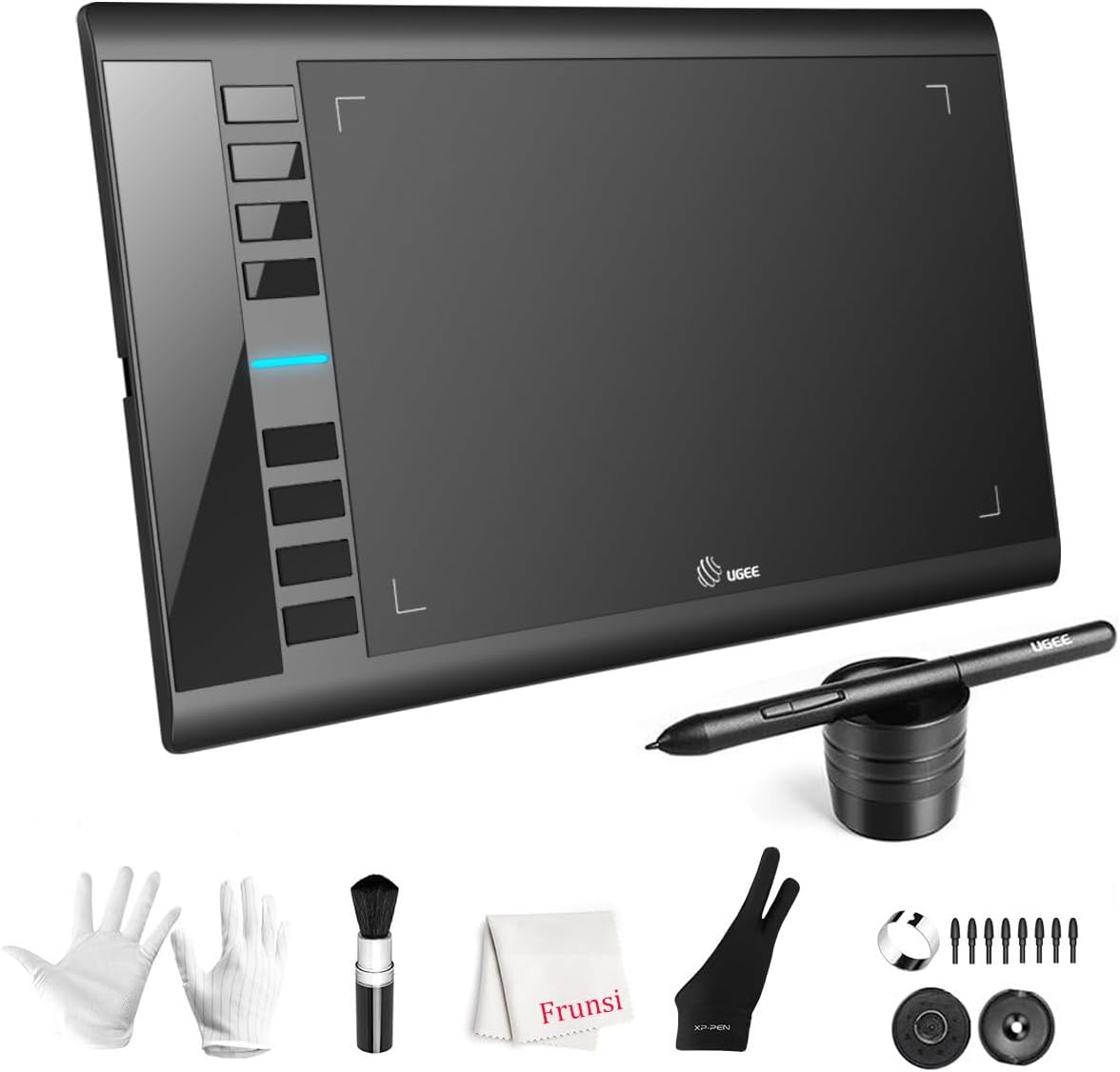
The UGEE M708 is a robust non-display tablet designed for artists who want a large active area without spending a fortune. It features a spacious 10×6 inch drawing surface that provides ample room for arm movements, which is crucial for smooth strokes and detailed work. With high ratings for performance and build quality, it is a popular choice for digital painters and graphic designers.
We may earn a commission when you buy through this link, at no additional cost to you.
One of its key features is the inclusion of eight customizable express keys on the side. These keys can be programmed to perform common functions like undo, zoom, or brush size, significantly improving workflow efficiency. The 16384 pressure levels offer precise control for line variation, and it is compatible with almost all major creative software on Windows, Mac, and Linux. The connection is straightforward with USB-C or standard USB.
The primary limitation is that it does not have a screen, so you must draw on the tablet while looking at your monitor. This can take some getting used to for those new to non-display tablets. Additionally, since it requires a computer, it is less portable than standalone devices. However, for a budget-friendly option that delivers professional-grade performance, these are minor trade-offs.
This electronic sketch pad is best suited for desktop artists and hobbyists who already have a setup and want to add drawing capabilities. It is a cost-effective way to enter digital art. If you are looking for a reliable workhorse for your computer that offers a large workspace and customizable shortcuts, the UGEE M708 is an excellent choice.
The 10×6 inch area allows for broad arm movements, reducing strain and enabling natural drawing gestures.
Eight express keys save time by letting you map shortcuts directly to the tablet for faster editing.
We may earn a commission when you buy through this link, at no additional cost to you.
The Wacom Intuos Small is a classic in the digital art world, known for its reliability and professional-grade pen technology. It offers a compact design that fits easily on any desk while delivering high-quality performance. With the highest rating in this list, it is trusted by designers worldwide for its precision and responsiveness, making it a strong contender for professionals and serious hobbyists.
We may earn a commission when you buy through this link, at no additional cost to you.
What sets this device apart is the inclusion of Wacom's EMR technology, which provides a battery-free pen that feels incredibly natural. You also receive a software bundle with access to popular creative apps, adding immediate value to the purchase. The driver support is excellent, ensuring seamless integration with Photoshop, Illustrator, and other tools. Its compact size makes it perfect for travel or small workspaces.
The main drawback is the small active area, which might feel restrictive for artists used to larger tablets. It also requires a wired USB connection, which limits portability compared to Bluetooth models. However, the build quality and pen performance are top-tier. For a reliable entry point into professional digital art, the value and performance offered by Wacom are hard to beat.
This electronic sketch pad is ideal for graphic designers, photo editors, and illustrators who need a trusted tool for daily work. If you want a tablet that just works and comes with a software package, the Wacom Intuos Small is a safe and professional choice.
Wacom EMR technology ensures a natural pen feel without the need for batteries or recharging.
Comes with bundled software credits for popular creative apps, helping you get started immediately.
We may earn a commission when you buy through this link, at no additional cost to you.
The TEKFUN LCD Writing Tablet is a versatile and durable option designed to keep children entertained on the go. It features a colorful 10-inch screen and a long-lasting battery that can last for months on a single charge. With a high user rating, it is appreciated for its robustness and ease of use, making it a practical travel companion for families.
We may earn a commission when you buy through this link, at no additional cost to you.
This device is built to withstand drops and spills, thanks to its waterproof and anti-fall design. This durability ensures it survives the rigors of travel in cars or planes. The one-click erase function allows kids to clear their work quickly, and the lock feature prevents accidental deletions. The pressure-sensitive technology creates varied lines, offering a tactile drawing experience similar to paper.
The tablet does not save drawings, so it is strictly for the act of creating rather than storing art. Also, it is limited to basic drawing functions without additional features. However, for a toy that promotes quiet time and creativity without the mess, these limitations are acceptable. The battery life is a standout feature that reduces the need for frequent charging.
This electronic sketch pad is perfect for road trips, long flights, or quiet play at home. If you want a reliable, mess-free toy that will keep kids engaged for hours, the TEKFUN LCD Writing Tablet is an excellent choice.
Waterproof and anti-fall design ensures the device survives accidental drops and spills during travel.
The built-in battery lasts up to six months, reducing the need for frequent recharging.
We may earn a commission when you buy through this link, at no additional cost to you.
The Bravokids LCD Writing Tablet stands out for its colorful screen, which adds an extra layer of fun to the drawing experience. It is designed for children aged three to eight, offering a safe and engaging way to express creativity. With a high satisfaction rating, it is praised for its eye-protective features and lightweight design, making it suitable for extended play sessions.
We may earn a commission when you buy through this link, at no additional cost to you.
This tablet features a colorful LCD screen that is safe for children's eyes, emitting no radiation or glare. The writing lines are pressure-sensitive, meaning they get thicker with more pressure, mimicking a real pen. The lock key allows kids to save their drawing until they are ready to erase it. The device is lightweight and easy to carry, perfect for school bags or travel.
The battery door is fixed with a screw for safety, which might make battery replacement slightly less convenient for adults. The functionality is basic, limited to drawing without saving capabilities. However, the focus on safety and color makes it a great educational toy. It encourages creativity while ensuring a comfortable viewing experience for young eyes.
This electronic sketch pad is ideal for children who enjoy drawing and coloring. If you are looking for a colorful, safe, and portable toy that promotes artistic expression, the Bravokids LCD Writing Tablet is a wonderful gift option.
The colorful screen makes drawing more engaging and fun for children compared to monochrome options.
No radiation or glare ensures that the device is safe for children to use for long periods.
We may earn a commission when you buy through this link, at no additional cost to you.
The Mafiti LCD Writing Tablet is one of the most compact and portable options available. Its 8.5-inch screen makes it easy to slip into a bag or pocket, perfect for quick notes or sketches on the go. With a solid rating, it is valued for its simplicity and affordability, making it a great option for casual users or children.
We may earn a commission when you buy through this link, at no additional cost to you.
This device features a replaceable coin-cell battery, so you do not need to worry about charging it via a cable. The stylus can double as a kickstand to prop up the tablet for display or easy use. The writing surface is responsive, and the one-click erase function is convenient for quick updates. Its ultra-thin design makes it one of the lightest options in its class.
The main limitation is the smaller screen size, which can restrict detailed work or complex drawings. Battery replacement is straightforward but requires having spare coins cells on hand. However, for note-taking or simple doodling, these drawbacks are minimal. The convenience of a standalone, cable-free device is a strong selling point.
This electronic sketch pad is perfect for quick notes, grocery lists, or simple sketches. If you need a small, lightweight, and affordable drawing tool, the Mafiti LCD Writing Tablet is a practical and efficient solution.
The stylus doubles as a kickstand to prop up the tablet for easy viewing or display.
Uses a replaceable CR2016 battery cell, avoiding the need for charging cables.
We may earn a commission when you buy through this link, at no additional cost to you.
Choosing the right electronic sketch pad involves understanding your specific needs and workflow. This guide breaks down the key factors you should consider to find the perfect device for your creative projects.
Electronic sketch pads generally come in two forms: those with screens (pen displays) and those without (non-display tablets). Pen displays offer a direct drawing experience where you see your strokes as you draw, which is intuitive for beginners. Non-display tablets require you to look at a separate monitor while drawing on the tablet surface, which can take practice but is often more affordable. If you prioritize realism, look for high-resolution displays with good color accuracy.
In summary, choose a pen display for a direct drawing experience and a non-display tablet for a cost-effective desktop solution.
Pressure sensitivity determines how well the stylus detects how hard you press to create varying line widths. Most quality tablets offer at least 2048 pressure levels, with high-end models offering 8192 or more. Higher sensitivity allows for more nuanced control over shading and line thickness, which is crucial for professional artwork. If you plan on doing detailed illustrations or painting, higher sensitivity is a priority.
In summary, aim for at least 2048 pressure levels, but prefer 4096 or higher for professional control.
Standalone tablets have built-in operating systems like Android and can run apps independently. This makes them ideal for mobility and drawing anywhere without needing a laptop. Connected tablets require a cable connection to a computer to function. If you need to work on the go or want a device that replaces a notebook, a standalone option is better. If you work primarily at a desk with a powerful PC, a connected tablet is sufficient.
In summary, choose standalone for mobility and connected for desktop workflows with more processing power.
The quality of the stylus is critical for a comfortable drawing experience. Look for battery-free pens that use EMR (electromagnetic resonance) technology, as they do not need charging and feel lighter. Some pens include tilt support and customizable buttons for extra convenience. Additionally, check if the pen comes with extra nibs for different textures. A comfortable grip is essential for long sessions.
In summary, prioritize battery-free pens with tilt support and customizable features for ergonomic comfort.
Ensure the tablet is compatible with the software you plan to use. Most drawing tablets support major programs like Photoshop, Illustrator, and Clip Studio Paint. Check if the manufacturer provides drivers for your operating system, whether it is Windows, Mac, or Linux. For standalone tablets, verify if the app store includes the creative apps you need.
In summary, verify driver and app compatibility with your preferred creative software and operating system.
The size of the active drawing area affects your comfort and detail level. Larger screens allow for broader arm movements and more workspace, which reduces hand fatigue. For high-resolution displays, look for FHD (1920×1080) or higher to ensure crisp images. A larger canvas is beneficial for complex projects, while a smaller one is more portable.
In summary, choose a screen size that fits your workspace and offers FHD resolution for clarity.
If you plan to travel with your sketch pad, consider the weight and build quality. Lightweight devices with sturdy cases are easier to carry. Look for features like anti-drop corners or waterproofing if you are buying for children. Battery life is also a key factor for portable devices to ensure they last through your work sessions.
In summary, check the weight, build materials, and battery life to ensure the device suits your travel needs.
Electronic sketch pads range from very affordable LCD doodle boards to expensive professional pen displays. Determine your budget early to narrow down options. Consider not just the hardware cost but also the value of included software, warranties, and accessories. Sometimes a slightly more expensive model offers significantly better longevity and support.
In summary, balance your budget with long-term value by checking warranties and included software bundles.
To get started with your new electronic sketch pad, ensure you have the necessary drivers installed from the manufacturer's website. Connect the device to your computer or charge it if it is standalone. Open your preferred drawing software and adjust the pen settings to match your preferred pressure sensitivity. Familiarize yourself with the shortcut keys to streamline your workflow.
Proper care involves keeping the screen clean with a microfiber cloth and avoiding exposure to extreme temperatures. Use a screen protector if your device does not come with one to prevent scratches. For the stylus, store it in a protective case to avoid damage to the nibs. Regularly update the software and drivers to ensure optimal performance and compatibility with new applications.
If you notice any lag or accuracy issues, recalibrate the pen settings through the driver software. Check the battery levels frequently for wireless devices to prevent sudden shutdowns during work. For children's LCD tablets, replace the battery as needed and ensure the lock function is used to save favorite drawings. With proper maintenance, your electronic sketch pad will remain reliable for years.
Not necessarily. Some electronic sketch pads are standalone devices with built-in operating systems that allow you to draw and save files directly without a computer. However, traditional non-display drawing tablets require a connection to a laptop or desktop to function. Always check the product specifications to see if it is a standalone or connected model.
Battery life varies significantly by model. Standalone tablets may last 8 to 15 hours on a single charge, while LCD writing tablets for kids can last months or even years on a replaceable battery. Some pen technologies like EMR do not require a battery at all. Check the product details for specific battery expectations.
Most professional and mid-range electronic sketch pads offer pressure sensitivity, allowing you to vary line thickness based on how hard you press. Basic LCD drawing boards often use simple pressure sensors that distinguish between writing and erasing but do not support nuanced line variation. Look for 'pressure sensitivity' or 'pressure levels' in the specifications.
Standalone tablets and connected pen displays allow you to save digital files and share them via email or cloud storage. Simple LCD writing boards for kids typically do not have storage features and rely on you taking a photo of the screen if you wish to keep the art. Verify the saving capabilities before purchase.
Most electronic sketch pads are compatible with popular creative software like Adobe Photoshop, Illustrator, and Corel Painter. Standalone Android tablets can download apps from the Google Play Store. Always check the manufacturer's compatibility list to ensure your favorite software is supported.
Yes, many electronic sketch pads are designed with beginners in mind, offering user-friendly interfaces and tutorials. Some models come with lifetime VIP tutorials to help new artists learn techniques. LCD tablets for kids are also excellent introductory tools that are easy to use and require no setup.
Some devices come with a pre-installed anti-reflective screen protector, which reduces glare and adds a paper-like texture. If your device does not include one, buying a separate protector can help reduce glare and protect the screen from scratches. Look for textured protectors for a natural drawing feel.
Use a soft, lint-free microfiber cloth to gently wipe the screen. Avoid using chemical cleaners or abrasive materials that could damage the display coating. For LCD kids tablets, a damp cloth can be used on the plastic casing. Always power off the device before cleaning to prevent accidental inputs.
We have reviewed ten top electronic sketch pads that cater to a wide range of needs and budgets. From the advanced capabilities of the XPPen Magic Note Pad to the simplicity of the Kayoubi LCD Writing Tablet, there is a device for every creator. Each option brings unique strengths to the table, ensuring you can find the right match for your workflow.
When making your decision, prioritize the features that matter most to you, such as screen quality, portability, or price. If you are a professional artist, investing in a high-performance pen display like the XP-PEN Artist12 might be best. For students or children, budget-friendly and durable options like the Bravokids or TEKFUN tablets are ideal.
Finally, keep in mind that technology evolves quickly, and prices may fluctuate. We recommend checking the latest offers and reading recent user reviews before purchasing to ensure you are getting the best value. We hope this guide helps you find the perfect electronic sketch pad to bring your creative visions to life.