
10Gb PCIe NIC Network Card, Intel 82599EN SFP+, X520-DA1 Compatible
4.5Editor score
Genuine Intel 82599EN silicon
No vendor lock on SFP+ cage
Plug and play on Proxmox
Discover the best Fiber Optic Network Interface Card options for speed and reliability. We compare top models featuring Intel and Realtek chipsets for diverse
Network infrastructure demands continue to evolve rapidly in modern computing environments. Organizations require reliable Fiber Optic Network Interface Cards to support high bandwidth applications and secure data transmission across critical systems.
We evaluated ten leading products based on chipset performance, compatibility, and user feedback. Our analysis covers gigabit and ten gigabit solutions suitable for servers, desktops, and network attached storage configurations.
Each selection highlights specific strengths like virtualization support, cooling design, and ease of deployment. Please note that market availability and pricing fluctuate regularly depending on vendor stock and demand cycles.
4.5Editor score

4.9Editor score
4.8Editor score
This comprehensive comparison table outlines key specifications across all selected fiber optic network interface cards. It helps you identify the right match for your server, desktop, or storage system requirements.


This CX4121A adapter stands out as a premium solution for virtualization and storage servers. It offers a stellar 4.9 rating thanks to its Mellanox ConnectX-4 Lx EN controller which ensures robust performance.
We may earn a commission when you buy through this link, at no additional cost to you.
The dual 25GbE SFP28 fiber ports deliver massive bandwidth for data centers. It supports advanced features like RDMA over RoCE which significantly reduces latency in storage networks.
While it requires specific SFP28 transceivers, the flexibility of open standards avoids vendor lock-in. The PCIe Gen 3.0 x8 interface ensures full-duplex performance without bottlenecks.
Environments needing high-speed virtualization or database analytics should prioritize this model. It is a reliable drop-in alternative for demanding server applications.
Remote Direct Memory Access capabilities allow faster data transfer between systems without CPU intervention.
Support for SR-IOV and NVGRE enables efficient network partitioning in virtual machine environments.
We may earn a commission when you buy through this link, at no additional cost to you.
This adapter delivers excellent value with genuine Intel 82599EN silicon at a budget price. It achieves a 4.5 rating due to reliable throughput for NAS and storage tasks.
We may earn a commission when you buy through this link, at no additional cost to you.
Unlike branded cards that reject third-party modules this unit works with various SFP+ optics. This flexibility saves money on transceiver costs for small setups.
It runs cool but requires case airflow due to the passive heatsink design. Users must ensure proper ventilation to maintain sustained performance.
Home labs and budget-conscious servers benefit most from this card. It offers enterprise-grade connectivity without the expensive price tag.
The SFP+ cage accepts third-party DAC and AOC cables without rejecting them.
Plug and play functionality works seamlessly on Proxmox and TrueNAS systems.
We may earn a commission when you buy through this link, at no additional cost to you.
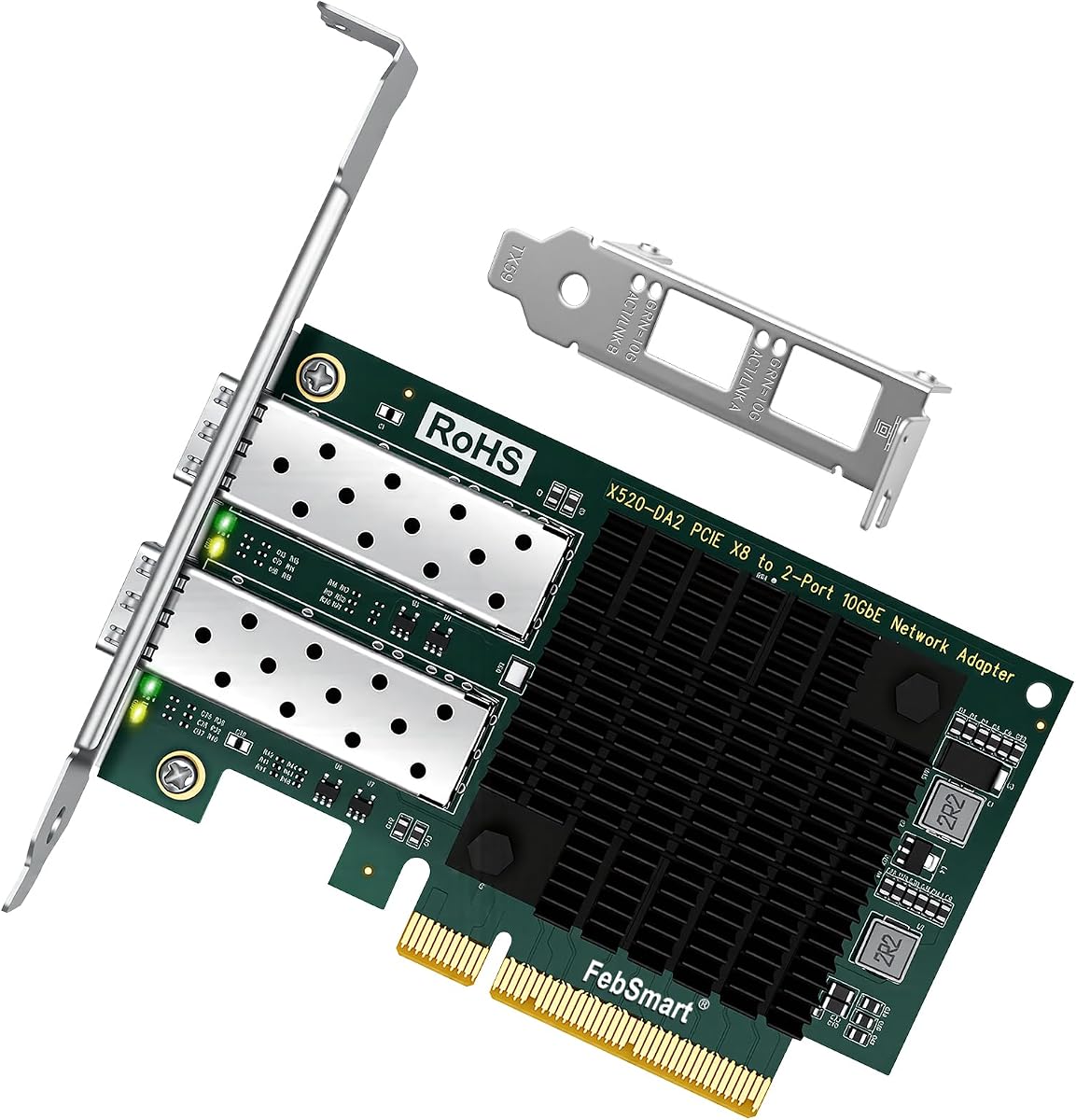
This X520-DA2 model offers dual 10GbE ports for redundancy and higher aggregate throughput. It earns a 4.8 rating for stable LAN and SAN connectivity in storage environments.
We may earn a commission when you buy through this link, at no additional cost to you.
The Intel 82599ES 2X controller supports critical virtualization technologies like VMDq and SR-IOV. This makes it suitable for complex virtual machine network management.
While it demands PCIe x8 slots it provides full bandwidth performance for both ports. The included low profile bracket fits smaller chassis designs well.
Data centers needing dual ports should choose this adapter. It balances performance and compatibility effectively for professional use cases.
Two independent 10GbE ports allow link aggregation or failover configurations easily.
Full support for VMware ESXi editions ensures smooth integration into virtual infrastructure.
We may earn a commission when you buy through this link, at no additional cost to you.
This Asus XG-C100F adapter emphasizes thermal management with a built-in aluminum heatsink. Its 4.3 rating reflects reliable performance under high load tasks.
We may earn a commission when you buy through this link, at no additional cost to you.
The automatic QoS technology prioritizes important streams or games automatically. This ensures smoother experience for users needing prioritized bandwidth.
Fiber optic compatibility allows long-distance connections without signal loss. However it offers only a single port which limits redundancy options.
Gamers and users needing long cable runs will appreciate this choice. It combines speed with effective thermal engineering in a compact form.
The aluminum heatsink keeps the controller cool during intense performance tasks.
Built-in QoS boosts bandwidth to critical streams without manual configuration.
We may earn a commission when you buy through this link, at no additional cost to you.
Equipped with high quality original Intel 82599EN controller this card ensures stability. It receives a 4.4 rating for its reliable support of various server environments.
We may earn a commission when you buy through this link, at no additional cost to you.
The single SFP+ port connects to 10 Gigabit modules or DAC cables easily. It supports 10G speeds which meet data center demands for fast transfers.
While it does not support hot swapping it offers a low profile bracket for small cases. Users must install drivers correctly for optimal Windows 11 performance.
System builders needing a straightforward single port card should consider this. The lifetime technology support adds significant value for long-term use.
High quality original Intel 82599EN controller supports I/O virtualization features.
The included low profile bracket makes installation in small cases easy.
We may earn a commission when you buy through this link, at no additional cost to you.
This card features Realtek RTL8127 controller with exclusive RealWoW technology. It earns a 4.5 rating for enhanced data transmission stability.
We may earn a commission when you buy through this link, at no additional cost to you.
The PCIe Gen4 x1 lane design ensures compatibility with standard slots. It reaches speeds of up to 10 Gbps which is a dramatic increase.
Linux support is limited to Kernel 6.15 but Windows 11 works well. Users needing FreeBSD or ESXi compatibility should look elsewhere.
Environments prioritizing stability and standard PCIe slots will find this reliable. The RealWoW technology ensures consistent uptime for daily tasks.
Realtek RTL8127 controller enhances data transmission stability and diagnostics.
The Gen4 x1 interface operates in PCIe X1, X4, X8 and X16 slots.
We may earn a commission when you buy through this link, at no additional cost to you.
This StarTech card uses Intel I350-AM2 chipset for robust gigabit performance. It holds a perfect 5.0 rating for compatibility and manageability.
We may earn a commission when you buy through this link, at no additional cost to you.
The unlocked 1GB SFP slots work with any MSA-compliant modules. This flexibility allows users to choose between fiber or copper cables easily.
While limited to 1G speeds it excels in server and desktop environments. The built-in heatsink ensures sustained optimal temperatures.
Server administrators needing reliable gigabit connectivity should select this card. It provides essential features like PXE boot and VLAN support.
Works with any Singlemode/Multimode MSA-compliant or branded SFP modules.
PXE boot enabled for centralized OS deployment and updates.
We may earn a commission when you buy through this link, at no additional cost to you.
Delivers stable and unified 10Gb/s connectivity for NAS and desktops. It receives a 4.3 rating for performance in storage applications.
We may earn a commission when you buy through this link, at no additional cost to you.
The Intel 82599ES controller supports virtualization technologies like VMDq. This enables unprecedented performance for gaming and streaming tasks.
Users on Windows 11 must install drivers manually which can be a hurdle. The passive cooling requires sufficient case airflow to avoid thermal throttling.
Gaming enthusiasts and NAS owners benefit from this adapter speed. It offers a balance of speed and cost for consumer upgrades.
Designed to support gaming 4K HD video streaming and high speed storage.
Supports Intel Virtualization Technology including SR-IOV and VMDq.
We may earn a commission when you buy through this link, at no additional cost to you.
This fiber optic network card features Intel 82599EN chip for stability. It offers fast speed and low latency suitable for industrial PCs.
We may earn a commission when you buy through this link, at no additional cost to you.
It includes one multimode optical module which saves initial setup costs. The gold-plate fingers provide effective antioxidant protection for contacts.
As a newer product detailed user ratings are currently unavailable. Buyers should check current compatibility notes before purchase for assurance.
Small offices needing multimode fiber connectivity will appreciate this value. The included module simplifies the transition to faster network speeds.
The gold-plate fingers reduce hardware contact fault and improve service life.
Comes with 1 piece multimode optical module for immediate connectivity.
We may earn a commission when you buy through this link, at no additional cost to you.
The TX401 delivers extreme speeds using latest 10GBase-T technology. It receives a 4.2 rating for ease of use with standard cables.
We may earn a commission when you buy through this link, at no additional cost to you.
It automatically negotiates speed with lower rates ensuring flexibility. A free 1.5m CAT6A Ethernet Cable is included with the package.
This unit does not support fiber optics so long runs are limited. However it simplifies upgrades for users without fiber infrastructure.
Office desktops needing quick 10G upgrades should choose this model. The 2-year warranty offers reliable peace of mind for users.
To maximize performance a 1.5 m CAT6A Ethernet Cable is included.
Industry leading 2-year warranty and free 24/7 technical support.
We may earn a commission when you buy through this link, at no additional cost to you.
Selecting the right fiber optic network interface card involves evaluating several critical factors. This guide breaks down key considerations to ensure you choose a model that fits your infrastructure needs.
The chipset determines performance and compatibility with your operating system. Look for established controllers like Intel 82599ES or Mellanox ConnectX series for proven stability.
Verify that the controller supports your required protocols and virtualization features before purchasing.
Check your motherboard for available PCIe slots and their generation. Ensure the card matches the slot type such as PCIe x4 or x8 to avoid bottlenecks.
A compatible interface guarantees the card can operate at full speed without performance loss.
Determine if you need Gigabit or 10GbE speeds for your data transfer goals. Higher speeds are essential for storage servers or intensive virtualization workloads.
Match the card speed to your network switch capabilities to maximize efficiency.
Consider whether you need single or dual ports for redundancy or aggregated bandwidth. Fiber optic ports like SFP+ offer flexibility in cable choices and distance.
Select a port configuration that aligns with your cabling infrastructure plans.
Ensure the card has drivers available for your specific OS version. Windows Server, Linux, and VMware often have different driver requirements.
Verify community or official support for your target OS to avoid installation issues.
If using virtual machines, look for SR-IOV and VMDq support on the card. These features improve performance by reducing CPU overhead during network operations.
Advanced virtualization features are critical for data center and cloud environments.
Check if the card includes a low-profile bracket for small form factor cases. Standard full-height brackets are necessary for larger server racks.
Proper bracket size ensures the card fits physically in your chassis.
Some branded cards reject third-party SFP modules which increases costs. Look for open standards compliance to allow choice in transceiver vendors.
Vendor unlocked cards provide long-term savings and flexibility for your network.
Install the card into a compatible PCIe slot on your motherboard and secure it with a screw. Ensure the bracket aligns properly with the case opening to prevent physical stress.
Connect fiber optic cables to the SFP ports carefully avoiding bending beyond the minimum bend radius. Use the provided low-profile bracket if you have a compact chassis.
Install the latest drivers from the manufacturer to ensure optimal performance and stability. Monitor LED indicators to confirm link status and troubleshoot connectivity issues quickly.
SFP+ supports speeds up to 10 Gigabit per second while SFP is limited to 1 Gigabit. SFP+ ports often support backward compatibility but performance depends on the card and cables used.
Most cards do not include transceivers so you must purchase them separately. Ensure the transceiver matches the port type and your operating distance requirements.
SFP+ ports require active optical cables or direct attach copper cables. Standard Ethernet cables do not fit directly without a specific media converter or active DAC.
Check your motherboard specifications to confirm the PCIe slot generation. If your system supports Gen 3.0 the card will run at full speed otherwise it may limit performance.
Windows Server often detects cards automatically but Linux or Windows 10/11 may need manual drivers. Always have the latest drivers available before starting installation.
Check the PCIe connection and ensure the slot is properly seated. Also verify that your BIOS settings allow PCIe devices to initialize correctly.
Our top picks highlight reliable options like the CX4121A for premium performance and budget-friendly 10Gb PCIe NICs. Each card offers unique benefits tailored to different network environments.
Prioritize chipset compatibility and virtualization features when selecting a model to ensure it meets your server or desktop needs. Check that your system has adequate PCIe slots before purchasing.
Market availability and pricing fluctuate so verify current stock and specifications before making a final decision. Choose a model that balances performance with long-term reliability for your setup.