
MEKO Stylus Pen for Touchscreen
4.6Editor score
Highly sensitive transparent disc tip
Durable rubber tip options included
No battery or Bluetooth required
This guide compares the top fine point stylus options for touchscreens, evaluating precision, compatibility, durability, and value to help you choose the
Finding the right fine point stylus can transform how you interact with touchscreen devices. Whether you are an artist, student, or professional, having a precise tool helps reduce errors and enhances creativity. This guide explores the best options available to meet diverse needs.
We have carefully evaluated each product based on user feedback, build quality, and performance metrics. Our team analyzed compatibility across various devices, tip durability, and overall user satisfaction. This ensures you receive accurate and trustworthy information for your purchasing decision.
Each pick highlights specific strengths and ideal use cases to match your requirements. Prices and availability may fluctuate over time, so please verify details before buying. We aim to provide a comprehensive overview to simplify your selection process effectively.
4.6Editor score

4.5Editor score

4.4Editor score
This table provides a side-by-side comparison of all ten selected products to help you quickly identify key differences in features, design, and target use cases.



This versatile stylus pen stands out with its 3-in-1 design offering multiple tips for different tasks. Rated highly by users, it provides a reliable solution for both casual browsing and detailed creative work on capacitive screens.
We may earn a commission when you buy through this link, at no additional cost to you.
The transparent disc tip allows for precise visibility of your writing point, which is crucial for accuracy. Additionally, the rubber tips make it perfect for scrolling and gaming without scratching the screen surface. Its broad compatibility ensures it works across iPads, phones, and other tablets.
While it lacks palm rejection, the design minimizes accidental touches during normal use. The replaceable tips ensure long-term usability, making it a cost-effective choice compared to single-function tools that might need replacement sooner.
Anyone needing a universal stylus for multiple devices should consider this top-rated option. It is an excellent choice for students and professionals alike who value precision and convenience in their daily digital interactions.
The transparent disc tip ensures you see exactly where your mark is being made for superior accuracy.
Replaceable tips allow you to extend the lifespan of the pen without needing to buy a new one.
We may earn a commission when you buy through this link, at no additional cost to you.
The MEKO stylus delivers exceptional value with its 3-in-1 design and inclusion of multiple replacement tips. With a solid rating from users, it proves that budget-friendly options can still offer high precision and versatility for everyday tasks.
We may earn a commission when you buy through this link, at no additional cost to you.
Its transparent disc tip ensures you can see exactly where you are drawing or writing. The dual rubber tips provide a smooth alternative for navigation without leaving fingerprints or scratches. This package offers a complete kit with extra tips for longevity.
The main trade-off is the lack of premium features like magnetic charging or attachment. However, for basic use cases like signing documents or browsing, it performs admirably without the need for batteries or pairing.
Users looking for an affordable and reliable stylus will find this choice ideal. It suits students and casual users who want a versatile tool without the cost of a branded proprietary stylus.
The package includes multiple replacement tips ensuring you do not run out when a tip wears down.
Using the stylus keeps your screen clean by reducing the oil and smudges left by bare fingers.
We may earn a commission when you buy through this link, at no additional cost to you.
This universal stylus combines premium features like magnetic adsorption and quick charging with broad device compatibility. Rated well by users who need a reliable tool for creative work, it offers a near-native experience for various users.
We may earn a commission when you buy through this link, at no additional cost to you.
The magnetic design ensures the pen is always within reach on your iPad Pro. Its fast charging capability and long battery life mean you spend more time creating and less time waiting for power. The sensitivity ensures accurate strokes without delay.
However, the magnetic feature is limited to specific iPad Pro models which might reduce utility for others. Additionally, the need for charging adds a maintenance step not required by passive styluses. These factors are minor given the performance.
Users seeking a premium feel and active features without the Apple Pencil price should consider this model. It is a strong choice for iPad Pro owners who want convenience and precision in a single package.
The magnetic adsorption design securely attaches the stylus to your iPad so it never gets lost.
A full charge supports nine to ten hours of continuous use which covers most work or study sessions.
We may earn a commission when you buy through this link, at no additional cost to you.
This active digital pen features a 1.5mm tip for realistic drawing and handwriting experiences on touchscreens. It is designed for users who need precise control and consistent performance during creative sessions without lag.
We may earn a commission when you buy through this link, at no additional cost to you.
The fine tip provides a realistic feel for creation with consistent line thickness. It powers on within one second without Bluetooth pairing. The automatic power off feature conserves battery life during inactivity ensuring it is ready when needed.
The main limitation is the lack of pressure sensitivity which means line thickness remains uniform. However, for sketching and signing documents the performance remains adequate. The quick power on reduces friction in your workflow significantly.
Artists and designers seeking a cost-effective active pen should consider this option. It balances basic active features with affordability for those who do not require advanced pressure sensitivity features.
The 1.5mm diameter tip gives you a realistic feeling for creation and detailed work.
The automatic power off function saves energy so the pen lasts longer between charges.
We may earn a commission when you buy through this link, at no additional cost to you.
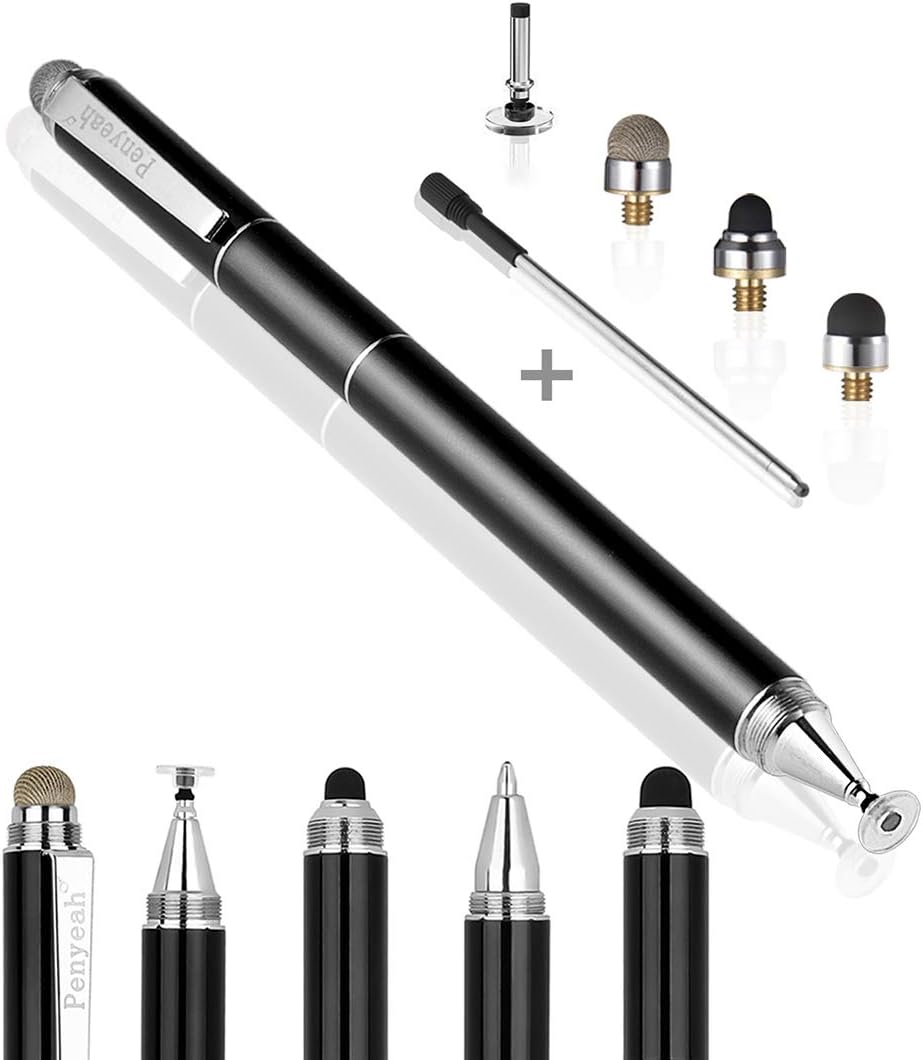
The Penyeah stylus offers a 4-in-1 solution that combines digital touch tips with a traditional ink pen in one body. This versatility makes it a favorite for professionals who need to switch between physical notes and digital work often.
We may earn a commission when you buy through this link, at no additional cost to you.
The high grade metal material gives it a sturdy feel that resists corrosion and wear. The interchangeable tips allow you to choose the best tool for signing or browsing. The ink pen adds utility for writing on paper when screens are not available.
Users should note that the device does not support palm rejection which might affect long sessions. Additionally switching tips requires a tool to ensure a secure fit. These are minor inconveniences given the wide range of utility provided.
This tool is ideal for users who want a single device for both digital and physical tasks. It is a practical choice for office workers and students who value versatility and build quality.
The pen is made of high grade metal material that is solid durable and corrosion resistant for daily use.
The included standard D1 pen refill allows you to write on paper without carrying an extra pen.
We may earn a commission when you buy through this link, at no additional cost to you.
This active stylus features an ultra fine tip and lightweight design making it comfortable for long study sessions. It is a cost-effective alternative to branded pens while still offering active functionality for precise input.
We may earn a commission when you buy through this link, at no additional cost to you.
The 1.5mm tip allows for accurate control against tablets and cellphones. There is no Bluetooth connection required which simplifies the setup process. The built-in battery supports up to eight hours of active use on a full charge.
The device charges via Micro USB which may be slower than modern USB-C standards. The auto shutdown helps save power but requires a power cycle if needed immediately. These factors do not significantly detract from its overall value.
Students and professionals looking for an affordable active pen should consider this option. It provides a similar function to expensive models at a fraction of the cost.
The pen is fine and light with a 13.3g weight ensuring it does not tire your hand during use.
There is no Bluetooth connection required for this stylus so you can start using it immediately.
We may earn a commission when you buy through this link, at no additional cost to you.
This 6-pack bundle provides excellent value for families or teams needing multiple styluses for shared devices. Each pen is designed for high sensitivity and durability ensuring reliable performance across various touchscreens without setup.
We may earn a commission when you buy through this link, at no additional cost to you.
The built-in clip allows you to attach the stylus to notebooks or pockets for easy access. The durable rubber tips glide smoothly without lag or scratching. The simple design requires no batteries or apps making it ready to use instantly.
The pens are basic in design which may not appeal to those seeking premium aesthetics. Also there are no extra tips included if one wears out. However the affordability of the pack offsets these minor limitations.
Families or offices needing multiple pens should find this bundle highly practical. It is an efficient solution for keeping touch devices usable for everyone without extra cost.
The built-in clip makes it easy to attach the pen to your bag or notebook to keep it within reach.
There is no Bluetooth or batteries required so you can simply pick up the stylus and start using it.
We may earn a commission when you buy through this link, at no additional cost to you.
This 4-pack stylus set provides exceptional value with extra tips included for each pen. It is designed for seamless transitions between writing and sketching and offers a sleek aluminum barrel that feels comfortable during extended use.
We may earn a commission when you buy through this link, at no additional cost to you.
The transparent disc tip fits flexibly on screens to provide improved accuracy for drawing. The soft rubber tip ensures a smoother and responsive digital touch experience. The package includes twelve replacement tips ensuring you do not run out quickly.
The main trade-off is the bulk packaging which may be less convenient than single units. The design is also standard and does not feature unique aesthetics. However the extra value makes it a strong contender for bulk buyers.
This set makes a perfect gift for students or writers who need reliable styluses. The replacement service adds peace of mind regarding long-term quality and satisfaction.
The 4-pack set provides 12 replacement tips to meet your creative needs without frequent replacements.
The aluminum barrel adds a comfortable grip for extended use which reduces hand fatigue.
We may earn a commission when you buy through this link, at no additional cost to you.
This 10-pack bulk set offers exceptional cost-effectiveness for shared environments like schools or offices. Each stylus features a durable alloy body and dual rubber tips to ensure smooth and precise operation across devices.
We may earn a commission when you buy through this link, at no additional cost to you.
The fine tip delivers accurate control for handwriting while the wider tip helps with navigation. The vibrant mixed colors allow you to distinguish pens easily for different users. The included 20 nibs ensure you are well supplied for months.
The basic design lacks premium features like magnetic attachment or active pressure sensitivity. The packaging is also simple which may not look as premium as other kits. However the value and durability make up for these points.
Families or classrooms needing a large number of styluses will find this pack practical. It is a reliable choice for daily use where multiple tools are required simultaneously.
This 10-pack comes in a mix of vibrant colors making it easy to distinguish pens for different users.
Crafted with a solid alloy metal body each stylus offers long-lasting durability for daily use.
We may earn a commission when you buy through this link, at no additional cost to you.
This 10-piece set offers exceptional accuracy with dual premium silicone rubber tips for smooth performance. The sleek aluminum body blends functionality with style making it a reliable tool for daily writing and navigation tasks.
We may earn a commission when you buy through this link, at no additional cost to you.
The anti-scratch design keeps your screen pristine by preventing smudges and marks. The dual rubber tips allow for adaptable use across writing and gaming needs. The responsive customer support team ensures prompt solutions to any questions.
The lack of battery means it does not need charging which is convenient for on-the-go use. However it may not offer advanced features like active pressure sensitivity. The affordability of the set makes these limitations acceptable.
Teams or groups needing multiple styluses will find this set highly practical. It is a solid choice for anyone wanting reliable tools for multiple devices without extra maintenance.
The anti-scratch design safeguards your device from fingerprints and scratches keeping your screen pristine.
There is no Bluetooth connection or charging required so you can start writing or drawing effortlessly.
We may earn a commission when you buy through this link, at no additional cost to you.
Selecting the right fine point stylus involves understanding your specific needs and device compatibility to ensure the best possible performance.
The tip type determines the accuracy and feel of your writing experience. Transparent disc tips allow you to see exactly where you are marking the screen which is ideal for detailed work like signing or drawing. Rubber tips are better for browsing and gaming as they provide a softer touch. Look for replaceable tips to extend the lifespan of your stylus.
Choose disc tips for precision and rubber tips for navigation to suit your primary activities.
Ensure the stylus is compatible with your specific device model to avoid connectivity issues. Passive capacitive styluses work on most touchscreens including phones and tablets. Active styluses may support specific iPad versions. Check the product description to confirm support for your phone or tablet model.
Verify device compatibility before purchasing to ensure seamless functionality.
Active styluses require charging while passive ones do not need any power source. If you plan to use the stylus for long periods like during a workday ensure the battery life is sufficient. Passive styluses are convenient for quick use without worrying about charging time.
Opt for passive models if you prefer zero maintenance or active models for advanced features.
A durable build ensures the stylus withstands daily use in bags or pockets. Metal bodies offer a premium feel and resistance to wear while plastic models may feel cheaper. Look for sturdy clip attachments to prevent loss during travel.
Select a model with high-quality materials to ensure longevity and reliability.
Palm rejection allows you to rest your hand on the screen while writing without accidental inputs. Not all styluses support this feature so check the product details carefully. This feature is essential for artists or note takers who need natural handwriting.
Prioritize styluses with palm rejection if comfort and natural writing are your main priorities.
Stylus prices vary widely from budget-friendly basic options to premium branded pens. Determine your budget and look for features that offer the best value within that range. A higher price does not always mean better performance for casual tasks.
Compare features against price to find the best value for your specific needs.
Accessories like replacement tips or storage cases add value to the purchase. Some bundles include multiple tips to extend the product life without extra cost. Check what is included in the box before buying to avoid purchasing parts separately.
Look for bundles with replacement tips or cases for long-term convenience and cost savings.
Reading user reviews provides real world insights into the stylus performance and durability. Look for feedback on accuracy and tip wear over time. High ratings from verified buyers indicate reliability and satisfaction.
Use user reviews to gauge real world performance and reliability before purchasing.
To ensure a smooth experience clean your device screen before using the stylus to prevent debris from scratching the surface. For styluses with replaceable tips check the installation instructions to ensure they are secure before use.
Avoid applying excessive pressure while writing as most styluses are designed to work with light contact. Excessive force can wear out the tips faster and may damage sensitive capacitive screens over time.
Store your stylus in a protective case or sleeve to prevent physical damage and tip wear. If your stylus requires charging keep it in a dry place to maintain battery health and avoid moisture damage.
Not all styluses require charging. Passive capacitive styluses do not need batteries and work immediately upon contact. Active styluses with features like pressure sensitivity usually require periodic charging via USB or wireless methods.
High quality styluses are designed not to scratch your screen. However cheap or damaged tips might cause abrasion. It is best to use styluses with soft rubber or silicone tips and avoid excessive force during use.
Yes many fine point styluses are compatible with laptops that have touchscreen capabilities. Ensure your device supports capacitive touch before purchasing. Most standard styluses work well on laptops with touch functionality.
Most styluses with replaceable tips allow you to twist or unscrew the old tip to remove it. Simply screw or snap on a new tip until it is secure. Follow the specific instructions provided by the manufacturer for best results.
If your stylus is not responding ensure your screen is clean and dry. For active styluses check if the battery is charged. Restart your device or check for software updates that may affect touch sensitivity.
Most styluses work fine with screen protectors but glass protectors might reduce sensitivity. Ensure your stylus has a compatible tip type for your protector material. Some styluses are specifically tested with tempered glass protectors.
Active styluses have internal electronics to support features like pressure sensitivity and palm rejection. Passive styluses rely on electrical capacitance of your finger and do not require power. Active models offer more advanced features but cost more.
Yes most universal fine point styluses work with Android devices including phones and tablets. Ensure the device has a capacitive screen for compatibility. Avoid proprietary styluses designed for specific brands unless confirmed compatible.
We have explored ten top-rated styluses offering a range of features from budget-friendly options to advanced active pens. Each product provides unique strengths suitable for different needs and budgets. Choosing the right one depends on your device and preferred tasks.
Prioritize features like tip precision and compatibility to ensure the stylus meets your daily requirements. A well-chosen stylus can significantly improve productivity and creative output. Take time to review the options to find the best match for your workflow.
Remember that prices and availability change so verify current details before making a purchase. Check for any ongoing deals or bundle offers to maximize value. We hope this guide helps you find the perfect tool for your digital needs.