
Ubiquiti Unifi Security Appliance (USG)
4.5Editor score
Integration with Unifi Controller
Convenient VLAN Support
VPN Server for Security
This guide compares the top firewall appliances for enterprise and home security, evaluating performance, features, and compatibility to help you choose the
Firewall appliances serve as the first line of defense for your network infrastructure, filtering traffic and blocking unauthorized access. Choosing the right device ensures your data remains secure against evolving cyber threats while maintaining optimal network performance for all connected users.
We evaluated ten leading firewall appliances based on throughput capacity, security features, ease of management, and hardware reliability. Our analysis focuses on real-world performance metrics, compatibility with popular operating systems, and the inclusion of advanced threat protection mechanisms like deep packet inspection.
Each selection highlights specific strengths tailored to different business sizes and technical requirements. Prices and availability can fluctuate frequently, so please verify current offers before purchasing. This guide provides a comprehensive overview to assist you in making an informed decision for your network security needs.
4.5Editor score

4.4Editor score

4.7Editor score
The following table provides a side-by-side comparison of all ten selected firewall appliances, highlighting their core specifications and key capabilities to help you quickly identify the model that best fits your specific network security requirements and budget constraints.



The Protectli Vault FW4B stands out as an exceptional entry point for those seeking a reliable and affordable firewall appliance without sacrificing essential performance features. Rated 4.6 stars by users, this device offers a robust foundation for securing small networks or home labs with its Intel Quad Core processor and ample memory.
We may earn a commission when you buy through this link, at no additional cost to you.
Its compact, fanless design ensures silent operation, making it ideal for office environments where noise levels matter. The inclusion of four Intel Gigabit Ethernet ports allows for flexible network segmentation, while AES-NI hardware support accelerates encryption tasks to maintain throughput speeds. Users appreciate the ability to choose their own operating system, whether it is pfSense, OPNsense, or Untangle, providing complete control over their security stack.
However, the lack of a pre-installed operating system means users must be comfortable with installing and configuring software themselves. This requirement might be a barrier for non-technical individuals but is often preferred by IT professionals who want specific customization. The older Celeron architecture is sufficient for many use cases but may struggle with extremely high traffic loads compared to newer models.
For budget-conscious buyers looking to build a custom security solution, the Protectli Vault FW4B is a top recommendation. Its balance of hardware quality, expandability, and price makes it a standout choice for small businesses or enthusiasts who need a dependable gateway without recurring subscription costs.
This appliance is rigorously tested with popular open-source firewall software like pfSense and OPNsense, ensuring stability and ease of setup for technical users.
AES-NI hardware support significantly improves performance during encrypted traffic inspection, allowing the device to maintain high speeds even when security is enabled.
We may earn a commission when you buy through this link, at no additional cost to you.
The FortiGate-60F Firewall Appliance is widely recognized as a premier choice for medium-sized businesses needing robust security without enterprise complexity. With a rating of 4.4 stars, this device delivers superior performance through its specialized system-on-a-chip acceleration, ensuring effective defense against a wide array of modern cyber threats.
We may earn a commission when you buy through this link, at no additional cost to you.
Connectivity is a major strength, featuring ten Gigabit Ethernet RJ45 ports that include dedicated WAN, DMZ, and internal ports. This flexibility supports diverse network configurations and simplifies physical cabling. The device excels in SSL inspection performance, allowing administrators to safely inspect encrypted traffic without creating bottlenecks. Management is streamlined through a user-friendly console that supports network automation and Zero Touch Integration for rapid deployment.
Users should note that the appliance listed often requires a separate subscription to activate advanced security services like FortiGuard Labs protection. While the hardware is powerful, its full potential relies on these ongoing services. Additionally, the device focuses heavily on hardware specs, so software updates and feature access depend on license status.
For organizations prioritizing performance and ease of management, the FortiGate-60F is an outstanding selection. Its combination of high-speed throughput, advanced security features, and scalable management tools makes it a trusted solution for protecting critical business networks effectively.
The built-in purpose-built security processor ensures top-tier performance for deep packet inspection and threat protection, maintaining speed even under heavy load.
Deployment is simplified with Zero Touch Integration capabilities, allowing for quick setup and remote management through Fortinet's Security Fabric ecosystem.
We may earn a commission when you buy through this link, at no additional cost to you.
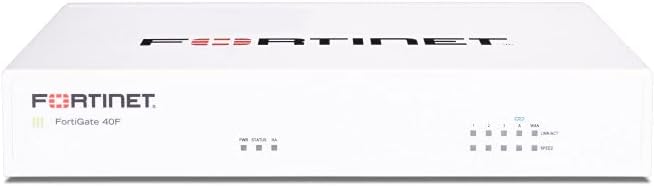
The FortiGate-40F Firewall Appliance is designed specifically for small to mid-sized businesses and branch offices seeking enterprise-grade security in a compact form. Rated 4.2 stars, it offers a balance of performance and efficiency, making it an ideal choice for environments with limited space and lower traffic demands.
We may earn a commission when you buy through this link, at no additional cost to you.
Its fanless design ensures quiet operation, which is crucial for open office spaces. The device includes five Gigabit Ethernet ports, providing sufficient connectivity for WAN and internal network segments. Despite its smaller size, it delivers high-performance security with up to 1 Gbps IPS throughput and advanced SSL inspection capabilities. Integrated AI-powered threat protection helps identify both known and unknown threats, maintaining robust security across network traffic.
While powerful for its size, the device may not scale as well as larger models for rapidly growing networks. Also, like other FortiGate models, full feature access often requires an active subscription for threat intelligence updates. Users must plan for these ongoing costs to maximize the appliance's potential.
For small businesses needing reliable, efficient protection without the bulk of enterprise hardware, the FortiGate-40F is a strong contender. Its combination of silent operation, essential port flexibility, and advanced threat detection makes it a practical choice for protecting modern office networks.
The fanless desktop form factor minimizes noise and space usage, allowing the appliance to run unnoticed on a desk or shelf in sensitive environments.
FortiGuard Labs integration provides continuous updates on emerging threats, ensuring the appliance stays ahead of new malware and attack vectors.
We may earn a commission when you buy through this link, at no additional cost to you.
The Ubiquiti Unifi Security Appliance (USG) is a popular choice for users already invested in the Unifi ecosystem, offering seamless integration with other Unifi networking devices. With a 4.5-star rating, it provides reliable firewall performance and essential routing features at a competitive price point, making it accessible for small offices and home setups.
We may earn a commission when you buy through this link, at no additional cost to you.
Its primary advantage lies in its compatibility with the Unifi Controller software, which simplifies network management and monitoring. The device supports convenient VLANs and QoS settings, which are particularly useful for prioritizing enterprise VoIP traffic. It includes three Gigabit Ethernet ports, sufficient for basic WAN and LAN separation, and features a built-in VPN server for secure remote access.
However, the limited port count restricts physical connectivity options for larger setups, often requiring additional switches. Additionally, some features rely heavily on the Unifi Controller software, meaning users must keep this software running to manage the appliance effectively. For non-Unifi users, the ecosystem dependency might be a drawback compared to standalone appliances.
For those seeking an affordable gateway that works well with Unifi infrastructure, the USG is an excellent solution. Its ease of use, solid performance for typical workloads, and robust software integration make it a favorite among smaller businesses and tech-savvy home users.
Management is centralized through the Unifi Controller, allowing administrators to monitor traffic, configure policies, and visualize network health from one interface.
The built-in VPN server enables secure communications for remote workers, allowing them to access the local network safely from anywhere.
We may earn a commission when you buy through this link, at no additional cost to you.
The SonicWall TZ280 Next-Gen Firewall Appliance is engineered to deliver high-speed security performance tailored for small businesses and branch offices. Boasting a 4.7-star rating, it leverages SonicWall's patented Reassembly-Free Deep Packet Inspection engine to inspect traffic at up to 2.5 Gbps without compromising on threat protection capabilities.
We may earn a commission when you buy through this link, at no additional cost to you.
Its connectivity options are impressive, featuring eight 1GbE ports and two 1G SFP slots, providing flexibility for various network cabling needs. The device supports zero-touch deployment, which simplifies setup for remote locations. Security features include intrusion prevention, gateway anti-malware, and Capture ATP sandboxing to detect advanced threats. It also supports secure SD-WAN and Zero-Trust Network Access to protect remote workers and distributed sites.
However, the appliance alone does not include security services; subscriptions are required to activate firmware updates and advanced protection features. This means buyers should budget for ongoing costs to maintain effective security. Additionally, the device focuses heavily on hardware specs, so users must understand the dependency on service plans for full functionality.
For organizations needing reliable, high-performance security that can scale with their needs, the SonicWall TZ280 is a compelling choice. Its combination of robust inspection speeds, flexible connectivity, and advanced threat detection tools makes it a trusted solution for protecting modern business networks.
This patented technology allows the firewall to inspect packet content without reassembling streams, significantly boosting throughput and reducing latency.
The appliance can be managed on-box or via the cloud Network Security Manager, offering remote visibility and control for distributed networks.
We may earn a commission when you buy through this link, at no additional cost to you.
The Netgate 1100 pfSense+ Security Gateway is a dedicated hardware appliance designed for those who want a reliable, pre-configured solution running pfSense+ software. Rated 4.1 stars, it simplifies deployment by coming pre-loaded with the software, allowing users to start customizing their secure edge networking needs immediately upon unboxing.
We may earn a commission when you buy through this link, at no additional cost to you.
Powered by a dual-core ARM Cortex-A53 processor, it delivers efficient routing and firewall throughput suitable for typical home or small office traffic. The device is compact and energy-efficient, allowing it to run silently on a desk or wall mount. Netgate includes TAC Lite technical support and a one-year hardware warranty, providing peace of mind for business users. Notably, it is also highlighted for its capability to protect AI workloads and data.
Its throughput speed is lower compared to enterprise-grade appliances, which may limit performance for high-bandwidth environments. The shipping process requires an adult signature, which can add a step to the delivery experience. While powerful for standard tasks, heavy traffic loads may expose its hardware limitations.
For users seeking a hassle-free entry into pfSense+ with reliable hardware and official support, the Netgate 1100 is an excellent option. Its pre-configured nature and lifetime software updates make it a dependable choice for securing small networks and home labs effectively.
Pre-loading pfSense+ software ensures the appliance is ready to configure immediately, removing the complexity of manual installation and setup.
Free help from the Netgate Technical Assistance Center is available 24/7/365, offering expert guidance for setup and troubleshooting issues.
We may earn a commission when you buy through this link, at no additional cost to you.
The FORTINET FG-100E FortiGate-100E Network Security Appliance is a powerful mid-range solution designed to protect networks from both known and unknown threats. With an impressive 4.7-star rating, it stands out for its ability to identify thousands of applications and detect malicious exploits before they can cause damage to your infrastructure.
We may earn a commission when you buy through this link, at no additional cost to you.
Its core strength lies in advanced threat protection, leveraging FortiGuard Labs intelligence to mitigate risks across all network traffic. The appliance provides comprehensive visibility into application usage, allowing administrators to enforce strict policies based on specific app types. This level of detail is crucial for maintaining compliance and preventing data exfiltration through unexpected channels.
While the provided details are concise, the high rating suggests robust performance and reliability in real-world deployments. Users should be aware that like other Fortinet models, full feature sets typically require an active security service subscription to keep protection up to date. Planning for these ongoing costs is essential to maintain long-term security.
For businesses needing a balance of performance, reliability, and advanced application control, the FG-100E is a top-tier choice. Its proven track record and powerful threat detection capabilities make it a trusted asset for securing networks against evolving cyber risks.
The ability to identify thousands of applications allows for granular control over network traffic, ensuring only authorized apps are used.
Protection against known exploits ensures that vulnerabilities in connected devices are blocked before attackers can exploit them.
We may earn a commission when you buy through this link, at no additional cost to you.
The Palo Alto PAN-PA-220 is an entry-level Next Generation Firewall Security Appliance designed for small networks requiring modern protection capabilities. With 8 ports and a compact form factor, it brings Palo Alto's advanced security technology to smaller environments, offering features typically found in more expensive enterprise models.
We may earn a commission when you buy through this link, at no additional cost to you.
This device focuses on next-generation security, providing application awareness and threat prevention essential for today's complex network threats. The inclusion of eight ports offers sufficient connectivity for small office or branch deployments. Its design allows for easy integration into existing rack or desktop setups without significant space requirements.
However, the 3.0-star rating suggests potential user concerns regarding setup complexity or performance consistency. Buyers should research recent reviews to understand current performance expectations, as legacy models sometimes have varying satisfaction rates. The value proposition relies heavily on the specific security features required by the buyer.
For small businesses looking to adopt next-generation firewall technology without breaking the bank, the PA-220 offers a compelling starting point. Its modern feature set and manageable form factor make it a viable option for those willing to invest time in configuration.
This appliance provides modern security features like application visibility and threat prevention, essential for defending against current cyber risks.
Its compact physical footprint ensures easy installation in various environments, making it suitable for small offices or remote branches.
We may earn a commission when you buy through this link, at no additional cost to you.
The Protectli Vault FW4C is a compact, fanless firewall micro appliance that delivers impressive performance for its small size. Rated 4.5 stars, it features an Intel J3710 Pentium Quad Core processor and four 2.5 Gigabit Ethernet ports, providing significant speed advantages over standard 1 Gigabit models for high-throughput environments.
We may earn a commission when you buy through this link, at no additional cost to you.
Its design prioritizes silent operation and compactness, making it ideal for quiet spaces or tight server racks. AES-NI hardware support ensures that encryption tasks are handled efficiently, maintaining performance even with security features enabled. The device is compatible with popular open-source solutions like pfSense, untangle, and OPNsense, giving users full control over their software stack.
While the 2.5G ports are a strong selling point, the 4GB of RAM and 32GB SSD are on the lower side for heavy multitasking or extensive logging. Users needing to run resource-intensive applications might need to upgrade storage or memory. Additionally, the absence of a pre-installed OS requires technical proficiency for setup.
For home labs or small businesses seeking fast connectivity in a silent, compact package, the Protectli Vault FW4C is a top choice. Its blend of modern networking speeds, quiet operation, and open-source flexibility makes it a standout option for custom security builds.
With four 2.5 Gigabit Ethernet ports, this appliance offers faster connectivity than standard models, ensuring efficient traffic handling for high-speed internet connections.
The fanless design ensures the device runs silently, making it perfect for environments where noise levels must be kept low, like home offices.
We may earn a commission when you buy through this link, at no additional cost to you.
The FortiGate-60F Network Security Appliance Bundle provides a complete solution including hardware and one year of FortiCare Premium and FortiGuard Unified Threat Protection. Rated 4.2 stars, this package is tailored for medium-sized businesses that need robust security without the infrastructure of larger enterprises, ensuring comprehensive protection against advanced online threats.
We may earn a commission when you buy through this link, at no additional cost to you.
This bundle includes essential services like web filtering and anti-botnet technologies that are often sold separately. The inclusion of FortiCare Premium ensures high-quality customer support and service continuity, which is vital for maintaining business operations. The advanced filtering technologies help safeguard against sophisticated threats, ensuring the network remains secure against evolving risks.
While the upfront cost is higher than the hardware-only version, the inclusion of a year of services simplifies procurement and ensures immediate protection. Buyers should plan for renewal costs after the first year to avoid gaps in security. It is an excellent choice for businesses wanting a ready-to-deploy security solution.
For medium-sized businesses looking for a turnkey security solution with reliable support, this bundle is an optimal choice. It eliminates the complexity of sourcing hardware and services separately, providing a seamless path to securing network infrastructure against advanced threats.
The UTP suite combines multiple security layers into one package, simplifying management while delivering comprehensive protection against diverse threats.
FortiCare Premium ensures that qualified support staff are available to assist with issues, maintaining uptime and service continuity for business users.
We may earn a commission when you buy through this link, at no additional cost to you.
Selecting the right firewall appliance requires evaluating several critical factors to ensure your network remains secure without compromising performance or budget. This guide outlines the key considerations to help you make an informed decision based on your specific operational needs.
Throughput is a measure of how much traffic the firewall can process per second. For businesses with high-speed internet connections or many users, a firewall with high IPS throughput is essential to prevent bottlenecks. Look for models that specify throughput speeds under heavy encryption loads to ensure consistent performance.
Always choose a firewall with throughput that exceeds your internet connection speed to maintain fast browsing and data transfer speeds for all users.
The number and type of ports determine how you can physically connect your network devices. Appliances with multiple Gigabit Ethernet ports allow for better network segmentation, separating WAN, LAN, and DMZ traffic efficiently. Ensure the device has enough ports for your current needs and potential expansion.
Verify that the firewall has sufficient ports to connect your router, switch, and any direct devices without needing immediate upgrades.
Some appliances come pre-installed with an OS like pfSense, while others are hardware-only. If you prefer a ready-to-use solution, look for pre-loaded software. For custom setups, ensure the hardware supports your preferred OS and offers necessary driver support for stable operation.
If you want simplicity, choose a pre-installed solution; for flexibility, verify hardware compatibility with open-source operating systems.
Advanced security features like intrusion prevention, anti-malware, and threat intelligence feeds are vital for modern protection. Many appliances rely on subscriptions for these services. Check if the base hardware includes essential security tools and what costs are associated with advanced threat intelligence updates.
Ensure you budget for necessary service subscriptions to keep your firewall protected against new threats after purchase.
The size and noise level of the appliance matter for deployment locations. Fanless designs are quieter but may have thermal limitations. Desktop models fit easily in offices, while rack-mount units suit server rooms. Consider the noise impact if the device will be in a shared workspace.
For quiet offices, prioritize fanless designs to prevent noise disruption while maintaining adequate cooling for your environment.
User-friendly management consoles simplify configuration and monitoring. Look for features like remote management, automation support, and intuitive interfaces. Some appliances integrate with broader ecosystems, which can streamline workflows if you already use compatible tools.
Choose a firewall with a management interface that matches your technical skill level to reduce configuration errors and setup time.
Consider not only the initial purchase price but also the cost of subscriptions, warranties, and potential hardware upgrades. A lower upfront cost might be offset by higher ongoing fees for security services. Calculate the five-year cost to understand the true investment.
Evaluate the full lifecycle costs including annual service renewals to ensure the appliance remains affordable over time.
Reliable technical support and warranty coverage are crucial for resolving issues quickly. Look for vendors offering 24/7 technical assistance or community support channels. A warranty period of at least one year protects against hardware defects and ensures peace of mind.
Prioritize models with strong warranty terms and accessible technical support to minimize downtime during hardware failures.
Start by connecting your WAN port to the modem and LAN ports to your network switches. Access the device's web interface to configure basic settings like IP addresses and security policies. Ensure all ports are properly labeled to maintain network clarity.
Regularly update the firmware to patch vulnerabilities and improve performance. If your appliance relies on a subscription, renew it on time to maintain advanced threat protection. Monitor traffic logs to detect unusual patterns or unauthorized access attempts.
Keep the device in a cool, dry environment to prevent overheating. Dust accumulates over time; clean air vents carefully to maintain airflow. Avoid placing the appliance near heat sources or in enclosed spaces without ventilation.
Many modern firewall appliances require a subscription to access advanced features like intrusion prevention, web filtering, and threat intelligence updates. Hardware-only versions may work for basic routing, but full protection relies on active service plans.
A hardware firewall is a physical device that protects the entire network by filtering traffic before it reaches devices. A software firewall runs on individual computers to protect specific endpoints. Hardware firewalls generally offer broader network-level protection.
Yes, most firewall appliances connect directly to your modem via WAN port. Configure your modem in bridge mode to prevent conflicts, ensuring the firewall handles routing and security functions efficiently for the entire network.
Select a firewall with IPS throughput that exceeds your internet speed. For example, if you have a 1 Gbps connection, choose a model rated for at least 1 Gbps IPS throughput to avoid slowdowns when security features are active.
Many appliances offer guided setup wizards and pre-installed software to simplify initial configuration. However, complex network policies may require technical knowledge. Consult manufacturer documentation or support teams if you encounter difficulties.
Absolutely. Entry-level appliances designed for small businesses provide effective protection for home offices. They can secure connected devices, filter malicious traffic, and allow safe remote access to your work environment.
Choosing the right firewall appliance depends on your specific network size, security requirements, and technical comfort. Whether you need the compact efficiency of the Protectli Vault FW4B or the enterprise-grade power of the FortiGate-60F, there is a solution tailored to your needs.
Prioritize throughput capacity, feature depth, and ease of management when making your decision. Balancing these factors ensures you secure your network effectively without overcomplicating operations or overspending on unnecessary capabilities.
Remember that prices and availability can change, so verify current offers before purchasing. Regular reviews and updates will help you maintain an optimal network security setup as your business and threat landscape evolve over time.