
Wireless Caregiver Pager
4.7Editor score
1500ft range
58 ringtones
IP55 waterproof
Finding the right gadgets for elderly parents can significantly improve their safety and independence at home. Modern devices offer peace of mind for caregivers while ensuring seniors have quick access to help when they need it most.
We evaluated ten highly rated products based on usability, range, features, and customer feedback. Our comparison covers wireless pagers, dementia-friendly clocks, and monitoring cameras designed to meet diverse caregiving requirements effectively.
Each pick highlights key benefits and potential drawbacks to help you make an informed decision. Keep in mind that product availability and pricing may change over time, so verify details before purchasing.
4.7Editor score

4.8Editor score

4.4Editor score
As an Amazon Associate we earn from qualifying purchases.
This side-by-side comparison highlights key specifications for each product to help you quickly identify the best fit for your family's specific caregiving needs and home environment.


This WiFi Caregiver Pager stands out as a top choice for modern home care. With a high customer rating and robust features, it ensures caregivers receive instant alerts via an app.
We may earn a commission when you buy through this link, at no additional cost to you.
Its multi-channel alert system allows notifications to be shared with family members globally. The waterproof design ensures reliability even in bathrooms or outdoor spaces where moisture is present.
While it supports only 2.4GHz networks, this limitation is common for stable home IoT devices. Subscription costs apply only for phone call alerts, keeping basic app features free for most users.
Ideal for tech-savvy families wanting remote monitoring, this device balances affordability with advanced connectivity. It remains a strong recommendation for comprehensive senior safety at home.
The app sends immediate alerts to your phone, ensuring you never miss a call for help even when away from home.
Buttons can be mounted on walls, worn as necklaces, or placed on bedsides to suit various senior mobility needs.
We may earn a commission when you buy through this link, at no additional cost to you.
The FullHouse Caregiver Pager offers excellent range and flexibility for large homes. Its design allows caregivers to move freely while staying connected to seniors via a simple button press.
We may earn a commission when you buy through this link, at no additional cost to you.
With up to 1000 feet of range in open spaces, this device ensures coverage across multiple rooms or floors. The LED flash option provides a silent alert for light sleepers or quiet environments.
Although the call button is splash-proof, it should not be submerged in water. The receiver must remain plugged in, which limits portability compared to battery-powered alternatives.
This pager is ideal for households needing reliable long-distance alerts without ongoing costs. Its versatile mounting options make it easy to customize for specific senior needs.
The LED flash mode alerts caregivers without disturbing others, making it perfect for nighttime use or quiet zones.
Buttons can be worn as a wristband or mounted on walls, ensuring help is always within reach for the senior.
We may earn a commission when you buy through this link, at no additional cost to you.
The SSYA Digital Calendar Clock is tailored for seniors with memory loss or dementia. It displays time with non-abbreviated words like Morning and Evening to reduce confusion.
We may earn a commission when you buy through this link, at no additional cost to you.
Auto night dimming protects sleep patterns while maintaining visibility. Users can set alarms for meals or medications, making daily routines more manageable without constant reminders.
A power outage may reset the clock, but it restores automatically once power returns. The only adapter requirement limits placement to areas near electrical outlets.
This clock is a vital tool for seniors struggling with time orientation. Its simplicity and clarity make it an essential addition to dementia care environments.
Spelling out time periods like Morning or Evening helps seniors understand the time of day without needing to interpret numbers.
Alarms can be tagged for specific tasks like medicine, ensuring seniors stay on track with important daily habits.
We may earn a commission when you buy through this link, at no additional cost to you.
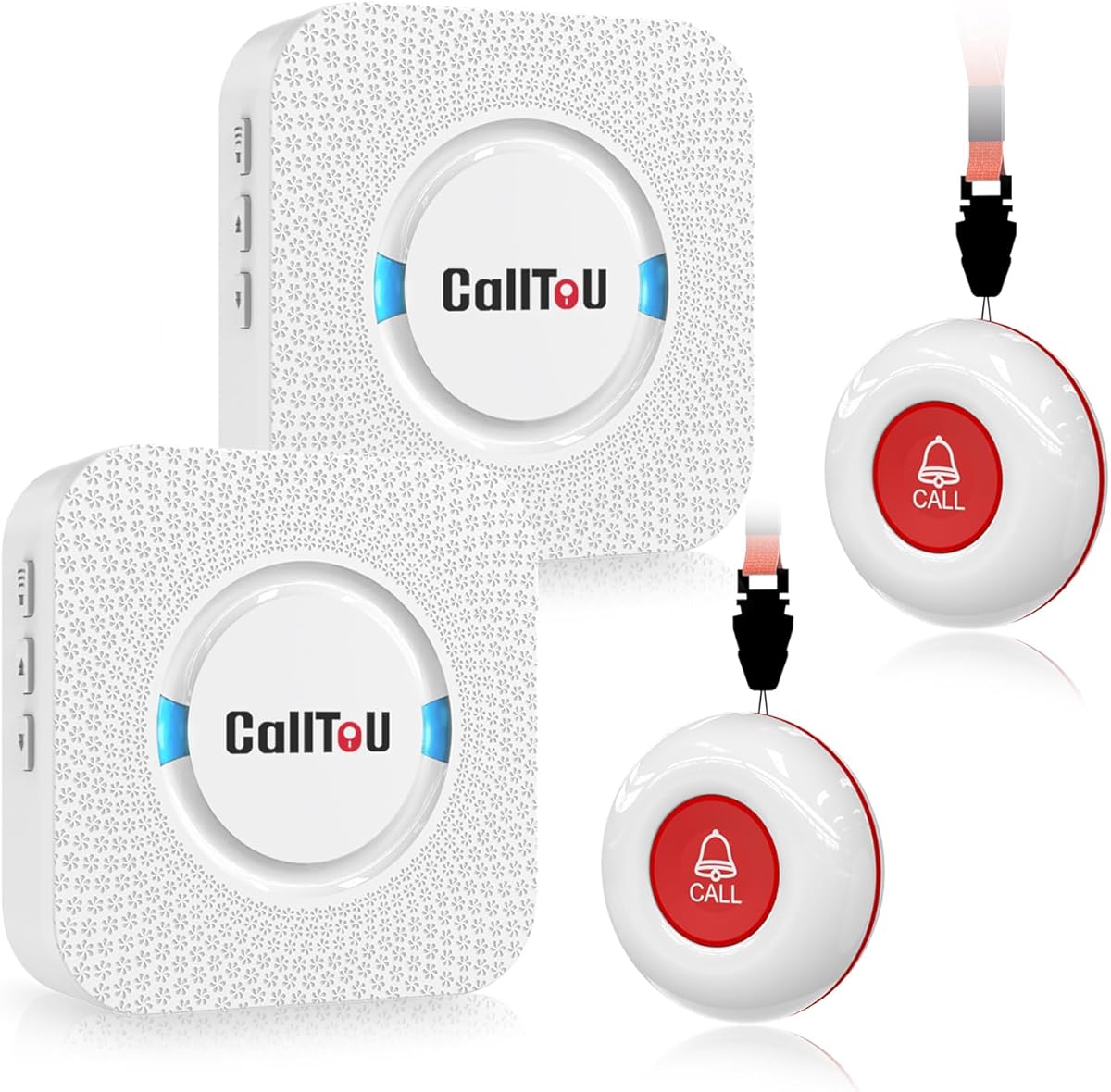
The CallToU Caregiver Pager provides a straightforward solution for home safety. With two call buttons included, it supports multiple locations or users without extra purchases.
We may earn a commission when you buy through this link, at no additional cost to you.
Its waterproof design allows installation in bathrooms or kitchens where accidents might occur. The receiver plugs directly into an outlet, ensuring consistent power without battery worries.
While its 500-foot range is modest compared to other models, it suffices for most single-story homes. The high volume settings ensure alerts are heard even in noisy environments.
This system is ideal for families seeking an affordable, reliable alert method. Its durability and user-friendly setup make it a practical choice for daily caregiving.
Both call buttons and receivers resist water and dust, allowing safe use in bathrooms or during rainy outdoor activities.
Five volume levels let you customize alert loudness to match hearing needs or environment noise levels effectively.
We may earn a commission when you buy through this link, at no additional cost to you.
This Digital Alarm Clock combines visual clarity with voice announcements to assist seniors with vision or memory challenges. Large fonts and clear displays ensure time is easily readable.
We may earn a commission when you buy through this link, at no additional cost to you.
Voice timing allows users to press a button and hear the time, reducing eye strain. Multiple alarms support medication schedules and daily routines without confusion.
Auto daylight saving time adjustments save manual setup hassle. The dimming function adjusts brightness to match day-night cycles, promoting better rest.
Ideal for elderly users needing tactile and auditory aids, this clock simplifies daily time management. Its straightforward design minimizes frustration during setup and use.
Pressing a button triggers a voice readout of the current time, helping those with poor vision stay oriented.
The clock automatically updates for daylight saving changes, ensuring accurate time without manual intervention twice a year.
We may earn a commission when you buy through this link, at no additional cost to you.
The Wireless Caregiver Pager delivers exceptional value with a 1500-foot range and robust alerts. Its budget-friendly price makes it accessible for families needing immediate safety tools.
We may earn a commission when you buy through this link, at no additional cost to you.
With support for up to 30 call buttons, this system can scale to larger homes or facilities. The IP55 waterproof rating ensures resilience in various environments.
While it lacks smart app integration, its simplicity ensures reliability. The receiver requires an outlet, which may limit placement but guarantees constant power availability.
This pager is perfect for those prioritizing range and cost over connectivity. Its strong warranty and versatile options offer peace of mind without complexity.
You can add up to 30 call buttons to the system, making it flexible for large families or multi-room setups.
With a 1500-foot transmission range, caregivers can move freely across large properties while staying connected to seniors.
We may earn a commission when you buy through this link, at no additional cost to you.
The DAYTECH WiFi Caregiver Call enables multiple family members to receive alerts simultaneously. Its wrist button adds flexibility for active seniors needing constant access.
We may earn a commission when you buy through this link, at no additional cost to you.
Shared notifications ensure no one misses a call for help. Custom ringtone settings help caregivers identify specific locations or devices triggering the alert.
Phone and text upgrades require internet or subscription. However, basic app alerts function well within standard home WiFi networks.
Ideal for distributed caregiving teams, this device fosters collective support. Its focus on shared communication enhances family involvement in daily care routines.
App alerts can be shared with multiple family members ensuring everyone stays informed regardless of location or availability.
A wearable wrist button allows seniors to seek help easily while moving about without reaching for a wall mount or desk.
We may earn a commission when you buy through this link, at no additional cost to you.
The SYMYNELEC Camera adds visual connection to caregiving. Its one-touch video calling lets seniors see faces without apps or smartphones reducing loneliness effectively.
We may earn a commission when you buy through this link, at no additional cost to you.
Fall detection sound alerts provide safety monitoring beyond simple pagers. The privacy mode physically rotates the lens, ensuring dignity while allowing remote checks.
Though it requires constant power, this ensures uninterrupted monitoring. Local recording to SD cards avoids cloud subscription fees, keeping costs predictable.
This camera is best for families valuing emotional connection alongside safety. Its combination of video and alerts offers a premium care experience.
Seniors can initiate video calls with a single button press, making technology accessible even for non-tech-savvy users.
A physical privacy mode rotates the lens away to ensure seniors feel comfortable and respected when cameras are not in use.
We may earn a commission when you buy through this link, at no additional cost to you.
This clock features a large HD display and extensive alarm options ideal for detailed daily planning. Custom reminders help seniors manage complex schedules easily.
We may earn a commission when you buy through this link, at no additional cost to you.
Photo playback turns it into a digital frame, reducing isolation by displaying family photos. Brightness settings reduce eye strain during night checks.
Battery backup preserves settings during power outages. DST manual adjustment ensures accuracy but requires user input annually.
This device is suited for seniors needing robust time organization. Its multimedia features blend practicality with emotional connection to loved ones.
Up to 20 reminders allow for detailed tracking of appointments, hydration, and medication schedules throughout the day.
Inserting an SD card displays family photos, turning the clock into a comforting digital frame for lonely seniors.
We may earn a commission when you buy through this link, at no additional cost to you.
This Caregiver Pager includes two call buttons and a portable receiver for flexibility. The belt clip allows caregivers to keep alerts close while moving around.
We may earn a commission when you buy through this link, at no additional cost to you.
With 500-foot range and 12-month support, it offers reliable daily help. Simple chime or alarm options let users choose alert styles.
Battery life is solid, though outlets are needed for the main unit. It suits small homes where mobility and simplicity are priorities.
Ideal for basic care needs, this system balances portability and ease of use. Its dual-button setup supports multiple seniors or zones affordably.
The clip-on pager allows caregivers to remain mobile while maintaining a clear alert channel to seniors nearby.
Including two buttons from the start makes it easy to monitor multiple areas without needing extra purchases initially.
We may earn a commission when you buy through this link, at no additional cost to you.
Choosing the right gadgets for elderly parents requires considering specific needs like memory support, mobility, and communication preferences. Here are key factors to evaluate.
Range is critical for larger homes. Wireless pagers should offer at least 500 to 1000 feet. WiFi devices enable remote alerts but depend on stable internet.
Always check signal strength in your home layout before purchasing to ensure reliable coverage across all essential rooms.
Simple interfaces prevent confusion. Look for large buttons, clear displays, and minimal setup steps. Voice announcements help those with vision issues.
Avoid complex menus. The best gadgets are intuitive enough that seniors can use them without training.
For dementia or memory loss, clocks with spelled-out time and alarms for meds are vital. Avoid abbreviations and ensure dates are clear.
Tools that show time of day visually help maintain orientation. This reduces anxiety for those struggling with routines.
Devices used in bathrooms or kitchens need waterproof ratings. Water resistance ensures safety when accidents happen in wet areas.
Check IP ratings to confirm suitability. Dustproof materials also extend device life in active homes.
Many devices claim no monthly fees. Verify if alerts via phone require a subscription. App-only alerts are typically free.
Choose devices with free core functions to avoid unexpected bills. Always read the fine print before purchase.
Some seniors need wearable options like wristbands or lanyards. Others benefit from wall-mounted buttons near beds or chairs.
Ensure the device is easy to secure and move as needed. Portability increases independence for active seniors.
Good customer support matters when issues arise. Look for products with warranties and accessible help desks.
A reliable brand ensures long-term reliability. Support channels should be easy to reach for non-technical users.
Camera or app-connected devices need encryption. Ensure data protection is in place to respect privacy.
Choose products with physical privacy controls. Security protects seniors from unwanted monitoring or data access.
Start by setting up the device in a central location. Test alerts with family members to ensure sound and notifications work properly before daily use.
Clean buttons and screens regularly with a damp cloth. Avoid harsh chemicals that might damage waterproof coatings or sensitive surfaces.
Check battery levels and power cords monthly. Replace batteries as needed to maintain performance and prevent unexpected device failures.
Yes, many gadgets in this list feature large displays and clear clocks designed for memory support. Look for devices that spell out time and offer simple alarms to reduce confusion.
Most devices in this guide avoid monthly fees for basic alerts. However, some may charge extra for SMS or phone call notifications. Always check the product details.
If internet is weak, choose a wireless pager that does not rely on WiFi. These devices use radio signals and work reliably even without internet connectivity.
Yes, WiFi-enabled devices allow shared app notifications. This ensures all caregivers are informed when a senior calls for help regardless of location.
Many call buttons are waterproof or water-resistant for bathroom use. Check specific IP ratings before installing them near sinks, tubs, or outside.
Most gadgets are plug-and-play with simple instructions. Follow the manual for basic setup and test the system to ensure proper communication with your phone or receiver.
Some waterproof models can work outdoors within their range limits. Ensure the receiver remains powered and protected from direct exposure to elements.
Most devices require an outlet, but some offer battery backup. Always keep spare batteries on hand for critical alert systems to maintain safety during outages.
We reviewed ten top-rated gadgets including pagers, clocks, and cameras tailored for senior care. Each offers unique benefits from memory support to instant alerts.
Prioritize ease of use and range when making your decision. Features like waterproofing and battery backup add essential reliability to any setup.
Always check current pricing and availability before purchasing. Products may change over time, so verify details to ensure you get the best value.