
TP-Link AXE5400 Tri-Band WiFi 6E Router
4.3Editor score
Tri-Band WiFi 6E support
5400 Mbps total throughput
VPN Server and Client support
This guide compares the top gaming routers for GTA 6 Online, evaluating latency, throughput, and stability to ensure seamless multiplayer experiences.
GTA 6 Online demands a stable connection to handle massive open worlds and real-time multiplayer interactions. A quality gaming router ensures low latency and consistent speeds for seamless gameplay across devices.
We evaluated ten top routers based on Wi-Fi standards, hardware specs, and gaming-specific features like QoS and traffic prioritization to identify the best options for this demanding title.
Each pick details key specs, pros, and cons to help you choose the right fit for your setup. Prices and availability change frequently, so verify details before purchasing.
4.3Editor score

4.3Editor score

4.6Editor score
This table compares the key specifications and features of the ten selected routers to help you evaluate performance, connectivity, and value for GTA 6 Online.



The TP-Link AXE5400 offers a compelling entry into Wi-Fi 6E with tri-band connectivity and solid gaming features at an accessible price point. It scores a 4.3 rating from users who appreciate its balance of performance and affordability for home networks.
We may earn a commission when you buy through this link, at no additional cost to you.
Its 6 GHz band delivers near-zero latency crucial for competitive gaming like GTA 6 Online, while OFDMA technology supports up to four times more concurrent device transmissions. The router also supports VPN Server and Client modes for flexible network security without extra hardware.
While it lacks multi-gigabit Ethernet ports, its wireless throughput is sufficient for most broadband connections. The unique housing design ensures effective heat dissipation, contributing to long-term reliability during extended gaming sessions.
This router is ideal for gamers seeking a budget-friendly upgrade to Wi-Fi 6E without compromising on core features. Its EasyMesh compatibility also allows future expansion if your home network grows beyond a single unit.
The dedicated 6 GHz band provides congestion-free channels that minimize interference from neighboring networks and household IoT devices.
Built-in VPN server and client support let you route traffic securely through remote servers or access your home network from anywhere.
We may earn a commission when you buy through this link, at no additional cost to you.
The GL.iNet Flint 2 is a powerful Wi-Fi 6 router designed for users who prioritize security, customization, and wired connectivity. With a 4.6 rating, it stands out for its robust hardware and open-source friendly firmware that appeals to advanced users.
We may earn a commission when you buy through this link, at no additional cost to you.
Its dual 2.5G ports ensure your gaming rig or console can utilize full multi-gigabit speeds from modern ISPs without wireless bottlenecks. The included OpenVPN and Wireguard support delivers high-speed encrypted connections for secure remote access or bypassing geo-restrictions.
While the initial setup requires a firmware update for optimal performance, the effort is worth the enhanced stability and speed. The built-in AdGuard Home feature provides effective ad blocking and tracking prevention at the network level without client installations.
This router is best suited for tech-savvy gamers who want full control over their network traffic and security settings. The generous RAM and storage capacity also allow for installing additional plugins to extend functionality as needed.
Dual 2.5G ports let you connect high-speed devices directly for maximum wired throughput and minimal latency during intense online battles.
AdGuard Home integration provides network-wide ad blocking and tracking protection for a cleaner browsing experience on all connected devices.
We may earn a commission when you buy through this link, at no additional cost to you.
The ASUS ROG Rapture GT-BE98 Pro represents the pinnacle of current networking technology with WiFi 7 support and quad-band performance. It holds a 4.3 rating from enthusiasts who value maximum throughput and advanced features for future-proofing their gaming setups.
We may earn a commission when you buy through this link, at no additional cost to you.
Its 30 Gbps theoretical maximum speed and 320MHz channels in the 6 GHz band ensure ample bandwidth for simultaneous 8K streaming and competitive gaming. Multi-link Operation allows devices to connect to multiple bands at once for stable connections even under heavy load.
While expensive and requiring compatible devices to fully utilize WiFi 7 benefits, the extensive wired ports including dual 10G connections provide unmatched flexibility. Triple-Level Game Acceleration optimizes traffic from your device all the way to the game server for reduced lag.
This router is perfect for power users with high-end internet plans and multiple gaming devices that demand the best possible performance. Its mesh support also enables whole-home coverage expansion without sacrificing speed in secondary rooms.
Multi-link Operation links multiple bands simultaneously for more stable internet connections and efficient data transfers during multiplayer sessions.
Traffic prioritization works at the device, packet, and server levels to ensure gaming data gets priority over other network activities.
We may earn a commission when you buy through this link, at no additional cost to you.
The ASUS RT-AX82U offers a renewed budget option for gamers wanting Wi-Fi 6 performance without the cost of tri-band systems. With a 4.4 rating, users appreciate its solid speed and gaming-centric features like Mobile Game Mode and dedicated game ports.
We may earn a commission when you buy through this link, at no additional cost to you.
Its 160MHz channel width enables ultrafast connections on the 5 GHz band that can handle high-speed internet plans effectively. The Mobile Game Mode minimizes latency specifically for mobile devices making it versatile for handheld gaming sessions on the go.
AiMesh support allows you to create a seamless whole-home network by adding compatible routers for expanded coverage. Lifetime free AiProtection Pro powered by Trend Micro ensures your network stays safe from online threats without ongoing subscription fees.
This model suits gamers looking for reliable dual-band performance with the option to expand later through mesh networking. The renewed status provides cost savings while still offering the core features needed for smooth online gameplay.
Mobile Game Mode minimizes lag and latency for mobile gaming with just a tap on the ASUS Router app for quick setup.
Lifetime free AiProtection Pro provides commercial-grade home network security including WPA3 and advanced parental controls out of the box.
We may earn a commission when you buy through this link, at no additional cost to you.
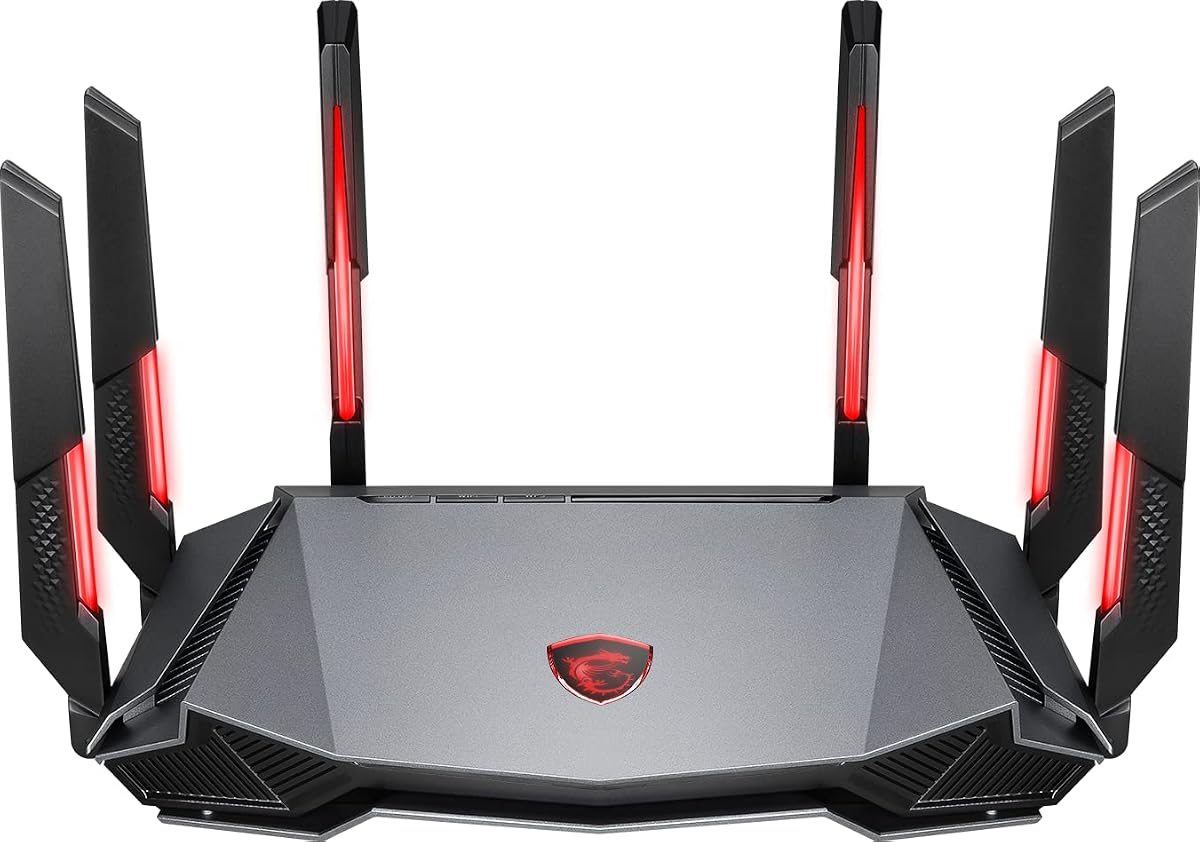
The MSI Radix AXE6600 delivers robust tri-band performance with an impressive 1.8 GHz quad-core processor that handles multiple streams efficiently. It earns a 4.3 rating from users who value AI-driven QoS for maintaining consistent gaming speeds during peak usage.
We may earn a commission when you buy through this link, at no additional cost to you.
Its tri-band configuration includes the 6 GHz band for less interference while 8-stream simultaneous transmission maximizes throughput for connected devices. The game accelerator ensures uninterrupted WiFi connections ideal for immersive experiences where every millisecond counts.
AI QoS automatically prioritizes data packets to satisfy all users needs by ensuring gaming traffic gets priority over downloads or streaming. This automation reduces the need for manual settings adjustments while delivering stable performance during intense multiplayer sessions.
This router is well suited for households with many connected devices that demand high bandwidth without slowing down gaming. The Mystic Light RGB sync adds a visual appeal that integrates with other compatible gaming peripherals for a cohesive setup.
AI QoS automatically prioritizes data packets by gaming traffic ensuring smooth performance without manual configuration or constant monitoring.
Sync RGB light effects with Mystic Light compatible products for a unified gaming aesthetic that matches your hardware and setup.
We may earn a commission when you buy through this link, at no additional cost to you.
The TP-Link Archer GXE75 stands out with a dedicated game panel that offers real-time insights into your battle environment and network status. Rated 4.4 by users, it combines tri-band Wi-Fi 6E performance with a user-friendly interface designed specifically for gamers.
We may earn a commission when you buy through this link, at no additional cost to you.
Its 2.5G WAN port delivers ultra-fast speeds from multi-gig modems ensuring your wired connection keeps up with modern internet plans. The game accelerator optimizes connections for headsets and controllers minimizing jitter and ping across major platforms.
The intuitive game panel empowers players to strategize effectively by showing accelerated games and gear alongside performance metrics. This visual dashboard removes the need for complex menu navigation during quick checks before or after matches.
This router is ideal for gamers who want clear visibility into their network health without leaving their desktop. EasyMesh compatibility further enhances coverage allowing you to eliminate dead zones that might otherwise cause drops during online play.
The intuitive game panel provides real-time insights into your battle environment network status and performance metrics for better strategy.
A 2.5G WAN port enables ultra-fast speeds from your multi-gig modem ensuring wired connections keep up with your broadband speed.
We may earn a commission when you buy through this link, at no additional cost to you.
The TP-Link AX73 is optimized for large homes with coverage up to 2000 square feet supported by six high-power antennas and beamforming. It holds a 4.5 rating from users who value reliable range and consistent performance across expansive spaces.
We may earn a commission when you buy through this link, at no additional cost to you.
Equipped with 4T4R and HE160 technologies on the 5 GHz band it enables ultra-fast connections suitable for 8K streaming and gaming simultaneously. Improved vented areas help unleash the full power of the router by dissipating heat effectively during prolonged use.
Its support for MU-MIMO and OFDMA reduces congestion allowing four times the average throughput for multiple connected devices. This makes it ideal for busy households where many devices compete for bandwidth without compromising gaming performance.
This router is a great fit for gamers living in larger homes who need strong signal strength in every room. The USB 3.0 port also allows for easy media sharing enabling you to create a private cloud storage for files.
Covers up to 2000 sq ft with high-power FEM and six antennas that adapt WiFi coverage to perfectly fit your home layout.
Supports MU-MIMO and OFDMA to reduce congestion and deliver four times the average throughput compared to older WiFi routers.
We may earn a commission when you buy through this link, at no additional cost to you.
The TP-Link BE550 brings WiFi 7 performance to a mid-range price point with tri-band speeds reaching up to 9300 Mbps and support for 320 MHz channels. It receives a 4.0 rating from early adopters who appreciate its future-proof features and comprehensive security options.
We may earn a commission when you buy through this link, at no additional cost to you.
Its Multi-Link Operation and Multi-RUs technologies ensure seamless streaming and gaming by dynamically distributing traffic across bands. Full 2.5G WAN and LAN ports make it an ideal solution for future-proofing your home network as gigabit plans become more common.
The private IoT network feature uses WPA3 encryption to create a separate WiFi network for smart devices protecting your main gaming network from threats. This isolation improves overall security without impacting performance on your primary devices.
This router suits gamers ready to adopt WiFi 7 without breaking the bank on premium models. Its EasyMesh capability ensures you can expand coverage later if your home grows or you move to a larger space.
Multi-Link Operation and Multi-RUs ensure seamless streaming and gaming by efficiently managing data transfers across all available bands.
Private IoT Network creates a separate WiFi network for smart devices using WPA3 encryption to boost security for your home network.
We may earn a commission when you buy through this link, at no additional cost to you.
The ASUS ROG Rapture GT-AXE16000 is the world's first quad-band WiFi 6E router offering ultrafast speeds up to 16000 Mbps across four separate bands. It holds a 4.4 rating from power users who need maximum throughput and dual 10G ports for high-speed networking.
We may earn a commission when you buy through this link, at no additional cost to you.
Its new 6 GHz band delivers higher performance lower latency and less interference compared to traditional bands while RangeBoost Plus improves overall signal range. The dual 10G ports enable up to 10X-faster data-transfer speeds for bandwidth-demanding tasks like large game file transfers.
Triple-Level Game Acceleration prioritizes traffic at device packet and server levels ensuring gaming data gets top priority across the network. Instant Guard privacy adds an extra layer of security by encrypting all device traffic when connected to a trusted network.
This router is perfect for enthusiasts with multiple high-end gaming PCs and consoles that demand uncompromised performance. Its AiMesh support also allows seamless whole-home coverage when paired with other compatible ASUS routers for expanded reach.
World's first quad-band WiFi 6E router boosts speeds up to 16000 Mbps delivering maximum capacity for multiple high-bandwidth devices.
Instant Guard encrypts all device traffic when connected to a trusted network adding privacy protection without slowing down your connection.
We may earn a commission when you buy through this link, at no additional cost to you.
The ASUS ROG Rapture GT-AX11000 has established itself as a top-tier tri-band gaming router with a 4.5 rating based on consistent performance and high user satisfaction. Its 1.8 GHz quad-core CPU provides ultimate performance for handling multiple game sessions without slowdowns.
We may earn a commission when you buy through this link, at no additional cost to you.
WTFast game accelerator technology accelerates game traffic with device packet and server prioritization to route data through optimized paths. This reduces ping and ensures smooth gameplay especially in competitive environments where latency can make or break the match.
With a dedicated 2.5G gaming port you can connect your console or PC directly for prioritized traffic that unlocks the full potential of your internet. The external eight antennas provide wide coverage ensuring strong signals throughout the gaming area.
This model remains relevant for gamers who prioritize proven tri-band stability over the newest WiFi 6E or 7 features. Its lifetime internet security and AiMesh compatibility make it a long-term investment for a secure and expandable gaming network.
Triple-level game acceleration accelerates game traffic with device packet and game server prioritization for optimal routing and minimal ping.
The 2.5G gaming port prioritizes all network traffic to unlock the full potential of your internet connection for critical gaming needs.
We may earn a commission when you buy through this link, at no additional cost to you.
Choosing the right gaming router requires understanding key performance factors that impact latency, stability, and overall online experience.
Select a router supporting WiFi 6E or WiFi 7 to access the 6 GHz band which offers wider channels and less interference essential for competitive gameplay.
The 6 GHz band provides near-zero latency crucial for real-time interactions in large open-world games like GTA 6 Online.
A multi-core processor with at least 1.8 GHz and adequate RAM ensures the router can handle multiple connections without throttling gaming traffic.
Strong CPU performance prevents slowdowns when many devices connect simultaneously during peak gaming hours.
Look for routers with AI QoS or dedicated game acceleration features that prioritize gaming packets over downloads and streaming.
Proper traffic prioritization maintains low latency even when other household devices are consuming bandwidth.
Multi-gigabit ports like 2.5G or 10G allow wired gaming rigs to utilize full broadband speeds without wireless bottlenecks.
Wired connections generally offer more stable latency compared to wireless even on modern WiFi systems.
Built-in VPN support and advanced firewall protection keep your network safe from external threats and unauthorized access.
Security features also protect your personal data when connecting to public networks while gaming on the go.
Ensure the router provides sufficient coverage for your home space or supports mesh expansion for seamless whole-home connectivity.
Dead zones can cause lag spikes so whole-home coverage is vital if you game from multiple rooms.
Start by positioning your router centrally in a cool well-ventilated area away from walls or obstacles to maximize signal distribution for all gaming devices.
Regularly update router firmware to patch security vulnerabilities and improve performance which is critical for maintaining stable connections during online matches.
Use wired connections for your console or PC when possible to bypass wireless congestion and ensure the lowest possible latency for competitive play.
WiFi 6E provides excellent performance with dedicated 6 GHz channels that reduce congestion effectively. While WiFi 7 offers higher speeds and broader bandwidth the practical difference for most players may be minimal compared to standard WiFi 6 options.
While modern WiFi standards are powerful a wired Ethernet connection will always provide the most stable low-latency experience. Using a wired link ensures your device gets priority bandwidth reducing packet loss during intense multiplayer sessions.
Most routers allow you to enable game acceleration through their web interface or dedicated mobile apps. Look for QoS settings or game modes where you can prioritize specific gaming devices or ports in your network.
Mesh systems can support competitive gaming well if the main unit is centrally located and backhaul is stable. Ensure your chosen mesh system supports WiFi 6E to minimize latency between nodes during real-time play.
HomeShield provides robust network security and parental controls but basic protection is often included for free. Evaluate if advanced IoT protection and detailed reporting justify the recurring fee based on your specific security needs.
Multi-gigabit ports become essential if your internet plan exceeds 1 gigabit speeds. For standard gaming usage gigabit ports are sufficient but faster ports provide future-proofing as speeds increase in upcoming broadband plans.
Our top picks include the TP-Link AXE5400 for budget gamers the ASUS ROG GT-BE98 Pro for future-proof performance and the GL.iNet Flint 2 for security-focused users.
Prioritize routers with the 6 GHz band strong processors and QoS features to ensure smooth gameplay regardless of household network congestion.
Remember to check current prices and availability before purchasing since these values change frequently and promotions may offer additional savings.