
NIMO 15.6 AI Ready Laptop
4.8Editor score
4-core Intel N150 processor
8GB RAM and SSD
180 degree lay flat hinge
Standard US backlit keyboard
Finding the right laptop for karaoke gear requires balancing performance with connectivity and display quality. You need a machine that can handle media playback smoothly while supporting external microphones and speakers without lag. Whether you host parties or practice vocals, the right device ensures your sound stays crisp and your visuals pop on screen.
We evaluated ten top models based on their processors, RAM, screen size, and port availability. Our analysis focused on how well each laptop integrates with common karaoke systems like mixers and wireless mics. We also considered battery life and build quality to ensure reliability during extended use at events or gatherings at home.
Each pick below highlights specific strengths for karaoke enthusiasts, from budget-friendly options to high-performance machines. Remember that prices fluctuate often so check current listings before purchasing. We aim to provide clear insights so you can choose a laptop that fits your unique setup and budget needs perfectly.
4.8Editor score

4.5Editor score

4.5Editor score
As an Amazon Associate we earn from qualifying purchases.
The following comparison table breaks down the key specifications of each laptop to help you see differences at a glance. Look closely at processor speed memory capacity and screen size to determine which model supports your specific karaoke software and hardware needs best.






The HP 17 inch Business Laptop Computer stands out as a robust choice for karaoke enthusiasts. It scores high for its large display and strong processing power. Users appreciate the clear visuals and reliable performance when running media apps.
We may earn a commission when you buy through this link, at no additional cost to you.
Its AMD Ryzen 5 CPU and 16GB RAM handle multiple apps smoothly. The 17.3 inch FHD display makes reading lyrics easy during sessions. You can connect mixers via USB or HDMI without lag disrupting your flow.
While it is heavier than smaller models the screen size justifies the bulk. The numeric keypad helps with data entry or playlist management quickly. Battery life supports long events though heavy use may drain it faster.
This laptop fits hosts who need a portable desktop experience. It balances price and performance well for home or mobile DJ needs. Consider it if screen real estate and speed are your top priorities.
The anti-glare FHD screen ensures clear text even under bright party lights. This reduces eye strain during long singing sessions at home or venues.
With multiple USB ports and HDMI output you can easily link external speakers or mixers. This versatility supports various karaoke hardware setups seamlessly.
We may earn a commission when you buy through this link, at no additional cost to you.
The Dell Pro 15.6 Laptop offers dependable performance for daily karaoke tasks. It is designed for smooth browsing and media playback. The fast DDR5 memory helps when switching between apps during events.
We may earn a commission when you buy through this link, at no additional cost to you.
Its Intel Core 3 100U processor provides enough power for streaming tracks. The 120Hz display ensures fluid visuals when playing videos. You can expand storage via SD card if you need more song files.
Storage is limited to 256GB which may fill up fast with media. The plastic build feels durable but less premium than metal. It is a good balance of cost and function for casual use.
Choose this if you want speed and portability for gigs. The audio output is clear enough for small rooms without extra gear. It handles basic setups well without complex configuration steps.
DDR5 memory ensures quick data access for smoother app transitions. This means less waiting time when loading playlists or changing tracks on the fly.
Weighing manageable pounds it is easy to carry to locations. The carbon black design resists minor scratches and looks professional in various settings.
We may earn a commission when you buy through this link, at no additional cost to you.
The HP OmniBook 3 brings a large screen and strong battery for events. It aims to provide a premium feel with solid everyday performance. Users value its wide viewing angles for group settings.
We may earn a commission when you buy through this link, at no additional cost to you.
Its AMD Ryzen 3 processor handles streaming well. The AI noise reduction helps during calls or voice checks. You get ample SSD storage for many song files without external drives.
RAM is limited to 8 GB which may slow heavy multitasking. The Radeon graphics are good for media but not for complex 3D visuals. The design remains thin yet sturdy for transport.
This laptop suits those prioritizing screen size and portability. The fast charge feature ensures you stay ready between uses. It is a great tool for singers needing reliable playback tools.
Fast charge restores half the battery in about 45 minutes. This means less downtime between events or long practice sessions at home.
Advanced noise reduction filters background sounds during communication. This keeps your focus on lyrics and sound quality during recording or calls.
We may earn a commission when you buy through this link, at no additional cost to you.
The NIMO 15.6 AI Ready Laptop is a budget friendly choice with strong value. It offers essential features for media playback without high costs. Users appreciate the warranty and build quality for the price.
We may earn a commission when you buy through this link, at no additional cost to you.
Its Intel 4 Core processor handles basic tasks well. The backlit keyboard helps when working in dim party settings. Connectivity is flexible with multiple USB-C and HDMI ports.
Performance may lag with heavy software but works for playlists. The lightweight frame makes it easy to carry in bags. Storage expansion is possible via Micro SD slots easily.
Pick this for beginners or secondary devices. It keeps costs low while providing necessary tools for setup. The warranty adds peace of mind for long term use.
Multiple ports reduce need for adapters. You can plug mics or drives directly into the laptop for seamless audio integration during shows.
The price point allows saving budget for better speakers. It serves as a solid controller for your audio gear without breaking your wallet.
We may earn a commission when you buy through this link, at no additional cost to you.
The HP Ultrabook 14 Laptop Computer offers a compact yet capable build. It focuses on storage and utility for users needing file space. The bundle adds value with Office and accessories included.
We may earn a commission when you buy through this link, at no additional cost to you.
It handles light media tasks with 16GB RAM. The anti-glare screen reduces glare in bright environments. You get a mix of internal and external storage for many tracks.
The 14 inch display may be small for detailed lyrics. The processor is sufficient for audio but not for heavy editing. Portability is a major plus for mobile hosts.
Choose this if you need storage in a small frame. The included accessories simplify setup for beginners. It is a practical tool for basic karaoke sessions anywhere.
The combined storage allows keeping many files locally. This avoids needing constant internet access for songs during events in remote areas.
Wireless earbuds and mouse help with control. These extras reduce initial setup costs when building your audio kit from scratch.
We may earn a commission when you buy through this link, at no additional cost to you.
The HP 255 G10 Laptop delivers balanced performance for tasks. It aims to provide smooth operation for daily media needs. The Ryzen 3 processor ensures decent speed for playback apps.
We may earn a commission when you buy through this link, at no additional cost to you.
16GB RAM supports switching between apps easily. The Full HD display offers sharp visuals for lyrics. It is designed to be portable for mobile users moving between rooms.
Storage is limited but sufficient for core files. The build is light which helps with carrying to venues. Connectivity covers essentials but may lack advanced features.
This model works well for home users needing reliability. It handles standard audio setups without complex tuning. Consider it for a straightforward and budget friendly solution.
High RAM ensures apps run without lag. This helps keep tracks flowing smoothly even when browser tabs are open.
The LED-backlit screen offers crisp views. It helps you read text easily in various lighting conditions during events.
We may earn a commission when you buy through this link, at no additional cost to you.
The HP OmniBook 3 16 inch Laptop PC features a touchscreen for interaction. It aims to give modern users intuitive control. The 2K resolution adds sharpness to media visuals.
We may earn a commission when you buy through this link, at no additional cost to you.
Its AMD Ryzen 3 processor supports smooth streaming. The AI noise reduction helps during voice tests. Battery life is long enough for extended sessions without worry.
RAM is 8 GB which limits heavy multitasking. Storage is decent but fills up with large video files. The display is a standout for touch navigation.
Pick this if you want touch for song selection. It enhances usability in shared spaces. It is a solid option for visual engagement with tracks.
The touchscreen lets you control playback with fingers. This simplifies navigation during parties without reaching for a mouse or keyboard.
Up to 14 hours of life keeps you going. You can host long events or travel without carrying heavy chargers constantly.
We may earn a commission when you buy through this link, at no additional cost to you.
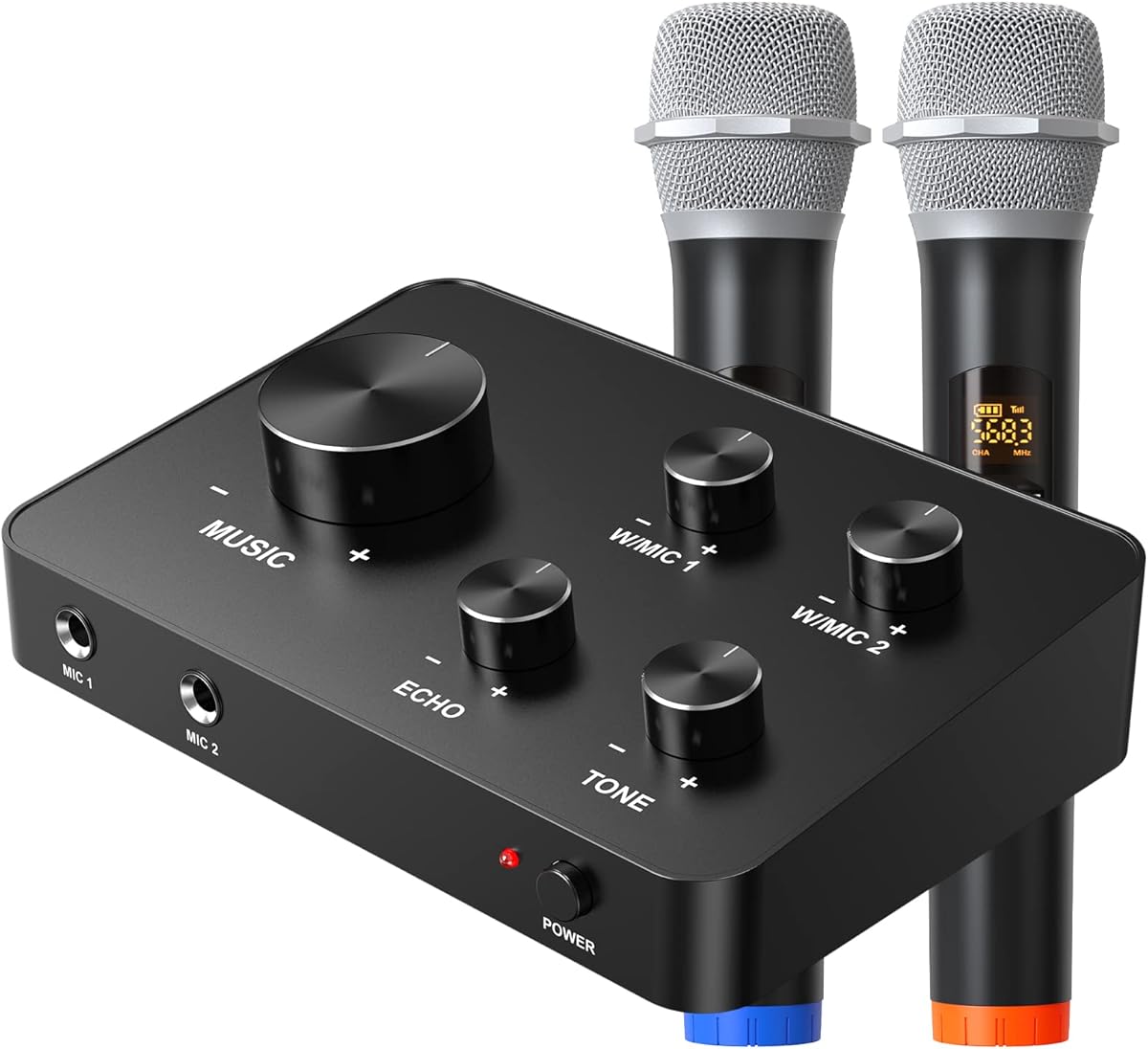
The Rybozen Wireless Microphone Karaoke Mixer System is a simple way to add mics. It connects to various devices like PCs or TVs. This helps create a full karaoke setup with minimal effort.
We may earn a commission when you buy through this link, at no additional cost to you.
It comes with two wireless mics for duets. The UHF range allows movement without cutting signal. You can control echo and tone for better sound quality.
Audio quality is basic but functional for casual use. The mix is easy to understand for beginners. Power may be drawn from connected devices sometimes.
Choose this for simple home parties without pro gear. It bridges the gap between speakers and input sources. It works well for quick gatherings without major investment.
Dual mics let two people sing at once. This adds fun to parties and encourages group participation during song sessions.
Dials allow quick adjustments to echo levels. You can tweak sound on the fly to match different singers voices easily.
We may earn a commission when you buy through this link, at no additional cost to you.
The Sound Town 16 Channels Wireless Mixer offers advanced control. It supports many input types for flexible setups. This is good for users needing detailed sound adjustments.
We may earn a commission when you buy through this link, at no additional cost to you.
It has HD ARC and Bluetooth for modern devices. Independent volume controls help balance vocals and music. You can select frequencies to avoid interference during use.
Setup can be complex due to many connections. It requires some tech knowledge to maximize features. The sound quality is improved with optical options.
Pick this if you want detailed sound control. It suits larger gatherings with complex audio needs. It adds depth to your home karaoke system.
Multiple inputs allow many devices at once. You can connect a laptop and TV simultaneously for different sources during shows.
Reverb and echo modes enhance voice quality. This helps singers sound better with minimal external equipment or studio gear.
We may earn a commission when you buy through this link, at no additional cost to you.
The Wireless Bluetooth Karaoke Microphone with Dynamic Lights is a simple tool. It works directly with phones for quick sessions. The built-in speaker removes need for extra gear.
We may earn a commission when you buy through this link, at no additional cost to you.
It features light shows and voice effects for fun. The battery lasts long enough for full events. Pairing is fast via Bluetooth for immediate use.
Range is limited to close areas. It does not support external mixers directly. This makes it best for casual singing or kids.
Choose this for parties needing minimal setup. It is great for travel or small spaces. The lights add fun visual appeal for all ages.
Up to 10 hours on one charge ensures use. This helps avoid interruptions during long events or travel days.
Voice effects transform vocals for entertainment. This creates unique sounds that amuse guests during singing sessions.
We may earn a commission when you buy through this link, at no additional cost to you.
Selecting the right laptop for karaoke gear involves checking several key specs. This guide explains the most important factors to consider before you buy.
The display is your main tool for reading lyrics and managing playback. Larger screens make text easier to read from a distance. Full HD or higher resolution ensures visuals stay sharp during playback.
Choose a size that fits your venue and needs. Larger screens help guests see better.
A capable processor keeps your system running smoothly while apps are open. Look for Intel Core i3 or better for general use. AMD Ryzen options work well for media playback.
More cores help with multitasking. Ensure your CPU can handle your audio software.
RAM affects how many apps you can run without lag. 8 GB is a minimum but 16 GB offers better speed. Storage should hold your song library and system files.
SSD storage loads files faster than hard drives. Get enough space for your track library.
You need ports to connect speakers microphones and mixers. USB ports are essential for input devices. HDMI helps link to external displays or TVs.
Check if the laptop has the needed connectors. Wi-Fi 6 helps with online track streaming.
Built-in speakers vary in quality. External connections are often better for karaoke. Ensure the audio jack supports your gear needs.
Good audio output reduces the need for extra amps. Check compatibility with your system.
For portable setups long battery is key. Aim for models that last many hours. This keeps your session running without cords.
Check real-world usage times. Bring a charger for safety.
Durable builds withstand travel and use. Look for solid materials like metal or tough plastic. This extends the life of your device.
Sturdy devices resist drops better. Protect your investment.
Ensure your OS supports your karaoke apps. Windows 11 is widely compatible. Check if your software needs specific drivers.
Compatible systems reduce setup issues. Verify before buying.
Connect your audio gear carefully using the right ports. Ensure cables are secure to avoid noise during play.
Keep your software updated to prevent crashes. Clear unused files to maintain speed over time.
Store your laptop in a padded case when moving. Avoid extreme temperatures to protect internal parts.
Aim for at least 8GB RAM and an SSD. A Full HD screen helps read lyrics. Ensure ports match your gear.
Yes but larger screens are easier for guests. Portability helps but balance size with screen space.
For small rooms built-in speakers work. Larger spaces need external speakers for better sound.
Use wired connections when possible. Close background apps to free up processor power.
Mac is compatible but Windows is standard. Check if your software supports macOS before buying.
Avoid constant charging. Unplug when fully charged and avoid heat sources.
The HP 17 inch Business Laptop Computer offers a great balance of size and power. For budget needs the NIMO model provides solid value. The HP OmniBook 3 brings premium features.
Focus on display quality and ports when choosing. These impact how well you can connect and view. Ensure your device matches your setup.
Prices change often so check current deals. We hope this guide helps you find the right machine. Enjoy your next karaoke event with confidence.