
HP 15.6 Portable Laptop
4.1Editor score
Affordable Entry-Level Price
Integrated Numeric Keypad
Windows 11 Home OS
Finding a laptop with a dedicated numeric keypad is essential for professionals who handle spreadsheets, accounting, or data entry daily. These devices streamline workflows by allowing quick number input without switching layers on a compact keyboard. Whether you manage finances or track inventory, having a full-size layout boosts efficiency significantly.
We evaluated ten top models based on performance, display quality, build durability, and keyboard ergonomics. Our analysis focused on devices that offer reliable computing power alongside the specific need for a ten-key numeric cluster. Each option balances portability with the functionality required for serious productivity tasks across various industries.
Each pick highlights key strengths like processor speed, memory capacity, and battery life to help you decide quickly. We include detailed pros and cons so you understand real-world trade-offs before purchasing. Please note that prices and availability change frequently, so check current listings for the most accurate information today.
4.1Editor score

4.1Editor score

4.8Editor score
As an Amazon Associate we earn from qualifying purchases.
This table provides a side-by-side comparison of all ten models to help you identify the right fit for your specific workflow needs and budget constraints quickly.




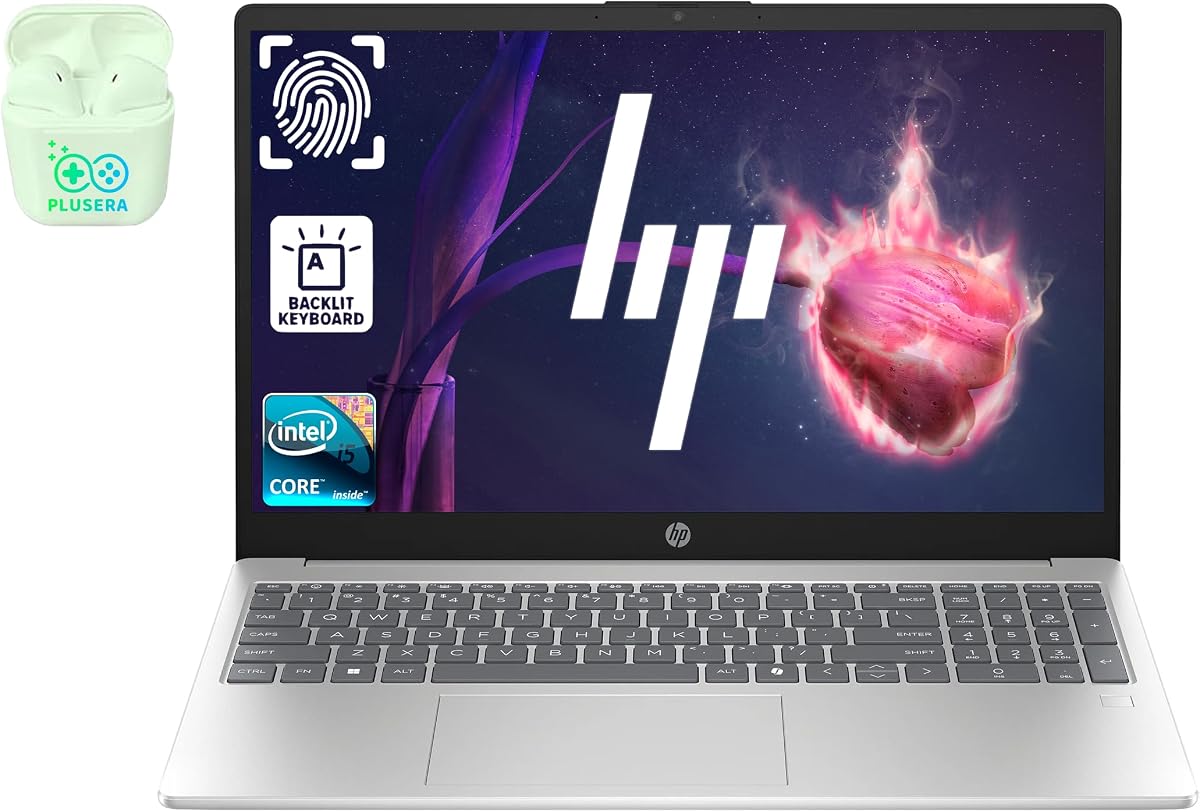

This HP model offers a compelling entry point for users needing a numeric keypad without breaking the bank. It features a standard Intel Pentium processor suitable for light workloads and multitasking. The inclusion of 16GB RAM is a standout feature at this price level.
We may earn a commission when you buy through this link, at no additional cost to you.
The laptop shines in storage flexibility by pairing a small SSD with an external drive for ample space. Students and home office workers benefit from the dedicated numeric keypad for data entry tasks. The red finish adds a touch of style to an otherwise utilitarian device.
While performance is limited compared to higher-end chips, the system handles web browsing and office apps well. Users should expect longer load times for heavy applications due to the entry-level CPU. However, the cost savings make it a viable choice for basic needs.
This device is best suited for students or administrative staff who prioritize memory capacity over raw processing speed. If you need a reliable machine for spreadsheets and email, this model delivers solid value. Consider it if budget constraints are a primary concern for your setup.
The 16GB RAM allows multiple browser tabs and applications to run simultaneously without significant slowdowns.
Users get immediate access to 600GB of storage combining internal SSD and external drive options effectively.
We may earn a commission when you buy through this link, at no additional cost to you.
This business laptop stands out with its massive 17.3-inch display and robust Intel Core 5 processor. It is designed for professionals who spend hours analyzing spreadsheets and financial data. The numeric keypad is integrated seamlessly into a full-size keyboard layout for comfort.
We may earn a commission when you buy through this link, at no additional cost to you.
Performance is exceptional for daily business tasks thanks to the 10-core architecture. Wi-Fi 6 ensures fast and stable connections for remote work needs. The 512GB SSD provides quick boot times and responsive file access across all applications.
The larger chassis means the device is less portable but offers significant screen real estate for multitasking. Users working from a fixed desk will appreciate the immersive viewing experience. It effectively replaces the need for an external monitor in many scenarios.
Investors and accountants should consider this model for its ability to handle complex data sets effortlessly. The combination of screen size and processing power makes it a top choice for productivity. It is ideal for those who value efficiency over portability in their daily routine.
The 17.3-inch panel provides ample room to view multiple spreadsheets side by side comfortably.
The 10-core Intel Core 5 processor ensures smooth multitasking even with heavy Excel workbooks open.
We may earn a commission when you buy through this link, at no additional cost to you.
The HP 255 G10 delivers a balanced mix of performance and professional features for business environments. It features the AMD Ryzen 7 7730U which offers excellent speed for general productivity tasks. The inclusion of Windows 11 Pro adds enhanced security and management tools for enterprise users.
We may earn a commission when you buy through this link, at no additional cost to you.
A 512GB PCIe SSD ensures that the system boots quickly and applications launch without delay. The keyboard includes a dedicated numeric keypad which is crucial for data entry roles. Port selection is generous with USB-C and HDMI options for connecting peripherals easily.
While the display is adequate for office work, it may not match the brightness of premium screens. The laptop is sturdy and designed to withstand daily use in various settings. It serves as a reliable tool for both remote and in-office professionals alike.
This model is highly recommended for small business owners who need a professional operating system. The hardware supports long-term usability without requiring immediate upgrades. If you need a dependable workhorse with numeric input capabilities this is a top contender.
Windows 11 Pro provides advanced security features and remote desktop access for business users.
The 512GB PCIe SSD offers rapid data transfer speeds for quick access to large files.
We may earn a commission when you buy through this link, at no additional cost to you.
The HP Pavilion line is known for combining style with functionality at a reasonable price point. This model features a crisp 1080p display that enhances readability for long study sessions. The numeric keypad is present to assist with math or data entry assignments.
We may earn a commission when you buy through this link, at no additional cost to you.
Powered by the Intel N100 processor it handles everyday tasks like web browsing and document editing well. The 256GB SSD provides enough space for school projects and essential applications. WiFi 6 support ensures stable connectivity in crowded environments like classrooms.
While it lacks the power for heavy gaming or video editing it is perfect for academic work. The lightweight design makes it easy to carry between classes or to the library. Users should be mindful of the 8GB RAM limit when running many apps at once.
Students looking for an affordable laptop with a numeric pad will find this unit very useful. It strikes a good balance between cost and performance for typical educational needs. It is a smart choice for those prioritizing portability and display quality.
The Full HD anti-glare screen reduces eye strain during extended reading or writing sessions.
Fast SSD storage ensures the system starts up in seconds ready for use immediately.
We may earn a commission when you buy through this link, at no additional cost to you.
This HP laptop offers a practical solution for users needing essential tools without a high price tag. It includes a year of Microsoft 365 which adds significant value for document creation and email management. The numeric keypad is included to support efficient data entry tasks.
We may earn a commission when you buy through this link, at no additional cost to you.
The Intel N200 processor is capable of basic computing tasks like browsing and video streaming. The silver finish gives it a modern look that fits well in professional settings. It supports WiFi 6 for faster internet speeds compared to older standards.
Storage is limited at 128GB so users may need to rely on cloud services for extra files. The HD resolution is adequate for general use but not ideal for detailed visual work. However, the cost savings make it attractive for budget-conscious buyers.
For home office users who primarily handle documents and spreadsheets this is a strong option. The included software suite reduces initial setup costs and effort. Consider this model if you need a simple reliable machine for everyday productivity.
A full year of Microsoft 365 comes pre-installed ready for immediate use upon setup.
WiFi 6 support ensures stable and fast internet connections for streaming and meetings.
We may earn a commission when you buy through this link, at no additional cost to you.
This business laptop is designed for professionals who need reliability and efficiency in daily tasks. It features a quad-core AMD processor paired with generous 16GB RAM for smooth multitasking. Windows 11 Pro ensures that security and management features are available for enterprise users.
We may earn a commission when you buy through this link, at no additional cost to you.
The 512GB SSD provides ample space for business files and quick access to applications. Connectivity is robust with multiple USB ports and HDMI for connecting external monitors or projectors. The keyboard includes a numeric keypad which is essential for financial and administrative work.
The display offers good color reproduction but lacks the brightness of higher-end consumer models. It is designed for indoor office use rather than bright outdoor environments. The chassis is durable and supports a stable typing experience during long sessions.
Small business owners will appreciate the balance of performance and professional features. It handles data processing and reporting tasks efficiently without lag. If you need a workhorse for accounting or management tasks this unit is highly capable.
With 16GB of RAM users can run multiple business applications simultaneously without slowdowns.
Windows 11 Pro provides advanced security tools to protect sensitive business data effectively.
We may earn a commission when you buy through this link, at no additional cost to you.
The Lenovo V15 Gen 4 brings high-performance processing to a business-oriented chassis. It uses a Core i5 H-series processor which delivers significant speed improvements over standard U-series chips. This makes it suitable for complex calculations and heavier data processing tasks.
We may earn a commission when you buy through this link, at no additional cost to you.
A key feature is the inclusion of an RJ45 Ethernet port for wired network connections. This ensures stable connectivity in environments where WiFi might be unreliable. The keyboard includes a numeric keypad to support rapid data entry workflows.
The 16GB RAM and 512GB SSD combo provides a responsive experience for modern workloads. The display offers clear visuals suitable for spreadsheets and detailed documents. Windows 11 Pro adds necessary tools for remote work and system management.
Professionals needing reliable internet connectivity will find the Ethernet port particularly useful. The performance is impressive for a mid-range laptop making it a strong value choice. Consider this model if you require extra speed for demanding applications.
The H-series processor handles demanding tasks faster than standard entry-level chips effectively.
The built-in Ethernet port guarantees a stable wired connection for secure data transfers.
We may earn a commission when you buy through this link, at no additional cost to you.
The Dell Inspiron adds a touchscreen layer to the traditional laptop experience enhancing usability. It is powered by a 10-core Intel Core i5 processor for robust multitasking performance. The numeric keypad is included to ensure compatibility with legacy data entry requirements.
We may earn a commission when you buy through this link, at no additional cost to you.
AI Copilot integration helps streamline workflows and organize tasks efficiently. The FHD display is vibrant and supports touch interactions for presentations or casual use. It offers a modern computing experience that blends touch and traditional input methods.
The 8GB RAM is sufficient for most daily tasks but may require closing apps for heavy use. The 256GB SSD provides fast system response times. Dell's reputation for build quality ensures the device is durable over time.
Users who enjoy touch gestures will appreciate the added interactivity this model provides. It is a good choice for presentations and creative work alongside standard office tasks. Consider it if you want a versatile screen for interacting with content directly.
The touchscreen allows direct interaction with apps and documents for intuitive navigation.
Built-in AI Copilot helps organize tasks and summarize information quickly for users.
We may earn a commission when you buy through this link, at no additional cost to you.
This renewed HP laptop offers a cost-effective way to access high-performance hardware. It features a 10-core Intel Core i5 processor that handles business applications smoothly. A numeric keypad is integrated into the keyboard for standard productivity workflows.
We may earn a commission when you buy through this link, at no additional cost to you.
The device includes a fingerprint reader for quick and secure login without typing passwords. The keyboard is backlit allowing for comfortable typing in low-light environments. Accessories like earphones are included to add immediate value to the purchase.
While refurbished units may show minor cosmetic signs of use they are tested for reliability. The performance matches new units with the same specs at a lower price. This option is ideal for budget-conscious buyers who want core capabilities.
Look for this model if you need a reliable work machine without paying full retail. It provides strong processing power and security features that are hard to find at this price point. It represents excellent value for professional or academic use.
A fingerprint reader allows for fast secure logins without needing to type a password.
The backlit keyboard ensures easy visibility of keys in dimly lit rooms.
We may earn a commission when you buy through this link, at no additional cost to you.
This 2026 edition laptop is built to serve professional needs over an extended period. It features a large 17.3-inch display that provides ample workspace for multitasking. The AMD Ryzen 5 CPU ensures the system remains relevant for years to come.
We may earn a commission when you buy through this link, at no additional cost to you.
Web-based Office 365 access allows users to create documents without installing heavy software. The numeric keypad supports data entry needs efficiently during daily work. Long battery life enables users to work throughout the day without needing a charger.
The larger size means it is best for stationary use rather than frequent travel. However, the performance and screen quality justify the added weight for desk setups. It is a durable choice for those who value screen real estate and speed.
Investors and analysts requiring a large workspace will find this model highly effective. The combination of battery life and processing power makes it a versatile tool for business. Choose this for a long-term investment in professional computing hardware.
Long battery duration supports uninterrupted work sessions throughout the entire day.
The 17.3-inch panel offers substantial screen real estate for complex data analysis.
We may earn a commission when you buy through this link, at no additional cost to you.
Selecting the right laptop with a numeric keypad involves evaluating several key components to ensure your daily workflow remains efficient.
The processor determines how fast your laptop can handle tasks like calculations and multitasking. For heavy data work choose a multi-core CPU like Intel Core i5 or AMD Ryzen 7 to avoid slowdowns.
Always check for at least a mid-range processor to ensure smooth operation during peak usage times.
RAM is crucial for running multiple applications simultaneously without lag. Professionals working with large spreadsheets should look for 16GB of RAM to ensure fluid performance.
Aim for at least 8GB of RAM as a minimum baseline for effective daily productivity tasks.
Solid State Drives offer much faster boot times and file access compared to older hard drives. Ensure your laptop includes an SSD to keep your system responsive and quick.
Prioritize an SSD over a traditional hard drive for better speed and reliability.
Larger screens provide more room to view multiple windows side by side. Consider a 17-inch model if you work from a desk but a 15-inch model if you travel often.
Choose a display size that balances viewing comfort with your portability needs.
Windows 11 Pro offers advanced security and management features suitable for business environments. Home editions are fine for personal use but may lack enterprise-level tools.
Select Windows 11 Pro if you need enhanced security and remote access capabilities.
Check for essential ports like USB-A USB-C and HDMI to connect external devices easily. Some models also include Ethernet ports for stable wired internet connections.
Ensure the laptop has enough ports to support your current hardware setup without adapters.
Long battery life is essential for professionals who work away from an outlet for hours. Look for models rated at least 8 hours for reliable all-day usage.
Prioritize battery life if you frequently move between locations without access to power.
A good keyboard with a numeric keypad should have adequate key travel for comfortable typing. This reduces strain during long data entry sessions throughout the day.
Check that the numeric keys are well separated and easy to reach to avoid mistakes.
Always keep the laptop on a flat hard surface to ensure proper ventilation. This prevents overheating during intensive tasks like large calculations.
Use a USB mouse for precise navigation when working with spreadsheets. The numeric keypad can then be used exclusively for data input without interference.
Clean the keyboard regularly with a microfiber cloth to remove dust and debris. This ensures the numeric keys remain responsive and easy to press.
A numeric keypad allows for rapid input of numbers which is essential for accounting and data entry. It separates numbers from letters on the keyboard to improve speed.
You can use an external USB numeric keypad with any laptop model. However, built-in keypads are more integrated and offer better ergonomics.
Pro versions include advanced security features and remote access tools for businesses. Home versions work for basic tasks but Pro offers better enterprise management.
For large complex spreadsheets you should aim for at least 16GB of RAM. This ensures smooth performance when handling thousands of rows and columns.
Not all business laptops include a numeric keypad especially smaller 14-inch models. You must specifically look for full-size keyboards or 15-inch screens.
Mid-range processors like Intel Core i5 or AMD Ryzen 5 offer good performance. They provide enough speed for calculations without the high cost of top-tier chips.
We have reviewed ten top models that cater to various needs from budget to premium. The HP 255 G10 offers a great balance while the 17-inch HP is ideal for large workspaces.
Prioritize processor speed and RAM capacity if you handle complex data sets daily. Battery life and portability should be secondary if your work is mostly desk-based.
Always check current prices and availability before making your final decision. Technology deals change frequently so verify the latest offers on these specific models today.