
Large Key Wired Telephone
4.2Editor score
Oversized physical keys
Adjustable ring tone
Visual warning light
This guide compares ten top large button phones for seniors focusing on volume clarity ease of use and accessibility features to help families choose the right
Finding the right communication device for older adults requires careful consideration of their unique needs. Large button phones simplify calling by offering oversized keys and clear displays that reduce frustration during daily use.
We analyzed ten highly rated models based on user feedback and accessibility features. Each product was evaluated for volume control ease of dialing and reliability to ensure they meet the demands of senior users.
Every pick below highlights specific strengths like photo dialing or extra loud ringers. Remember that availability and stock levels may shift so verify current listings before making your final selection.
4.2Editor score

4.1Editor score
4.2Editor score
This side-by-side comparison outlines the key features of each model to help you quickly identify which phone aligns best with specific accessibility requirements or home setups.


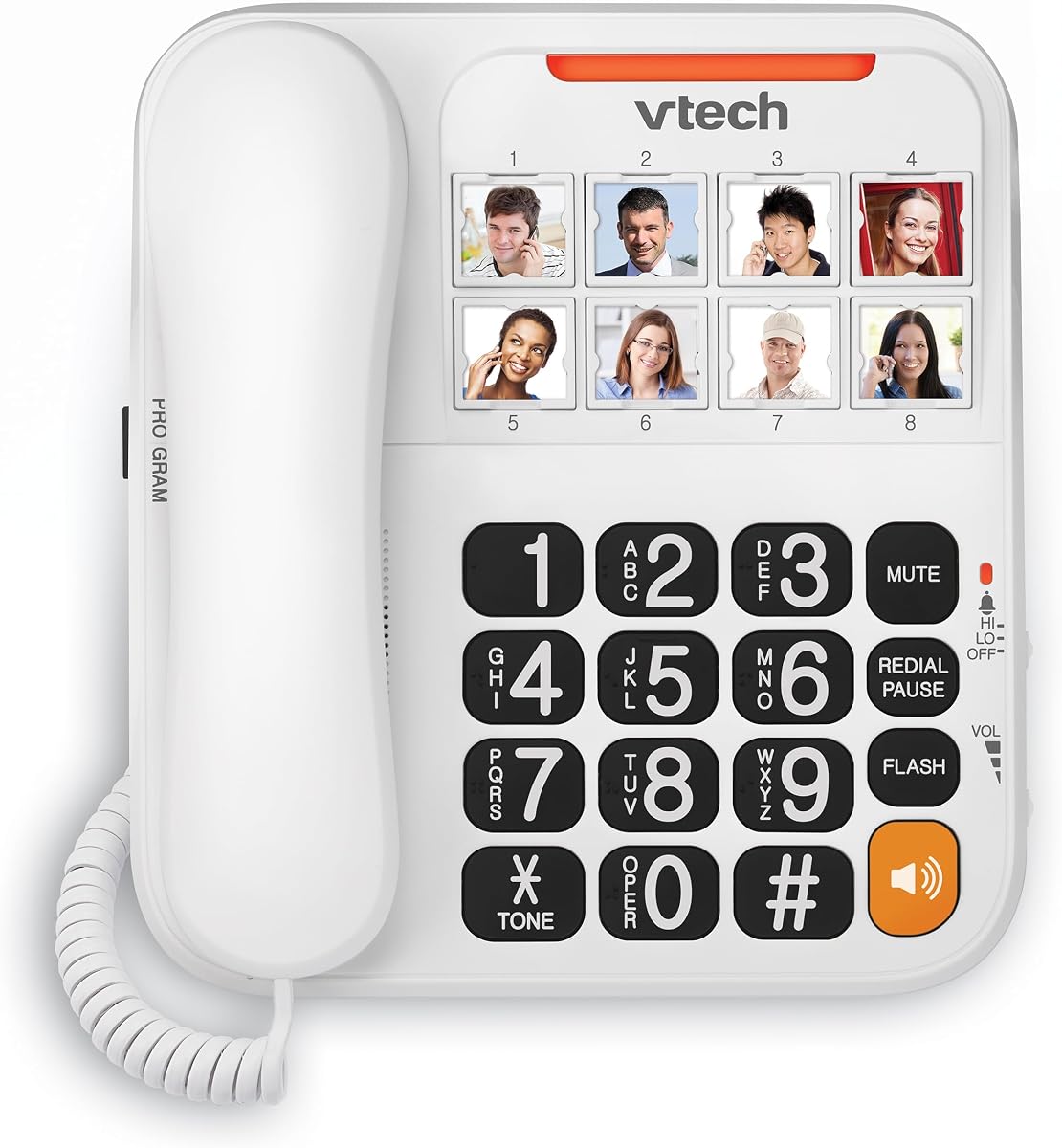
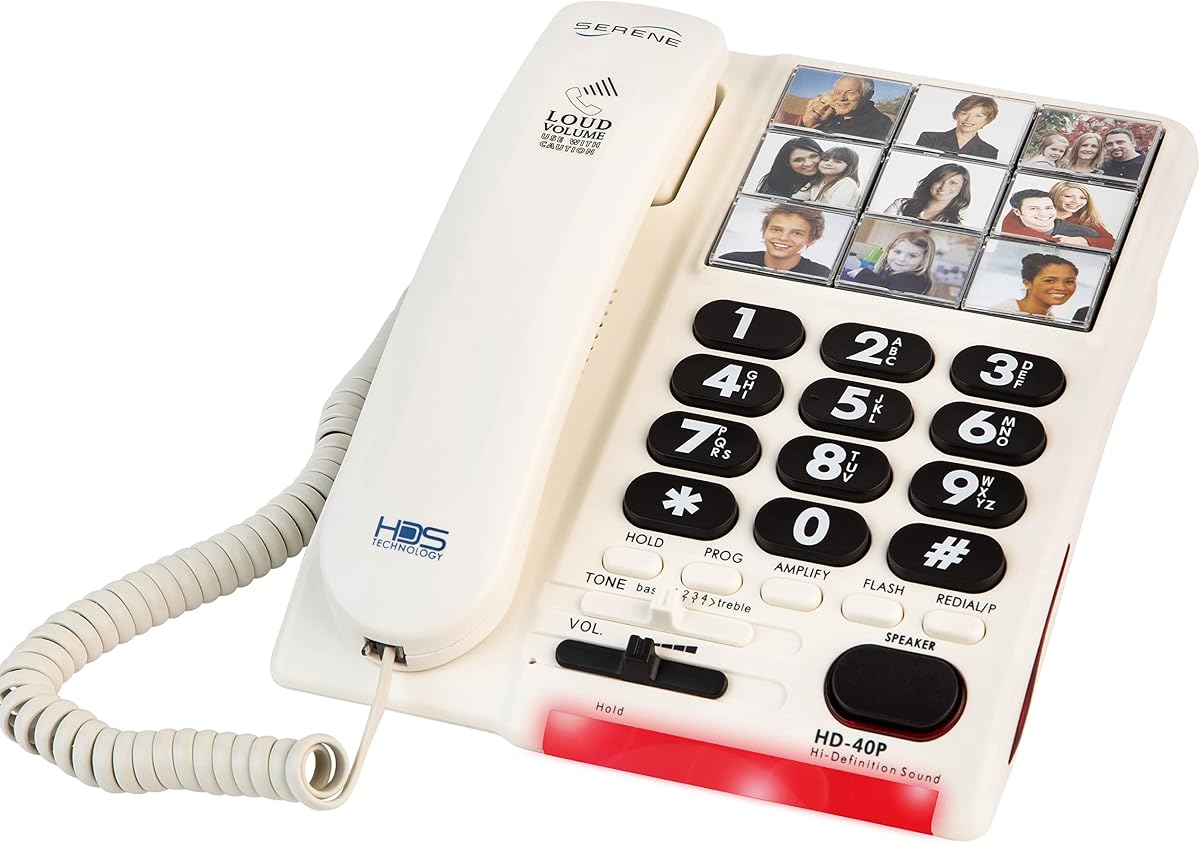


The Uvital Big Button Phone stands out for its intuitive photo dialing feature which helps seniors with memory loss connect quickly. It holds a solid 4.1 star rating and offers a robust set of accessibility tools tailored for home use.
We may earn a commission when you buy through this link, at no additional cost to you.
Its standout quality is the customizable photo buttons that let users press a face to call instead of memorizing numbers. The 120 dB ring tone ensures calls are never missed even in noisy environments or for those with mild hearing loss.
While it lacks modern features like a display screen or internet connectivity these omissions keep the interface simple and reliable. The absence of a screen reduces confusion which is often a trade-off users accept for clarity and ease of use.
This phone is ideal for caregivers seeking a straightforward device for parents or relatives who struggle with traditional dialing. Its reliability during power outages and focus on visual and auditory alerts make it a top recommendation for independent living.
Users can attach photos to eight speed dial keys reducing cognitive load and speeding up calls significantly.
With adjustable volume up to 90 dB and a 120 dB ring the device accommodates various hearing levels comfortably.
We may earn a commission when you buy through this link, at no additional cost to you.
This model offers exceptional value for families on a budget who still need reliable communication tools. It scores a 4.2 rating for its straightforward design and durability in everyday household environments.
We may earn a commission when you buy through this link, at no additional cost to you.
The oversized physical keys measure 1.0 inches in width making them easy to locate and press for users with limited dexterity. The adjustable ring tone and earpiece volume ensure that sound levels can be tailored to specific hearing needs.
Its simplicity is both a strength and a limitation as it does not offer advanced features like caller ID or photo speed dial. However for basic calling needs it provides a robust and dependable solution that rarely fails during use.
Buyers looking for a no-fuss landline phone will appreciate its straightforward operation and low maintenance requirements. It serves well as a secondary phone or for users who prioritize function over flashy features.
Constructed with ABS material the phone offers a comfortable hand feel and resistance to accidental drops or wear.
A large warning light at the bottom signals incoming calls providing an essential backup for those with hearing challenges.
We may earn a commission when you buy through this link, at no additional cost to you.
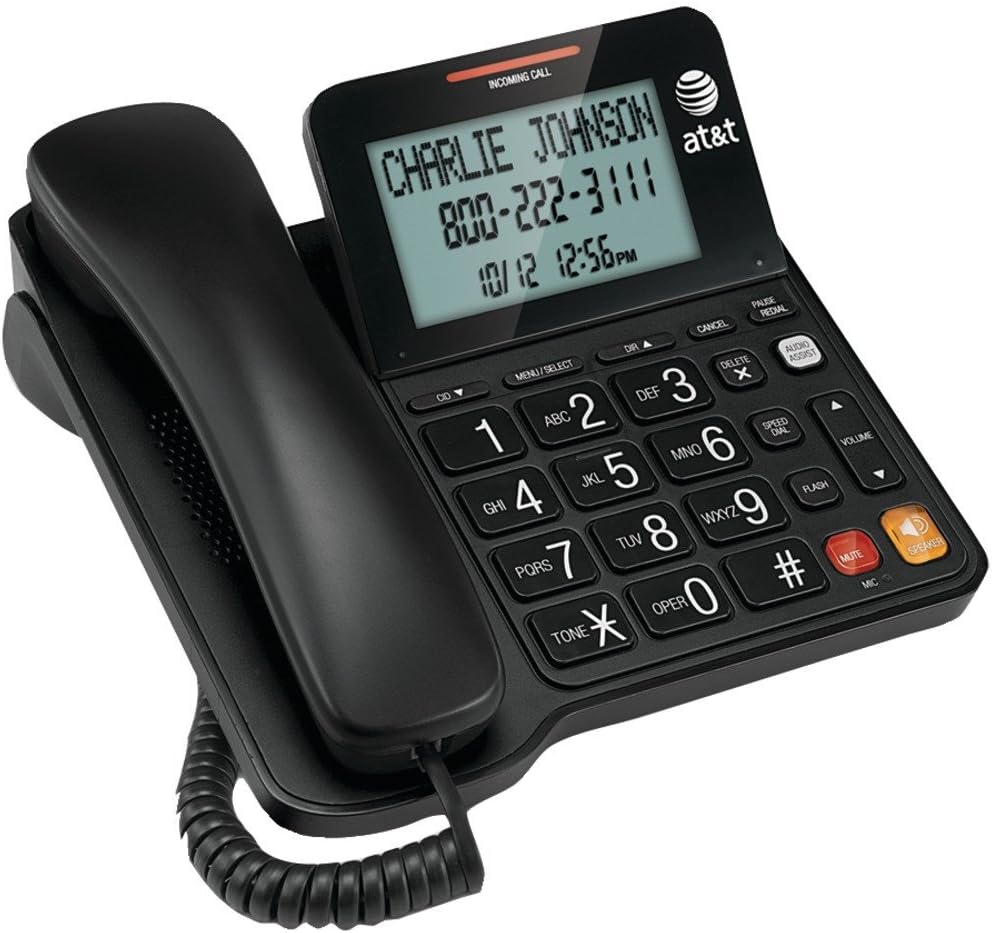
The AT&T CL2940 brings premium features to a senior-focused phone with a clear display and enhanced audio capabilities. It maintains a 4.2 rating for balancing advanced functionality with user-friendly design elements.
We may earn a commission when you buy through this link, at no additional cost to you.
Its tiltable display and extra-large buttons cater to varying vision levels while the caller ID helps screen incoming calls effectively. The Audio Assist Volume Boost feature amplifies sound during calls ensuring conversations remain clear and understandable.
Users may need to insert batteries for caller ID functionality which is a minor inconvenience compared to the utility gained. The higher cost reflects these added features but may not be necessary for those who only need basic dialing.
This phone is perfect for seniors who want some modern conveniences without navigating a complex interface. It strikes a great balance between classic reliability and helpful features that improve daily communication.
The large display shows up to 50 names and numbers allowing users to screen calls and track history easily.
Sound amplification technology helps boost incoming audio volume for clearer hearing during active conversations.
We may earn a commission when you buy through this link, at no additional cost to you.
This device focuses heavily on safety and simplicity with a dedicated SOS button that provides peace of mind for those living alone. It has earned a 4.2 rating for its robust build and effective emergency features.
We may earn a commission when you buy through this link, at no additional cost to you.
The buttons are roughly the size of a dollar coin and feature high contrast black numbers on a white background for maximum visibility. One-touch memory keys allow quick access to family or caregivers making it simple to stay connected throughout the day.
Lacking a speakerphone means hands-free calling is not an option on this specific model which limits multitasking during conversations. However the reliable corded connection ensures it works during power outages a vital safety feature for many households.
It is an excellent choice for families concerned about emergency access and ease of use. The combination of physical safety features and intuitive design makes it a strong contender for senior independence.
A prominent red SOS key allows immediate one-touch calls to pre-programmed emergency contacts or caregivers.
High contrast labeling helps users with fading vision or cataracts read numbers and buttons with clarity.
We may earn a commission when you buy through this link, at no additional cost to you.
The SWISSVOICE Xtra TMAX10 offers a high degree of customization with six photo memory keys that streamline calling important contacts. It holds a 4.5 rating reflecting strong user satisfaction and effective design choices.
We may earn a commission when you buy through this link, at no additional cost to you.
Each button can be customized with a photo helping seniors identify who they are calling instantly. The separate volume controls for handset and ringer allow users to balance noise levels comfortably which helps in varied home environments.
While the six key limit may be restrictive for very large contact lists it covers most essential needs like family and medical services. The visual ring indicator serves as a helpful backup for hearing impaired users.
This phone is best for those who rely heavily on visual cues to navigate daily tasks. Its ease of use and straightforward layout make it a favorite for seniors transitioning from older phone models.
Large keys support photo placement reducing the need to memorize numbers and lowering dialing errors.
Dedicated plus and minus buttons allow precise adjustment of both incoming ring and handset volume.
We may earn a commission when you buy through this link, at no additional cost to you.
VTech brings decades of experience to this senior phone with talking digits that announce numbers as you dial for added clarity. It has a 4.0 rating and is designed to reduce frustration for users with low vision.
We may earn a commission when you buy through this link, at no additional cost to you.
The talking feature is a standout addition that helps users confirm they are pressing the correct keys before dialing. A full-duplex speakerphone allows natural conversations where both parties can speak at once without cutting off.
While it offers solid features the lower rating suggests some users may find the build or audio quality slightly basic. However the talking digits and visual ring provide essential aids that support independent living effectively.
This model is well suited for those who struggle with visual identification of keys. Its combination of auditory and visual feedback creates a supportive environment for daily phone use.
The phone speaks numbers aloud as they are pressed helping users verify their selections without looking.
Supports natural back and forth conversation without the need to press a button to talk and listen.
We may earn a commission when you buy through this link, at no additional cost to you.
Designed specifically for cognitive challenges this model simplifies communication to ensure seniors can stay connected without confusion. It maintains a 3.9 rating due to its specialized focus on dementia and memory care needs.
We may earn a commission when you buy through this link, at no additional cost to you.
The photo buttons allow users to call loved ones with a single touch supporting independence even when memory declines. A loud 85 dB ring ensures that incoming calls are noticed even if hearing is impaired or attention is focused elsewhere.
While the price point is higher than generic models the assistive design features offer value for those with specific care needs. The lack of dependency on electrical mains ensures it works continuously during outages.
This phone is ideal for caregivers managing households where cognitive decline is a factor. Its design prioritizes reliability and simplicity over advanced features to reduce daily stress.
Simplified interface design helps users with dementia or Alzheimer's navigate calls with minimal training.
An 85 dB ring cuts through ambient noise making it easier to notice incoming calls consistently.
We may earn a commission when you buy through this link, at no additional cost to you.
This phone offers versatility by supporting both wall and desk placement making it adaptable to different room setups. It has a 4.0 rating for its practical features and flexible installation options.
We may earn a commission when you buy through this link, at no additional cost to you.
The ability to mount the phone on a wall can save counter space and place the device within easy reach for seated users. Ten two-touch memory keys allow ample storage for frequent contacts reducing the need to remember numbers.
While the build is basic it includes a hands-free speaker and adjustable ring tones to suit various preferences. The LED light indicator ensures users do not miss calls even when the device is silent.
It is a solid choice for those who need to customize where the phone is placed. Its flexibility and memory capacity make it a practical tool for busy households.
Users can choose to mount the phone on a wall or place it on a desk based on their needs.
Ten memory slots allow quick access to a wide range of contacts without needing to dial manually.
We may earn a commission when you buy through this link, at no additional cost to you.
The Excelltel model includes a useful flash function that helps correct mistakes before dialing which reduces frustration. It holds a 4.1 rating for its reliable performance and user-friendly interface.
We may earn a commission when you buy through this link, at no additional cost to you.
With nine one-touch speed dials and a redial key users can quickly reach contacts they call often. The LED light syncs with incoming calls providing a visual cue that supports those with hearing loss or background noise.
While it lacks advanced features like photos or calling ID it focuses on the essentials that matter most for daily use. The redial and flash keys ensure that dialing remains straightforward even if errors occur.
This phone is best for users who want a straightforward device without extra complexity. Its practical features make it a dependable option for regular home communication.
The flash function allows users to restart dialing easily if they make a mistake before sending the call.
LED lights flash in sync with incoming calls ensuring visibility even when audio alerts are missed.
We may earn a commission when you buy through this link, at no additional cost to you.
This model stands out by including an answering machine and a cordless handset for added flexibility in home use. It has a 3.4 rating which reflects mixed experiences with setup and features.
We may earn a commission when you buy through this link, at no additional cost to you.
The inclusion of a cordless handset offers mobility around the house while the answering machine helps capture messages when the user is away. Hearing aid compatibility ensures that those using assistive devices can still communicate clearly.
While the features are comprehensive they can make the setup more complex than simpler models. Users may need to take time to program the system but once set up it offers significant utility.
It is best for those who need message recording and mobility within the home. The combination of phone and recording functions makes it a versatile choice for busy households.
Built-in answering machine allows users to record and play back messages without separate equipment.
An additional cordless handset allows users to move around the home while talking on the phone.
We may earn a commission when you buy through this link, at no additional cost to you.
Choosing the right phone involves balancing ease of use with necessary features to ensure daily communication is smooth and reliable.
Large clear buttons are essential for seniors with vision or dexterity challenges. Look for models with raised keys and high contrast numbering to reduce errors.
Prioritize phones with oversized buttons to ensure easy access and confidence during dialing.
Adjustable volume settings allow users to customize sound levels for both incoming and outgoing calls. High ringer volume ensures that calls are not missed due to hearing loss.
Check for volume boost features and adjustable ring settings to match hearing needs.
Speed dial or photo keys reduce the need to memorize numbers and simplify daily communication. Look for models with memory buttons or photo support for quick access.
Select phones with speed dial keys to minimize cognitive load and dialing time.
Visual indicators like flashing lights help those with hearing loss or noise issues identify incoming calls. These cues provide an extra layer of security for missed calls.
Ensure the phone includes a visual alert system to complement audio notifications.
A speakerphone allows users to talk without holding the handset which is useful for multitasking or limited mobility. This feature supports natural conversation without physical strain.
Choose models with full-duplex speakerphone for natural and comfortable conversations.
Reliable corded phones often work without AC power ensuring functionality during outages. This durability is crucial for emergencies and consistent access.
Opt for corded models with battery-free operation to ensure reliability during power failures.
Simple interfaces without complex menus prevent frustration and help users get started quickly. Avoid phones with too many features that are rarely used.
Stick to straightforward models with clear instructions to reduce setup challenges.
Extra tools like caller ID or answering machines can add utility but may complicate use. Decide which features are truly necessary for the user's daily routine.
Evaluate additional features based on actual needs to avoid unnecessary complexity.
Start by connecting the phone to a standard telephone line and testing the ringer and handset volume. Ensure all buttons are functioning correctly before handing it over to the user.
Program speed dial or photo keys with important numbers to simplify daily communication. Regularly check that these numbers are accurate to avoid confusion or missed calls.
Keep the phone in a dry place away from direct heat or moisture. Clean the keys with a soft cloth to maintain responsiveness and prevent dust buildup.
Most corded landline phones operate on power from the telephone line and do not require electricity. This ensures they continue working during power outages when cell towers may be unavailable.
Some models support photo speed dial where users can attach pictures to keys. Check the product details to see if it includes this feature before purchasing.
Phones with ringer volumes above 90 dB are generally sufficient for those with hearing loss. Look for adjustable volume settings to customize comfort for both ring and call audio.
Many modern landline phones are hearing aid compatible with T-coil or M-mode support. Review specifications or product descriptions to confirm compatibility with specific devices.
Traditional corded phones are not designed for internet or VoIP calls unless specified. Verify if the model supports internet connections before using it with VoIP services.
Use the speed dial keys to assign emergency contacts or caregivers. Follow the instruction manual to set these up so they are easily accessible with one press.
Some large button models include a cordless handset for more flexibility. Check the product details to see if a cordless base or extra handset is included.
Higher-end models often include caller ID and call waiting features. Basic budget phones may not have a display so check specs if this feature is needed.
We highlighted ten top models that offer clarity reliability and accessibility for seniors and their families. Each option brings unique strengths whether it is photo dialing emergency buttons or high volume.
Prioritize ease of use and specific accessibility needs over extra features that may complicate daily operation. Choose a device that matches the user's ability to ensure consistent use.
Remember to verify current stock and availability before purchasing as selections may vary. Check product pages regularly to ensure you get the best model for your specific requirements.