
Thermalright Trofeo Vision LCD 9.16”
4.3Editor score
1920×480 resolution
USB-C plug and play
DIY theme support
Adding an LCD screen for PC case transforms your build into a dynamic display for system stats and custom visuals. These panels integrate seamlessly with modern cases and liquid coolers to show real-time data.
We evaluated ten leading models based on resolution, connectivity, software features, and mounting flexibility. Our analysis ensures you find a display that matches your specific hardware and aesthetic needs.
Each pick highlights unique strengths for different users from budget builders to premium enthusiasts. Prices and availability change frequently so check current listings before making your final decision today.
4.3Editor score

4.4Editor score

4.2Editor score
As an Amazon Associate we earn from qualifying purchases.
This side-by-side comparison highlights the key specifications and features of each model to help you quickly identify which screen fits your case and needs.




The Lian Li SM088X stands out as the top choice for users seeking a premium LCD screen for PC case experience. With a rating of 4.4 stars it delivers vibrant visuals and seamless integration into modern builds. Its 8.8 inch screen offers enough space for detailed hardware stats while maintaining a sleek profile.
We may earn a commission when you buy through this link, at no additional cost to you.
This model shines through its powerful L-Connect 3 software which allows deep customization of layouts themes and animations. You can upload your own videos and images to create a truly unique look. The ARGB frame syncs with your system lighting for a cohesive aesthetic that enhances any glass panel case.
While the price point is higher than budget options the build quality and feature set justify the cost. Some users may find the software interface initially complex but it offers unmatched flexibility once mastered. The included mounting hardware ensures secure installation on various surfaces without needing extra tools.
If you want a display that combines performance and style this screen is the ideal investment. It suits builders who value customization and reliability over saving a few dollars. Its ability to function as a secondary monitor also adds unique utility beyond standard case displays.
L-Connect 3 enables modular information layouts and dynamic themes that respond to system data in real time.
The bracket supports height and tilt adjustments allowing you to position the screen optimally on fans or panels.
We may earn a commission when you buy through this link, at no additional cost to you.
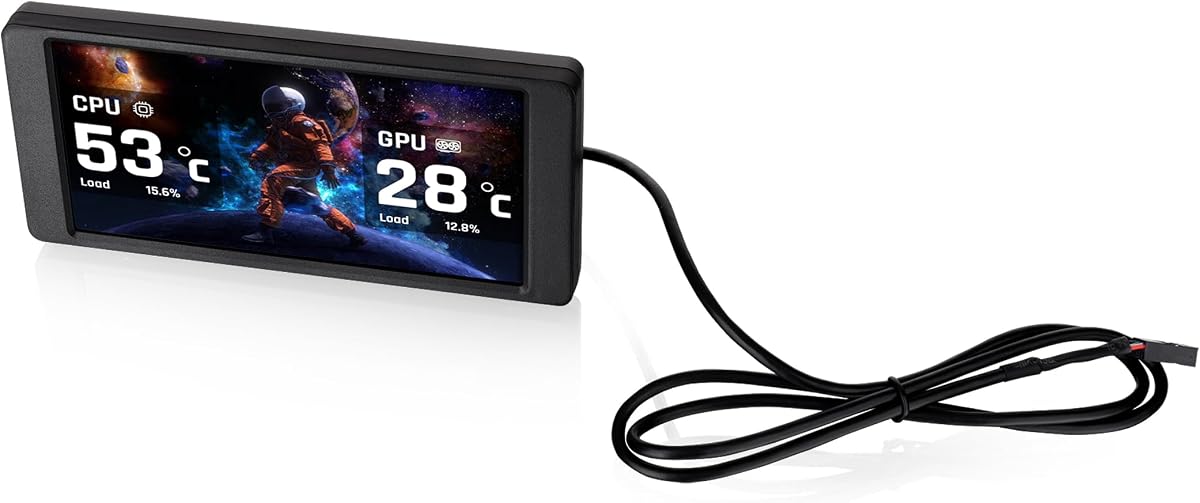
For builders on a budget this Thermalright model offers excellent value without compromising on core features. It holds a solid 4.3 rating and provides a crisp 1920×480 resolution for clear monitoring of temperatures and usage stats. The 9.16 inch size fits well on most side panels or coolers.
We may earn a commission when you buy through this link, at no additional cost to you.
The plug-and-play USB-C connection simplifies installation by removing the need for complex internal wiring. Software is straightforward with preset themes that make it easy to get started quickly. Its slim profile ensures it does not obstruct airflow or look bulky inside your PC.
While it lacks advanced customization seen in pricier models it covers all essential needs for system monitoring. The lack of touch controls is expected at this price and does not impact its primary function. Build quality remains robust with a durable aluminum frame that resists wear over time.
Choose this screen if you prioritize affordability and simplicity in your build. It delivers a reliable display experience for those who want to monitor hardware without spending a fortune. Its compact design makes it perfect for smaller cases where space is limited.
USB-C connection ensures quick installation without needing extra headers or complex cable management.
Track CPU and GPU temps easily through TRCC software designed for straightforward real-time updates.
We may earn a commission when you buy through this link, at no additional cost to you.
This expansive bar screen transforms your PC case into a multimedia hub with its wide 12.6 inch display. Rated 4.2 stars it delivers sharp visuals and includes built-in speakers for audio without needing external devices. It is specifically designed to fit the Hyte Y60 case perfectly.
We may earn a commission when you buy through this link, at no additional cost to you.
The inclusion of speakers sets it apart from most case screens by adding an audio dimension to your setup. HDMI connectivity allows for versatile usage as a secondary monitor or media display. The resolution ensures text remains crisp even when stretched across the wide form factor.
Installation is made simple with included screws and brackets tailored to the Y60 panel. While it requires a dedicated power source and HDMI connection the experience is worth the effort. The build quality matches the premium positioning with sturdy materials and polished finish.
Enthusiasts looking for a standout feature will find this screen delivers on style and function. It turns your build into a media station that rivals dedicated desk monitors. Its unique design justifies the investment for those wanting maximum impact.
Built-in speakers provide sound output without needing extra cables or external audio devices.
HDMI interface lets you use it as a secondary display for streaming or gaming outside the case.
We may earn a commission when you buy through this link, at no additional cost to you.
The darkFlash V92 offers a specialized sensor panel experience for those focused on hardware data. With a 9.2 inch IPS panel it provides sharp visuals and wide viewing angles for easy reading. It uses Station Space software to organize widgets for CPU GPU and RAM monitoring.
We may earn a commission when you buy through this link, at no additional cost to you.
The mounting bracket allows you to install it directly on case fans or panels for maximum visibility. You can choose between USB-C or internal 9-pin connection based on your motherboard layout. The slim aluminum body ensures it does not add bulk to your interior.
Users must keep Station Space running for the screen to function which limits independence slightly. Also it is not compatible with macOS or Linux systems which reduces its audience. However for Windows users it delivers a clean and effective dashboard for system stats.
This screen is ideal if you want a dedicated monitoring tool rather than a flashy display. Its focus on data visibility makes it practical for workstations and gaming rigs. The price point reflects its specific purpose and solid build quality.
Station Space software organizes critical hardware metrics into easy to read widgets.
Mounting brackets allow placement on fans or cases for optimal viewing angles.
We may earn a commission when you buy through this link, at no additional cost to you.
WOWNOVA earns the highest rating of 4.5 stars with its user-friendly approach to case screens. The 8 inch panel supports a unique desktop mode which lets you use it as an extended screen. This flexibility gives it an edge over static display options in the market.
We may earn a commission when you buy through this link, at no additional cost to you.
Setup is incredibly simple requiring only one USB-C or 9-pin cable for power and data. The software updates continuously to add new themes and features for users. This ongoing support ensures the product remains relevant and functional over time.
While the customization options are not as deep as some rivals the ease of use makes up for it. The IPS panel ensures colors remain vibrant even when viewed from the side. It fits well in smaller builds where a 8 inch footprint is ideal.
This is a great choice for first-time buyers or those who prefer simplicity. The desktop mode feature adds utility beyond basic monitoring which appeals to diverse users. Its strong reputation and reliable performance make it a safe purchase.
Switch to desktop mode to use the screen as an extended display for apps and media.
Single cable solution reduces internal clutter while providing stable power and signal.
We may earn a commission when you buy through this link, at no additional cost to you.
This model brings an interactive layer to case screens with its capacitive touch interface. You can interact with your dashboard directly without needing keyboard shortcuts or mouse input. It integrates well with AIDA64 making it perfect for power users who monitor detailed metrics.
We may earn a commission when you buy through this link, at no additional cost to you.
The HDMI connection allows you to use it across different devices beyond PCs like Raspberry Pi or consoles. Low power consumption means it does not stress your PSU even during extended use. The 8.8 inch size balances portability with clear visibility.
While the touch feature is handy it relies on AIDA64 for PC stats which costs a license. The driverless design helps on some systems but can require tweaks on others. Still the tactile control adds a modern touch to traditional monitoring displays.
Choose this if you want to tap directly into your system dashboard while gaming. It suits users who enjoy advanced software and interactive displays. The broad OS compatibility also makes it versatile for multi-platform setups.
Touch interface lets you adjust settings or switch views directly on the screen.
Compatible with multiple systems including Windows and Linux for flexible usage scenarios.
We may earn a commission when you buy through this link, at no additional cost to you.
Thermaltake designed this kit specifically for their View series chassis to maintain design consistency. The 6 inch screen delivers 720p clarity which looks sharp for icons and small text. It supports TT RGB Plus 3.0 for synchronized lighting effects across your system.
We may earn a commission when you buy through this link, at no additional cost to you.
You can upload custom graphics and videos to personalize your build without needing external software. Standalone functionality means it works independently of PC state for basic animations. The higher resolution helps readability even on a smaller screen panel.
Compatibility is restricted to View 370 and 390 models which limits its broader use. Some users report minor software glitches when uploading complex themes. Despite these issues it remains a strong choice for Thermaltake owners wanting seamless integration.
This kit is the ideal upgrade if you own a compatible case and value brand matching. Its support for media files allows creative customization that stands out. It balances functionality and aesthetics effectively for those within the ecosystem.
Designed to match View 370 and 390 cases perfectly for cohesive aesthetics.
Upload your own images and videos to create unique backgrounds and animations.
We may earn a commission when you buy through this link, at no additional cost to you.
GeeekPi delivers a premium wide-format experience with a 12.6 inch screen designed for Y60 cases. It supports up to 10-point multi-touch enabling precise control and multi-finger gestures. The included speakers add audio functionality which rare for PC displays.
We may earn a commission when you buy through this link, at no additional cost to you.
Installation is straightforward with plug and play support on Windows and macOS systems. The tempered glass protects the surface while maintaining clarity and responsiveness. Its wide resolution makes it suitable for showing detailed graphs or multiple stats at once.
Fingerprints can appear easily on the glossy screen so regular cleaning is necessary. Touch drivers may need updates for best performance depending on your OS. Yet the responsiveness and accuracy make it one of the most interactive panels available.
This display suits those wanting a large touch-enabled screen integrated into their PC. It blends functionality with a high-end look that elevates any build. Its compatibility with Y60 ensures a clean fit without extra mounting work.
Ten-point touch support allows complex gestures and accurate input selection.
Dual speakers provide sound output directly from the panel for a complete experience.
We may earn a commission when you buy through this link, at no additional cost to you.
The standout feature of this model is its magnetic suction design allowing easy placement and removal. It removes the need for screws or brackets making installation tool-free for many cases. The 9.16 inch panel offers high resolution for clear text and media playback.
We may earn a commission when you buy through this link, at no additional cost to you.
The metal frame provides durability while the magnetic attachment secures it against vibrations. You can reposition it easily to test angles or remove it for airflow maintenance. TRCC software supports dynamic content and system monitoring for rich visual outputs.
Magnetic strength depends on the case material so steel panels work best for secure fit. Users on non-metal cases may need adhesive pads to hold it in place. Despite this limitation the convenience and sleek design remain highly appealing to modders.
This screen is perfect for those who prefer flexible setups and clean aesthetics. The magnetic concept simplifies hardware management and reduces clutter. It balances practicality and modern design effectively for DIY enthusiasts.
Magnetic suction allows secure placement without screws or complex mounting hardware.
Easily remove or adjust the display to test viewing angles or improve airflow.
We may earn a commission when you buy through this link, at no additional cost to you.
This smaller variant offers a compact alternative for those with limited space or specific cooler placements. The magnetic panel works with Aio coolers allowing flexible positioning near CPU areas. It remains affordable while supporting dynamic themes and basic monitoring.
We may earn a commission when you buy through this link, at no additional cost to you.
The resolution is lower than larger models but sufficient for essential stats like temps and usage. Its small size ensures it does not obstruct airflow in tight cases. TRCC software enables basic customization to match your setup aesthetic easily.
User feedback varies due to magnetic strength consistency across different surfaces. Some report issues with adhesion on non-metal parts of the case. Nevertheless the low price and portability make it a viable entry point into case screens.
Choose this for tight builds or as a companion display for your cooler. It provides essential monitoring without taking up much room inside the chassis. Its adaptability and cost-efficiency suit beginners well.
Magnetic compatibility allows placement directly on AIO coolers for focused system stats.
Budget-friendly price makes it easy to add a display without a large investment.
We may earn a commission when you buy through this link, at no additional cost to you.
Selecting the right display requires balancing size, connectivity, and software features to match your build.
Size impacts how many stats you can view at once. Larger panels like 12 inches suit wide spaces while 8 inches fit compact cases. Resolution should match your content needs to keep text sharp and readable.
Pick a size that fits your panel without blocking vents or airflow. Higher resolution ensures details remain clear even when viewed from angles.
Most panels use USB or internal 9-pin headers for power and data. Ensure your motherboard has free headers or external USB ports. HDMI models need more power and external cables for operation.
Check your case layout before buying. Internal headers reduce clutter but limit placement to specific locations on the board.
The software drives customization and stability. Some require third-party apps while others offer built-in themes. Ensure the software works with your OS and updates regularly for new features.
Look for open customization tools that let you upload your own videos or images. Compatibility with your OS is critical to avoid installation issues.
Flexible brackets or magnetic designs let you adjust angles easily. Check if the mount works with your case panels or fans. Secure mounting prevents vibration and damage during transport.
Select a system that supports your case type. Magnetic mounts are quick but may need metal surfaces for best adhesion.
Aluminum frames resist heat and impact better than plastic. The glass surface should be tempered to resist scratches. Quality materials extend lifespan and ensure safe operation near hot components.
Look for durable materials in reviews and product specs. Good build quality ensures safety around sensitive internal PC hardware.
ARGB frames or clean bezels can match your existing setup. Choose designs that support your preferred color scheme and themes. A cohesive look enhances the overall visual impact of the PC.
Consider if lighting effects sync with your motherboard or RGB devices. Custom themes help unify the look of your system.
Built-in speakers or touch capabilities add value beyond basic stats. Touchscreens allow interactive menus while speakers provide audio feedback. Weigh these extras against price and real needs.
Decide if interactive or audio features are necessary. Extra functionality can improve daily interaction with your system data.
Budget models offer core monitoring while premium ones add media and touch. Evaluate if extra features justify the price difference. A balanced choice ensures quality without overspending on unused functions.
Find a model that meets your must-haves within budget. Focus on features you use regularly rather than niche options.
Start by installing the provided software before connecting the device. This ensures drivers are ready for immediate display and prevents recognition errors during setup.
Route cables carefully to avoid blocking airflow inside your case. Use zip ties to bundle connections and maintain clean internal aesthetics for better cooling.
Clean the screen surface using a microfiber cloth to prevent scratches. Avoid harsh chemicals that can damage coatings or frames on your display panel.
Most require dedicated software to manage themes and system stats. Some use lightweight apps while others need full drivers. Always check compatibility with your OS before buying.
Many models support extended display modes via USB. HDMI versions work fully as second screens. Check software features to confirm independent monitor functionality.
Slim panels designed for cases minimize airflow blockage. Mount on side panels rather than front intakes. Proper placement ensures cooling remains effective during gaming.
Most are optimized for Windows and some Linux distributions. Check product specs for OS support. macOS compatibility is rare among case-specific displays.
Most draw power from USB headers or external ports. Some HDMI screens need additional DC power supplies. Ensure your PSU has spare connectors if needed.
Many models support video playback through software. Upload custom files to create dynamic backgrounds. Check software limits on file types and duration.
Top picks like the Lian Li SM088X and Thermalright Trofeo cover varied user needs. Each model offers unique benefits from touch interactivity to magnetic mounts for builders.
Prioritize features that match your case layout and usage goals. Budget options provide solid monitoring while premium models add multimedia capabilities.
Check current prices and availability before finalizing your order. Specifications and stock often change so verify details with the retailer.