
Cudy Gigabit Multi-WAN Router, OpenWRT
4.4Editor score
Multi-WAN Continuity
OpenWRT-Ready Control
Complete VPN Gateway Suite
This comprehensive guide compares the top 10 load balancing routers for reliability, speed, and security to help you choose the perfect networking solution for
Finding the right load balancing router is essential for maintaining consistent internet speeds and uptime across your business or home network. These devices distribute traffic across multiple connections to prevent bottlenecks and ensure seamless connectivity for all users.
We evaluated ten top models based on port flexibility, security features, VPN capabilities, and ease of management. Each selection offers distinct advantages for different network sizes and technical requirements ranging from basic setups to enterprise environments.
Each review highlights key strengths, limitations, and ideal use cases to guide your decision. Note that prices and availability fluctuate regularly so verify current details before purchasing to ensure you get the best value for your specific situation.
4.4Editor score

4.4Editor score

4.7Editor score
Compare these ten models side by side to find the ideal load balancing router. Each entry includes key specifications, port types, and unique capabilities to streamline your selection process.


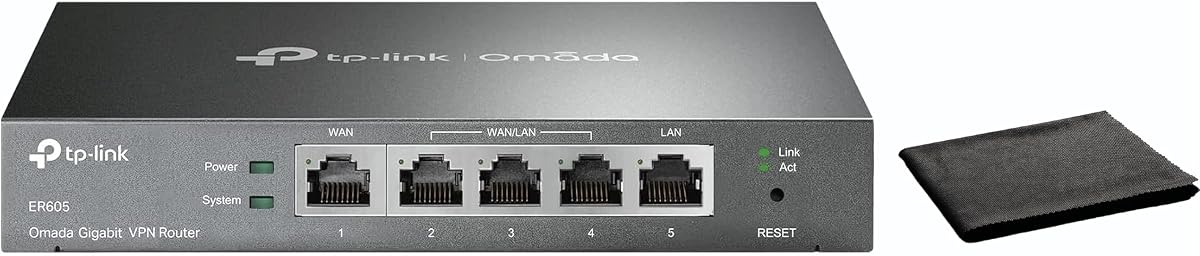

The TP-Link ER605 stands out as a top pick for its balanced features and reliable performance. It delivers consistent load balancing with strong security protocols ideal for small to medium businesses.
We may earn a commission when you buy through this link, at no additional cost to you.
This model supports up to three WAN ports allowing you to aggregate bandwidth from multiple ISPs effectively. The hardware accelerated VPN support ensures secure remote access without slowing down your local traffic.
While it lacks integrated Wi-Fi the wired ports handle high traffic volumes effortlessly. Users should note that advanced setup may require networking knowledge but the stability is excellent.
Buyers needing affordable multi-WAN capability will find this router a solid investment. It remains a strong choice for those prioritizing uptime and security over wireless convenience.
The ER605 automatically balances traffic across active WAN links preventing congestion during peak usage.
Advanced firewall policies and DoS defense protect your perimeter against common online threats.
We may earn a commission when you buy through this link, at no additional cost to you.
The ER7206 targets professional environments needing robust scalability and centralized control. It manages large client bases efficiently while supporting extensive VPN requirements.
We may earn a commission when you buy through this link, at no additional cost to you.
Its integration with Omada SDN allows seamless management across switches and access points. Cloud access enables remote configuration making it ideal for distributed business locations.
Advanced users will appreciate the SFP WAN port for fiber connectivity. However managing the SDN ecosystem adds complexity compared to standalone routers.
This model is best for growing enterprises planning future expansion. It offers excellent long term value for network admins needing unified control.
Omada SDN integrates gateways switches and APs into one unified management platform for easier scaling.
Cloud based controllers allow administrators to monitor and configure networks from any location securely.
We may earn a commission when you buy through this link, at no additional cost to you.
The Cudy R700 impresses with its open source flexibility and multi-WAN support. It suits tech savvy users wanting custom control over network traffic.
We may earn a commission when you buy through this link, at no additional cost to you.
OpenWRT compatibility unlocks VLAN segmentation and advanced QoS policies often absent in stock firmware. This allows tailored performance for specific applications.
Failover mechanisms keep business connections stable during ISP outages. However leveraging full potential requires familiarity with network administration.
Budget conscious buyers should consider this if they value customization. It offers professional features at an accessible price for home labs or offices.
Full OpenWRT support lets you install community packages and modify firewall rules freely.
Built in WireGuard and OpenVPN servers make secure site-to-site links easy to configure.
We may earn a commission when you buy through this link, at no additional cost to you.
The Route10 offers cutting edge performance with 10Gbps capabilities and strong processing power. It targets advanced users needing minimal latency and maximum bandwidth.
We may earn a commission when you buy through this link, at no additional cost to you.
Real-time network monitoring provides deep visibility into traffic flows and device usage. This helps admins optimize connections and identify bottlenecks quickly.
PoE+ support simplifies hardware setup by powering access points directly. Yet the specialized hardware may be overkill for standard home networks.
This router fits tech enthusiasts upgrading to multi-gigabit internet. It ensures future-proofing and professional grade control.
The Qualcomm quad-core processor handles complex routing and VPN tasks without performance drops.
Built-in PoE+ reduces cable clutter and eliminates separate power injectors for access points.
We may earn a commission when you buy through this link, at no additional cost to you.
The ER7412-M2 delivers extensive port flexibility and strong security features. It is designed for high-density networks needing advanced traffic analysis.
We may earn a commission when you buy through this link, at no additional cost to you.
With up to eleven WAN ports it maximizes broadband utilization across multiple connections. Deep Packet Inspection ensures only safe traffic passes through.
The multi-gigabit ports support future-proof connectivity speeds. However full functionality relies on Omada controller integration.
Ideal for offices requiring granular traffic control and security. This router scales well with business growth.
DPI and IPS/IDS provide detailed insights into application usage and block malicious traffic.
Load balancing across eleven WAN links optimizes usage and prevents single point failures.
We may earn a commission when you buy through this link, at no additional cost to you.
This model offers basic load balancing for smaller offices needing redundant connections. It balances cost with essential features for reliable internet access.
We may earn a commission when you buy through this link, at no additional cost to you.
Client account management helps admins control access and bandwidth per user. Portal authentication provides easy guest network access.
While ports are limited to Fast Ethernet it works well for standard connections. Users requiring Gigabit speeds should look elsewhere.
Budget focused buyers will appreciate its straightforward operation. It suits internet cafes or small businesses on tight budgets.
PPPoE server and client accounts allow flexible user management and internet access control.
DDNS simplifies remote management by linking dynamic IP addresses to static domain names.
We may earn a commission when you buy through this link, at no additional cost to you.
The TL-R480T+ provides simple load balancing for basic dual ISP needs. Its compact design fits well in small offices or home setups.
We may earn a commission when you buy through this link, at no additional cost to you.
Three configurable WAN/LAN ports offer deployment flexibility. It handles moderate traffic without complexity.
While lacking advanced security tools it maintains stable internet links. Users needing advanced features will outgrow this quickly.
Best for those needing essential failover without high cost. It is a practical entry point to multi-WAN routing.
Configurable ports adapt to changing network needs without hardware swaps.
Stable routing keeps essential services running even if one link drops temporarily.
We may earn a commission when you buy through this link, at no additional cost to you.
This model combines ease of use with essential business security features. Cloud monitoring simplifies remote management for distributed teams.
We may earn a commission when you buy through this link, at no additional cost to you.
Intuitive setup reduces configuration time. Bandwidth management ensures critical apps get priority during peak hours.
Dual WAN limits scalability compared to multi-port alternatives. But it is enough for many small offices.
Ideal for small businesses needing simple yet secure routing. It delivers reliable performance without steep learning curves.
Centralized cloud monitoring provides real-time status updates from any internet connected device.
QoS settings prioritize business critical traffic to prevent lag during video calls.
We may earn a commission when you buy through this link, at no additional cost to you.
The EdgeRouter 4 offers powerful routing capabilities in a compact fanless package. It suits tech proficient users needing raw performance.
We may earn a commission when you buy through this link, at no additional cost to you.
Its hardware delivers low latency routing ideal for demanding applications. Mounting options fit neatly into network racks.
Web interface is minimal so CLI is often used for configuration. This appeals to advanced admins preferring precise control.
Best for professionals integrating into larger Ubiquiti setups. It provides high reliability for critical network edges.
Fanless design ensures silent performance reducing noise in quiet office environments.
Power efficient CPU delivers consistent throughput with low heat generation.
We may earn a commission when you buy through this link, at no additional cost to you.
The Fusion 2.5G combines high speed ports with an innovative touchscreen interface. It simplifies on-site maintenance without external tools.
We may earn a commission when you buy through this link, at no additional cost to you.
Quad-core performance supports heavy loads effortlessly. Bluetooth setup speeds up initial deployment significantly.
Cloud access removes licensing fees for centralized management. The cost is justified by its feature richness and speed.
Choose this for high speed networks needing modern management. It sets a new standard for ease of use.
The touchscreen displays speed tests and health scores directly on the device for quick checks.
Omada App allows batch adoption of devices streamlining deployment across sites.
We may earn a commission when you buy through this link, at no additional cost to you.
Selecting the right load balancing router requires understanding your specific network needs and growth plans.
The quantity of WAN ports determines how many internet lines you can connect. Models vary from dual-WAN to multi-WAN supporting five or more connections.
Choose a unit with enough ports to cover current ISPs plus room for future expansion without buying new hardware.
Check if ports support Gigabit or Multi-Gigabit speeds. Slow ports bottleneck high-speed internet connections.
For fast internet plans ensure at least some WAN/LAN ports match your bandwidth for full throughput.
Firewalls and intrusion prevention protect against external threats. Look for SPI and DoS defense.
Robust security is vital for business data. Prioritize models with updated threat protection standards.
VPN support allows secure remote access and site-to-site links. Check protocol support like IPsec or WireGuard.
Ensure the router meets your encryption needs for safe data transfer over public networks.
Web interfaces cloud apps and touchscreen UIs vary by model. Consider your preferred control method.
Cloud management simplifies remote administration. On-device screens help quick troubleshooting without laptops.
Consider how the router handles increased client counts or bandwidth demands. Enterprise models support hundreds of users.
If you plan to grow choose a device with higher client limits and advanced QoS to manage traffic.
Automatic failover ensures continuity when one ISP fails. Some systems reroute traffic instantly.
For mission-critical connections verify the failover speed and reliability to minimize downtime.
Prices range widely based on features. Basic routers cost less while premium models have advanced tools.
Balance upfront cost with long-term reliability and needed features to get the best value.
Begin by connecting your primary ISPs to designated WAN ports and configure link detection settings in the web interface.
Enable load balancing rules to distribute traffic evenly. Test failover by unplugging one connection to verify traffic redirects.
Keep firmware updated for security patches. Monitor temperature and clear logs periodically to maintain optimal performance.
A load balancing router distributes internet traffic across multiple connections to maximize speed and ensure uptime. If one link fails it reroutes data through others automatically.
Yes many home users benefit from redundant connections for gaming or streaming. Look for models supporting multiple ISPs with easy setup.
Most dedicated load balancing routers focus on wired connections and do not have built-in Wi-Fi. You may need separate access points for wireless coverage.
Multi-WAN connects several internet lines allowing the router to balance traffic or provide backup. It improves speed and reliability for heavy workloads.
Prioritize SPI firewalls DoS protection and IP filtering. These tools guard against malicious traffic and unauthorized access attempts.
Cloud management lets you configure devices remotely without visiting the site. This saves time especially for distributed businesses or IT teams.
Our top picks like the TP-Link ER605 offer strong performance and security for most users. Each model balances price with necessary networking features.
Focus on port counts and speeds matching your internet plan. Prioritize security features if handling sensitive business data.
Always check current pricing and availability as deals change frequently. Investing in a reliable router ensures stable connectivity for years.