
ASRock Motherboard Micro ATX DDR3 1066 NA D1800M
4.0Editor score
Intel J1800 Processor Included
DDR3 Memory Support
Multiple USB Ports
Discover the top low power motherboard options for efficient builds. We compare features, performance, and connectivity to help you choose the right board.
Finding the right low power motherboard is essential for energy efficient computing. These boards reduce electricity usage while maintaining solid performance for daily tasks and specialized applications like network storage.
Our team analyzed ten top rated models based on specifications and user feedback. We focused on power draw, connectivity options, and compatibility to ensure you get reliable hardware for your specific needs today.
Each pick highlights key strengths and ideal use cases for different users. Prices and availability change frequently so please check the current listings before making your final purchase decision online.
4.0Editor score

4.1Editor score

4.5Editor score
The following table provides a side by side overview of all ten models. Compare their core specifications and features to determine which board aligns best with your performance and efficiency goals.




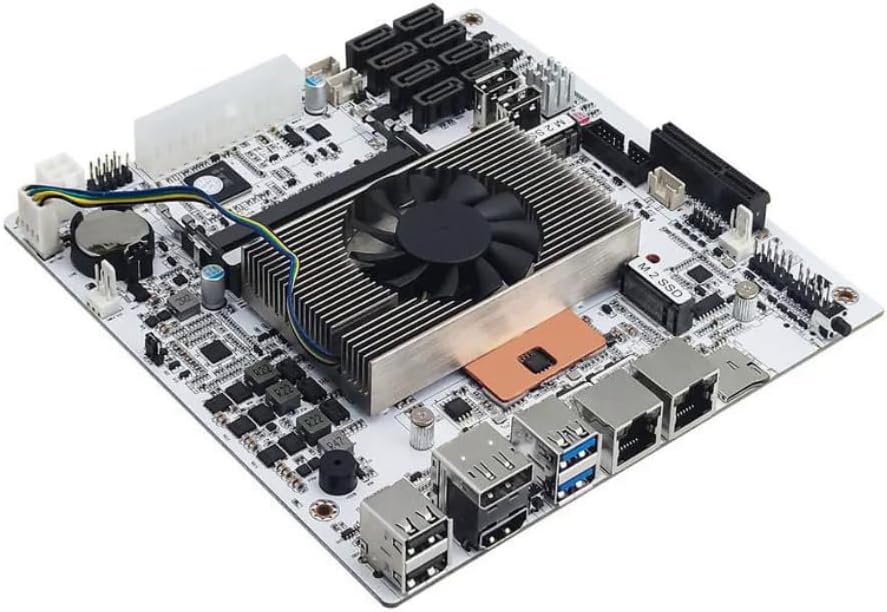
This industrial NAS motherboard stands out with its powerful N5105 processor and robust connectivity options. It holds a strong rating for its ability to handle demanding network and storage tasks efficiently.
We may earn a commission when you buy through this link, at no additional cost to you.
The board features four 2.5GbE ports for high speed networking alongside six SATA connections for extensive storage expansion. Dual 4K display support makes it versatile for multimedia applications beyond just server duties.
While it requires both 24PIN and 4PIN power connections the initial boot time can be lengthy as memory reads occur. These minor inconveniences are outweighed by the performance and reliability it offers for professional setups.
Ideal for users building a home server or firewall appliance this board delivers consistent power. Its combination of speed and efficiency makes it a top recommendation for those prioritizing low energy consumption.
Four high speed Ethernet ports ensure your data transfer rates remain fast and stable during heavy loads.
Six SATA ports and two M.2 slots provide ample room for expanding your storage array easily.
We may earn a commission when you buy through this link, at no additional cost to you.
This ASRock model offers an entry point into low power computing with its included Intel J1800 processor. Users appreciate its straightforward design and budget friendly price point for basic tasks.
We may earn a commission when you buy through this link, at no additional cost to you.
The board supports DDR3 memory which keeps costs down but limits speed compared to newer standards. It provides essential ports including USB and VGA making it suitable for office or light home use.
While the storage options are limited to two SATA ports this might constrain large scale expansion. However for simple builds the low cost and included CPU make it a compelling option for tight budgets.
Best suited for casual users or legacy upgrades this board delivers essential functionality without unnecessary complexity. It remains a solid choice for those needing basic low power performance on a strict budget.
Priced under forty dollars this board includes the processor making it an extremely economical choice.
Sufficient for office tasks and media playback without demanding high performance or complex setup.
We may earn a commission when you buy through this link, at no additional cost to you.
This Mini-ITX board combines a powerful eight thread processor with extensive connectivity for server builds. It ranks well for its balance of performance and efficiency making it ideal for home labs.
We may earn a commission when you buy through this link, at no additional cost to you.
The inclusion of eight SATA ports and dual 2.5GbE LAN connections allows for significant expansion and speed. Virtualization features like VT-x and VT-d ensure smooth operation for users running multiple virtual machines.
Users should note a known sleep mode bug and the need for specific power connections during setup. Despite these quirks the hardware reliability and expansion options make it a strong contender for dedicated servers.
Perfect for enthusiasts building a firewall or NAS this board offers professional features in a small package. Its ability to handle 24/7 continuous operation makes it a reliable pick for dedicated workloads.
Supports VT-x and VT-d ensuring efficient operation for users running multiple virtual machines simultaneously.
Eight SATA ports plus M.2 slots allow you to connect a wide variety of storage devices easily.
We may earn a commission when you buy through this link, at no additional cost to you.
This GIGABYTE board brings AMD AM4 capabilities to a budget friendly price point for general users. It supports a wide range of Ryzen processors making it a flexible choice for various system builds.
We may earn a commission when you buy through this link, at no additional cost to you.
The board features dual M.2 slots and PCIe 4.0 support for modern storage speeds despite the lower cost. Its thermal armor and power design provide steady delivery for everyday computing tasks without excess power draw.
While the VRM design is basic it handles standard Ryzen chips effectively. The limited number of rear USB ports may require headers for front connections but it meets most basic connectivity needs.
Recommend for users seeking a simple AMD platform this board balances price and performance well. It is a practical choice for office PCs or budget gaming rigs where low power is a priority.
Supports 3000 4000 and 5000 series processors allowing for easy upgrades without changing the motherboard.
PCIe 4.0 support on M.2 slots ensures fast data transfer for compatible NVMe drives.
We may earn a commission when you buy through this link, at no additional cost to you.
The MSI PRO B550M-P delivers solid performance with advanced memory and cooling features for its price. It stands out with Frozr AI cooling and Core Boost technology to manage power and heat efficiently.
We may earn a commission when you buy through this link, at no additional cost to you.
Memory speeds up to 4400+ MT/s OC provide responsive performance for daily tasks. The board also offers PCIe 4.0 support and robust storage options ensuring future compatibility for modern components.
While the audio and rear USB connectivity are standard the focus here is on core performance stability. The passive chipset cooling helps keep noise levels low during operation which suits quiet environments.
This board is ideal for users needing a stable platform without excessive power consumption. It offers enough features to build a reliable system that balances efficiency with decent performance.
Frozr AI cooling adjusts fan settings automatically based on CPU and GPU temperatures.
DDR4 Memory Boost supports extreme overclocking speeds for responsive daily computing tasks.
We may earn a commission when you buy through this link, at no additional cost to you.
This ASRock board uses the efficient J4125 quad core processor for low power tasks. It supports DDR4 memory and offers limited expansion slots suitable for compact builds.
We may earn a commission when you buy through this link, at no additional cost to you.
The board is designed for simple NAS or media center use where power efficiency is key. While it lacks high speed networking its low cost and small footprint are attractive to budget builders.
However user ratings are mixed compared to higher end options in the list. Users may experience limitations with modern storage speeds due to older PCIe slots on this specific model.
Best for those needing a basic inexpensive board for light tasks this model offers value. It remains a viable option for entry level home server projects requiring minimal power.
The J4125 processor delivers solid performance for light loads with very low power consumption.
Includes standard PCIe slots for adding WiFi or small expansion cards easily.
We may earn a commission when you buy through this link, at no additional cost to you.
The ASRock B550M-HDV brings strong Ryzen support to a budget board with reliable features. It supports overclocked memory speeds and offers diverse video outputs for flexible display setups.
We may earn a commission when you buy through this link, at no additional cost to you.
Its six USB 3.2 ports and Gigabit LAN provide solid connectivity for peripherals and networking. The spike protection on ports adds reliability against electrical surges which benefits long term stability.
While it lacks Wi-Fi or high end audio the focus remains on essential functionality and durability. This makes it suitable for office environments or home PCs where basic connectivity is sufficient.
Ideal for users wanting AMD performance without paying extra this board balances price and utility. It is a strong pick for those prioritizing stable power and legacy monitor support.
Supports DDR4 speeds up to 4733+ OC for responsive system performance.
Three video outputs including VGA ensure compatibility with older and modern monitors.
We may earn a commission when you buy through this link, at no additional cost to you.
This Gigabyte Mini-ITX board delivers high performance in a small footprint for compact builds. It includes Intel Wi-Fi and Bluetooth making it easy to build wireless systems without extra cards.
We may earn a commission when you buy through this link, at no additional cost to you.
The six phase digital PWM ensures steady power delivery for Ryzen CPUs. Three display interfaces allow for multi-monitor setups which is useful for work or entertainment in small cases.
While it uses PCIe 3.0 rather than 4.0 the speed remains adequate for most uses. The premium wireless and VRM features justify the higher price point for those needing space efficiency.
Best for small form factor builds this board offers robust features without taking up much room. It is a smart choice for users needing connectivity and efficiency in a tiny chassis.
Intel Wi-Fi 6E and Bluetooth provide fast and reliable connectivity out of the box.
Direct 6 Phase PWM design ensures steady power for Ryzen processors.
We may earn a commission when you buy through this link, at no additional cost to you.
This ASRock board impresses with a perfect user rating and extensive connectivity options. It supports Ryzen 3000 to 5000 series processors making it a versatile choice for various builds.
We may earn a commission when you buy through this link, at no additional cost to you.
The board features Wi-Fi 6E for low latency wireless performance and eight USB ports for peripherals. This level of connectivity ensures you can connect almost any device without needing hubs.
High memory speeds and premium audio support add to the user experience. While it is a standard microATX board the inclusion of modern wireless tech makes it feel premium.
Ideal for users needing both wired and wireless flexibility this board is highly recommended. It stands out as a top pick for home or office systems requiring robust connections.
Wi-Fi 6E support provides low latency gaming and fast streaming capabilities.
Eight USB 3.2 ports ensure plenty of connections for external drives and accessories.
We may earn a commission when you buy through this link, at no additional cost to you.
This specialized NAS board offers eight SATA ports and dual network ports for serious storage. It uses an i5 8265U processor for low power consumption while handling heavy data loads.
We may earn a commission when you buy through this link, at no additional cost to you.
Virtualization support and dual 2.5GbE LAN make it suitable for advanced server or firewall use. The compact Mini-ITX design allows for efficient storage builds in smaller enclosures.
Note that this version does not support sleep mode which is typical for continuous run systems. Users should verify the CPU version details as it is an ES variant that may differ.
Best for dedicated NAS projects this board provides exceptional expandability and connectivity. It is a strong choice for users building a reliable storage solution with high throughput needs.
Eight SATA ports allow for massive storage capacity without additional PCIe cards.
Dual 2.5GbE Ethernet ports ensure fast and reliable data transfer.
We may earn a commission when you buy through this link, at no additional cost to you.
Selecting the right low power motherboard requires balancing power efficiency with the features you need. Use these factors to narrow down options based on your specific computing goals.
Thermal Design Power indicates how much heat and power the processor will use. Lower TDP processors consume less electricity and produce less heat making them ideal for fanless or quiet builds.
Look for chips with 15W or lower for maximum efficiency.
Check the memory type and speed supported by the board. DDR4 is common but newer DDR5 offers better efficiency. Ensure the board supports the capacity you need for your applications.
Higher speeds allow for better performance without increased power draw.
Evaluate the number and type of USB and network ports available. If you need high speed transfers look for USB 3.2 or USB-C. For networking consider boards with 2.5GbE for faster LAN speeds.
Ensure the rear panel has enough ports for your peripherals.
For NAS or media systems count the SATA and M.2 slots. More slots mean more drives can be connected directly to the motherboard without extra cards. This saves power and reduces clutter.
Prioritize boards with multiple M.2 slots for faster storage options.
The size of the board determines which cases it fits in. Mini-ITX boards are great for small systems but offer fewer expansion slots. Micro-ATX provides a balance between size and features.
Measure your case before purchasing to ensure compatibility.
Voltage Regulator Modules supply power to the CPU. A better VRM design ensures stability and lower energy loss. Digital VRMs are often more efficient than analog ones.
Check for digital phases if you plan to use higher end CPUs.
If you are not using a dedicated graphics card the onboard video matters. HDMI and DisplayPort support is standard. Check for multiple ports if you need dual displays.
Ensure the board matches your monitor inputs.
Integrated Wi-Fi saves the need for a separate card which consumes extra power. Wi-Fi 6 or 6E offers better performance. Check if Bluetooth is included as well.
Built-in wireless keeps the system compact and efficient.
Always follow the motherboard manual when connecting power. Some low power boards require specific 24PIN and 4PIN connections. Ensure your power supply provides these connectors properly.
Keep the system clean and free of dust. Use compressed air to clean ports and heatsinks every few months. This prevents overheating which can reduce efficiency.
Update the BIOS regularly to ensure compatibility with new processors. Most boards have a Q-Flash or similar feature to update safely. This ensures the hardware runs smoothly.
Yes especially for casual gaming. Most boards support modern CPUs and graphics cards. The low power design helps keep noise and heat down during play sessions.
Absolutely many boards are designed specifically for NAS use. Look for ones with multiple SATA ports and stable power delivery. This ensures data remains safe during continuous operation.
Many modern models support 2.5GbE or even 10GbE connections. This allows for high speed data transfer if you need it. Check the specs before buying to confirm speed support.
Digital VRMs provide more precise power control. This means less energy waste and better stability. They also often run cooler than traditional analog regulators.
Standard ATX power supplies work for most boards. However some models may require specific 4-pin CPU connectors. Check your supply compatibility with the motherboard specs.
Compare the form factor of your case with the board. Mini-ITX and Micro-ATX are common. Most small cases support Mini-ITX but check the manual for Micro-ATX compatibility.
We highlighted ten top options ranging from budget to premium models. Each board offers unique strengths depending on your storage and networking needs.
Prioritize power efficiency and expansion based on your use case. For NAS builders focus on SATA count while home users should look at connectivity options.
Prices change frequently so check current listings before purchasing. A quick review of the latest deals ensures you get the best value for your money.