
Coral M.2 Accelerator B+M Key
5.0Editor score
4 TOPS Peak Performance
2 TOPS Per Watt Efficiency
Works with Debian Linux
This expert guide compares the top M2 Accelerator Cards for AI, storage, and computing needs. We review performance, compatibility, and value for every budget.
M2 Accelerator Cards are essential components for modern computing systems requiring high-speed data processing and artificial intelligence capabilities. These compact modules fit directly into M.2 slots on motherboards or development boards. They provide dedicated hardware acceleration for machine learning inference, video analytics, and storage expansion tasks.
We compared ten leading M2 Accelerator Cards based on their processing power, power efficiency, software support, and hardware compatibility. Our analysis covers Edge TPU modules, NVMe expansion cards, and specialized AI accelerators. Each product was evaluated for its ability to handle demanding workloads in embedded systems, desktops, and server environments.
Each pick in this guide highlights specific strengths like peak performance, energy efficiency, or broad operating system support. We include detailed specifications and real-world use cases to help you make an informed decision. Please note that prices and availability change frequently, so check current listings before purchasing.
5.0Editor score

4.3Editor score

This side-by-side comparison highlights the key specifications and capabilities of each M2 Accelerator Card on our list. We focus on interface types, performance metrics, power requirements, and operating system compatibility to help you find the perfect match for your project needs.


The MX3 M.2 AI Accelerator stands out as a top choice for developers needing high-performance computer vision capabilities. With a rating of 4.3 stars, users appreciate its ability to handle demanding workloads efficiently. The card is designed specifically for AI tasks, offering substantial processing power in a compact form factor.
We may earn a commission when you buy through this link, at no additional cost to you.
Its high-performance AI processing capabilities make it ideal for edge computing scenarios where speed and efficiency are critical. The MX3 integrates seamlessly into existing systems via its M.2 M-key form factor, supporting Linux operating systems natively. The comprehensive SDK simplifies development, allowing teams to deploy models quickly without extensive configuration.
While the MX3 offers impressive performance, it does require a Linux environment and specific hardware compatibility like the Raspberry Pi 5 HAT. These constraints are acceptable trade-offs given the specialized nature of AI acceleration. Developers focused on Linux-based systems will find these limitations minor compared to the performance benefits.
This card is best suited for engineering teams building AI-powered vision systems in industrial or IoT contexts. If you need reliable, efficient processing for complex models, the MX3 delivers. Its balance of power and energy efficiency makes it a smart investment for scalable edge deployments.
The MX3 easily integrates into existing systems via M.2 M-key slot and Linux support.
A comprehensive SDK streamlines development and deployment for faster project timelines.
We may earn a commission when you buy through this link, at no additional cost to you.
This M.2 Accelerator features dual Google Edge TPU ML accelerators on a single card, offering robust inference capabilities. With 8 TOPS total peak performance, it handles multiple models or streams simultaneously. The card uses an E-key interface suitable for 2230 slots, fitting neatly into many embedded boards and mini PCs.
We may earn a commission when you buy through this link, at no additional cost to you.
Its dual TPU design provides significant advantages for complex applications requiring parallel processing. The energy efficiency of 2 TOPS per watt ensures low heat generation and reduced power draw. This makes it ideal for battery-powered or thermally constrained environments where performance per watt is a priority.
The main limitation is its dependency on specific E-key slots and PCIe Gen2 interfaces. Users without compatible slots may need adapters. However, for those with the right hardware, the dual TPU setup offers a cost-effective way to boost ML capacity without expanding to full PCIe cards.
Ideal for prototyping and production edge AI devices, this accelerator balances cost and performance well. If you need to run two models at once or increase throughput for vision tasks, this dual-card solution delivers. Its compact design fits seamlessly into space-constrained builds.
Two Edge TPUs on one card enable parallel processing for complex ML workloads.
At 2 TOPS per watt, it delivers strong performance with minimal power consumption.
We may earn a commission when you buy through this link, at no additional cost to you.
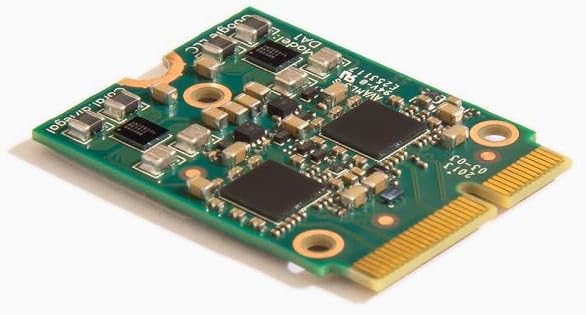
The Coral M.2 Accelerator with B+M Key earns a perfect 5.0 rating for its reliability and performance. It features an on-board Edge TPU coprocessor capable of 4 trillion operations per second. This card excels at running mobile vision models like MobileNet v2 at high frame rates efficiently.
We may earn a commission when you buy through this link, at no additional cost to you.
Its support for Debian Linux systems makes it accessible for a wide range of embedded projects. TensorFlow Lite models can be compiled directly to run on the Edge TPU, reducing build time significantly. The card also supports AutoML Vision Edge for rapid custom model deployment without extensive coding.
While it runs best on Debian-based Linux, users should note the OS dependency when planning projects. The single TPU limits throughput compared to dual TPU options, but for many use cases, 4 TOPS is sufficient. The low power usage and high compatibility make it a budget-friendly powerhouse.
This accelerator is perfect for hobbyists, educators, and small businesses deploying ML at the edge. It delivers professional-grade performance without the complexity of enterprise hardware. If you need a reliable, cost-effective solution for image classification and object detection, this is an excellent choice.
AutoML Vision Edge support simplifies building and deploying custom image classification models.
4 TOPS peak performance delivers rapid inference for real-time applications.
We may earn a commission when you buy through this link, at no additional cost to you.
The QNAP QM2-2P10G1TB is designed primarily for storage and network expansion in QNAP systems. It offers two M.2 2280 PCIe Gen3 x4 NVMe slots for high-speed caching or storage. Additionally, it includes a 10GbE port to connect to high-speed network devices seamlessly.
We may earn a commission when you buy through this link, at no additional cost to you.
Equipped with Marvell's AQtion AQC113C Ethernet Controller, this card ensures reliable high-speed data transfers. The PCIe Gen3 x8 interface provides sufficient bandwidth for demanding storage workloads. It supports QNAP's QTS and QuTS hero alongside Windows and Linux operating systems for flexibility.
While optimized for QNAP NAS environments, its versatility makes it useful in broader server contexts. The included low-profile bracket simplifies installation in compact chassis. However, users outside the QNAP ecosystem may need to verify specific compatibility before purchasing.
This card is ideal for IT administrators seeking to boost storage speed and network throughput simultaneously. If you manage media servers or file storage systems, the combination of NVMe slots and 10GbE networking delivers tangible performance gains. It simplifies infrastructure upgrades significantly.
The 10GbE port allows connecting to high-speed network devices efficiently.
Two M.2 2280 slots enable caching or primary storage expansion in one card.
We may earn a commission when you buy through this link, at no additional cost to you.
The Rocket 1604L leverages PCIe Gen5 technology to deliver unmatched bandwidth for high-performance storage. It supports up to four M.2 NVMe devices with dedicated x4 lanes per port. This ensures each drive operates at full speed without sharing bandwidth, crucial for server workloads.
We may earn a commission when you buy through this link, at no additional cost to you.
Its PCIe 5.0 x16 interface future-proofs builds against emerging hardware standards. The card natively supports mainstream operating systems and runs on x86 Intel, AMD, and ARM platforms. This cross-platform compatibility makes it versatile for diverse deployment scenarios.
However, using this card requires a motherboard with a PCIe 5.0 slot, which limits its immediate adoption. It also comes at a higher price point compared to Gen3 or Gen4 options. These costs are justified by the performance gains and longevity for professional environments.
Best suited for data centers, workstations, and servers requiring massive I/O throughput, this card excels. If you need to deploy multiple high-speed NVMe drives, the Rocket 1604L provides the bandwidth and reliability needed. It represents the cutting edge of M.2 storage expansion.
PCIe 5.0 x16 support ensures compatibility with upcoming high-performance hardware.
Works across x86 Intel/AMD and ARM platforms for broad deployment options.
We may earn a commission when you buy through this link, at no additional cost to you.
This adapter transforms a single PCIe slot into a dual-TPU workstation for enhanced AI inference. It allows two Coral M.2 Accelerator cards to operate simultaneously via a PCIe Gen3 x4 to dual Gen2 x1 splitter. A heatsink ensures thermal management for sustained performance.
We may earn a commission when you buy through this link, at no additional cost to you.
Ideal for object detection, image classification, and video analytics, it doubles the inference capacity. The design is developer-friendly for TensorFlow Lite models and edge deployments. It saves space compared to using multiple full-sized PCIe cards while maintaining cost efficiency.
The adapter requires existing Coral TPU cards to function, limiting flexibility for new builds. It is a specialized component rather than a standalone accelerator. Users must ensure proper airflow to manage heat when running both TPUs at full load continuously.
Best for scaling AI projects without replacing the entire system, this adapter offers a practical path. If you already own Coral TPUs and need more throughput, this solution maximizes your investment efficiently. It supports real-time applications effectively in a compact form factor.
Get dual TPU performance without requiring multiple PCIe slots or new systems.
Built-in heatsink ensures reliable performance during extended inference tasks.
We may earn a commission when you buy through this link, at no additional cost to you.
The ASUS Hyper M.2 x16 Gen5 card adapts server-grade PCB technology to support up to four M.2 NVMe drives. It delivers up to 512 Gbps bandwidth for smooth data transfers in high-demand environments. A large heatsink, thermal pads, and an active fan prevent throttling.
We may earn a commission when you buy through this link, at no additional cost to you.
The two-phase power solution provides up to 14-watt output to support the latest NVMe drives reliably. It supports RAID functions across platforms to create bootable arrays, improving performance and data redundancy. Fan control is integrated via the chassis header for smart temperature management.
Users must provide a dedicated 6-pin PCIe power connector and sufficient case airflow for the active fan. Without adequate power, performance may suffer under heavy loads. The physical size requires careful planning to fit in smaller enclosures or cases with limited clearance.
This card is perfect for workstations and servers needing massive local storage speeds. If you require RAID setups for video editing or database servers, its performance and reliability stand out. It brings enterprise-level storage capabilities to compatible consumer and professional platforms effectively.
Active fan and large heatsink reduce SSD temperatures for unthrottled transfer speeds.
Support RAID functions across platforms to create bootable arrays easily.
We may earn a commission when you buy through this link, at no additional cost to you.
The waveshare Hailo-8 M.2 Module delivers an impressive 26 TOPS using the Hailo-8 AI processor. With typical power consumption of just 2.5W, it offers high efficiency for edge devices. It enables simultaneous processing of multi-streams and multi-models for complex AI workloads.
We may earn a commission when you buy through this link, at no additional cost to you.
Supporting frameworks like TensorFlow, TensorFlow Lite, ONNX, Keras, and Pytorch makes it versatile for developers. It works on Linux and Windows systems and operates in a temperature range of -40°C to 85°C for industrial reliability. Rich wiki resources provide necessary support for integration.
This module is sold as a module only, requiring users to handle mounting and interface connections separately. Beginners may rely heavily on official documentation and community wikis. However, the extensive framework support and temperature range make it a robust choice for outdoor or industrial deployments.
Best for advanced developers needing high TOPS without a massive power footprint, this module excels. If you require real-time low latency processing on edge devices, its scalability is ideal. Its compatibility with major AI frameworks simplifies migration from other hardware choices significantly.
26 TOPS performance at 2.5W power consumption delivers superior energy efficiency.
Supports TensorFlow, ONNX, Keras, and Pytorch for flexible model deployment.
We may earn a commission when you buy through this link, at no additional cost to you.
This Coral M.2 Accelerator features an A+E Key interface for easy integration into existing systems. It delivers 4 TOPS peak performance for machine learning inference tasks with a strong compatibility profile. The design focuses on low power operation, ideal for embedded applications.
We may earn a commission when you buy through this link, at no additional cost to you.
Compatible with Linux Debian 10, Ubuntu 16.04+, and Windows 10 64-bit, it offers wide OS support. Its industrial-grade reliability allows operation between -20°C and +85°C, suitable for harsh environments. This robustness ensures consistent performance in varying physical conditions.
While the A+E key limits physical slot compatibility to specific devices, the software support is broad. The single TPU limits peak throughput compared to dual TPU options, but it remains efficient. Users in industrial settings benefit from the wide temperature range and stable performance.
Best suited for embedded systems requiring stable AI inference, this module balances power and durability. If you need a reliable accelerator for retail or industrial devices with limited space, this fits well. Its broad OS compatibility reduces deployment barriers significantly.
Supports Debian, Ubuntu, and Windows 10 for diverse system deployment options.
Operating temperature range suits harsh environments and industrial applications well.
We may earn a commission when you buy through this link, at no additional cost to you.
Designed exclusively for Coral M.2 Accelerator with Dual Edge TPU modules, this adapter maximizes AI inference performance. It fits standard M.2 2280 B-key or M-key slots using PCIe protocol only. It includes a stainless steel mounting screw for vibration-resistant PCB fixation.
We may earn a commission when you buy through this link, at no additional cost to you.
The bidirectional Gen2 bandwidth provides 5Gbps upstream and dual 5Gbps downstream lanes for efficient data flow. It is explicitly incompatible with Raspberry Pi CM4 or USB enclosures to prevent buyer errors. This specificity ensures compatibility only with intended systems.
Users should verify their host slot supports PCIe M.2 specifically rather than SATA variants. While limited to Coral modules, it ensures stable mechanical mounting and correct lane splitting. The 5.0 rating reflects user satisfaction with its reliability and design intent.
Best for users deploying dual TPU configurations in embedded or industrial setups, this adapter offers precision. If you need a secure, standard-compliant way to connect your Coral accelerators, it performs reliably. Its clear specifications prevent costly compatibility mistakes during installation.
Includes stainless steel mounting screw for vibration-resistant PCB fixation.
Fits M.2 2280 B/M key slots with PCIe protocol for proper data flow.
We may earn a commission when you buy through this link, at no additional cost to you.
Selecting the right M2 Accelerator Card requires understanding your specific performance needs and hardware compatibility. Consider the following factors to ensure you choose a card that delivers optimal results for your application.
Ensure the card fits your available slot type (M-key, E-key, B+M key) and supports the correct PCIe generation. Using an incompatible interface will prevent physical installation or limit performance to lower speeds.
Always verify your motherboard or development board documentation before purchasing to confirm slot type and protocol support.
Identify the necessary TOPS (trillion operations per second) for your workload. High-throughput video analytics may require dual TPU or higher TOPS modules, while basic inference might suffice with standard single TPU options.
Choose a card that meets your peak load requirements to avoid bottlenecks in production environments.
Check if the card supports your operating system. Many accelerators are optimized for Linux distributions, while some offer broader Windows compatibility. Ensure drivers and SDKs are available for your target OS version.
Prefer cards with active developer communities and official SDK support to simplify deployment and troubleshooting.
Evaluate the power draw relative to your system's capabilities. High-performance cards may require external power connectors, while efficient models run directly on the M.2 slot. Low power designs reduce cooling needs and battery drain.
Prioritize energy efficiency for embedded or battery-powered applications to ensure stable operation.
Look for cards with built-in cooling like heatsinks or active fans. Thermal throttling can reduce performance significantly under sustained loads. Ensure your enclosure has adequate airflow for the specific cooling solution used.
Select cards with robust thermal designs for high-temperature environments to maintain reliability.
Consider the availability of development tools and frameworks. Cards with support for TensorFlow, Pytorch, or ONNX streamline model deployment. Access to comprehensive documentation and SDKs accelerates development cycles.
Choose a card with strong software support to reduce integration time and ongoing maintenance costs.
Verify the card length (2230, 2242, 2280) and height to ensure it fits within your chassis. Space-constrained devices like mini PCs or industrial boxes have strict dimensional limits that affect cooling and airflow.
Measure your available space before purchasing to avoid fit issues and potential clearance problems.
Consider future project needs when selecting a card. PCIe Gen5 options offer better long-term value than older generations. Dual accelerator options allow scaling without replacing the entire card.
Invest in cards that can support increased workloads as your projects grow to protect your hardware investment.
Install the M2 Accelerator Card into the correct slot on your motherboard or development board, ensuring proper alignment of the keys. Secure it with mounting screws to prevent vibrations from loosening the connection over time.
Install the necessary drivers and SDKs provided by the manufacturer before running any inference tasks. Verify device recognition through your system's diagnostics tools to ensure the card is initialized correctly.
Monitor temperatures during high-load operations to ensure your cooling solutions are effective. Clean dust from heatsinks and fans regularly to maintain optimal airflow and prevent thermal throttling in enclosed environments.
M2 Accelerator Cards are primarily used for AI inference, machine learning tasks, and high-speed storage expansion. They accelerate computer vision models, object detection, and video analytics on edge devices. Some variants support NVMe SSD expansion for data center storage performance.
Check your motherboard manual for available M.2 slots and their supported key types (M-key, E-key, B+M) and PCIe generations. Ensure the slot provides sufficient power and physical clearance for the card dimensions. Look for BIOS settings that enable PCIe mode for M.2 slots if needed.
Many cards support Windows, but some are optimized for Linux or Debian-based systems. Always verify OS compatibility on the product page before purchasing. If you need Windows support, prioritize models explicitly listing it in their requirements.
Most M.2 powered cards draw sufficient power from the motherboard slot for low-power operations. High-performance NVMe expansion cards may require external PCIe power connectors to avoid overloading the motherboard. Check specific product requirements for power needs before installation.
M-key slots typically support NVMe SSDs and high-bandwidth AI accelerators, while E-key slots are common for wireless modules. Using the wrong key type physically prevents installation. Ensure your card matches the key type of your available slot exactly.
Some models explicitly support Raspberry Pi 5 with specific HATs or adapters. Check product descriptions for Raspberry Pi compatibility statements. Standard PCIe slots on Pi devices may require additional adapters for full functionality.
Keep the card clean by regularly removing dust from heatsinks and ensuring proper airflow in your case. Avoid running sustained peak loads without adequate cooling to prevent thermal stress. Follow manufacturer guidelines for operating temperatures and power management to ensure longevity.
The MX3 M.2 AI Accelerator, Coral M.2 Accelerator B+M Key, and Rocket 1604L PCIe Gen5 stand out as top picks for their respective categories. Each offers unique strengths in performance, efficiency, and platform compatibility for specialized workloads.
Prioritize interface compatibility and operating system support when selecting your accelerator to avoid costly mismatches. Match the card's throughput capabilities to your specific workload requirements for the best return on investment.
Prices for M2 Accelerator Cards fluctuate based on market demand and hardware generation. Always check current listings and availability on trusted retail platforms before making a final purchase decision.