
Thrustmaster T-Flight Hotas X USB Flight Sim Stick
4.5Editor score
Detachable throttle design
12 programmable buttons
Adjustable joystick resistance
Explore our expert guide comparing the top ten Mac game flight controllers for realistic simulation experiences with detailed feature breakdowns.
Finding the right flight controller for your Mac can transform your simulation experience. Whether you prefer civil aviation or military combat, the right hardware brings your virtual cockpit to life with precision and comfort.
We evaluated ten top-rated controllers based on build quality, compatibility, and immersive features. Our analysis focuses on how well each device integrates with popular Mac flight simulation software and its overall usability during long sessions.
Each pick highlights specific strengths and ideal use cases for different pilot profiles. Please note that availability and configurations may change over time, so verify current details before making your final purchase decision today.
4.5Editor score

4.3Editor score

3.9Editor score
The following table provides a side-by-side comparison of all ten reviewed flight controllers. Each entry highlights key specifications and features to help you quickly identify the best match for your simulation needs.


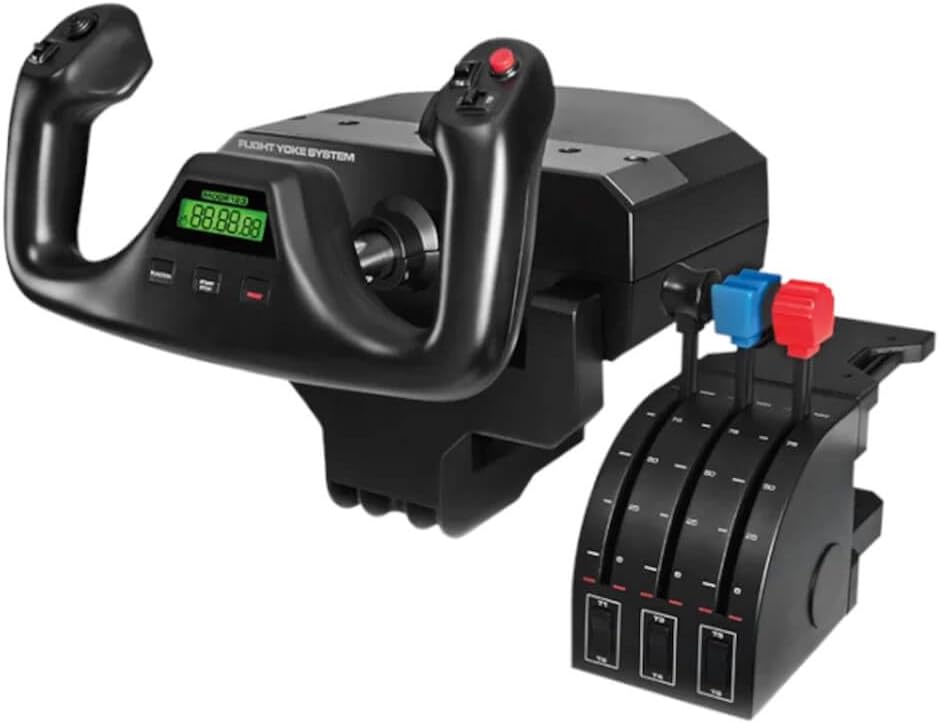

The Logitech G PRO Flight Yoke System stands out as a top choice for Mac users seeking realistic simulation. With a 4.3 rating, it offers robust controls and accurate movement for various aircraft types.
We may earn a commission when you buy through this link, at no additional cost to you.
Its stainless steel shaft ensures smooth operation while the included throttle quadrant adds essential functionality. The 54 programmable controls allow you to map most aircraft functions directly to your fingertips.
While the system relies on optional software for full simulation integration, the setup process remains straightforward. The desk clamp provides stability so your inputs stay consistent during long flight sessions.
This controller is perfect for aspiring pilots who want professional-grade feedback. The secure mounting and realistic feel make it an excellent investment for serious simulation enthusiasts today.
The stainless steel shaft and smooth bearings deliver precise pitch and roll inputs for authentic flight dynamics.
With 54 programmable controls including a POV hat, you can access essential aircraft functions without leaving the cockpit.
We may earn a commission when you buy through this link, at no additional cost to you.
The Thrustmaster T-Flight Hotas X offers exceptional value for those on a budget. Its 4.5 rating reflects a comfortable ergonomic design and reliable performance across simulation titles.
We may earn a commission when you buy through this link, at no additional cost to you.
Featuring a detachable throttle, it allows flexible configurations depending on your available desk space. The adjustable resistance dial lets you fine tune stick tension for personal preference.
Although it is a more affordable option, it still includes essential features like dual rudder control and a multi-directional hat switch. The plug and play setup ensures quick access to flying without complex configuration steps.
This controller is ideal for beginners or casual gamers who want a complete hotas setup. The ergonomic design supports long sessions while the programmable buttons enhance your control over virtual aircraft.
The wide hand rest and shaped throttle keep your hands in a natural position to reduce fatigue during extended use.
You can separate the throttle from the joystick for a full cockpit feel or keep them connected for a compact desktop setup.
We may earn a commission when you buy through this link, at no additional cost to you.
The Logitech G Saitek X52 Pro Flight Control System delivers advanced features for experienced pilots. Despite a 3.9 rating, it offers unique functionalities like an LCD display and progressive throttle resistance.
We may earn a commission when you buy through this link, at no additional cost to you.
Illuminated buttons and an LCD display provide intuitive feedback while you fly. The progressive throttle with detents supports precise control for idle and afterburner settings.
The 5 position handle adjustment system ensures comfort across different hand sizes. Although it requires a software download for full customization, the smart technology allows deep control mapping.
This system suits users who want detailed customization and premium feedback. The combination of visual feedback and adjustable ergonomics makes it a strong contender for dedicated simulation setups.
The multi-function LCD display shows essential flight data directly on the controller for quick reference.
Progressive resistance and detents allow you to control throttle settings with high accuracy during various flight phases.
We may earn a commission when you buy through this link, at no additional cost to you.
The Turtle Beach VelocityOne Flightstick brings modern features to flight simulation with its OLED display and high-precision axes. Its 4.2 rating indicates a solid performance across multiple platforms.
We may earn a commission when you buy through this link, at no additional cost to you.
Featuring an integrated OLED flight management display, it provides real-time data without cluttering your screen. The touchpad navigation sensor allows full cursor control for added versatility.
Designed to be ambidextrous, it accommodates both left and right-handed users comfortably. The 27 programmable buttons and 8 axes ensure you have enough inputs for complex maneuvers.
This controller is a great option for those seeking a mix of modern tech and practical utility. Its universal compatibility and detailed display make it stand out in competitive flight stick categories.
The integrated OLED display shows vital flight information directly on the controller for quick monitoring.
The touchpad navigation sensor offers full cursor control which enhances menu navigation and interface interactions.
We may earn a commission when you buy through this link, at no additional cost to you.
The Logitech G X56 H.O.T.A.S offers extensive customization for pilots who demand high performance. With a 4.0 rating, it delivers military-grade precision and hundreds of programmable controls.
We may earn a commission when you buy through this link, at no additional cost to you.
Its 189 programmable controls allow deep mapping options for complex flight systems. The adjustable stick force via the 4-spring system ensures you can tailor resistance to your style.
RGB lighting adds a customizable aesthetic that matches your gaming rig. Although the setup can be complex due to the sheer number of buttons, the payoff is a highly adaptable cockpit.
This controller is ideal for enthusiasts who prioritize detail and customization. The high number of inputs and adjustable features make it a powerful tool for serious simulation scenarios.
With over 189 programmable controls, you can map nearly every aircraft function directly to the controller.
The 4-spring system lets you fine tune the stick force to match your preferred handling characteristics.
We may earn a commission when you buy through this link, at no additional cost to you.
The Turtle Beach VelocityOne H.O.T.A.S. provides a full-size experience with 73 programmable inputs. While the rating is lower, its feature set is robust for detailed simulation needs.
We may earn a commission when you buy through this link, at no additional cost to you.
It includes a full-color display for real-time flight data and quick performance tuning. The swappable dual throttle detents deliver tactile thrust reference points for precise throttle control.
The adjustable left- or right-handed grip ensures comfort during long sessions. Although setup might be challenging, the expandable ecosystem supports additional pedals and mounting solutions.
This controller is best for users wanting a complete, highly configurable setup. The detailed data display and tactile feedback points make it suitable for complex flight scenarios.
Swappable dual throttle detents provide tactile reference points that help you manage thrust accurately during flights.
The full-color display offers real-time flight data reducing the need to switch screens during critical moments.
We may earn a commission when you buy through this link, at no additional cost to you.
The Logitech G Pro Flight Yoke System Bundle combines a yoke with rudder pedals for a complete experience. With a 4.6 rating, it is highly praised for adding realistic control layers.
We may earn a commission when you buy through this link, at no additional cost to you.
The smooth and accurate self-centering rudder pedals enhance your ability to manage yaw. Differential toe brakes deliver full control when taxiing and managing aircraft on runways.
The bundle includes all controls necessary for immersive simulation including the programmable yoke features. Foot rests adjust to accommodate different sizes ensuring comfort for all users.
This bundle is ideal for those ready to commit to a full cockpit setup. The combination of a yoke and pedals provides the most complete experience for aviation simulation on your Mac.
The self-centering rudder pedals and differential toe brakes offer precise control for taxiing and yaw management.
Getting both yoke and pedals together ensures compatibility and streamlines your setup process significantly.
We may earn a commission when you buy through this link, at no additional cost to you.
The Honeycomb Alpha Flight Controls Yoke & Switch Panel is designed for high fidelity simulation. Its 4.4 rating reflects a focus on realistic control and engineering precision.
We may earn a commission when you buy through this link, at no additional cost to you.
It features a realistic full 180° yoke rotation and a solid steel shaft with dual linear ball bearings. The included switch panel adds essential master and avionics switches for authenticity.
The dual mounting solution allows full use with or without clamps providing flexibility for different desk types. Designed by pilots it ensures the most realistic flight simulation experience possible.
This yoke is a strong choice for users who prioritize build quality and realism. The 180 rotation and included switch panel make it a top-tier option for serious simulation enthusiasts.
The full 180 degree yoke rotation replicates real aircraft movements for authentic pitch and roll feedback.
The included switch panel adds master alternator and avionics switches for a complete cockpit experience.
We may earn a commission when you buy through this link, at no additional cost to you.
The Logitech G PRO Flight Yoke System offers detailed controls with 75 programmable options. Its 4.4 rating highlights reliability and functionality for serious flight simulation tasks.
We may earn a commission when you buy through this link, at no additional cost to you.
Featuring configurable throttle knobs and a separate three axis lever throttle it provides precise control over aircraft systems. The integrated USB 2.0 port hub simplifies connectivity for your Mac.
The stainless steel yoke shaft ensures durability while the 3-position mode switch adds flexibility. The 14 button controls and POV hat allow access to essential functions without switching modes often.
This system suits pilots who need detailed inputs and durable construction. The integrated USB hub and configurable knobs make it a convenient and practical choice for desktop setups.
The throttle knobs are configurable allowing you to map specific engine parameters for precise control during flights.
An integrated USB 2.0 port hub reduces cable clutter and simplifies connecting additional peripherals to your setup.
We may earn a commission when you buy through this link, at no additional cost to you.
The Logitech G Saitek PRO USB Flight Yoke System (Renewed) offers a budget-friendly entry into simulation. With a 4.2 rating, it provides smooth controls and Mac compatibility at a lower cost.
We may earn a commission when you buy through this link, at no additional cost to you.
Featuring ultra-precise bearings it delivers exceptionally smooth pitch and roll control inputs. The dedicated control quadrant includes realistic throttle and prop mixture controls for detailed management.
Saitek's Smart Technology software ensures complete customizability for your setup. Although it is a renewed product, it maintains the quality and features of the original design.
This option is best for those seeking a reliable yoke without the premium price tag. Its compatibility with Mac OS and durable build make it a practical choice for casual simmers.
The ultra-precise bearings ensure smooth inputs for pitch and roll to enhance realism and accuracy.
Saitek's Smart Technology software allows complete customizability of control configuration for personalized setups.
We may earn a commission when you buy through this link, at no additional cost to you.
Selecting the right flight controller involves evaluating compatibility build quality and feature sets to match your simulation goals.
Ensure the controller supports Mac operating systems directly or via drivers. Many devices are optimized for Windows so verify software availability before purchasing.
Check official support lists or community forums to confirm stability and driver updates for your specific macOS version.
Decide between a yoke system for airliners or a joystick stick for military combat. Yokes offer realism while sticks provide agility and speed for fighter jets.
Consider your preferred flight sim genre to select a controller that aligns with typical aircraft types and maneuvers.
Look for durable materials like stainless steel shafts and robust clamps. These features ensure long-term stability and consistent performance during intense sessions.
A solid construction minimizes wear and tear ensuring your controller remains responsive over years of regular use.
Adequate button and axis counts allow complex mapping of aircraft systems. More controls provide better access to essential functions without relying on keyboard shortcuts.
Review the software capabilities to ensure you can save profiles and customize layouts for different aircraft.
Comfort is critical for long flights so check handle design and grip texture. Adjustable handles and padded surfaces reduce fatigue during extended sessions.
Consider whether the controller supports both handed preferences or includes comfortable hand rests for better usability.
Secure mounting prevents movement and enhances realism. Clamps and suction pads are common options depending on your desk material and thickness.
Ensure the mounting hardware is compatible with your workspace to avoid instability during flight simulations.
Modern controllers include displays lighting and touchpads to enhance immersion. These features provide real-time data and reduce the need to look away from the cockpit.
Evaluate which features add genuine value to your workflow versus those that are merely aesthetic or redundant.
Flight controllers range from affordable stick setups to expensive full cockpit bundles. Determine your budget and prioritize essential features over optional extras.
Consider renewed options if you want high-end features at a lower cost while maintaining reliability.
Start by installing the manufacturer's software and configuring your control mappings. This setup ensures that each button and axis corresponds to the correct aircraft function for your preferred simulation.
Secure the controller to your desk using the provided clamps or mounting solutions. A stable base prevents unwanted movement and keeps your inputs consistent during flight maneuvers.
Regularly clean the surfaces and moving parts to maintain responsiveness. Dust and debris can accumulate around buttons and shafts so use a soft cloth to wipe them down periodically.
Many controllers are designed primarily for Windows but several models list Mac OS compatibility. Always check the specific requirements and download the correct drivers for your macOS version.
A yoke system is ideal for airliners as it replicates the physical controls of commercial aircraft. It offers realistic pitch and roll inputs essential for civil aviation simulations.
Yes jo stick are preferred for military combat simulations due to their agility and responsiveness. They allow quick maneuvers and have high button counts for weapon systems.
Use the manufacturer's software to assign buttons and axes to specific aircraft functions. Most controllers allow you to save multiple profiles for different aircraft types.
Most flight controllers connect via USB which provides sufficient power for operation. However some advanced models with displays or lights may require additional USB ports for stability.
Many systems are modular allowing you to add pedals or throttle quadrants later. Check if the model supports ecosystem expansion to customize your cockpit over time.
Most controllers require proprietary software available on the manufacturer's website. This software allows you to customize button mappings and save profiles for different simulations.
Keep the controller clean and avoid excessive force on the axes. Store it in a dry environment and update the software regularly to ensure smooth performance.
This guide highlights ten exceptional flight controllers suitable for Mac users with varying simulation needs. From budget-friendly sticks to premium yoke bundles there is a device for every pilot.
Prioritize compatibility and ergonomics when selecting a controller to ensure long-term satisfaction and comfort. Choosing a model with ample programmable controls will enhance your immersion significantly.
Remember to check current availability and configurations before purchasing. These options evolve over time so verifying the latest details helps you secure the best experience for your virtual cockpit.