
2026 Mac OS Shortcuts Sticker for MacBook Neo, Air & Pro (1-Pack)
4.6Editor score
52 essential macOS shortcuts
Zero residue adhesive vinyl
Water repellent matte finish
Your MacBook Neo is a powerful tool for work and creativity, but it needs protection and connectivity to truly shine. Choosing the right accessories can enhance productivity, safeguard your investment, and personalize your workflow effectively.
We compared ten top-rated products specifically designed for the 2026 MacBook Neo model. Our analysis focused on compatibility, build quality, user reviews, and real-world performance to ensure you get reliable gear for daily use.
Each pick in this list highlights key features and potential trade-offs to help you decide. Note that availability and pricing may change, so verify details before purchasing to ensure the best value for your needs.
4.6Editor score

4.5Editor score

4.2Editor score
As an Amazon Associate we earn from qualifying purchases.
This table provides a quick side-by-side overview of all ten products, highlighting their core specifications and compatibility details to help you compare options at a glance.


This sticker pack offers a practical solution for users who want to master macOS shortcuts without memorizing them. With a rating of 4.6 stars, it is highly rated for its clarity and ease of use on the MacBook Neo.
We may earn a commission when you buy through this link, at no additional cost to you.
The 52 curated shortcuts are grouped by task, making it easy to find what you need quickly. The premium vinyl material resists water and smudges, ensuring the text stays legible even after months of daily use.
While the adhesive is designed to be residue-free, some users might notice faint traces if removed improperly. However, this is a minor issue considering the low cost and the productivity boost it provides.
This is an ideal choice for students or professionals who rely heavily on keyboard commands. It transforms your workspace into a reference guide that speeds up your workflow significantly.
Keep essential commands visible to reduce reliance on menus and mouse clicks.
The matte finish prevents glare and the residue-free adhesive protects your device surface.
We may earn a commission when you buy through this link, at no additional cost to you.
Protection is paramount for expensive electronics, and this case delivers with a precision-crafted hard shell. Rated at 4.5 stars, it is praised for its ability to guard against daily wear without adding significant weight.
We may earn a commission when you buy through this link, at no additional cost to you.
The engineering polycarbonate material is tough enough to handle coffee spills and bag keys while maintaining a clear view of your laptop's design. It includes a full set of accessories like keyboard covers and a screen protector.
Users should be aware that the bottom case might prevent certain magnetic hubs from attaching securely. Despite this trade-off, the comprehensive protection it offers makes it a top contender for everyday safety.
Ideal for students and commuters, this kit ensures your device remains pristine. It balances style and function perfectly for those who need reliable defense against accidents.
Get a complete kit that covers the shell, screen, and keyboard in one purchase.
High-transparency shell stays clear and resists fingerprints for a clean look.
We may earn a commission when you buy through this link, at no additional cost to you.
For power users needing high-speed connectivity, this hub is a standout option. With a 4.2 star rating, it is valued for its Thunderbolt transmission capabilities and support for ultra-high refresh rate displays.
We may earn a commission when you buy through this link, at no additional cost to you.
The detachable magnetic USB-C connector adds a unique layer of convenience, allowing for easy attachment without worrying about port wear. It supports up to 140W pass-through charging to keep your MacBook Neo powered up.
The main limitation is that it may not fit well if you have a protective case on the bottom of your laptop. However, the performance benefits make it a worthwhile investment for desktop setups.
Creative professionals and gamers will appreciate the 8K@240Hz output capability. This hub unlocks the full potential of your MacBook Neo for external display and data tasks.
Connect high-resolution monitors and fast storage devices with minimal latency.
The magnetic connector simplifies daily connection and disconnect tasks.
We may earn a commission when you buy through this link, at no additional cost to you.
This case variant focuses on a sleek matte finish that repels fingerprints better than standard clear cases. Rated at 4.6 stars, it is appreciated for maintaining a pristine look with minimal cleaning.
We may earn a commission when you buy through this link, at no additional cost to you.
The package includes a 360-degree protective sleeve and extra keyboard covers, adding significant value. The matte surface reduces smudges and keeps your device looking professional in any setting.
One consideration is that the transparency varies depending on the color of your laptop. While this might not matter to everyone, it is worth noting if you want an exact see-through effect.
It is a great choice for business travelers who need a clean look on the go. The added sleeve ensures your laptop is protected even when stored in a busy bag.
The engineered matte finish actively repels daily smudges and fingerprints.
The included sleeve offers extra protection for commuting and travel.
We may earn a commission when you buy through this link, at no additional cost to you.
This bundle is perfect for those who prioritize physical cushioning against bumps. With a 4.6 star rating, the puffy sleeve is highly rated for its soft quilted design that absorbs shocks effectively.
We may earn a commission when you buy through this link, at no additional cost to you.
The hard shell case guards against scratches while the sleeve provides an extra layer of safety during transit. It is designed to be lightweight and portable without adding unnecessary bulk to your bag.
While the puffy sleeve is stylish, it might not fit in very tight laptop compartments compared to flat sleeves. However, the protection it offers is well worth the slight trade-off in dimensions.
Ideal for frequent travelers, this set ensures your device is safe from rough handling. The plush interior gives you peace of mind when moving between locations.
The quilted puffy material provides extra cushioning against accidental drops.
Combines hard shell protection with a soft sleeve for maximum safety.
We may earn a commission when you buy through this link, at no additional cost to you.
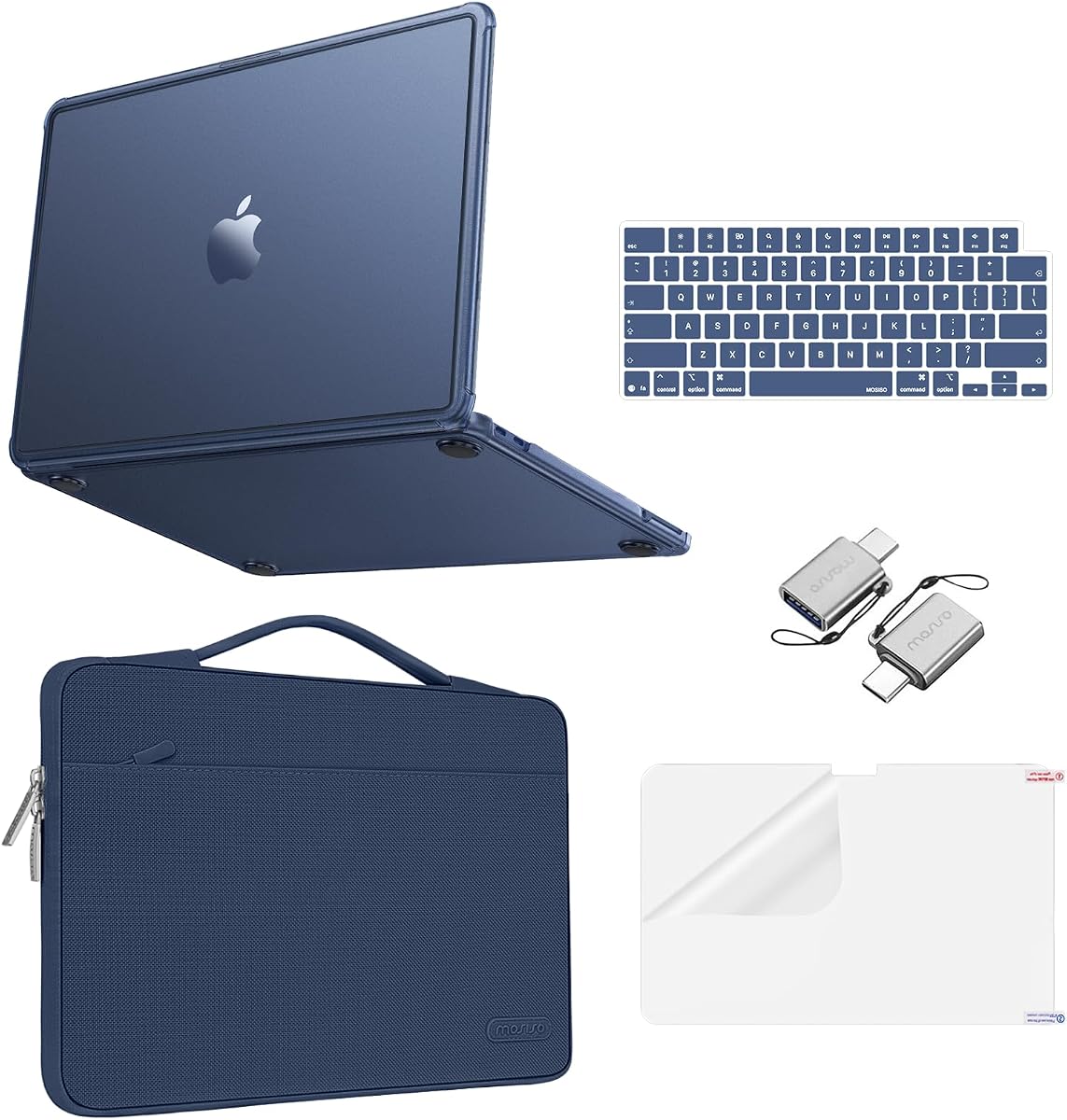
This case is designed to show off the beautiful design of your MacBook Neo while keeping it safe. With a 4.7 star rating, it is one of the highest-rated options for clarity and slim profile.
We may earn a commission when you buy through this link, at no additional cost to you.
The transparent PC material is durable enough to resist scratches and daily scuffs. It includes versatile USB-C to USB-A adapters which are useful for connecting older devices without a separate dongle.
While the clarity is impressive, clear cases can sometimes yellow with exposure to UV light over time. Regular cleaning can help mitigate this, but it is a common trait of this material.
Perfect for users who love the original look of their device, this case is a solid choice. It balances protection and aesthetics better than many competing products in this price range.
The transparent material highlights the unique color and finish of your Neo.
Included USB adapters add value and convenience to your connectivity options.
We may earn a commission when you buy through this link, at no additional cost to you.
Privacy protection is critical for public workspaces, and this protector offers a secure way to block side views. Rated at 4.2 stars, it is valued for its magnetic installation that avoids permanent adhesive.
We may earn a commission when you buy through this link, at no additional cost to you.
The 30-degree privacy technology ensures only you can see the screen content, while anti-blue light filters protect your eyes during long sessions. The ultra-thin design does not affect lid closure.
Using a privacy screen can slightly reduce overall brightness and color vibrancy. However, this is a necessary trade-off to maintain data security in cafes or offices where others might look over your shoulder.
This is an excellent choice for professionals who handle sensitive data on the go. It provides peace of mind without damaging your screen or requiring a complicated setup process.
Attach and remove the screen in seconds using the magnetic strip system.
Blue light blocking technology helps reduce visual fatigue during extended use.
We may earn a commission when you buy through this link, at no additional cost to you.
This screen offers high-definition clarity while protecting your privacy effectively. With a 4.2 star rating, it is praised for its premium materials imported from Japan and Germany which enhance its durability.
We may earn a commission when you buy through this link, at no additional cost to you.
The magnetic strip ensures a tight fit without sliding, and the filter blocks a significant amount of blue and UV light. This helps maintain screen visibility and protects your eyes from harmful radiation.
The need for precise alignment during installation can be a minor inconvenience for some users. However, once attached, it stays securely in place and performs its function reliably.
Ideal for those who want both clarity and privacy, this screen is a strong contender. It ensures your data remains private without sacrificing visual quality significantly.
Advanced materials ensure the screen remains sharp and high definition.
Significant reduction in UV and blue light exposure benefits eye health.
We may earn a commission when you buy through this link, at no additional cost to you.
While this sticker is universal for Air and Pro models, it is a great reference for learning Mac shortcuts quickly. With a 4.6 star rating, it is highly regarded for its quality and clear layout.
We may earn a commission when you buy through this link, at no additional cost to you.
The laminated vinyl ensures durability against daily wear and tear. The adhesive is strong enough to stay put but requires careful removal to avoid residue, which is noted in the product details.
Users with a MacBook Neo should verify compatibility before purchasing as it is designed for standard Air and Pro models. Despite this, the shortcut guide remains a valuable tool for productivity.
It is a perfect gift for students or new Mac users. The clear guide helps you master the system faster than traditional manuals or online searches.
A visual guide that helps you memorize essential keyboard combinations effectively.
Designed and packaged in the USA with trusted customer support guarantees.
We may earn a commission when you buy through this link, at no additional cost to you.
Ports are vulnerable to dust and debris, and this set provides complete coverage for your MacBook Neo. Rated at 4.7 stars, it is a top choice for those who want to keep internal components clean.
We may earn a commission when you buy through this link, at no additional cost to you.
The flexible silicone material makes insertion and removal easy without damaging the port. It covers USB-C, MagSafe, HDMI, and even includes a webcam cover for added security.
While the silicone plugs fit well, there is a risk of losing these small parts if they are not stored properly. The included plastic case helps mitigate this risk effectively.
Ideal for dust-prone environments or outdoor work, these plugs are a simple but effective safeguard. They extend the lifespan of your ports by preventing debris accumulation.
Ensure every port and jack is protected from dust and debris.
Soft silicone protects ports from scratches while being easy to use.
We may earn a commission when you buy through this link, at no additional cost to you.
Choosing the right accessories for your MacBook Neo requires careful consideration of compatibility, build quality, and your specific usage needs.
Always verify your MacBook Neo model number before purchasing cases or screen protectors. The 2026 Neo models have specific dimensions and port layouts that may not fit older accessories.
Check the listing title and product description to ensure the accessory explicitly lists your model number for a perfect fit.
Decide whether you need a hard shell case for scratch protection or a soft sleeve for shock absorption during travel. Many kits offer both options in a single bundle.
Consider your daily environment; a puffy sleeve is better for commuters while a slim case suits desk-bound professionals.
Dust plugs are inexpensive but vital for preventing debris from clogging your USB-C and audio ports. Look for silicone options that do not damage port surfaces.
Ensure the plugs are easy to insert and remove so you do not struggle when you need to connect a device quickly.
Choose a hub that offers the speed and ports you need, such as Thunderbolt support for fast data transfer. Magnetic hubs can be more convenient for frequent disconnects.
Check if your hub supports pass-through charging so you can use it without sacrificing your laptop's battery power.
If you work in public spaces, a privacy screen protector can prevent unauthorized viewing of your data. Magnetic protectors are easier to install and remove than adhesive ones.
Look for screens that also block blue light to protect your eyes during long working hours.
A high-quality screen protector can shield your display from scratches without reducing clarity. Ensure it is compatible with your specific display technology.
Some protectors include anti-glare features which help in bright environments but may slightly reduce color vibrancy.
Keyboard covers prevent liquid and dust from damaging the keys. Silicone or rubber materials are durable and easy to clean.
Ensure the cover is thin enough not to interfere with typing comfort or lid closure when the laptop is closed.
Look for materials like polycarbonate or aluminum that resist wear and tear over time. High-quality construction ensures your accessories last longer.
Reading user reviews can give you insight into how the material holds up in real-world conditions.
For cases and protectors, always clean your device surface before application to avoid trapping dust. Smooth out any bubbles gently with a soft cloth to ensure a flat finish.
Clean your hub and ports regularly with a soft brush to remove lint and debris. Avoid using harsh chemicals on screens or sensitive components as this may damage coatings.
Store small items like dust plugs and webcam covers in a dedicated case to prevent loss. Regularly check the condition of cables and sleeves to ensure they remain intact and functional.
Yes, a thick case on the bottom of your laptop may prevent magnetic hubs from attaching properly. If you use a magnetic dock, check if your case allows for a snug connection or consider a hub without magnetic attachments.
Yes, most slim silicone keyboard covers are designed to allow the lid to close without damage. However, always check the thickness of the cover to ensure it does not interfere with the hinge mechanism.
A privacy screen limits the viewing angle to block others from seeing your screen, while a standard protector focuses on scratch and impact resistance. Privacy screens often have an anti-glare finish which reduces brightness slightly.
Use a gentle adhesive remover or warm soapy water to soften the glue. Peel the sticker back slowly at a low angle to minimize residue left on the surface.
Most cases and screen protectors are model-specific due to varying sizes and ports. Always verify the product compatibility list to ensure it supports your exact MacBook Neo or other model.
Clean your case and sleeves weekly with a damp cloth to remove dust and oils. Hubs and ports should be cleaned monthly to prevent debris buildup that could affect connectivity.
Choosing the right accessories for your MacBook Neo can enhance both productivity and longevity. We have highlighted top options like the MOSISO cases for protection and the VENTION hub for connectivity.
Prioritize items that fit your specific workflow such as a privacy screen for public work or a keyboard cover for spill protection. Ensure compatibility with your model number before making any purchases.
Prices and availability may change so always verify current details before buying. Invest in high-quality accessories that offer long-term value and support for your device.